

Updated on 2026-02-09 GMT+08:00
How Can I Migrate Xen ECSs?
All versions of the Xen software used by Huawei Cloud have reached end of life. You need to change Xen ECSs to KVM ECSs before the migration.
Preparations
Checking Whether Your ECSs Use Xen
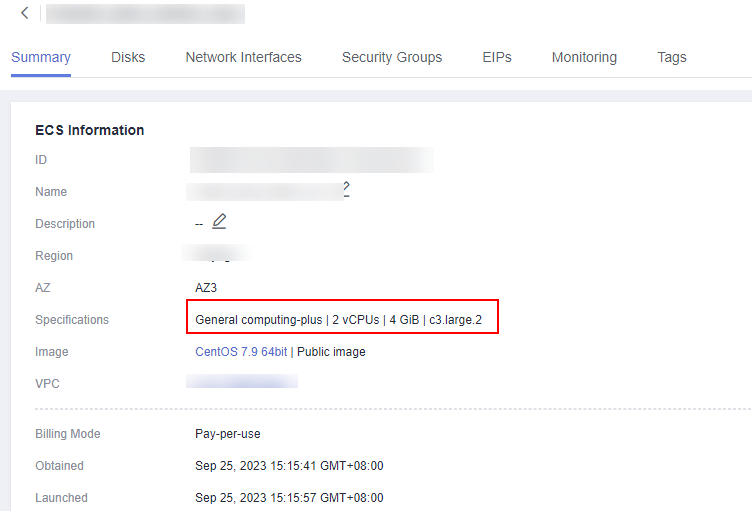
You can determine whether an ECS uses Xen based on its flavor in the basic information of the ECS. Xen ECSs include C1, C2, S1, M1, E1, E2, ET2, D1, H1, G1 and G2 ECSs.
Figure 1 Checking an ECS flavor
Installing Drivers
- For Linux servers, install the required drivers by referring to:
- Steps 1 and 2 in Automatically Changing a Xen ECS to a KVM ECS (Linux)
- Step 1 to step 3 in Manually Changing a Xen ECS to a KVM ECS (Linux)
- For Windows source servers, install the required drivers by referring to step 1 to step 3 in Changing a Xen ECS to a KVM ECS (Windows).
Migration
Create a cross-AZ migration workflow by referring to Migrating Servers Across AZs.
What is your overall rating for this page?
0
1
2
3
4
5
6
7
8
9
10
Very dissatisfiedVery satisfied
Thank you very much for your feedback. We will continue working to improve the documentation.See the reply and handling status in My Cloud VOC.
The system is busy. Please try again later.
For any further questions, feel free to contact us through the chatbot.
Chatbot


