

Help Center/ Cloud Firewall/ API Reference/ Appendix/ Obtaining the Names and IDs of Accounts, IAM Users, Projects, User Groups, Regions, and Agencies
Updated on 2026-07-24 GMT+08:00
Obtaining the Names and IDs of Accounts, IAM Users, Projects, User Groups, Regions, and Agencies
Obtaining Account, IAM User, and Project Information
- Using the console
- On the Huawei Cloud homepage, click Console in the upper right corner.
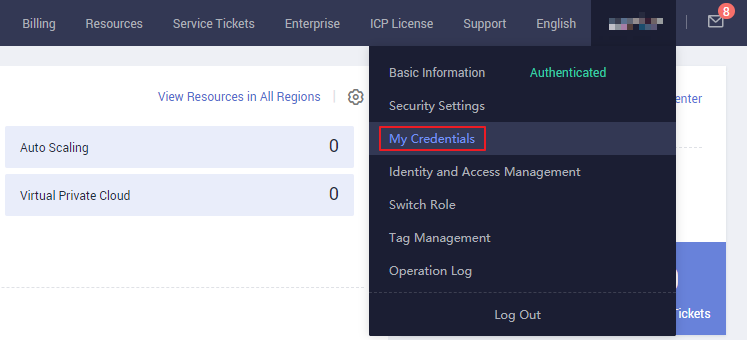
- Hover over the username in the upper right corner and choose My Credentials. Figure 1 My Credentials
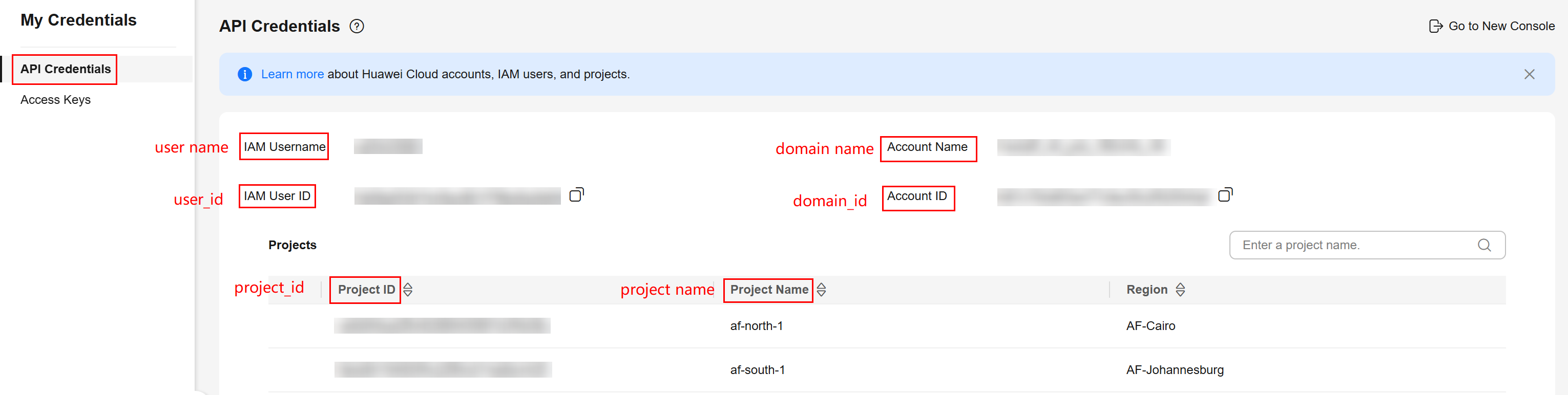
- View the account name, account ID, username, user ID, project name, and project ID on the API Credentials page. The project ID varies depending on the region where the service is located.Figure 2 Viewing the account, user, and project information
- Calling an API
- For details about how to obtain a user ID, see Listing IAM Users.
- For details about how to obtain a project ID, see Querying Project Information.
Obtaining User Group Information
- Log in to the IAM console, and choose User Groups from the navigation pane.
- Click the name of the target user group. On the displayed details page, check the user group name and ID. Figure 3 Viewing the user group name and ID

Obtaining Region Information
- Log in to the IAM console, and choose Projects from the navigation pane.
- View the content in the Project Name column, which is the ID of the region to which the project belongs. Figure 4 Viewing the region ID

Obtaining Agency Information
- Log in to the IAM console, and choose Agencies from the navigation pane.
- Hover the cursor over the target agency. Its name and ID are displayed. Figure 5 Viewing the agency ID

What is your overall rating for this page?
0
1
2
3
4
5
6
7
8
9
10
Very dissatisfiedVery satisfied
Thank you very much for your feedback. We will continue working to improve the documentation.See the reply and handling status in My Cloud VOC.
The system is busy. Please try again later.
For any further questions, feel free to contact us through the chatbot.
Chatbot


