

URL Validation
Referer validation can filter requests by checking the HTTP referer header. However, the referer header can be forged, so referer validation cannot fully protect your VOD resources. For better protection, VOD provides URL validation. You can configure a key to generate signed playback URLs with an expiration time. This method effectively prevents your VOD content from being illegally accessed.
Implementation
Referer validation works in a simple way. After a blacklist or whitelist is configured on the VOD console, VOD distributes the blacklist or whitelist to CDN. When receiving a request, CDN checks whether the request is valid based on the list. If the request is valid, CDN accesses the requested resource. If the request is invalid, CDN rejects the request and returns a status code 403.
URL validation is implemented by VOD edge nodes and origin server in VOD. It is a more secure and reliable anti-piracy solution than referer validation. Figure 1 shows how URL validation works.
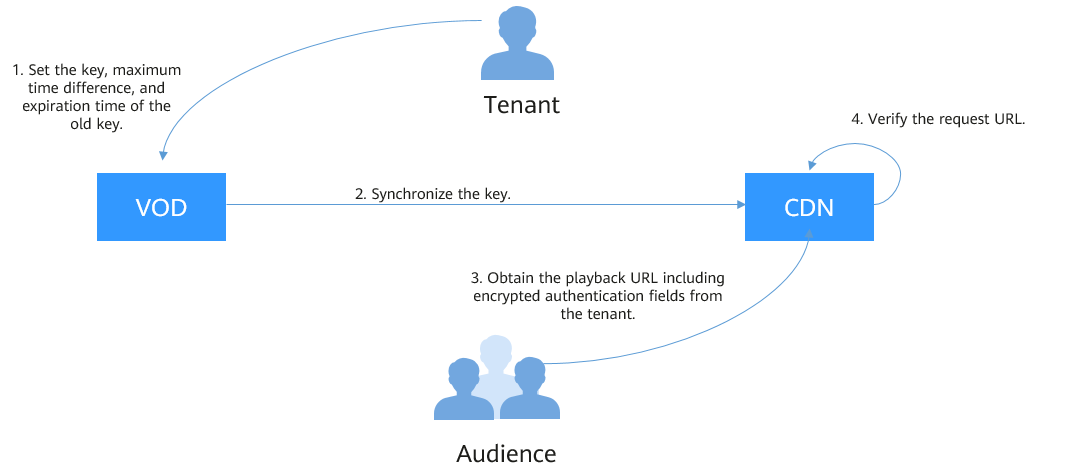
The process is as follows:
- You enable URL validation on the VOD console and configure the allowed time difference and algorithm.
- VOD delivers the configured key value to CDN nodes.
- You obtain the authentication URL of a VOD media file.
- Viewers request CDN to play a video through the authentication playback URL.
- CDN verifies the request based on authentication information carried in the playback URL. Only requests that pass the verification are allowed.
Notes
- This function is optional and is disabled by default.
- After this function is enabled, the original URLs can no longer be used. You must generate new signed URLs based on the configured rules.
- If a signed URL expires or the signature fails verification, playback will be blocked, and a "403 Forbidden" error will be returned.
- Algorithms A, B, and C do not support HLS or DASH playback. Algorithm E is recommended.
- Algorithms A, B, C, and D are insecure. Algorithm E is recommended.
- When URL validation is enabled, playback with multiple audio tracks and multilingual subtitles is not supported.
Procedure
- Log in to the VOD console.
- In the navigation pane, choose Domain Name Management.
- Locate the desired domain name and click Configure in the Operation column. On the displayed page, choose the Hotlink Protection Settings tab. Figure 2 Hotlink protection settings

- Click Edit on the right of URL Validation. The URL Validation dialog box is displayed, as shown in Figure 3. Configure URL validation settings based on Table 1.
Table 1 Parameters Parameter
Description
Signing Key
You can enter a key or click Generate on the right to automatically generate one.
Note:
- You are advised to use an auto-generated key. Keys that are not sufficiently random may compromise authentication security.
- The key cannot be queried after being set. Keep it secure. If the key is lost, reset it or submit a service ticket to request access.
Secondary Key
You can enter a key or click Generate on the right to automatically generate one.
Note:
- You are advised to use an auto-generated key. Keys that are not sufficiently random may compromise authentication security.
- The key cannot be queried after being set. Keep it secure. If the key is lost, reset it or submit a service ticket to request access.
Validity Period
How long a signed URL remains valid. The default value is 120 minutes.
For example, if the signed URL is generated at 1573806090 (Nov. 15, 2019 16:21:30 GMT+08:00) with a validity period of 120 minutes, the URL expires at Nov. 15, 2019 18:21:30 GMT+08:00.
Algorithm
Key encryption algorithm. The following algorithms are supported:
Algorithms A, B, and C: use the MD5 message-digest algorithm. For details, see Encryption Algorithm A, Encryption Algorithm B, and Encryption Algorithm C.
Algorithm D: uses symmetric encryption. For details, see Encryption Algorithm D.
Algorithm E: uses the SHA256 algorithm. For details, see Encryption Algorithm E (same as the Signing Method C2 of CDN).
NOTE:- Algorithms A, B, C, and D are insecure. Algorithm E is recommended.
- Algorithms A, B, and C do not support HLS or DASH playback. Algorithm E is recommended.
- If you modify the URL validation settings, such as changing the algorithm or key, you are advised to verify the settings before distribution.
Signature Algorithm
Algorithms A, B, and C support SHA-256. MD5 is available for existing users by default.
Note:
- If you need to change the signature algorithm for key encryption algorithm A, B, or C, generate signed URLs by referring to Generating a Signed URL (Demo). Otherwise, playback will fail.
- MD5 is not recommended because it is insecure.
Authentication Scope
Defines which files require authentication. You can choose to authenticate all files, authenticate only files with specific extensions, or exclude files with specific extensions from authentication.
Authentication Inherit Config
Adds authentication parameters to TS and MP4 files referenced by M3U8/MPD index files so they can be played after authentication succeeds.
NOTE:- For multi-layer M3U8/MPD files, only the first-layer M3U8/MPD files are parsed. TS/MP4 streams referenced by deeper layers are not expanded.
- Standard M3U8 is supported. Files are parsed line by line. If parsing fails, the origin server response is returned. URIs in #EXT-X-MAP and URLs/URIs on lines not starting with # are supported.
- Standard MPD is supported. Files are parsed line by line. If parsing fails, the origin server response is returned. URIs between tags <BaseURL> and </BaseURL> are identified. The SegmentTemplate tag is not supported.
Preview
Only HLS and MP4 files can be previewed.
NOTE:Only algorithms D and E support preview, but they work exclusively with HLS and MP4 files. MP4 preview takes effect only when MOOV precedes MDAT. After preview is enabled, playback URLs can be obtained from the VOD console. The default preview duration is 300s.
- Click OK.
- Verify whether the URL validation settings have taken effect.
Obtain a signed playback URL and play the content via the URL. If the playback is successful, the URL validation settings have taken effect.

Generating a Signed URL
Obtaining a Signed URL on the Console
- Log in to the VOD console.
- In the navigation pane, choose Management > Audio and Video Management.
- Click Details in the row containing your media file and then choose the Playback tab.
The column displays the original streaming URL of the media file. Click
 to obtain the signed URL.Figure 4 Playback URL

Encryption Algorithm A
Signed URL format
Original URL?auth_key={timestamp}-{rand}-{uid}-{auth_key} auth_key = {MD5 or SHA256}(/asset/{assetId}/{file_name}-{timestamp}-{rand}-{uid}-{private_key}) | Field | Description |
|---|---|
| timestamp | Time when a signed URL is generated. The value is a Unix timestamp, which is the number of seconds since January 1, 1970. Example: 1564731935 (2019.08.02 15:45) |
| rand | Random number. The recommended value is a UUID, which cannot contain hyphens (-). Example: f03cbe7c4a3849bc8d8769e3110e4533 |
| uid | This parameter is not used now. Set it to 0. |
| private_key | Key value set on the console. For details, see Procedure. |
Original URL: http://1.cdn.myhuaweicloud.com/asset/6b2d740f10b8697d8ea6672868ecdb6f/test.mp4
private_key: myPrivateKey
timestamp: 1547123166
rand: 477b3bbc253f467b8def6711128c7bec
uid: 0
auth_key = md5(/asset/6b2d740f10b8697d8ea6672868ecdb6f/test.mp4-1547123166-477b3bbc253f467b8def6711128c7bec-0-myPrivateKey) = 584883719a3f722bf1a32a3b0a4d25dd
Signed URL with algorithm A
http://1.cdn.myhuaweicloud.com/asset/6b2d740f10b8697d8ea6672868ecdb6f/test.mp4?auth_key=1547123166-477b3bbc253f467b8def6711128c7bec-0-584883719a3f722bf1a32a3b0a4d25dd
Encryption Algorithm B
https://{cdn_domain}/{date_YYYYmmddHHMM}/{authStr}/asset/{asset_id}/{file_name} authStr = {MD5 or SHA256}({private_key}{date_yyyyMMddHHmm}/asset/{asset_id}/{file_name}) | Field | Description |
|---|---|
| date_yyyyMMddHHmm | Time when a signed URL is generated. The format is yyyyMMddHHmm. Example: 201908051445 |
| file_name | Part starting behind the media asset ID of the original streaming URL to the end of the URL. Example: play_video/test.mp4 |
| private_key | Key value set on the console. For details, see Procedure. |
Original URL: http://1.cdn.myhuaweicloud.com/asset/6b2d740f10b8697d8ea6672868ecdb6f/test.mp4
private_key: myPrivateKey
date_yyyyMMddHHmm: 201901102026
file_name: test.mp4
Take MD5 as an example. Obtain authStr according to the calculation formula.
authStr = md5(myPrivateKey201901102026/asset/6b2d740f10b8697d8ea6672868ecdb6f/test.mp4) = 713ef643de8df076da6ec3c0545968cb
Signed URL with algorithm B
http://1.cdn.myhuaweicloud.com/201901102026/713ef643de8df076da6ec3c0545968cb/asset/6b2d740f10b8697d8ea6672868ecdb6f/test.mp4
Encryption Algorithm C
https://{cdn_domain}/{authStr}/{time_hex}/asset/{asset_id}/{file_name} authStr = {MD5 or SHA256}({private_key}/asset/{asset_id}/{file_name}{time_hex}) | Field | Description |
|---|---|
| file_name | Part starting behind the media asset ID of the original streaming URL to the end of the URL. Example: play_video/test.mp4 |
| time_hex | Time when a signed URL is generated. The value is a hexadecimal Unix timestamp. Example: hex(1564987530)=5D47D08A |
| private_key | Key value set on the console. For details, see Procedure. |
Original URL: http://1.cdn.myhuaweicloud.com/asset/6b2d740f10b8697d8ea6672868ecdb6f/test.mp4
private_key: myPrivateKey
time_hex: hex(timestamp) = hex(1547123166) = 5C3739DE
file_name: test.mp4
authStr=md5(myPrivateKey/asset/6b2d740f10b8697d8ea6672868ecdb6f/test.mp45C3739DE) = afa20c956043fe6d130b16f2704ac870
Signed URL with algorithm C
http://1.cdn.myhuaweicloud.com/afa20c956043fe6d130b16f2704ac870/5C3739DE/asset/6b2d740f10b8697d8ea6672868ecdb6f/test.mp4
Encryption Algorithm D
Signed URL format
Original URL?auth_info={Encrypted string}.{EncodedIV} &exper={exper}&plive={plive_starttime} - Original string:
- With preview enabled: Original string = url_encoding({path})+"$"+{Timestamp}+"$"+{exper}
- With pseudo-streaming enabled: Original string = url_encoding({path})+"$"+{Timestamp}+"$"+{plive_starttime}
- Encrypted string = aes_cbc_128_pkcs5padding(Original encrypted string,key,IV)
- EncodedIV = hex(IV)
| Field | Description |
|---|---|
| path | Directory from the domain name to the last level, including the slash (/) behind the domain name and slash (/) behind the last level of directory, excluding the file name Example: /asset/32237c8f68fcc6071a2d8e3421eee20d/play_video/ |
| Timestamp | Time when a signed URL is generated. The value is UTC time in yyyyMMddHHmmss format. Example: 20190805101025 |
| key | Key value set on the console. For details, see Procedure. |
| (Optional) exper | Video preview duration, in seconds. Only MP4 and HLS videos can be previewed. For HLS, the master index cannot be previewed, but secondary indexes can. Specify this parameter only for preview. In other cases, this parameter is not required for calculating the signed URL. |
| (Optional) plive | Start time of pseudo-streaming, in UTC time. Specify this parameter only for pseudo-streaming. In other cases, this parameter is not required for calculating the signed URL. The preview and Pseudo-Streaming functions cannot be enabled at the same time. |
| IV | Randomly generated byte array. It can be up to 16 characters long. hex(): converts the byte array into a hexadecimal string. Sample code for generating IV is: byte[] iv = new byte[16]; SecureRandom secureRand = new SecureRandom(); secureRand.nextBytes(iv); |
Original URL: https://179.cdn-vod.huaweicloud.com/asset/32237c8f68fcc6071a2d8e3421eee20d/play_video/index.m3u8
path: /asset/32237c8f68fcc6071a2d8e3421eee20d/play_video/
key: 8Ks1qn14XRO28qOa
Timestamp: 20190805102430
exper: 300
plive: 1704074400
- With preview enabled
Original string = url_encoding("/asset/32237c8f68fcc6071a2d8e3421eee20d/play_video/") + "$" + "20190805102430"+ "$" + "300"
Encrypted string = aes_cbc_128_pkcs5padding(Original string,key,IV) = 34M%2F6KtYgxuAozdBLIVTe0dUVAZdvXsYQoYAnDmuhRHh1hshYg%2B2Tl0AmSwySDh%2BmkER44qYKpSP%2BgfsLM%2FIZe4F6K4n1Nx6ouGwyKfqdDA%3D
EncodedIV = hex(IV) = 79436d453636364e335941713330534e
- With pseudo-streaming enabled
Original string = url_encoding("/asset/32237c8f68fcc6071a2d8e3421eee20d/play_video/") + "$" + "20190805102430"+ "$" + "1704074400"
Encrypted string = aes_cbc_128_pkcs5padding(Original string,key,IV) = 34M%2F6KtYgxuAozdBLIVTe0dUVAZdvXsYQoYAnDmuhRHh1hshYg%2B2Tl0AmSwySDh%2BmkER44qYKpSP%2BgfsLM%2FIZe4F6K4n1Nx6ouGwyKfqdDA%3D
EncodedIV = hex(IV) = 79436d453636364e335941713330534e
- With preview enabled
https://179.cdn-vod.huaweicloud.com/asset/32237c8f68fcc6071a2d8e3421eee20d/play_video/index.m3u8?auth_info=34M%2F6KtYgxuAozdBLIVTe0dUVAZdvXsYQoYAnDmuhRHh1hshYg%2B2Tl0AmSwySDh%2BmkER44qYKpSP%2BgfsLM%2FIZe4F6K4n1Nx6ouGwyKfqdDA%3D.79436d453636364e335941713330534e&exper=300
- With pseudo-streaming enabled
https://179.cdn-vod.huaweicloud.com/asset/32237c8f68fcc6071a2d8e3421eee20d/play_video/index.m3u8?auth_info=34M%2F6KtYgxuAozdBLIVTe0dUVAZdvXsYQoYAnDmuhRHh1hshYg%2B2Tl0AmSwySDh%2BmkER44qYKpSP%2BgfsLM%2FIZe4F6K4n1Nx6ouGwyKfqdDA%3D.79436d453636364e335941713330534e&plive=1704074400
Encryption Algorithm E

The preview and pseudo-streaming functions cannot be enabled at the same time. The following URLs are for reference only. exper and plive cannot exist at the same time.
Signed URL format
Original URL?auth_key={authKey}×tamp={timestamp}&exper={exper}&plive={plive_starttime} Formula for calculating authKey:
- With preview enabled: auth_key = sha256({PrivateKey}{fileName}{timestamp}{exper})
- With pseudo-streaming enabled: auth_key = sha256({PrivateKey}{fileName}{timestamp}{plive_starttime})
Table 6 Authentication fields Field
Description
timestamp
Time when a signed URL is generated. The value is a Unix timestamp, which is the number of seconds since January 1, 1970. Unit: second.
Example: 1564731935, that is, the time is 2019.08.02 15:45.
fileName
Back-to-origin URL. During authentication, the value must start with a slash (/) and cannot include the parameters behind ? in the signed URL.
Example: /asset/6b2d740f10b8697d8ea6672868ecdb6f/test.hls
PrivateKey
Signing key, which is used to generate a signed URL.
The key can contain 16 to 32 characters. Only letters and digits are allowed.
(Optional) exper
Video preview duration, in seconds. Only MP4 and HLS videos can be previewed. For HLS, the master index cannot be previewed, but secondary indexes can.
Specify this parameter only for preview. In other cases, this parameter is not required for calculating the signed URL.
(Optional) plive
Start time of pseudo-streaming, in UTC time. This field is valid only for the HLS format.
Specify this parameter only for pseudo-streaming. In other cases, this parameter is not required for calculating the signed URL. The preview and Pseudo-Streaming functions cannot be enabled at the same time.
Original URL: http://1.cdn.myhuaweicloud.com/asset/6b2d740f10b8697d8ea6672868ecdb6f/test.hls
private_key: 32d6b2d740f10b86
timestamp: 1547123166
fileName: /asset/6b2d740f10b8697d8ea6672868ecdb6f/test.hls
exper: 300
plive: 1704074400
- Preview enabled
auth_key = sha256(32d6b2d740f10b86/asset/6b2d740f10b8697d8ea6672868ecdb6f/test.hls1547123166300) = 3a935cf1d8299fe63ec8d4e0afb5ef3304883a702a4e760f3c5ae838a4b69768
- Pseudo-streaming enabled
auth_key = sha256(32d6b2d740f10b86/asset/6b2d740f10b8697d8ea6672868ecdb6f/test.hls15471231661704074400) = 3a935cf1d8299fe63ec8d4e0afb5ef3304883a702a4e760f3c5ae838a4b69768
- Preview enabled
http://1.cdn.myhuaweicloud.com/asset/6b2d740f10b8697d8ea6672868ecdb6f/test.hls?auth_key=3a935cf1d8299fe63ec8d4e0afb5ef3304883a702a4e760f3c5ae838a4b69768×tamp=1547123166&exper=300
- Pseudo-streaming enabled
http://1.cdn.myhuaweicloud.com/asset/6b2d740f10b8697d8ea6672868ecdb6f/test.hls?auth_key=3a935cf1d8299fe63ec8d4e0afb5ef3304883a702a4e760f3c5ae838a4b69768×tamp=1547123166&plive=1704074400
What is your overall rating for this page?
Thank you very much for your feedback. We will continue working to improve the documentation.See the reply and handling status in My Cloud VOC.
For any further questions, feel free to contact us through the chatbot.
Chatbot


