

HSS
Function Description
This plugin is built into SecMaster and calls Host Security Service (HSS) APIs to perform operations. It is mainly used to manage HSS resources such as the status, vulnerabilities, and security incidents related to servers.
Each built-in plugin has a corresponding built-in operation connection.
Viewing Details and Operation Connections of the HSS Plugin
- Log in to the SecMaster console.
- Click
 in the upper left corner of the management console and select a region or project.
 - In the navigation pane on the left, choose Workspaces > Management. In the workspace list, click the name of the target workspace. Figure 1 Workspace management page

- In the navigation pane on the left, choose . Figure 2 Plugins page
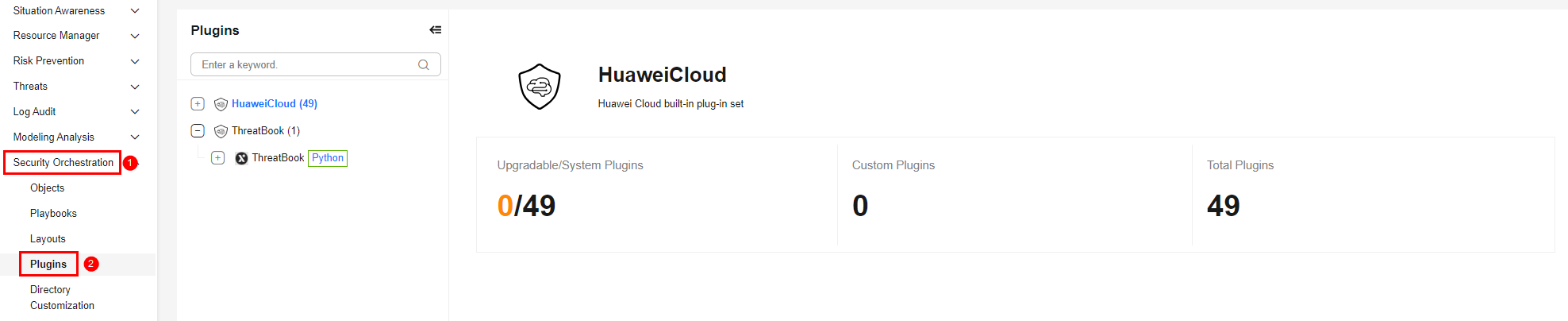
- On the Plugins page, select the HSS plugin under the Huawei Cloud catalog. The Details tab is displayed by default. The Details tab displays the login credential information of the operation connection associated with the plugin.
- Click the Operation Connections tab for the HSS plugin. On the displayed page, you can view information about the operation connections associated with the plugin.
- For details about how to edit or delete an operation connection, see Editing an Operation Connection and Deleting an Operation Connection. For details about how to add an operation connection for a plugin, see Creating an Operation Connection. A plugin can have multiple operation connections.
Plugin Execution Function listHostStatus
- Parameters of the listHostStatus Function: describes the input and output parameters of the function.
- Output Example of the ListHostStatus Function: provides an example of the function output.
Parameters of the listHostStatus Function
Function: Calls HSS APIs to list server status information. A large number of filtering parameters are supported.
| Parameter | Parameter Type | Parameter Description | Mandatory |
|---|---|---|---|
| host_id | string | Server ID. | No |
| offset | string | Offset. | No |
| limit | string | Number of records on each page. | No |
| enterprise_project_id | string | Enterprise project ID. | No |
| agent_status | string | Agent status. | No |
| host_name | string | Server name. | No |
| host_status | string | Server status: ACTIVE (running), SHUTOFF (stopped), BUILDING (creating), or ERROR (faulty). | No |
| os_type | string | OS type. The value can be Linux or Windows. | No |
| private_ip | string | Private IP address. | No |
| public_ip | string | Public IP address. | No |
| detect_result | string | Cloud server security scan result. | No |
| ip_addr | string | Public or private IP address. | No |
| protect_status | string | Protection status. | No |
| group_id | string | Server group ID. | No |
| group_name | string | Server group name. | No |
| vpc_id | string | VPC ID | No |
| has_intrusion | string | Whether there are alerts. | No |
| has_vul | string | Whether there are vulnerabilities. | No |
| has_baseline | string | Whether there are baseline risks. | No |
| sort_key | string | Key value used for sorting. Currently, data can only be sorted by recent_scan_time, and the value of sort_dir determines whether to sort the data in ascending or descending order. | No |
| sort_dir | string | Sorting order. The default order is descending. If sort_key is set to recent_scan_time, this parameter determines the sorting order. If sort_key is set to other values, data is sorted in descending order. | No |
| policy_group_id | string | Policy group ID. | No |
| policy_group_name | string | Policy group name. | No |
| charging_mode | string | Billing mode. packet_cycle: yearly/monthly billing. on_demand: pay-per-use billing | No |
| refresh | string | Whether to forcibly synchronize servers from ECS. | No |
| get_common_login_locations | string | Whether to obtain the common login locations of a server. The value can be true or false. | No |
| above_version | string | Whether to return all versions later than the current version. | No |
| outside_host | string | Whether a server is a Huawei Cloud server. | No |
| asset_value | string | Asset importance. Its value can be:
| No |
| label | string | Label. | No |
| server_group | string | List of server groups to which tasks are delivered. | No |
| agent_upgradable | string | Whether the agent is upgradable. | No |
| install_mode | string | Whether the installation mode is enabled. | No |
| binding_key | string | Whether a DEW key is bound. | No |
| protect_interrupt | string | Directory where honeypot protection failed. (This parameter has a value only if certain honeypots failed to be deployed.) | No |
| incluster | string | Whether a node is in a cluster. | No |
| protect_degradation | string | Protection degradation. | No |
| cluster_id | string | Cluster ID. | No |
| resultVariable | Object | Output parameter filtering parameter. Format: {"New field name 1": "$ (Original parameters returned).xxx (Next level of the returned parameters) or {xxx1, xxx2}", {"New field name 2": ...}, ...}, for example, {"alert_id": "$.body.data.id"} or {"alert": "$.body.data{id,name}"}. | No |
| Parameter | Parameter Type | Parameter Description |
|---|---|---|
| headers | Object | Headers of the response returned by the HSS API. It includes basic request and response information, such as the request time, response service, and request ID. |
| code | Int | Status code, which indicates whether the request is successful. Response code description:
|
| body | Object | Content returned by the API. |
Output Example of the ListHostStatus Function
{
  "headers": {
    "Transfer-Encoding": "chunked",
    "Server": "api-gateway",
    "X-Request-Id": "86c1a4653fadf6cc0ab4acc6baed323d",
    "X-Content-Type-Options": "nosniff",
    "Connection": "keep-alive",
    "X-Download-Options": "noopen",
    "Date": "Mon, 25 May 2026 07:52:28 GMT",
    "X-Frame-Options": "SAMEORIGIN",
    "Strict-Transport-Security": "max-age=31536000; includeSubdomains;",
    "Cache-Control": "no-cache, no-store, max-age=0, must-revalidate",
    "Set-Cookie": "JSESSIONID=7A398C2C40223D1A28FB712C87A95C40; Path=/hss; Secure; HttpOnly",
    "X-XSS-Protection": "1; mode=block;",
    "Content-Type": "application/json; charset=UTF-8"
  },
  "code": 200,
  "body": {
    "data_list": [
      {
        "host_sources": "ecs",
        "agent_update_time": 1776670824120,
        "public_ip": "124.71.xxx.0",
        "agent_id": "ed8bafxxx938a69306f3b44ae69812xxxxx17481639ea159cd1845805c700",
        "charging_mode": "packet_cycle",
        "enterprise_project_name": "default",
        "vpc_id": "315xxxf2-a174-4ddc-bcc0-e44xxxxe1f3",
        "open_time": 1776670861034,
        "auto_open_version": "hss,hss-pc,ces",
        "private_ip": "192.xxx.21.153",
        "policy_group_id": "fe192900-d3e6-4a86-ab28-501xxxxa38949",
        "mode": "default",
        "upgradable": false,
        "agent_status": "online",
        "ransom_protection_status": "opened",
        "os_bit": "64",
        "protect_interrupt": false,
        "protect_status": "opened",
        "two_factor_auth": false,
        "outside_host": false,
        "detect_result": "risk",
        "os_version": "10.0.2xxx8.2",
        "service_provider_name": "",
        "vulnerability": 3,
        "baseline": 7,
        "wtp_protect_status": "closed",
        "host_status": "ACTIVE",
        "version": "hss.version.premium",
        "host_id": "eda720c2-e690-42f5-be13-b12xxxx9900",
        "policy_group_name": "tenant_windows_premium_default_policy_group(default)",
        "agent_version": "4.0.34",
        "enterprise_project_id": "0",
        "intrusion": 10,
        "kernel_version": "10.0.2xxx48.2",
        "os_type": "Windows",
        "asset_value": "common",
        "container_type": 0,
        "os_name": "Windows Server 2022",
        "resource_id": "d4758bae-16cd-4c2d-bd5b-8cxxxx43640",
        "asset": 0,
        "agent_create_time": 1776670725830,
        "host_name": "ecs-495011-attack-defense test"
      }
    ],
    "total_num": 1
  }
}
Plugin Execution Function changeVulStatus
- Parameters of the changeVulStatus Function: describes the input and output parameters of the function.
- Output Example of the changeVulStatus Function: provides an example of the function output.
Parameters of the changeVulStatus Function
Function: Calls the corresponding HSS API to change the vulnerability status. This API allows you to ignore or unignore a vulnerability.
| Parameter | Parameter Type | Parameter Description | Mandatory |
|---|---|---|---|
| operateType | String | Operation type. The options are as follows:
| Yes |
| vulID | String | Vulnerability ID. | Yes |
| hostIdList | String | Server ID list, which is the list of servers to be operated. | Yes |
| agency_type | String | Unified adaptation parameter for multiple accounts. Use the default value. | No |
| Parameter | Parameter Type | Parameter Description |
|---|---|---|
| headers | Object | Headers of the response returned by the HSS API. It includes basic request and response information, such as the request time, response service, and request ID. |
| code | Int | Status code, which indicates whether the request is successful. Response code description:
|
| body | Object | Content returned by the API. |
Output Example of the changeVulStatus Function
{
  "headers": {
    "Transfer-Encoding": "chunked",
    "Server": "api-gateway",
    "X-Request-Id": "101a8a4a46892d9ad8e284805333a8b7",
    "X-Content-Type-Options": "nosniff",
    "Connection": "keep-alive",
    "X-Download-Options": "noopen",
    "Date": "Wed, 29 Apr 2026 09:30:12 GMT",
    "X-Frame-Options": "SAMEORIGIN",
    "Strict-Transport-Security": "max-age=31536000; includeSubdomains;",
    "Cache-Control": "no-cache, no-store, max-age=0, must-revalidate",
    "Set-Cookie": "JSESSIONID=5E4B3254xxxxE1965F2D6422ACD; Path=/hss; Secure; HttpOnly",
    "Vary": "Origin, Access-Control-Request-Method, Access-Control-Request-Headers",
    "X-XSS-Protection": "1; mode=block;",
    "Content-Type": "application/json; charset=utf-8"
  },
  "code": 200,
  "body": {}
}
Plugin Execution Function listVulnerabilities
- Parameters of the listVulnerabilities Function: describes the input and output parameters of the function.
- Output Example of the listVulnerabilities Function: provides an example of the function output.
Parameters of the listVulnerabilities Function
Function: Calls the corresponding HSS API to list vulnerability information.
| Parameter | Parameter Type | Parameter Description | Mandatory |
|---|---|---|---|
| type | String | Vulnerability type. | No |
| vulID | String | Vulnerability ID. | No |
| limit | String | Number of records displayed on each page. The value ranges from 10 to 200. | No |
| page | String | Page number for the query. | No |
| enterprise_project_id | string | Enterprise project ID, which is used to filter assets in different enterprise projects. To query all enterprise projects, specify the all_granted_eps parameter. | No |
| vul_name | string | Vulnerability name. The value can contain 0 to 256 characters. | No |
| repair_priority | string | Vulnerability fixing priority. Options: Critical, High, Medium, and Low. | No |
| handle_status | string | Vulnerability handling status. Options: unhandled and handled. | No |
| label_list | string | Vulnerability tag. The value can contain 0 to 128 characters. | No |
| status | string | Vulnerability statuses:
| No |
| asset_value | string | Importance of the vulnerable host. Value range: important, common, and test. | No |
| group_name | string | Name of the server group to which the vulnerable host belongs. The value is a string of 0 to 256 characters. | No |
| Parameter | Parameter Type | Parameter Description |
|---|---|---|
| headers | Object | Headers of the response returned by the HSS API. It includes basic request and response information, such as the request time, response service, and request ID. |
| code | Int | Status code, which indicates whether the request is successful. Response code description:
|
| body | Object | Content returned by the API. |
Output Example of the listVulnerabilities Function
{
  "headers": {
    "Transfer-Encoding": "chunked",
    "Server": "api-gateway",
    "X-Request-Id": "030d5594846a7c3786652c7fbbbc9e9a",
    "X-Content-Type-Options": "nosniff",
    "Connection": "keep-alive",
    "X-Download-Options": "noopen",
    "Date": "Wed, 29 Apr 2026 09:30:12 GMT",
    "X-Frame-Options": "SAMEORIGIN",
    "Strict-Transport-Security": "max-age=31536000; includeSubdomains;",
    "Cache-Control": "no-cache, no-store, max-age=0, must-revalidate",
    "Set-Cookie": "JSESSIONID=55FA148134245FC5BC7355B31A794479; Path=/hss; Secure; HttpOnly",
    "Vary": "Origin, Access-Control-Request-Method, Access-Control-Request-Headers",
    "X-XSS-Protection": "1; mode=block;",
    "Content-Type": "application/json; charset=utf-8"
  },
  "code": 200,
  "body": {
    "data_list": [
      {
        "vul_name": "HCE2-SA-2026-0047 An update for libarchive is now available for HCE 2.0",
        "label_list": [
          "Exploit Disclosed",
          "Exploited In The Wild",
          "POC Disclosed"
        ],
        "description": "Security Fix(es): An issue was discovered in libarchive bsdtar before version 3.8.1 in function apply_substitution in file tar/subst.c when processing crafted -s substitution rules. This can cause unbounded memory allocation and lead to denial of service (Out-of-Memory crash). (CVE-2025-60753)",
        "type": "linux_vul",
        "severity_level": "Medium",
        "solution_detail": "To upgrade the affected software",
        "url": "https://repo.huaweicloud.com/hce/2.0/sa/HCE2-SA-2026-0047.xml",
        "unhandle_host_num": 2,
        "host_id_list": [
          "d27f2d2e-5b35-4228-9533-7axxxxf893",
          "eddc1821-fd72-49e3-a59d-xxxxea",
          "0f4e55e3-2bdf-4224-952b-8axxxxxb4a0a"
        ],
        "cve_list": [
          {
            "cve_id": "CVE-2025-60753",
            "cvss": 5.5
          }
        ],
        "repair_priority": "Medium",
        "vul_id": "HCE2-SA-2026-0047",
        "repair_priority_list": [
          {
            "repair_priority": "Critical",
            "host_num": 0
          },
          {
            "repair_priority": "High",
            "host_num": 0
          },
          {
            "repair_priority": "Medium",
            "host_num": 3
          },
          {
            "repair_priority": "Low",
            "host_num": 0
          }
        ],
        "host_num": 3,
        "repair_necessity": "Medium",
        "scan_time": 1777454641685,
        "max_cvss_score": 5.5,
        "hosts_num": {
          "important": 0,
          "common": 3,
          "test": 0
        }
      }
    ],
    "total_num": 1
  }
}
Plugin Execution Function listEvents
- Parameters of the listEvents Function: describes the input and output parameters of the function.
- Output Example of the listEvents Function: provides an example of the function output.
Parameters of the listEvents Function
Function: Calls the corresponding HSS API to list security incidents.
| Parameter | Parameter Type | Parameter Description | Mandatory |
|---|---|---|---|
| region | string | Region. | Yes |
| category | string | Incident category. The value can be attack, illegal, or vulnerability. | Yes |
| Parameter | Parameter Type | Parameter Description |
|---|---|---|
| headers | Object | Headers of the response returned by the HSS API. It includes basic request and response information, such as the request time, response service, and request ID. |
| code | Int | Status code, which indicates whether the request is successful. Response code description:
|
| body | Object | Content returned by the API. |
Output Example of the listEvents Function
{
  "headers": {
    "Transfer-Encoding": "chunked",
    "Server": "api-gateway",
    "X-Request-Id": "67c9d44e053cbab6a18a71256f3d4bbd",
    "X-Content-Type-Options": "nosniff",
    "Connection": "keep-alive",
    "X-Download-Options": "noopen",
    "Date": "Wed, 29 Apr 2026 06:43:08 GMT",
    "X-Frame-Options": "SAMEORIGIN",
    "Strict-Transport-Security": "max-age=31536000; includeSubdomains;",
    "Cache-Control": "no-cache, no-store, max-age=0, must-revalidate",
    "Set-Cookie": "JSESSIONID=8ABA80B620119E44C607C2BE421C2556; Path=/hss; Secure; HttpOnly",
    "Vary": "Origin, Access-Control-Request-Method, Access-Control-Request-Headers",
    "X-XSS-Protection": "1; mode=block;",
    "Content-Type": "application/json; charset=utf-8"
  },
  "code": 200,
  "body": {
    "data_list": [
      {
        "handle_time": 1777443489307,
        "handler": "System",
        "public_ip": "100.93.XX.83",
        "event_count": 1,
        "recommendation": "For mining software alarm events, the following suggestions are provided:\r\n1. After receiving an alarm, check whether the related file or process is normal. If yes, select the corresponding alarm event, click Handle, and select Ignore or Add to Alarm Trustlist.\r\n2. After receiving an alarm, check whether the file or process is normal. If the file or process is malicious, select the alarm event, click Handle, and select Isolate and Kill or manually clean the virus.\r\n3. If malicious programs cause data loss and you have enabled the CBR service, you can restore data from the CBR service backup.\r\n4. To prevent further intrusion, you can fix vulnerabilities on the Vulnerability Management page of HSS Risk Prevention.",
        "description": "After hackers intrude, mining programs are implanted to earn profits. Such programs occupy CPU resources, affecting normal services of users and causing great harm. In addition, the program may also have a self-deleting behavior, or disguised as a system program to evade detection.\r\n\r\n",
        "private_ip": "192.xx8.0.246",
        "event_abstract": "The suspected mining software exists on host test-a00607964. The confidence value is Medium, the file path is /opt/Auto_test/test/sample/Virus + Malware + Trojan + Backdoor + Worm + Cryptojacking + Hacker/Cryptojacking software /Xmrig-mining-virus-samples-master/newinit.sh\n"
        "event_type": 1016,
        "occur_time": 1777443470000,
        "agent_status": "online",
        "operate_accept_list": [
          "do_not_isolate_or_kill"
        ],
        "att_ck": "Impact",
        "event_details": "{\"\"Confidence\"\":\"\"90\"\",\"\"Trust Level\"\":\"\"Malicious\"\",\"\"Virus Type\"\":\"\"Linux.Miner.Coinminer\"\",\"\"Malware Family\"\":\"\"Linux.Miner.Coinminer\"\",\"\"file info\"\": [{\"\"File Hash\"\":\"\"196b528e7c816ef6dc101e193bb73338e2e6c696137302f991099682e52bc910\"\",\"\"File SHA-256\"\":\"\"196b528e7c816ef6dc101e193bb73338e2e6c696137302f991099682e52bc910\"\",\"\"File Path\"\":\"\"/opt/Auto_test/test/sample/Virus + Malware + Trojan + Backdoor + Worm + Cryptojacking + Hacker/Cryptojacking software/Xmrig-mining-virus-samples-master/newinit.sh\"\"} ], \"\"Virus Name\"\":\"\"Linux.Miner.Coinminer\"\"}",
        "handle_status": "handled",
        "protect_status": "opened",
        "recent_time": 1777443470000,
        "severity": "Critical",
        "resource_info": {
          "host_ip": "192.xxx.0.246",
          "public_ip": "100.xx.12.83",
          "os_version": "2.0",
          "host_id": "d27f2d2e-5b35-4228-9533-7axxxxf893",
          "agent_version": "3.2.31.B010",
          "enterprise_project_id": "0",
          "vm_uuid": "d27f2d2e-5b35-4228-9533-7adxxxx7f893",
          "project_id": "f69081793d9e4exxxx79dcef961989",
          "asset_value": "common",
          "os_type": "Linux",
          "os_name": "HCE",
          "region_name": "cn-north-7",
          "cloud_id": "",
          "host_name": "test-axxx964",
          "vm_name": "test-axxx7964"
        },
        "file_info_list": [
          {
            "file_path": "/opt/Auto_test/test/sample/Virus + Malware + Trojan + Backdoor + Worm + Cryptojacking + Hacker/Cryptojacking software /Xmrig-mining-virus-samples-master/newinit.sh",
            "file_hash": "196b528e7c816ef6dc101e193bb73338xxxx37302f991099682e52bc910",
            "file_sha256": "196b528e7c816ef6dc101e193bb7333xxxxx37302f991099682e52bc910"
          }
        ],
        "confidence": 90,
        "attack_phase": "actions",
        "operate_detail_list": [
          {
            "file_path": "/opt/Auto_test/test/sample/Virus + Malware + Trojan + Backdoor + Worm + Cryptojacking + Hacker/Cryptojacking software /Xmrig-mining-virus-samples-master/newinit.sh",
            "agent_id": "13b6130f9cdcb12de8951593eb111axxxf8a61158f7ace46aea76",
            "is_parent": false
          }
        ],
        "malware_info": {
          "severity": 4,
          "detect_module": "av_det",
          "detect_type": "disk_scan",
          "event_detail": "{\"engineResultList\":[{\"detect_engine\":\"AV_03_A\",\"malware_class\":2},{\"detect_engine\":\"AV_02_CDE\",\"malware_class\":2}]}",
          "event_type": "Linux.Miner.Coinminer",
          "file_hash": "196b528e7c816ef6dc101e193bb73338xxxxxx37302f991099682e52bc910",
          "event_name": "Linux.Miner.Coinminer",
          "module_name": "agentEventAv",
          "malware_class": "malware",
          "detect_time": 1752568327697,
          "recent_time": 1752568327697,
          "malware_family": "Linux.Miner.Coinminer"
        },
        "host_status": "ACTIVE",
        "host_id": "d27f2d2e-5b35-4228-9533-7adxxx893",
        "handle_method": "isolate_and_kill",
        "event_id": "261cab5c-4393-11f1-96a5-fa163e1e766c",
        "event_class_id": "av_1016",
        "os_type": "Linux",
        "asset_value": "common",
        "attack_tag": "collapsible_host",
        "event_name": "Mining",
        "host_name": "test-axxx964"
      }
    ],
    "total_num": 1
  }
}
Plugin Execution Function handEvent
- Parameters of the handEvent Function: describes the input and output parameters of the function.
- Output Example of the handEvent Function: provides an example of the function output.
Parameters of the handEvent Function
Function: Calls the corresponding HSS API to handle security incidents.
| Parameter | Parameter Type | Parameter Description | Mandatory |
|---|---|---|---|
| operateType | string | Operation type. | Yes |
| handler | string | Handler. | Yes |
| eventClassID | string | Incident category ID. | Yes |
| eventID | string | Incident ID. | Yes |
| occurTime | string | Occurrence time. | Yes |
| eventType | string | Incident type. | Yes |
| operateDetailList | string | Operation details list, in JSON format. | Yes |
| agency_type | string | Unified adaptation parameter for multiple accounts. Use the default value. | No |
| Parameter | Parameter Type | Parameter Description |
|---|---|---|
| headers | Object | Headers of the response returned by the HSS API. It includes basic request and response information, such as the request time, response service, and request ID. |
| code | Int | Status code, which indicates whether the request is successful. Response code description:
|
| body | Object | Content returned by the API. |
Output Example of the handEvent Function
{
  "headers": {
    "Transfer-Encoding": "chunked",
    "Server": "api-gateway",
    "X-Request-Id": "2f1a90568708dd70223922bf7e045272",
    "X-Content-Type-Options": "nosniff",
    "Connection": "keep-alive",
    "X-Download-Options": "noopen",
    "Date": "Fri, 24 Apr 2026 01:38:18 GMT",
    "X-Frame-Options": "SAMEORIGIN",
    "Strict-Transport-Security": "max-age=31536000; includeSubdomains;",
    "Cache-Control": "no-cache, no-store, max-age=0, must-revalidate",
    "Set-Cookie": "JSESSIONID=C3BC36608xxxx80C9C1A2CF7A4; Path=/hss; Secure; HttpOnly",
    "Vary": "Origin, Access-Control-Request-Method, Access-Control-Request-Headers",
    "X-XSS-Protection": "1; mode=block;",
    "Content-Type": "application/json; charset=utf-8"
  },
  "code": 200,
  "body": {}
}
Plugin Execution Function listSecurityEvents
- Parameters of the listSecurityEvents Function: describes the input and output parameters of the function.
- Output Example of the listSecurityEvents Function: provides an example of the function output.
Parameters of the listSecurityEvents Function
Function: Calls the corresponding HSS API to list security incident details.
| Parameter | Parameter Type | Parameter Description | Mandatory |
|---|---|---|---|
| offset | string | Offset. | No |
| limit | string | Number of records on each page. | No |
| eventId | string | Incident ID. | No |
| region | string | Region ID. | Yes |
| enterpriseProjectId | string | Enterprise project ID. | No |
| lastDays | string | Number of recent days for the query. | No |
| hostName | string | Server name. | No |
| hostId | string | Server ID. | No |
| privateIp | string | Private IP address of the host. | No |
| containerName | string | Container name. | No |
| eventTypes | string | List of incident types. | No |
| handleStatus | string | Handling status. Options: unhandled and handled. | No |
| severity | string | Severity. Options: security, low, medium, high, and critical. | No |
| category | string | Incident category. The value can be attack, illegal, or vulnerability. | Yes |
| beginTime | string | Query start time. The value is a timestamp, in milliseconds. | No |
| endTime | string | Query end time. The value is a timestamp, in milliseconds. | No |
| eventClassIds | string | Incident category ID list. Multiple IDs must be separated by commas (,). | No |
| Parameter | Parameter Type | Parameter Description |
|---|---|---|
| headers | Object | Headers of the response returned by the HSS API. It includes basic request and response information, such as the request time, response service, and request ID. |
| code | Int | Status code, which indicates whether the request is successful. Response code description:
|
| body | Object | Content returned by the API. |
Output Example of the listSecurityEvents Function
{
  "headers": {
    "Transfer-Encoding": "chunked",
    "Server": "api-gateway",
    "X-Request-Id": "67c9d44e053cbab6a18a71256f3d4bbd",
    "X-Content-Type-Options": "nosniff",
    "Connection": "keep-alive",
    "X-Download-Options": "noopen",
    "Date": "Wed, 29 Apr 2026 06:43:08 GMT",
    "X-Frame-Options": "SAMEORIGIN",
    "Strict-Transport-Security": "max-age=31536000; includeSubdomains;",
    "Cache-Control": "no-cache, no-store, max-age=0, must-revalidate",
    "Set-Cookie": "JSESSIONID=8ABA80B620119E44C607C2BE421C2556; Path=/hss; Secure; HttpOnly",
    "Vary": "Origin, Access-Control-Request-Method, Access-Control-Request-Headers",
    "X-XSS-Protection": "1; mode=block;",
    "Content-Type": "application/json; charset=utf-8"
  },
  "code": 200,
  "body": {
    "data_list": [
      {
        "handle_time": 1777443489307,
        "handler": "System",
        "public_ip": "100.xx.12.83",
        "event_count": 1,
        "recommendation": "For mining software alarm events, the following suggestions are provided:\r\n1. After receiving an alarm, check whether the related file or process is normal. If yes, select the corresponding alarm event, click Handle, and select Ignore or Add to Alarm Trustlist.\r\n2. After receiving an alarm, check whether the file or process is normal. If the file or process is malicious, select the alarm event, click Handle, and select Isolate and Kill or manually clean the virus.\r\n3. If malicious programs cause data loss and you have enabled the CBR service, you can restore data from the CBR service backup.\r\n4. To prevent further intrusion, you can fix vulnerabilities on the Vulnerability Management page of HSS Risk Prevention.",
        "description": "After hackers intrude, mining programs are implanted to earn profits. Such programs occupy CPU resources, affecting normal services of users and causing great harm. In addition, the program may also have a self-deleting behavior, or disguised as a system program to evade detection.\r\n\r\n",
        "private_ip": "192.xx8.0.246",
        "event_abstract": "The suspected mining software exists on host test-a00607964. The confidence value is Medium, the file path is /opt/Auto_test/test/sample/Virus + Malware + Trojan + Backdoor + Worm + Cryptojacking + Hacker/Cryptojacking software /Xmrig-mining-virus-samples-master/newinit.sh\n"
        "event_type": 1016,
        "occur_time": 1777443470000,
        "agent_status": "online",
        "operate_accept_list": [
          "do_not_isolate_or_kill"
        ],
        "att_ck": "Impact",
        "event_details": "{\"\"Confidence\"\":\"\"90\"\",\"\"Trust Level\"\":\"\"Malicious\"\",\"\"Virus Type\"\":\"\"Linux.Miner.Coinminer\"\",\"\"Malware Family\"\":\"\"Linux.Miner.Coinminer\"\",\"\"file info\"\": [{\"\"File Hash\"\":\"\"196b528e7c816ef6dc101e193bb73338e2e6c696137302f991099682e52bc910\"\",\"\"File SHA-256\"\":\"\"196b528e7c816ef6dc101e193bb73338e2e6c696137302f991099682e52bc910\"\",\"\"File Path\"\":\"\"/opt/Auto_test/test/sample/Virus + Malware + Trojan + Backdoor + Worm + Cryptojacking + Hacker/Cryptojacking software/Xmrig-mining-virus-samples-master/newinit.sh\"\"} ], \"\"Virus Name\"\":\"\"Linux.Miner.Coinminer\"\"}",
        "handle_status": "handled",
        "protect_status": "opened",
        "recent_time": 1777443470000,
        "severity": "Critical",
        "resource_info": {
          "host_ip": "192.xx8.0.246",
          "public_ip": "100.93.12.83",
          "os_version": "2.0",
          "host_id": "d27f2d2e-5b35-4228-9533-7axxxx893",
          "agent_version": "3.2.31.B010",
          "enterprise_project_id": "0",
          "vm_uuid": "d27f2d2e-5b35-4228-9533-7ad2cxxx93",
          "project_id": "f69081793d9e4ea8a2f4xxxx961989",
          "asset_value": "common",
          "os_type": "Linux",
          "os_name": "HCE",
          "region_name": "cn-north-7",
          "cloud_id": "",
          "host_name": "test-axxxx64",
          "vm_name": "test-a0xxxx64"
        },
        "file_info_list": [
          {
            "file_path": "/opt/Auto_test/test/sample/Virus + Malware + Trojan + Backdoor + Worm + Cryptojacking + Hacker/Cryptojacking software /Xmrig-mining-virus-samples-master/newinit.sh",
            "file_hash": "196b528e7c816ef6dc101e193bb73338e2e6c696137302f991099682e52bc910",
            "file_sha256": "196b528e7c816ef6dc101e193bb73338e2e6c696137302f991099682e52bc910"
          }
        ],
        "confidence": 90,
        "attack_phase": "actions",
        "operate_detail_list": [
          {
            "file_path": "/opt/Auto_test/test/sample/Virus + Malware + Trojan + Backdoor + Worm + Cryptojacking + Hacker/Cryptojacking software /Xmrig-mining-virus-samples-master/newinit.sh",
            "agent_id": "13b6130f9cdcb12de8951593eb111ab37e2812e30ef4f8a61158f7ace46aea76",
            "is_parent": false
          }
        ],
        "malware_info": {
          "severity": 4,
          "detect_module": "av_det",
          "detect_type": "disk_scan",
          "event_detail": "{\"engineResultList\":[{\"detect_engine\":\"AV_03_A\",\"malware_class\":2},{\"detect_engine\":\"AV_02_CDE\",\"malware_class\":2}]}",
          "event_type": "Linux.Miner.Coinminer",
          "file_hash": "196b528e7c816ef6dc101e193bb7xxxxx9682e52bc910",
          "event_name": "Linux.Miner.Coinminer",
          "module_name": "agentEventAv",
          "malware_class": "malware",
          "detect_time": 1752568327697,
          "recent_time": 1752568327697,
          "malware_family": "Linux.Miner.Coinminer"
        },
        "host_status": "ACTIVE",
        "host_id": "d27f2d2e-5b35-4228-9533-7ad2xxxx893",
        "handle_method": "isolate_and_kill",
        "event_id": "261cab5c-4393-11f1-96a5-fa163e1e766c",
        "event_class_id": "av_1016",
        "os_type": "Linux",
        "asset_value": "common",
        "attack_tag": "collapsible_host",
        "event_name": "Mining",
        "host_name": "test-a00607964"
      }
    ],
    "total_num": 1
  }
}
Plugin Execution Function changeEvent
- Parameters of the changeEvent Function: describes the input and output parameters of the function.
- Output Example of the changeEvent Function: provides an example of the function output.
Parameters of the changeEvent Function
Function: Calls the corresponding HSS API to change the security incident information or status.
| Parameter | Parameter Type | Parameter Description | Mandatory |
|---|---|---|---|
| region | string | Region ID. | Yes |
| enterpriseProjectId | string | Enterprise project ID. | No |
| containerName | string | Container name. | No |
| containerId | string | Container ID. | No |
| operateType | string | Operation type. The value can be ignore, not_ignore, block_ip, unblock_ip, isolate_file, or restore_file. | No |
| handler | string | Handler account. | No |
| eventClassId | string | Incident category ID. | Yes |
| eventId | string | Incident ID. | Yes |
| eventType | string | Incident type. The value is an integer. | Yes |
| occurTime | string | Time when the incident occurred. The value is a timestamp, in milliseconds. | Yes |
| operateDetailList | string | Operation details list, in JSON format. | Yes |
| eventWhiteRuleList | string | Incident whitelist rules, in JSON format. | Yes |
| agency_type | string | Unified adaptation parameter for multiple accounts. Use the default value. | No |
| Parameter | Parameter Type | Parameter Description |
|---|---|---|
| headers | Object | Headers of the response returned by the HSS API. It includes basic request and response information, such as the request time, response service, and request ID. |
| code | Int | Status code, which indicates whether the request is successful. Response code description:
|
| body | Object | Content returned by the API. |
Output Example of the changeEvent Function
{
  "headers": {
    "Transfer-Encoding": "chunked",
    "Server": "api-gateway",
    "X-Request-Id": "2f1a90568708dd70223922bf7e045272",
    "X-Content-Type-Options": "nosniff",
    "Connection": "keep-alive",
    "X-Download-Options": "noopen",
    "Date": "Fri, 24 Apr 2026 01:38:18 GMT",
    "X-Frame-Options": "SAMEORIGIN",
    "Strict-Transport-Security": "max-age=31536000; includeSubdomains;",
    "Cache-Control": "no-cache, no-store, max-age=0, must-revalidate",
    "Set-Cookie": "JSESSIONID=C3BC366082E2857DxxxxxxxCF7A4; Path=/hss; Secure; HttpOnly",
    "Vary": "Origin, Access-Control-Request-Method, Access-Control-Request-Headers",
    "X-XSS-Protection": "1; mode=block;",
    "Content-Type": "application/json; charset=utf-8"
  },
  "code": 200,
  "body": {}
}
Plugin Execution Function getVirus
- Parameters of the getVirus Function: describes the input and output parameters of the function.
- Output Example of the getVirus Function: provides an example of the function output.
Parameters of the getVirus Function
Function: Calls the corresponding HSS API to obtain virus or malware information.
| Parameter | Parameter Type | Parameter Description | Mandatory |
|---|---|---|---|
| enterpriseProjectId | String | Enterprise project ID. To query all enterprise projects, set this parameter to all_granted_eps. | No |
| Parameter | Parameter Type | Parameter Description |
|---|---|---|
| headers | Object | Headers of the response returned by the HSS API. It includes basic request and response information, such as the request time, response service, and request ID. |
| code | Int | Status code, which indicates whether the request is successful. Response code description:
|
| body | Object | Content returned by the API. |
Output Example of the getVirus Function
{
  "headers": {
    "Transfer-Encoding": "chunked",
    "Server": "api-gateway",
    "X-Request-Id": "b0c596ce0defd46122d7bf7d953a4634",
    "X-Content-Type-Options": "nosniff",
    "Connection": "keep-alive",
    "X-Download-Options": "noopen",
    "Date": "Mon, 25 May 2026 08:41:54 GMT",
    "X-Frame-Options": "SAMEORIGIN",
    "Strict-Transport-Security": "max-age=31536000; includeSubdomains;",
    "Cache-Control": "no-cache, no-store, max-age=0, must-revalidate",
    "Set-Cookie": "JSESSIONID=4F8F5DFE5FC0xxxxxxxx6992464B; Path=/hss; Secure; HttpOnly",
    "Vary": "Origin, Access-Control-Request-Method, Access-Control-Request-Headers",
    "X-XSS-Protection": "1; mode=block;",
    "Content-Type": "application/json; charset=utf-8"
  },
  "code": 200,
  "body": {
    "enabled": true
  }
}
Plugin Execution Function killVirus
- Parameters of the killVirus Function: describes the input and output parameters of the function.
- Output Example of the killVirus Function: provides an example of the function output.
Parameters of the killVirus Function
Function: Calls the corresponding HSS API to enable or disable the virus scan function.
| Parameter | Parameter Type | Parameter Description | Mandatory |
|---|---|---|---|
| enterpriseProjectId | string | Enterprise project ID. | Yes |
| enabled | string | Whether to enable virus scan. The value can be true (enabled) or false (disabled). | Yes |
| agency_type | string | Unified adaptation parameter for multiple accounts. Use the default value. | No |
| Parameter | Parameter Type | Parameter Description |
|---|---|---|
| headers | Object | Headers of the response returned by the HSS API. It includes basic request and response information, such as the request time, response service, and request ID. |
| code | Int | Status code, which indicates whether the request is successful. Response code description:
|
| body | Object | Content returned by the API. |
Output Example of the killVirus Function
{
  "headers": {
    "Transfer-Encoding": "chunked",
    "Server": "api-gateway",
    "X-Request-Id": "68e1221569967b3906c1b19cba30d655",
    "X-Content-Type-Options": "nosniff",
    "Connection": "keep-alive",
    "X-Download-Options": "noopen",
    "Date": "Mon, 25 May 2026 08:49:08 GMT",
    "X-Frame-Options": "SAMEORIGIN",
    "Strict-Transport-Security": "max-age=31536000; includeSubdomains;",
    "Cache-Control": "no-cache, no-store, max-age=0, must-revalidate",
    "Set-Cookie": "JSESSIONID=4681056F655D7B7FC9F62DA11A7B0FCA; Path=/hss; Secure; HttpOnly",
    "Vary": "Origin, Access-Control-Request-Method, Access-Control-Request-Headers",
    "X-XSS-Protection": "1; mode=block;",
    "Content-Type": "application/json; charset=utf-8"
  },
  "code": 200,
  "body": {}
}
Plugin Execution Function createVulnerabilityScanTask
- Parameters of the createVulnerabilityScanTask Function: describes the input and output parameters of the function.
- Output Example of the createVulnerabilityScanTask Function: provides an example of the function output.
Parameters of the createVulnerabilityScanTask Function
Function: Calls the corresponding HSS API to create a vulnerability scan task.
| Parameter | Parameter Type | Parameter Description | Mandatory |
|---|---|---|---|
| manualScanType | string | Manual scan type. The value can be vul_scan (vulnerability scan) or baseline_scan (baseline scan). | Yes |
| batchFlag | string | Whether to perform batch scanning. The value can be true (batch) or false (single). | Yes |
| rangeType | string | Scan scope type. The value can be all_host (all hosts) or specific_host (specified hosts). | Yes |
| agentIdList | string | Agent ID list. This parameter is mandatory when rangeType is set to specific_host. | No |
| urgentVulIdList | string | Critical vulnerability ID list. | No |
| agency_type | string | Unified adaptation parameter for multiple accounts. Use the default value. | No |
| Parameter | Parameter Type | Parameter Description |
|---|---|---|
| headers | Object | Headers of the response returned by the HSS API. It includes basic request and response information, such as the request time, response service, and request ID. |
| code | Int | Status code, which indicates whether the request is successful. Response code description:
|
| body | Object | Content returned by the API. |
Output Example of the createVulnerabilityScanTask Function
{
  "headers": {
    "Transfer-Encoding": "chunked",
    "Server": "api-gateway",
    "X-Request-Id": "68e1221569967b3906c1b19cba30d655",
    "X-Content-Type-Options": "nosniff",
    "Connection": "keep-alive",
    "X-Download-Options": "noopen",
    "Date": "Mon, 25 May 2026 08:49:08 GMT",
    "X-Frame-Options": "SAMEORIGIN",
    "Strict-Transport-Security": "max-age=31536000; includeSubdomains;",
    "Cache-Control": "no-cache, no-store, max-age=0, must-revalidate",
    "Set-Cookie": "JSESSIONID=4681056F655D7B7FC9F62DA11A7B0FCA; Path=/hss; Secure; HttpOnly",
    "Vary": "Origin, Access-Control-Request-Method, Access-Control-Request-Headers",
    "X-XSS-Protection": "1; mode=block;",
    "Content-Type": "application/json; charset=utf-8"
  },
  "code": 200,
  "body": {
    "task_id": "d8a12cf7-6a43-4cd6-92b4-aabf1e917"
  }
}
Plugin Execution Function listContainerNodes
- Parameters of the listContainerNodes Function: describes the input and output parameters of the function.
- Output Example of the listContainerNodes Function: provides an example of the function output.
Parameters of the listContainerNodes Function
Function: Calls the corresponding HSS API to list container nodes.
| Parameter | Parameter Type | Parameter Description | Mandatory |
|---|---|---|---|
| offset | string | Offset. | No |
| region | string | Region ID. | No |
| enterpriseProjectId | string | Enterprise project ID. | No |
| limit | string | Number of records on each page. | No |
| hostName | string | Server name. | No |
| agentStatus | string | Agent status. The value can be installed, not_installed, online, or offline. | No |
| protectStatus | string | Protection status. The value can be closed, opened, or protection_exception. | No |
| containerTags | string | Container label. | No |
| resultVariable | Object | Output parameter filtering parameter. Format: {"New field name 1": "$ (Original parameters returned).xxx (Next level of the returned parameters) or {xxx1, xxx2}", {"New field name 2": ...}, ...}, for example, {"alert_id": "$.body.data.id"} or {"alert": "$.body.data{id,name}"}. | No |
| language | string | Response language of the query result. The value can be zh-cn or en-us. Uppercase letters and other values are not supported. The value zh-cn indicates that the query result is displayed in simplified Chinese, and the value en-us indicates that the query result is displayed in English. | No |
| Parameter | Parameter Type | Parameter Description |
|---|---|---|
| headers | Object | Headers of the response returned by the HSS API. It includes basic request and response information, such as the request time, response service, and request ID. |
| code | Int | Status code, which indicates whether the request is successful. Response code description:
|
| body | Object | Content returned by the API. |
Output Example of the listContainerNodes Function
{
  "headers": {
    "Transfer-Encoding": "chunked",
    "Server": "api-gateway",
    "X-Request-Id": "d7650f84626f019a9a5aac61a5b2c83a",
    "X-Content-Type-Options": "nosniff",
    "Connection": "keep-alive",
    "X-Download-Options": "noopen",
    "Date": "Mon, 25 May 2026 08:57:56 GMT",
    "X-Frame-Options": "SAMEORIGIN",
    "Strict-Transport-Security": "max-age=31536000; includeSubdomains;",
    "Cache-Control": "no-cache, no-store, max-age=0, must-revalidate",
    "Set-Cookie": "JSESSIONID=FFA239FBB538B85123AF8E52B04EFF41; Path=/hss; Secure; HttpOnly",
    "Vary": "Origin, Access-Control-Request-Method, Access-Control-Request-Headers",
    "X-XSS-Protection": "1; mode=block;",
    "Content-Type": "application/json; charset=utf-8"
  },
  "code": 200,
  "body": {
    "data_list": [
      {
        "public_ip": "xx1.36.76.xx9",
        "agent_id": "ce88298ff7ecXXXXXXXXX71824b06711d8b2fd7854a5cc288175785f188cf9dc0",
        "group_name": "Container (all Projects)",
        "enterprise_project_name": "default",
        "detect_result": "undetected",
        "is_container_node": true,
        "auto_open_version": "hss",
        "host_status": "ACTIVE",
        "host_id": "005e54ce-736a-436b-b7fb-8xxxxx53fb7",
        "private_ip": "192.168.0.197",
        "policy_group_id": "20210330-1430-1001-1002-10xxx0000",
        "policy_group_name": "default_policy_group",
        "agent_status": "online",
        "container_tags": "other",
        "asset_value": "common",
        "os_type": "Linux",
        "protect_interrupt": false,
        "os_name": "EulerOS",
        "protect_status": "closed",
        "host_name": "ecs-poc-test",
        "is_trial_quota": false
      }
    ],
    "total_num": 1
  }
}
Plugin Execution Function listRansomwareProtectionNodes
- Parameters of the listRansomwareProtectionNodes Function: describes the input and output parameters of the function.
- Output Example of the listRansomwareProtectionNodes Function: provides an example of the function output.
Parameters of the listRansomwareProtectionNodes Function
Function: Calls the corresponding HSS API to list ransomware protection nodes.
| Parameter | Parameter Type | Parameter Description | Mandatory |
|---|---|---|---|
| offset | string | Offset. | Yes |
| enterprise_project_id | string | Enterprise project ID. | No |
| limit | string | Number of records on each page. | Yes |
| host_name | string | Server name. | No |
| host_id | string | Server ID. | No |
| os_type | string | OS type. The value can be Linux or Windows. | No |
| host_ip | string | Host IP address. | No |
| private_ip | string | Private IP address. | No |
| host_status | string | Server status: ACTIVE (running), SHUTOFF (stopped), BUILDING (creating), or ERROR (faulty) | No |
| ransom_protection_status | string | Ransomware protection status. The value can be closed (disabled), opened (being protected), opening (being enabled), closing (being disabled), protect_failed (protection failed), or protect_degraded (protection degraded) | No |
| protect_policy_name | string | Defense policy name. | No |
| policy_name | string | Policy name. | No |
| policy_id | string | Policy ID. | No |
| agent_status | string | Agent status. | No |
| group_id | string | Server group ID. | No |
| group_name | string | Server group name. | No |
| last_days | string | Number of latest days for the query. | No |
| resultVariable | Object | Output parameter filtering parameter. Format: {"New field name 1": "$ (Original parameters returned).xxx (Next level of the returned parameters) or {xxx1, xxx2}", {"New field name 2": ...}, ...}, for example, {"alert_id": "$.body.data.id"} or {"alert": "$.body.data{id,name}"}. | No |
| Parameter | Parameter Type | Parameter Description |
|---|---|---|
| headers | Object | Headers of the response returned by the HSS API. It includes basic request and response information, such as the request time, response service, and request ID. |
| code | Int | Status code, which indicates whether the request is successful. Response code description:
|
| body | Object | Content returned by the API. |
Output Example of the listRansomwareProtectionNodes Function
{
  "headers": {
    "Transfer-Encoding": "chunked",
    "Server": "api-gateway",
    "X-Request-Id": "e3134584c0b749600c51b34ebf6679d6",
    "X-Content-Type-Options": "nosniff",
    "Connection": "keep-alive",
    "X-Download-Options": "noopen",
    "Date": "Mon, 25 May 2026 09:01:14 GMT",
    "X-Frame-Options": "SAMEORIGIN",
    "Strict-Transport-Security": "max-age=31536000; includeSubdomains;",
    "Cache-Control": "no-cache, no-store, max-age=0, must-revalidate",
    "Set-Cookie": "JSESSIONID=865A9AA9FD1B33DE8722444EC76E6485; Path=/hss; Secure; HttpOnly",
    "Vary": "Origin, Access-Control-Request-Method, Access-Control-Request-Headers",
    "X-XSS-Protection": "1; mode=block;",
    "Content-Type": "application/json; charset=utf-8"
  },
  "code": 200,
  "body": {
    "data_list": [
      {
        "host_ip": "124.71.228.0",
        "backup_policy_enabled": false,
        "protect_policy_id": "dc32b365-97d7-308a-8923-52axxxxxx93",
        "agent_id": "ed8bafe11a1938a69306f3b44ae69812a21fb51xxxxxxd1845805c700",
        "backup_error": {
          "error_code": 0
        },
        "host_status": "ACTIVE",
        "count_protect_event": 0,
        "host_id": "eda720c2-e690-42f5-be13-xxxx9900",
        "private_ip": "192.xxx.21.153",
        "agent_version": "4.0.34",
        "enterprise_project_id": "0",
        "project_id": "099706f40xxxx014b68c0527",
        "host_source": "ecs",
        "os_type": "Windows",
        "ransom_protection_status": "opened",
        "agent_status": "online",
        "os_name": "Windows Server 2022",
        "protect_policy_name": "tenant_windows_anti_default_policy(default)",
        "protect_status": "opened",
        "backup_protection_status": "closed",
        "host_name": "ecs-495011-attack-defense test"
      }
    ],
    "total_num": 1
  }
}
Plugin Execution Function listWtpProtectHost
- Parameters of the listWtpProtectHost Function: describes the input and output parameters of the function.
- Output Example of the listWtpProtectHost Function: provides an example of the function output.
Parameters of the listWtpProtectHost Function
Function: Calls the corresponding HSS API to list hosts with web tamper protection enabled.
| Parameter | Parameter Type | Parameter Description | Mandatory |
|---|---|---|---|
| offset | string | Offset. | No |
| enterprise_project_id | string | Enterprise project ID. | No |
| limit | string | Number of records on each page. | No |
| host_name | string | Server name. | No |
| host_id | string | Server ID. | No |
| os_type | string | OS type. The value can be Linux or Windows. | No |
| private_ip | string | Private IP address. | No |
| public_ip | string | Public IP address. | No |
| agent_status | string | Agent status. | No |
| wtp_status | string | Web tamper protection status. The value can be closed (disabled), opened (protected), opening (enabling), closing (disabling), or open_failed (protection failed). | No |
| group_name | string | Server group name. | No |
| protect_status | string | Protection status. | No |
| resultVariable | string | Output parameter filtering parameter. Format: {"New field name 1": "$ (Original parameters returned).xxx (Next level of the returned parameters) or {xxx1, xxx2}", {"New field name 2": ...}, ...}, for example, {"alert_id": "$.body.data.id"} or {"alert": "$.body.data{id,name}"}. | No |
| Parameter | Parameter Type | Parameter Description |
|---|---|---|
| headers | Object | Headers of the response returned by the HSS API. It includes basic request and response information, such as the request time, response service, and request ID. |
| code | Int | Status code, which indicates whether the request is successful. Response code description:
|
| body | Object | Content returned by the API. |
Output Example of the listWtpProtectHost Function
{
  "headers": {
    "Transfer-Encoding": "chunked",
    "Server": "api-gateway",
    "X-Request-Id": "8aa7f8b7e7197ca198d1037600d3ecfb",
    "X-Content-Type-Options": "nosniff",
    "Connection": "keep-alive",
    "X-Download-Options": "noopen",
    "Date": "Mon, 25 May 2026 09:03:22 GMT",
    "X-Frame-Options": "SAMEORIGIN",
    "Strict-Transport-Security": "max-age=31536000; includeSubdomains;",
    "Cache-Control": "no-cache, no-store, max-age=0, must-revalidate",
    "Set-Cookie": "JSESSIONID=0CD5CA1XXXXXXXX6AB301168CA3A1B; Path=/hss; Secure; HttpOnly",
    "Vary": "Origin, Access-Control-Request-Method, Access-Control-Request-Headers",
    "X-XSS-Protection": "1; mode=block;",
    "Content-Type": "application/json; charset=utf-8"
  },
  "code": 200,
  "body": {
    "data_list": [],
    "total_num": 0
  }
}
Plugin Execution Function listOtherVulnerabilities
- Parameters of the listOtherVulnerabilities Function: describes the input and output parameters of the function.
- Output Example of the listOtherVulnerabilities Function: provides an example of the function output.
Parameters of the listOtherVulnerabilities Function
Function: Calls the corresponding HSS API to list other types of vulnerabilities.
| Parameter | Parameter Type | Parameter Description | Mandatory |
|---|---|---|---|
| projectId | String | Project ID. | No |
| domainId | String | Tenant ID. | No |
| type | String | Vulnerability type. | No |
| vulID | String | Vulnerability ID. | No |
| limit | String | Number of records displayed on each page. | No |
| page | String | Offset. It specifies the starting position from which records are returned. | No |
| Parameter | Parameter Type | Parameter Description |
|---|---|---|
| headers | Object | Headers of the response returned by the HSS API. It includes basic request and response information, such as the request time, response service, and request ID. |
| code | Int | Status code, which indicates whether the request is successful. Response code description:
|
| body | Object | Content returned by the API. |
Output Example of the listOtherVulnerabilities Function
{
  "headers": {
    "Transfer-Encoding": "chunked",
    "Server": "api-gateway",
    "X-Request-Id": "030d5594846a7c3786652c7fbbbc9e9a",
    "X-Content-Type-Options": "nosniff",
    "Connection": "keep-alive",
    "X-Download-Options": "noopen",
    "Date": "Wed, 29 Apr 2026 09:30:12 GMT",
    "X-Frame-Options": "SAMEORIGIN",
    "Strict-Transport-Security": "max-age=31536000; includeSubdomains;",
    "Cache-Control": "no-cache, no-store, max-age=0, must-revalidate",
    "Set-Cookie": "JSESSIONID=55FA148134XXXXXXXXX794479; Path=/hss; Secure; HttpOnly",
    "Vary": "Origin, Access-Control-Request-Method, Access-Control-Request-Headers",
    "X-XSS-Protection": "1; mode=block;",
    "Content-Type": "application/json; charset=utf-8"
  },
  "code": 200,
  "body": {
    "data_list": [
      {
        "vul_name": "HCE2-SA-2026-0047 An update for libarchive is now available for HCE 2.0",
        "label_list": [
          "Exploit Disclosed",
          "Exploited In The Wild",
          "POC Disclosed"
        ],
        "description": "Security Fix(es): An issue was discovered in libarchive bsdtar before version 3.8.1 in function apply_substitution in file tar/subst.c when processing crafted -s substitution rules. This can cause unbounded memory allocation and lead to denial of service (Out-of-Memory crash). (CVE-2025-60753)",
        "type": "linux_vul",
        "severity_level": "Medium",
        "solution_detail": "To upgrade the affected software",
        "url": "https://repo.huaweicloud.com/hce/2.0/sa/HCE2-SA-2026-0047.xml",
        "unhandle_host_num": 2,
        "host_id_list": [
          "d27f2d2e-5b35-4228-9533-7adxxxxxf893",
          "eddc1821-fd72-49e3-a59d-26xxxxx8ea",
          "0f4e55e3-2bdf-4224-952b-8axxxxxx4a0a"
        ],
        "cve_list": [
          {
            "cve_id": "CVE-2025-60753",
            "cvss": 5.5
          }
        ],
        "repair_priority": "Medium",
        "vul_id": "HCE2-SA-2026-0047",
        "repair_priority_list": [
          {
            "repair_priority": "Critical",
            "host_num": 0
          },
          {
            "repair_priority": "High",
            "host_num": 0
          },
          {
            "repair_priority": "Medium",
            "host_num": 3
          },
          {
            "repair_priority": "Low",
            "host_num": 0
          }
        ],
        "host_num": 3,
        "repair_necessity": "Medium",
        "scan_time": 1777454641685,
        "max_cvss_score": 5.5,
        "hosts_num": {
          "important": 0,
          "common": 3,
          "test": 0
        }
      }
    ],
    "total_num": 1
  }
}
Plugin Execution Function changeOtherVulStatus
- Parameters of the changeOtherVulStatus Function: describes the input and output parameters of the function.
- Output Example of the changeOtherVulStatus Function: provides an example of the function output.
Parameters of the changeOtherVulStatus Function
Function: Calls the corresponding HSS API to change the status of other types of vulnerabilities.
| Parameter | Parameter Type | Parameter Description | Mandatory |
|---|---|---|---|
| operateType | String | Handling operation type. The value can be ignore, not_ignore, immediate_repair, manual_repair, or verify. | Yes |
| vulID | String | Vulnerability ID. | Yes |
| hostIdList | String | List of IDs of servers to be operated. | Yes |
| projectId | String | Project ID. | No |
| domainId | String | Tenant ID. | No |
| agency_type | String | Unified adaptation parameter for multiple accounts. Use the default value. | No |
| Parameter | Parameter Type | Parameter Description |
|---|---|---|
| headers | Object | Headers of the response returned by the HSS API. It includes basic request and response information, such as the request time, response service, and request ID. |
| code | Int | Status code, which indicates whether the request is successful. Response code description:
|
| body | Object | Content returned by the API. |
Output Example of the changeOtherVulStatus Function
{
  "headers": {
    "Transfer-Encoding": "chunked",
    "Server": "api-gateway",
    "X-Request-Id": "101a8a4a46892d9ad8e284805333a8b7",
    "X-Content-Type-Options": "nosniff",
    "Connection": "keep-alive",
    "X-Download-Options": "noopen",
    "Date": "Wed, 29 Apr 2026 09:30:12 GMT",
    "X-Frame-Options": "SAMEORIGIN",
    "Strict-Transport-Security": "max-age=31536000; includeSubdomains;",
    "Cache-Control": "no-cache, no-store, max-age=0, must-revalidate",
    "Set-Cookie": "JSESSIONID=5E4B3254438AB3BCDE1965F2D6422ACD; Path=/hss; Secure; HttpOnly",
    "Vary": "Origin, Access-Control-Request-Method, Access-Control-Request-Headers",
    "X-XSS-Protection": "1; mode=block;",
    "Content-Type": "application/json; charset=utf-8"
  },
  "code": 200,
  "body": {}
}
Plugin Execution Function changeCheckRuleState
- Parameters of the changeCheckRuleState Function: describes the input and output parameters of the function.
- Output Example of the changeCheckRuleState Function: provides an example of the function output.
Parameters of the changeCheckRuleState Function
Function: Calls the corresponding HSS API to change the status of a check rule.
| Parameter | Parameter Type | Parameter Description | Mandatory |
|---|---|---|---|
| hostId | string | Server ID. | No |
| enterpriseProjectId | string | Enterprise project ID. | No |
| action | string | Operation action. The value can be ignore, not_ignore, immediate_repair, manual_repair, or verify. | Yes |
| checkName | string | Check item name. | Yes |
| checkRuleId | string | Check rule ID. | Yes |
| standard | string | Baseline standard. The value can be hw_standard, cis_standard, and custom_standard. | Yes |
| agency_type | string | Unified adaptation parameter for multiple accounts. Use the default value. | No |
| Parameter | Parameter Type | Parameter Description |
|---|---|---|
| headers | Object | Headers of the response returned by the HSS API. It includes basic request and response information, such as the request time, response service, and request ID. |
| code | Int | Status code, which indicates whether the request is successful. Response code description:
|
| body | Object | Content returned by the API. |
Output Example of the changeCheckRuleState Function
{
   "headers": {
     "Transfer-Encoding": "chunked",
     "Server": "api-gateway",
     "X-Request-Id": "f7e759ff25266227a1d31f5068a5b3ed",
     "X-Content-Type-Options": "nosniff",
     "Connection": "keep-alive",
     "X-Download-Options": "noopen",
     "Pragma": "no-cache",
     "Date": "Mon, 25 May 2026 09:10:00 GMT",
     "X-Frame-Options": "SAMEORIGIN",
     "Strict-Transport-Security": "max-age=31536000; includeSubdomains;",
     "Cache-Control": "no-cache, no-store, max-age=0, must-revalidate",
     "X-XSS-Protection": "1; mode=block;",
     "Content-Type": "application/json; charset=UTF-8"
   },
   "code": 200,
   "body": {}
} What is your overall rating for this page?
Thank you very much for your feedback. We will continue working to improve the documentation.See the reply and handling status in My Cloud VOC.
For any further questions, feel free to contact us through the chatbot.
Chatbot


