

Passing Session Tags
The delivery of session tags varies depending on the Huawei Cloud Security Token Service (STS) API you call: During AssumeAgency API calls, session tags are passed through the tags parameter when switching the IAM trust agency. During AssumeAgencyWithSAML API calls, session tags are passed through the specified attributes in the SAML assertion. During AssumeAgencyWithOIDC API calls, session tags are passed through the specified fields in the OIDC token. For detailed delivery methods, see the subsequent sections.
When you call an STS API, it generates a set of temporary security credentials, consisting of a temporary AK/SK pair and a session token (security_token). These credentials are valid only for the duration of the assumed-agency session and are governed by a specific expiration time. When you use these credentials to authenticate a request, the request context automatically includes the g:PrincipalTag condition key. You can leverage g:PrincipalTag within the Condition element of your IAM policies to allow or deny access based on the specific tags associated with the session.
Session Tags
Currently, session tags can be passed only via the STS AssumeAgency, AssumeAgencyWithSAML, and AssumeAgencyWithOIDC APIs. It is not possible to pass session tags when assuming trust agencies through the IAM console.
You can also make session tags transitive by setting transitive_tag_keys. Similarly, their delivery method varies depending on the Huawei Cloud STS API being called:
-
During AssumeAgency API calls, session tags are passed through the transitive_tag_keys parameter when switching the IAM trust agency.
-
During AssumeAgencyWithSAML API calls, session tags are passed through the specified attributes in the SAML assertion.
-
During AssumeAgencyWithOIDC API calls, session tags are passed through the specified fields in the OIDC token.
For detailed delivery methods, see the subsequent sections.
Session tags specified in transitive_tag_keys will persist in the agency chain. For more information, see Obtaining Temporary Security Credentials. You will encounter failed STS API calls for passing session tags, if:
- You pass more than 20 session tags.
- The key of a session tag contains more than 128 characters.
- The value of a session tag contains more than 255 characters.
- You pass more than 20 transitive tag keys.
Things to Know About Session Tags
- When using session tags, the identity policy attached to the principal (IAM user or trust agency) and the trust policy of the target trust agency must contain the sts::tagSession permission. Otherwise, the AssumeAgency operation will fail. For the AssumeAgencyWithSAML and AssumeAgencyWithOIDC APIs, you only need to include the sts:identity:tagSession permission within the trust policy of the target trust agency.
- Session tags take the form of key-value pairs. For example, if you want to add contact information to a session, set the tag key to email and the tag value to example@example.com.
- When using an agency chain (switching from one trust agency to another), new session tags do not override existing session tags with the same tag key.
- Session tags cannot be passed when you switch trust agencies on the IAM console.
- Session tags are applied only for the current session.
- Session tags support agency chains. By default, STS does not pass tags to the next trust assumed-agency session. However, you can set the session tags as transitive, so that they remain in the agency chain.
- You can use the g:PrincipalTag condition key to control access of assumed-agency sessions to Huawei Cloud resources.
Permissions Required for Using Session Tags
sts::tagSession
- To specify session tags for an IAM user to assume a trust agency, the identity policy of the IAM user and the trust policy of the trust agency must have the sts::tagSession permission.
- To specify session tags for an agency to assume another agency, the identity policy of the agency initiating the assumption and the trust policy of the target agency must have the sts::tagSession permission.
- To allow a federated identity to specify session tags when assuming an agency, you must explicitly grant the sts:identity:tagSession permission within the trust policy of the target trust agency.
{
	"Version": "5.0",
	"Statement": [{
		"Effect": "Allow",
		"Action": [
			"sts:agencies:assume",
			"sts::tagSession"
		]
	}]
} {
"Version": "5.0",
"Statement": [{
"Action": [
"sts:agencies:assume",
"sts::tagSession"
],
"Effect": "Allow",
"Principal": {
"IAM": [
"{account_id}"
]
}
}]
} Passing Session Tags Using the AssumeAgency API
The AssumeAgency API generates temporary security credentials that you can use to access Huawei Cloud resources. You can initiate this request using either existing IAM user or agency credentials. To pass session tags when switching agencies, include session tags by configuring specific parameters in the API request body:
tags: Used to pass session tags to the new agency session.
transitive_tag_keys: Used to identify which session tags are transitive. These tags are propagated through the agency chain, ensuring they are retained if the temporary credentials are subsequently used to assume another agency.
Passing Session Tags Using the AssumeAgencyWithSAML API
- Passing session tags
To pass SAML attributes as session tags, include the Attribute element in the SAML assertion and set the Name attribute to https://www.huaweicloud.com/SAML/Attributes/PrincipalTag:{TagKey}.
Specify the value of the tag in the AttributeValue element. Each session tag must contain an independent Attribute element.
Example: Pass Project:Automation, CostCenter:12345, and Department:Engineering.<Attribute Name="https://www.huaweicloud.com/SAML/Attributes/PrincipalTag:Project"> <AttributeValue>Automation</AttributeValue> </Attribute> <Attribute Name="https://www.huaweicloud.com/SAML/Attributes/PrincipalTag:CostCenter"> <AttributeValue>12345</AttributeValue> </Attribute> <Attribute Name="https://www.huaweicloud.com/SAML/Attributes/PrincipalTag:Department"> <AttributeValue>Engineering</AttributeValue> </Attribute>
- Setting a tag as transitive
To set the preceding tags as transitive (retained in the agency chain), add an Attribute element and set the Name attribute to https://www.huaweicloud.com/SAML/Attributes/TransitiveTagKeys.
Example: Set Project and Department as transitive.<Attribute Name="https://www.huaweicloud.com/SAML/Attributes/TransitiveTagKeys"> <AttributeValue>Project</AttributeValue> <AttributeValue>Department</AttributeValue> </Attribute>
Passing Session Tags Using AssumeAgencyWithOIDC API
The AssumeAgencyWithOIDC API uses the OIDC protocol for identity authentication. Upon successful authentication, the API returns a set of temporary security credentials, which you can then use to access Huawei Cloud resources. To pass session tags from OIDC, you must include the tags in the OIDC token when submitting the request. Huawei Cloud supports two distinct formats for session tag claims within OIDC token authentication: nested claim format and flattened claim format. While these formats differ structurally, they offer identical functionality. The flattened format is designed to ensure compatibility with IdPs, such as Microsoft Entra ID, that do not support nested JSON objects within OIDC token claims. Please note that these two formats are mutually exclusive; you must choose one or the other, as they cannot be used concurrently.
- Nested claim format This format consists of structured objects within the https://www.huaweicloud.com/tags claim of an OIDC token.
- principal_tags: contains a nested object for principal tags.
- transitive_tag_keys: contains an array for transitive tag keys.
- Both keys are nested under the Huawei Cloud namespace.
{
    "sub": "johndoe",
    "iss": "https://xyz.com",
    "https://www.huaweicloud.com/tags": {
        "principal_tags": {
            "Project": "Automation",
            "CostCenter": "987654",
            "Department": "Engineering"
        },
        "transitive_tag_keys": [
            "Project",
            "CostCenter"
        ]
    }
}
- Flattened claim format This format applies to identity providers, such as Microsoft Entra ID, that do not support nested objects in OIDC token claims.
- Principal tags are represented by individual claims with the prefix https://www.huaweicloud.com/tags/principal_tags/.
- The list of transitive tag keys is represented by a single claim with the prefix https://www.huaweicloud.com/tags/transitive_tag_keys, where the value is an array of strings.
{
    "sub": "johndoe",
    "iss": "https://xyz.com",
    "https://www.huaweicloud.com/tags/principal_tags/Project": "Automation",
    "https://www.huaweicloud.com/tags/principal_tags/CostCenter": "987654",
    "https://www.huaweicloud.com/tags/principal_tags/Department": "Engineering",
    "https://www.huaweicloud.com/tags/transitive_tag_keys": [
        "Project",
        "CostCenter"
    ]
}
Chaining Roles with Session Tags
You can assume a trust agency, and then use the obtained temporary security credentials to assume another trust agency. This process is called agency chaining. You can set session tag keys as transitive to pass these session tags to subsequent sessions in the agency chain. Trust agency tags cannot be set as transitive. To pass these tags, you must explicitly specify them as session tags.
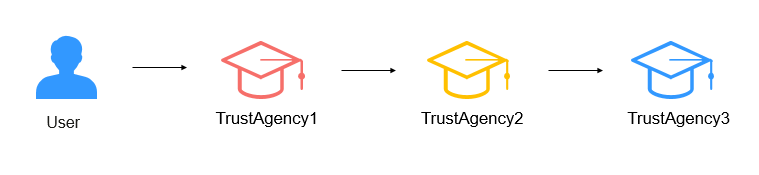
The following example shows how STS passes session tags and agency tags to subsequent sessions in an agency chain. In this example agency chaining scenario, you use the AssumeAgency API and the access key of an IAM user to assume TrustAgency1. Then, you use the temporary security credentials generated from the first session to switch to TrustAgency2. Finally, you use the second temporary security credentials to switch to TrustAgency3. These requests occur as three separate operations. Each agency is already tagged in IAM. You can use the tags and the transitive_tag_keys parameter in the AssumeAgency API to ensure that tags from an earlier session persist to the later sessions.
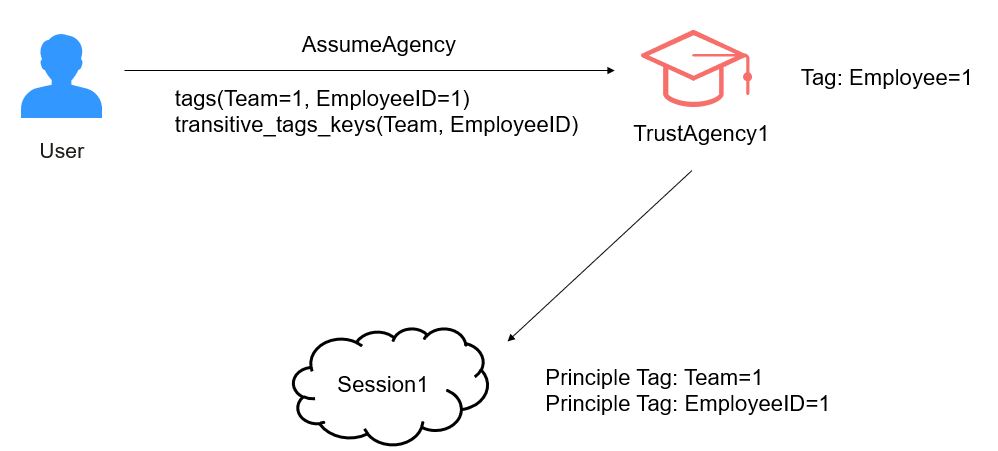
For example, you set the session tag "Team=1" as transitive and tag TrustAgency1 with "EmployeeID=1" when you call the AssumeAgency API to assume TrustAgency1. To keep the trust agency tag "EmployeeID=1" persist in the agent chain, you must pass it as a session tag and set it as transitive. The session principal will then contain both "Team=1" and "EmployeeID=1" tags, allowing you to use the g:PrincipalTag/Team and g:PrincipalTag/EmployeeID condition keys for access control.
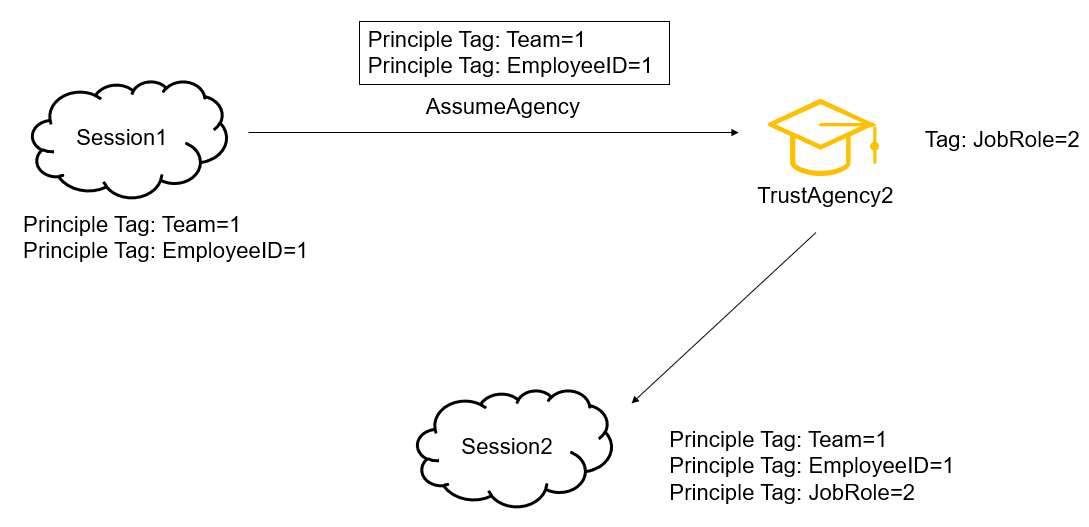
Now, use the temporary security credentials of session 1 to assume TrustAgency2. The "Team=1" and "EmployeeID=1" tags are inherited from session 1 to session 2. The tag "JobRole=2" is added to TrustAgency2, but you do not add it as a session tag or set it as transitive. As a result, although the session principal has the "Team=1", "EmployeeID=1", and "JobRole=2" tags, the "JobRole=2" tag does not persist to the subsequent session and is valid only in session 2.
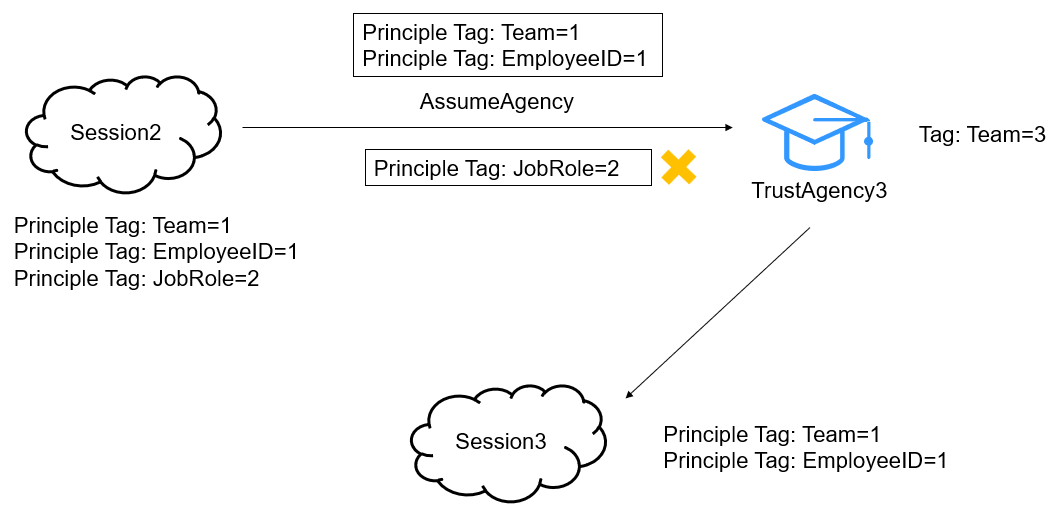
Now, use the temporary security credentials of session 2 to assume TrustAgency3. The "Team=1" and "EmployeeID=1" tags are inherited from session 2 to session 3. The principal tags of session 3 consist of the new session tag, new transitive tag, and trust agency tag. The tag "Team=3" is added to TrustAgency3. The inherited tag "Team=1" and the trust agency tag "Team=3" have the same tag key. As the inherited tag takes precedence over the trust agency tag, "Team=1" overwrites "Team=3". As a result, the generated session principal contains both "Team=1" and "EmployeeID=1".
Using Session Tags for Access Control
{
	"Version": "5.0",
	"Statement": [{
		"Effect": "Allow",
		"Action": [
			"iam:*:*"
		],
		"Condition": {
			"StringEquals": {
				"g:PrincipalTag/Team": [
					"1"
				]
			}
		}
	}]
} {
"agency_urn": "iam::account_id:agency:agency_name",
"agency_session_name": "session_name",
"tags": [{
"key": "Team",
"value": "1"
}]
} What is your overall rating for this page?
Thank you very much for your feedback. We will continue working to improve the documentation.See the reply and handling status in My Cloud VOC.
For any further questions, feel free to contact us through the chatbot.
Chatbot


