

Dynamic Graph
In most real-world scenarios, entities and their relationships evolve dynamically—examples include pandemic transmission networks and financial transaction systems. The temporal changes underlying these dynamics carry critical information that significantly impacts outcomes. Therefore, dynamic graphs are essential for modeling, storing, and analyzing such data over time. GES provides comprehensive support for dynamic graph capabilities.


This section mainly describes the data format of dynamic graphs. For details about operations related to these graphs, see Creating Dynamic Graph and Using a Dynamic Graph.
Dynamic Graph Data Models
A standard property graph is modeled as a directed graph composed of vertices, edges, labels, and properties. In contrast, dynamic graphs are distinguished by their ability to capture changes in vertices and edges over time. Based on temporal granularity, they can be categorized into four types: static graphs, spatiotemporal graphs (STGs), discrete-time dynamic graphs (DTDGs), and continuous-time dynamic graphs (CTDGs). Among these, CTDGs offer the finest level of detail, providing the most comprehensive representation of information.
GES supports modeling using CTDGs:
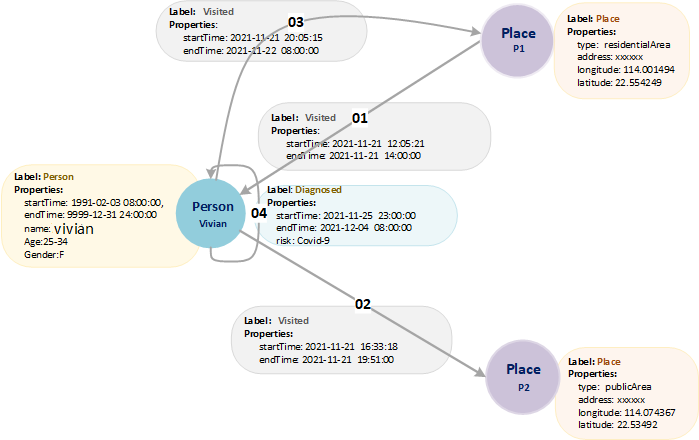
For example, Figure 2 illustrates a sample dynamic graph consisting of three vertices and four edges. The vertices are labeled Vivian, P1, and P2, while the edges represent relationships such as (P1, Vivian), (Vivian, P1), (Vivian, P2), and (Vivian, Vivian). Vertex types (labels) include Person and Place, whereas edge types (labels) denote Visited and Diagnosed. Each state is associated with a timestamp range [startTime, endTime], indicating its duration. For example, the edge (Vivian, P1) signifies that Vivian visited location P1 between [2021-11-21 20:05:15, 2021-11-22 08:00:00]. Similarly, the edge (Vivian, Vivian) indicates that Vivian contracted COVID-19 during [2021-11-25 23:00:00, 2021-12-04 08:00:00]. Here, vertex state changes, such as contracting a disease, are modeled as edges connected to the corresponding vertex.
Metadata of Dynamic Graphs
Timestamps are important features of dynamic graphs. To describe dynamic graph data, you need to define timestamp-related properties such as startTime and endTime in metadata.
<PMML>
  <labels>
    <label name="Person">
      <properties>
        <property dataType="long" name="startTime" cardinality="single"/>
        <property dataType="long" name="endTime" cardinality="single"/>
        <property dataType="string" name="name" cardinality="single"/>
        <property dataType="int" name="age" cardinality="single"/>
        <property dataType="string" name="gender" cardinality="single"/>
      </properties>
    </label>
    <label name="Place">
      <properties>
        <property dataType="string" name="type" cardinality="single"/>
        <property dataType="string" name="address" cardinality="single"/>
        <property dataType="float" name="longitude" cardinality="single"/>
        <property dataType="float" name="latitude" cardinality="single"/>
      </properties>
    </label>
    <label name="Visited">
      <properties>
        <property dataType="long" name="startTime" cardinality="single"/>
        <property dataType="long" name="endTime" cardinality="single"/>
      </properties>
    </label>
    <label name="Dignosed">
      <properties>
        <property dataType="long" name="startTime" cardinality="single"/>
        <property dataType="long" name="endTime" cardinality="single"/>
        <property dataType="string" name="risk" cardinality="single"/>
      </properties>
    </label>
  </labels>
</PMML>
Vertices of Dynamic Graphs
- Dynamic vertex
For dynamic graphs, each line of the vertex file contains the data of a vertex. id uniquely identifies vertex data, startTime indicates the start time of the vertex lifecycle, and endTime indicates the end time of the vertex lifecycle.
id,label,startTime,endTime,property1,property2...
Example:
Vivian,Person,1991-02-03 08:00:00,9999-12-31 24:00:00,Vivian,F, 25-34
- Static vertex
A vertex without specified startTime and endTime is a static vertex.
id,label,property1,property2...
Example:
Vivian,Person,Vivian,F,25-34
P1,Place,residentialArea,xxxxxx,114.001494,22.554249
P2,Place,publicArea,xxxxxx,114.074367,22.53492
- Note
If a vertex changes over time in its lifecycle, for example, the health status information of a person changes in a certain period, the changes can be modeled as an edge. The edge data is stored in a line of the edge file, representing status changes of the vertex.
id,id,label,startTime,endTime,property...
Example:
Vivian,Vivian,Diagnosed,2021-11-25 23:00:00,2021-12-04 08:00:00,Covid-9
Edges of Dynamic Graphs
- Dynamic edge
The following example shows the data of an edge in a dynamic graph. Each line in the edge file contains the data of an edge. id 1 and id 2 indicate the IDs of the start and end vertices of an edge, respectively. startTime indicates the start time of the edge lifecycle, and endTime indicates the end time of the edge lifecycle.
id 1, id 2, label, startTime, endTime, property 1, property 2, …
The following is an example:
Vivian,P1,Visited,2021-11-21  12:05:21,2021-11-21  14:00:00
Vivian,P2,Visited,2021-11-21  16:33:18,2021-11-21  19:51:00
- Static edge
An edge without the start time and end time is a static edge.
id 1, id 2, label, property 1, property 2, …
Vertex and Edge Data File
- Vertex data file
Each line in the file indicates a dynamic/static vertex. You can use more than one vertex file.
Vivian,Person,Vivian,F,25-34
P1,Place,residentialArea,xxxxxx,114.001494,22.554249
P2,Place,publicArea,xxxxxx,114.074367,22.53492
- Edge data file
Each line in the file indicates a dynamic/static edge. You can use more than one edge file.
Vivian,P1,Visited,2021-11-21  12:05:21,2021-11-21  14:00:00
Vivian,P2,Visited,2021-11-21  16:33:18,2021-11-21  19:51:00
What is your overall rating for this page?
Thank you very much for your feedback. We will continue working to improve the documentation.See the reply and handling status in My Cloud VOC.
For any further questions, feel free to contact us through the chatbot.
Chatbot


