

Static Graph
Before importing graph data into GES, it is essential to understand the supported formats:
- GES only accepts raw graph data in standard CSV or TXT format. If your data does not meet these specifications, you must convert it into a compatible format.
- The supported graph data format consists of three components: vertex files, edge files, and metadata.
- Vertex file: Stores vertex data in a headerless CSV format.
- Edge file: Stores edge data in a headerless CSV format.
- Metadata: Describes the structure of the vertex and edge files using XML. It defines the schema (e.g., labels for vertices/edges and their property structures).
Conceptual Overview
GES imports graph data based on the property graph model, so understanding its core concepts is crucial.
A property graph is a directed graph composed of vertices, edges, labels, and properties.
- Vertices are also called nodes, and edges represent relationships between them. These two entities form the foundation of the graph.
- Metadata describes the properties of vertices or edges. It comprises multiple labels, each consisting of one or more properties.
- Assigning labels to vertices or edges groups those with identical labels into distinct sets.
Metadata
The following figure shows the metadata structure.
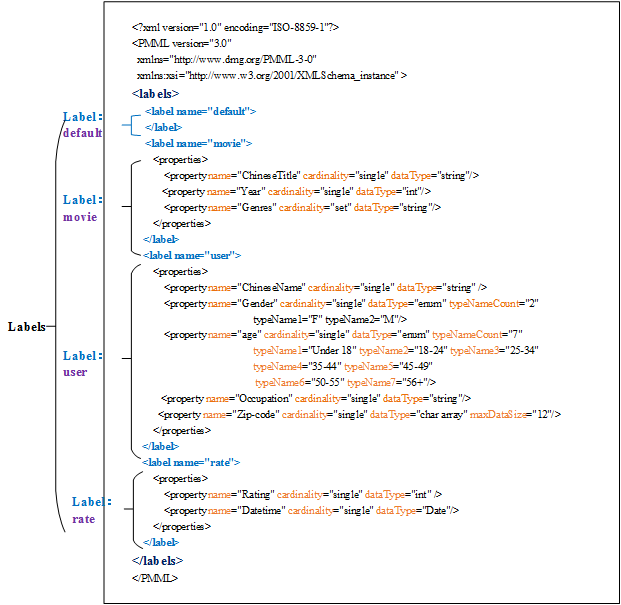
GES metadata is stored in an XML file and is used to define vertex and edge properties.
It contains labels and properties.
- Label
A label is a collection of properties. It describes formats of property data contained within a vertex or an edge.

If the same property name is defined in different labels, the cardinality and dataType of the properties in different labels must be the same. Starting from version 2.3.18, this restriction no longer exists, meaning that properties with the same name under different labels can have different types.
- Property
A property refers to the data format of a single property and contains three fields.
- Property name: Enter 1 to 256 characters. Special characters (<>& and ASCII codes 14, 15, and 30) are not allowed.
A label cannot contain two properties with the same name.
- cardinality: Indicates the composite type of data. Possible values are single, list, and set.
- single indicates that the data of this property has a single value, such as a digit or a character string.
If value1;value2 is of the single type, it is regarded as a single value.
- list and set indicate that data of this property consists of multiple values separated by semicolons (;).
- list: The values are placed in sequence and can be repeated. For example, 1;1;1 contains three values.
- set: The values are in random sequence and must be unique. Duplicate values will be overwritten. For example, 1;1;1 contains only one value (1).
list and set do not support values of the char array data type.
- single indicates that the data of this property has a single value, such as a digit or a character string.
- dataType: Indicates the data type of the property values. The following table lists the data types supported by GES.
Table 1 Supported data types Type
Description
char
Character
char array
Fixed-length string. Set the maximum length using the maxDataSize parameter.
NOTE:- You can set maxDataSize to limit the maximum length of the string. For details, see Metadata structure.
- Only single supports the data type.
- If the string length is not fixed or the string is long, you are advised to use string.
float
Float type (32-bit float)
double
Double floating point type (64-bit float point)
bool
Boolean type. Available values are 0/1 and true/false.
long
Long integer (value range: -2^63 to 2^63-1)
int
Integer (value range: -2^31 to 2^31-1)
date
Date. Currently, the following formats are supported:
- YYYY-MM-DD HH:MM:SS
- YYYY-MM-DD
NOTE:The value of MM or DD must consist of two digits. If the value contains only one digit, add 0 before it, for example, 05-01.
enum
Enumeration. Specify the number of the enumerated values and the name of each value. For details, see Metadata structure.
string
Variable-length string
NOTE:The data import efficiency can be very low if the string is too long. You are advised to use a char array instead.
You can set the length of a char array as needed. It is recommended that the length be less than or equal to 32 characters.
- Property name: Enter 1 to 256 characters. Special characters (<>& and ASCII codes 14, 15, and 30) are not allowed.
The following figure shows a metadata example:
<?xml version="1.0" encoding="ISO-8859-1"?>
<PMML version="3.0"
  xmlns="http://www.dmg.org/PMML-3-0"
  xmlns:xsi="http://www.w3.org/2001/XMLSchema_instance" >
  <labels>
    <label name="default">
    </label>
    <label name="movie">
        <properties>
            <property name="ChineseTitle" cardinality="single" dataType="int" />
            <property name="Year" cardinality="single" dataType="string"/>
            <property name="Genres" cardinality="single" dataType="string"/>
        </properties>
    </label>
	<label name="user">
        <properties>
            <property name="ChineseName" cardinality="single" dataType="int" />
            <property name="Gender" cardinality="single" dataType="string"/>
            <property name="age" cardinality="single" dataType="enum" typeNameCount="7"
			typeName1="Under 18" typeName2="18-24" typeName3="25-34" typeName4="35-44" typeName5="45-49"
			 typeName6="50-55" typeName7="56+"/>
			<property name="occupation" cardinality="single" dataType="enum" typeNameCount="21"
			typeName1="other or not specified" typeName2="academic/educator" typeName3="artist" typeName4="clerical/admin" typeName5="college/grad student"
			 typeName6="customer service" typeName7="doctor/health care" typeName8="executive/managerial" typeName9="farmer" typeName10="homemaker"
			  typeName11="K-12 student" typeName12="lawyer" typeName13="programmer" typeName14="retired" typeName15="sales/marketing"
			   typeName16="scientist" typeName17="self-employed" typeName18="technician/engineer" typeName19="tradesman/craftsman" typeName20="unemployed"
			    typeName21="writer"/>
			<property name="Zip-code" cardinality="single" dataType="char array" maxDataSize="12"/>
        </properties>
    </label>
	<label name="rate">
        <properties>
            <property name="Rating" cardinality="single" dataType="int" />
            <property name="Datetime" cardinality="single" dataType="string"/>
        </properties>
    </label>
</labels>
</PMML>
Vertex Files
A vertex file contains the data of each vertex. A vertex of data is generated for each behavior. The following is an example. id is the unique identifier of a set of vertex data.
id, label, property 1, property 2, property 3, ...
- Name of the vertex ID. You are advised not to use hyphens (-) as it may impact Gremlin queries.
- You do not need to set the data type of the vertex ID. It is of the string type by default.
- Do not add spaces before or after a label. Use commas (,) to separate information. If a space is identified as a part of a label, the label may fail to be identified. In this case, the system may display a message indicating that the label does not exist.
Example:
Vivian, user, Vivian, F, 25-34, artist, 98133
Eric, user, Eric, M, 18-24, college/grad student, 40205
Edge Files
An edge file contains the data of each edge. An edge of data is generated for each behavior. The graph size in GES is defined by the quantity level of the edges, for example, one million edges. The following is an example. id 1 and id 2 are the IDs of the two endpoints (vertices) of an edge.
id 1, id 2, label, property 1, property 2, ...
Example:
Eric,Lethal Weapon,rate,4,2000-11-21 15:33:18
Vivian,Eric,friends
Note: To store edges with the same vertices and labels in a database edition graph, you need to include a sortKey column. This column should be placed after the property column, which should be the last column.
When importing, specify the sortKey parameter. If sortKey has a value, it will be correctly read based on the graph's sortKey type. If there is no value, add a comma at the end of the property. This will import an empty value, which will set sortKey to NULL.
id 1, id 2, label, property 1, property 2, ...,sortKey
Example:
Eric,Lethal Weapon,rate,4,2000-11-21 15:33:18, 5
Vivian,Eric,friends,
What is your overall rating for this page?
Thank you very much for your feedback. We will continue working to improve the documentation.See the reply and handling status in My Cloud VOC.
For any further questions, feel free to contact us through the chatbot.
Chatbot


