

Checking a Domain Name
Scenarios
After adding record sets to a domain name on the Huawei Cloud DNS console, you can check whether the domain name can be resolved by using the domain name check function or command. If a domain name cannot be resolved, Huawei Cloud DNS provides you with suggestions to address the issue.
Constraints
- Only record sets added to public zones can be checked.
- Domain name suffixes supported by domain name check are as follows:
.band, .top, .net, .store, .online, .beer, .shop, .bio, .cab, .cafe, .cash, .fan, .fashion, .fit, .auto, .wiki, .mobi, .fyi, .games, .vip, .city, .company, .press, .kim, .luxe, .market, .mba, .media, .organic, .pet, .icu, .sale, .cc, .org.cn, .net.cn, .bj.cn, .sd.cn, .red, .love, .fund, .gold, .zone, .shopping, .link, .art, .studio, .tax, .technology, .vin, .xin, .yoga, .design, .site, .ltd, .space, .club, .ink, .website, .team, .tech, .world, .blue, .video, .cn, .pub, .com.cn, .hi.cn, .group, .pro, .info, .run, .live, .host, .plus, .guru, .life, .show, .today, .social, .gz.cn, .poker, .yn.cn, .xz.cn, .gs.cn, .qh.cn, .ac.cn, .cloud, .sh.cn, .tj.cn, .cq.cn, .he.cn, .sx.cn, .ln.cn, .jl.cn, .wang, .work, .xyz, .fun, .hl.cn, .zj.cn, .ah.cn, .fj.cn, .ha.cn, .hb.cn, .ren, .chat, .pink, .email, .center, .cool, .black, .gd.cn, .gx.cn, .nx.cn, .tw.cn, .hk.cn, .mo.cn, .nm.cn, .js.cn, .jx.cn, .hn.cn, .sc.cn, .sn.cn, .xj.cn, .com, .co, .asia, and .biz
Using Domain Name Check
Huawei Cloud DNS provides the domain name check function, which allows you to check whether a domain name can be resolved. You can check by Website domain or Email domain.
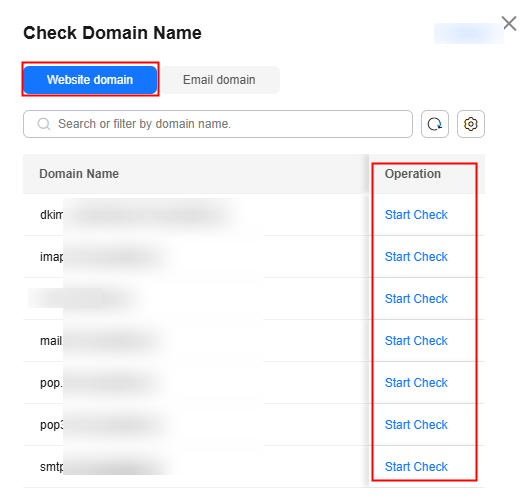
After configuring all required record sets for a website domain name, you can perform the following operations to check whether these record sets are active.
Procedure
- Go to the Public Zones page.
- Locate the target public zone and click Check Domain Name in the Operation column.

- On the Check Domain Name page, locate the domain name and click Start Check in the Operation column.
The A, AAAA, and CNAME record sets configured for the domain name will be checked in sequence.
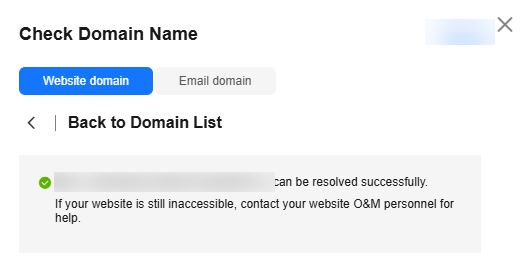
- View the check results and rectify the fault (if any) following the provided suggestion.
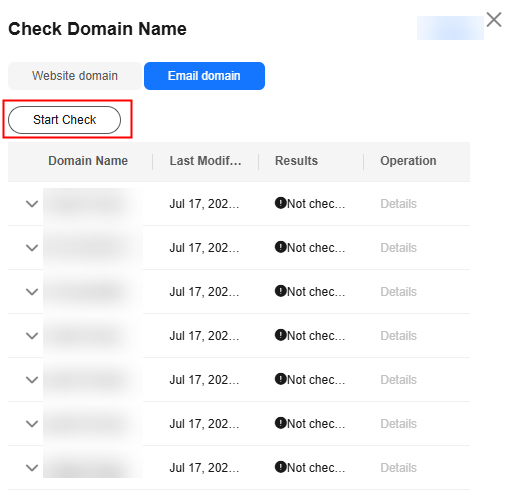
After configuring all required record sets for an email domain name, you can perform the following operations to check whether these record sets are active.
Procedure
- Go to the Public Zones page.
- Locate the target public zone and click Check Domain Name in the Operation column.

- Click Start Check.
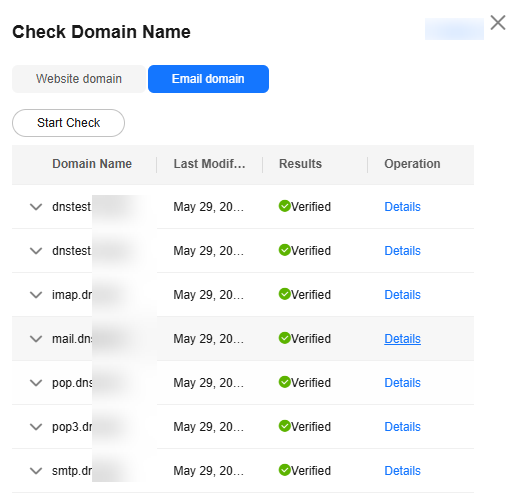
- View the check results and rectify the fault (if any) following the provided suggestion.
You can also click View Details to view detailed information.
Using the nslookup Command
- On your local host, click the search icon and enter cmd to open the CLI.
- Check whether the record set has been applied:
nslookup -qt=<record-set-type-of-domain-name>
Example commands for querying common record set types:
- A: nslookup -qt=a example.com
- CNAME: nslookup -qt=cname example.com
- TXT: nslookup -qt=txt example.com
- MX: nslookup -qt=mx example.com
If the displayed IP addresses are the same as those configured in the record set, the record set has been applied.
Common Issues and Solutions
| Error Message | Possible Causes | Solution |
|---|---|---|
| The domain name cannot be resolved. | The DNS settings for the domain name are not applied. | Contact your domain name registrar to check the domain name status. |
| The domain name has not been registered yet. | Register the domain name with a domain name registrar. | |
| The request timed out or the task failed. | Try again later. | |
| The domain name status is abnormal. | Check the domain name to ensure it can be resolved normally and try again. | |
| The domain name is not hosted on Huawei Cloud DNS. | The domain name is managed by another DNS service provider. | Configure record sets on the console of that DNS service provider or contact that DNS service provider for troubleshooting. |
What is your overall rating for this page?
Thank you very much for your feedback. We will continue working to improve the documentation.See the reply and handling status in My Cloud VOC.
For any further questions, feel free to contact us through the chatbot.
Chatbot


