

Overview
What Is Public DNS Resolution?
Public DNS resolution translates a domain name like www.example.com into an IP address like 1.2.3.4 for routing traffic over the Internet. It is implemented by public DNS servers, including authoritative and non-authoritative DNS servers. An authoritative DNS server stores various DNS records, including A, CNAME, and MX records, and returns accurate responses to DNS queries.
Authoritative DNS services are highly available and scalable authoritative DNS resolution services and domain name management services. They are typically provided by either domain name registrars or cloud service providers.
If you host domain names on the Huawei Cloud DNS service, the DNS service will provide public domain name resolution for your website and email server. Visitors can access your website, mailbox, or web application by entering your domain name in the address box of their browser.

Public Zones
A public domain name is registered and purchased at a domain name registrar, for example, Huawei Cloud. DNS service providers like Huawei Cloud DNS are responsible for resolving domain names. You can use DNS to create a public zone for your domain name, which can work for access to portal websites, enterprise emails, and web applications.
Unlike private zones, public zones are designed for external users and prioritize higher security and robust management to handle Internet-facing traffic. Private zones are used for internal networking services and emphasize limited access scope.
Domain name resolution follows a hierarchical structure and often relies on recursive queries.
The following uses example.com as an example to describe the structure and hierarchy of a domain name.
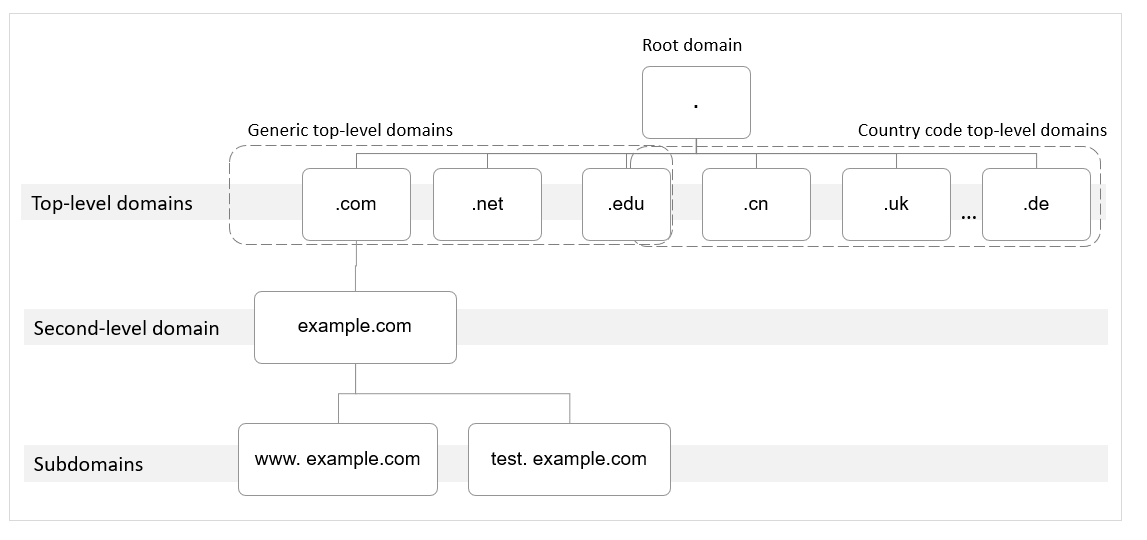
- Root domain
A period (.) is the designation for the root domain.
A fully qualified domain name (FQDN) ends with a period (example.com.). When you enter a domain name (example.com) in the browser, the DNS system will automatically add a period at the end.
Root domain names are resolved by root name servers that hold the addresses of top-level domain servers.
- Top-level domain
Below the root domain are top-level domains, which are categorized into two types:
- Generic top-level domain (gTLD), such as .com, .net, .org, and .top
- Country code top-level domain (ccTLD), such as .cn, .uk, and .de
Top-level domains are resolved by top-level domain servers that hold the addresses of second-level DNS servers. For example, the top-level domain server of .com saves the addresses of all DNS servers of second-level domains that end with .com.
- Second-level domain
Second-level domains (such as example.com) are subdomains of top-level domains and are resolved by authoritative servers, which provide authoritative domain name resolution services.
For example, if you purchase example.com from a domain name registrar and set a DNS server for it, the DNS server will provide authoritative resolution for example.com, and its address will be recorded by all top-level domain servers.
If you host your domain names using the Huawei Cloud DNS service, the DNS service will provide authoritative resolution services for them.
- Subdomain
Second-level domains can be further divided into subdomains (such as www.example.com) to indicate specific servers or services.
Resolution Process
The figure below shows the process for accessing a website using domain name www.example.com.
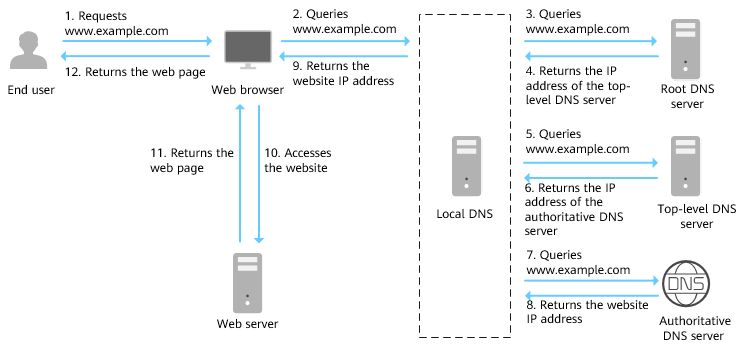
- An end user enters www.example.com in the address box of a browser.
- The query for www.example.com is routed to the local DNS server.
Local DNS servers, typically provided by an Internet service provider, cache DNS records to speed up future lookups and perform recursive queries on behalf of clients when the answer is not cached.
- If the local DNS server does not cache the record of this domain name, it routes the query to the root name server.
- The root name server returns the address of the top-level domain server of .com to the local DNS server.
- The local DNS server sends the query to the top-level domain server.
- The top-level domain server returns the address of the authoritative DNS server which provides authoritative records for example.com.
- The local DNS server sends the query to the authoritative DNS server.
If you have hosted www.example.com on the DNS service and configured Huawei Cloud DNS servers as name servers for it, these name servers will provide authoritative DNS for the domain name.
- The authoritative DNS server returns the IP address mapped to www.example.com to the local DNS server.
- The local DNS server returns the IP address to the web browser.
- The web browser accesses the web server with the IP address.
- The web server returns the web page to the browser.
- The end user views the web page using the browser.
Related Functions
| Category | Operation | Description |
|---|---|---|
| Public zones | Create a zone for your domain name to host it in DNS. | |
| Create a subdomain. | ||
| On the DNS console, create public zones for domain names registered with third-party domain name registrars. Constraints:
| ||
| View and change the DNS servers of a public domain name. | ||
| Reclaim your own zone that has been created by another Huawei Cloud account. | ||
| Modify, transfer, delete, batch delete, disable, enable, view, and batch export public zones. Constraints:
| ||
| Transferring a Domain Name and Its Record Sets to Another Huawei Cloud Account | Transfer record sets from one Huawei Cloud account to another account. | |
| DNS rules | Learn about types, scenarios, and configuration rules of record sets supported by public zones. | |
| Learn about record set conflicts of public zones and how to handle the conflicts. | ||
| Record sets | Configure record sets for public zones. | |
| Modify a record set, delete a record set, batch delete record sets in a single zone, and view record set details. | ||
| Add, modify, and delete record sets in batches. | ||
| Check whether the record sets configured for your website or email domain have been applied. If any record sets are not applied, Huawei Cloud DNS will provide suggestions to help you address the issue. | ||
| Disable or enable record sets for a domain name. The system-generated SOA and NS record sets cannot be disabled. | ||
| Map all subdomains of a domain name to the same value. The system-generated SOA and NS record sets cannot be disabled. | ||
| Associate the record set of a domain name with a Huawei Cloud resource.
| ||
| Use DNSSEC to ensure the integrity and authenticity of DNS queries and responses. It helps defend your domain name against threats such as DNS spoofing and cache poisoning. | ||
| Intelligent resolution | Configure ISP lines when you create record sets. | |
| Configure region lines when you create record sets. | ||
| Configure custom lines based on specific IP address ranges. | ||
| Set weights for different record sets for load balancing, failover, and leveraging geographical location benefits.
| ||
| Configuration examples | Route Internet traffic to a website. | |
| Route traffic to a mailbox. |
What is your overall rating for this page?
Thank you very much for your feedback. We will continue working to improve the documentation.See the reply and handling status in My Cloud VOC.
For any further questions, feel free to contact us through the chatbot.
Chatbot


