

Overview
KMS allows you to manage the lifecycle of keys and encrypt and decrypt data.
The core key components in KMS include customer master keys (CMKs) and data encryption keys (DEKs). CMK, the top-level key of the user, is used to encrypt and decrypt sensitive data and generate DEKs. DEK, the second-level key in the envelope encryption process, is used to encrypt services and is protected by CMKs.
Key Usage
Keys created in KMS can be used for server-side encryption of cloud services and application-integrated KMS encryption.
- Server-side encryption of cloud services: KMS keys are integrated with cloud services such as OBS, EVS, and RDS to implement transparent encryption of static data and protect data assets on the cloud. For details, see Interacting with Huawei Cloud Services.
- Application-integrated KMS encryption: KMS OpenAPIs/SDKs are called to implement cryptographic functions such as data encryption and decryption, digital signature, and signature verification in applications. For details, see Working with User Applications.
Key Types
KMS provides default keys, custom keys, and external keys to meet security and compliance requirements in different service scenarios. The following table lists the details.

| Key Type | Scenario | Function | Algorithm Type | Key Specifications | Description |
|---|---|---|---|---|---|
| Used by cloud services for server-side encryption. For details, see Cloud Services Integrated with KMS. | Only data encryption and decryption are supported. | Symmetric keys: AES | AES_256 (AES-256-GCM authentication encryption) | Default keys are created and managed by KMS. The alias of a default key ends with /default. | |
| Data encryption, decryption, and digital signature are supported. |
NOTE: To enable the ML-DSA algorithm, submit a service ticket. |
For details, see Key Algorithms and Specifications Supported by KMS. | You can create a key and manage its lifecycle on KMS, which generates key materials. | |
| Data encryption, decryption, and digital signature are supported. |
|
For details, see Key Algorithms and Specifications Supported by KMS. | You can create a key and manage its lifecycle on KMS. You need to import the key materials. |
Key Algorithms and Specifications Supported by KMS
| Key Type | Algorithm Type | Key Specifications | Description | Scenario |
|---|---|---|---|---|
| Symmetric key | AES | AES_256 (AES-256-GCM authentication encryption) | AES symmetric key |
|
| Digest key | SHA |
| Digest key |
|
| Asymmetric key | RSA |
| RSA asymmetric key |
|
| Asymmetric key | ECC |
| Elliptic curve recommended by NIST | Digital signature and signature verification |
| Asymmetric key | ED25519 | ED25519 | Elliptic curve in Edwards form | Digital signature and signature verification |
| Asymmetric key | ML-DSA NOTE: To enable the ML-DSA algorithm, submit a service ticket. |
| Modular lattice digital signature algorithm | Quantum-resistant digital signature and signature verification |
| Asymmetric key | SECP256K1 | SECP256K1 | Elliptic curve cryptography (ECC) | Digital signature and signature verification |
Table 3 describes the encryption and decryption algorithms supported for user-imported keys.
| Algorithm | Description | Configuration |
|---|---|---|
| RSAES_OAEP_SHA_256 | RSA algorithm that uses OAEP and has the SHA-256 hash function | Select an algorithm based on your HSM functions. If the HSMs support the RSAES_OAEP_SHA_256 algorithm, use RSAES_OAEP_SHA_256 to encrypt key materials. |
KMS-Created and Imported Key Materials
- When you create a custom key on the KMS console, KMS automatically generates a key material for the key.
- If you want to use your own key material, set Management Type to Platform-managed when you create a custom key on KMS, and import the key material.
| Key Material Source | Difference |
|---|---|
| KMS |
|
| User import |
|
Principles of Key Regions
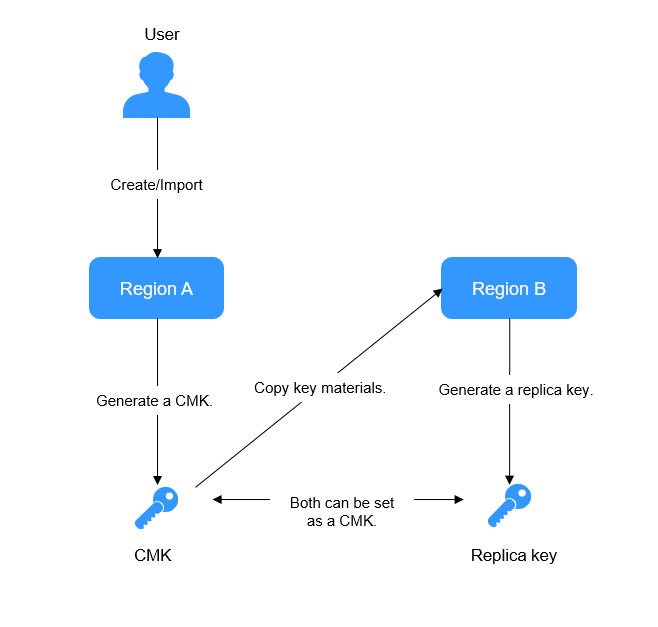
KMS allows you to use keys across regions. Each pair of CMK and replica key shares the same key materials, so that data encrypted in a region can be decrypted in another.
You can manage keys of multiple regions, edit replica key alias, enable, disable, tag, and authorize replica keys. You can also encrypt and decrypt replica keys online. The rotation of replica keys cannot be configured independently, which is synchronized with CMK rotation.
For details about how to create a replica key, see Creating a Replica Key for a Custom Key.
Figure 1 shows the principle of multi-region keys.
| Application Scenario | Description |
|---|---|
| Disaster recovery (DR) | If resources in the region where a key is created are frozen due to arrears or data cannot be decrypted due to exceptions, replica keys in another region can be used to ensure service continuity. |
| Cross-region signature verification | If services are deployed in different regions, you can use multi-region keys to verify and decrypt signatures, improving service interconnection efficiency. |
Appendix: Components of a Key
A key consists of a key identifier, metadata, and a key material.
- Key identifier: It uniquely identifies and references a key on the console, in an API, or in a policy. KMS supports the following identifiers:
- Key ID: A 36-byte string that matches the ^[0-9a-z]{8}-[0-9a-z]{4}-[0-9a-z]{4}-[0-9a-z]{4}-[0-9a-z]{12}$ regular expression. Example: 0d0466b0-e727-4d9c-b35d-f84bb474a37f
- Alias: The identifier of a key. The value starts with alias/. Example: alias/4555
- URN: Each alias automatically matches a unique URN. Example: kms:eu-de-ring0:3ba44455500dd43127:alias:4555
- Metadata: Information that describes the attributes of a key, such as the key ID, creation date, key status (enabled or disabled), and key usage (encryption/decryption or signing/verification).
- Key material: Binary data used for cryptographic operations, including encryption, decryption, and signing. KMS supports the following material sources:
- Huawei Cloud KMS: You can use KMS to generate key materials.
- External: You can generate a key material locally and import it to KMS.
What is your overall rating for this page?
Thank you very much for your feedback. We will continue working to improve the documentation.See the reply and handling status in My Cloud VOC.
For any further questions, feel free to contact us through the chatbot.
Chatbot


