

Help Center/ DataArts Studio/ User Guide/ Buying and Configuring a DataArts Studio Instance/ Creating and Managing a Workspace/ Operations Supported for Different Roles in Enterprise Mode/ Deployer Operations
Updated on 2026-11-12 GMT+08:00
Deployer Operations
Scenario
- A deployer reviews the tasks to be released. Related operations are outlined below.
- A deployer reviews the release tasks submitted by developers. Modified jobs can be synchronized to the production environment only after the corresponding release tasks are approved.
In enterprise mode, when a developer submits a script or job version, the system generates a release task. After the developer confirms the release and the deployer approves the release request, the modified job is synchronized to the production environment.
Prerequisites
A developer has completed the operations in Releasing a Script Task or Releasing a Job Task.
Procedure
- On the DataArts Studio console, locate a workspace and click DataArts Factory.
- In the left navigation pane, choose .
- Click the Packages tab. You can click View Details in the Operation column to view the changes of the task compared with its previous version.
- If there is any issue, click Revoke to reject the release task. After the developer modifies and submits the release task again, you can review it again.
- After confirming that the release task has no remaining issue, click Release to approve the task.
Figure 1 Reviewing and releasing a task
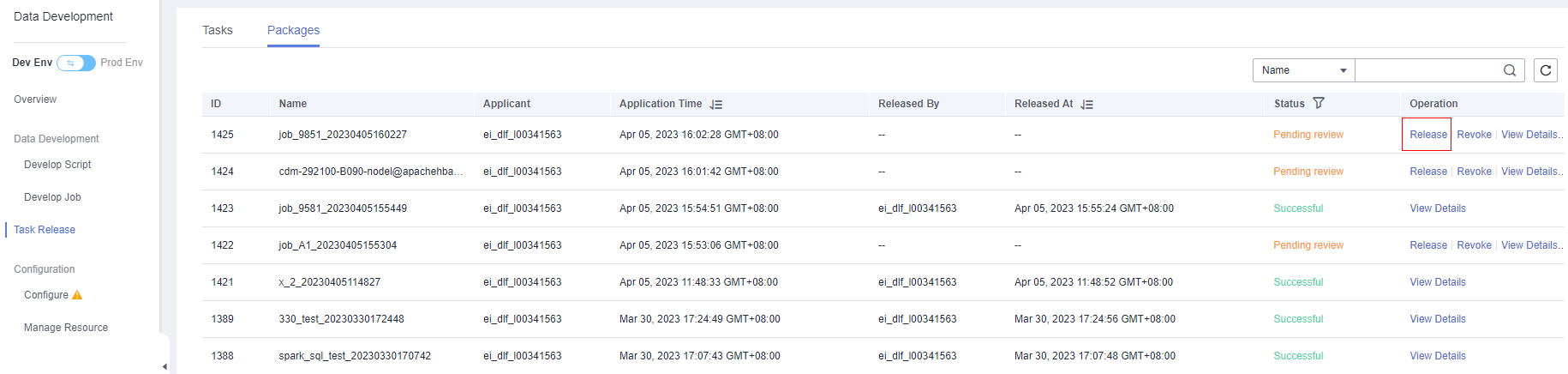
- After the task is released, you can view its status. The developer's modification is synchronized to the production environment. Figure 2 Viewing the task status

What is your overall rating for this page?
0
1
2
3
4
5
6
7
8
9
10
Very dissatisfiedVery satisfied
Thank you very much for your feedback. We will continue working to improve the documentation.See the reply and handling status in My Cloud VOC.
The system is busy. Please try again later.
For any further questions, feel free to contact us through the chatbot.
Chatbot


