

Permission Introduction
Permissions are used to control whether a user is allowed to access database objects (such as tables, views, functions, and models) and perform operations (such as adding, deleting, modifying, querying, and creating database objects).
Permissions management in Aura falls into two categories:
- Data object permissions
Grant permissions for a database object (table, view, column, database, function, or schema) to a role or user. The GRANT command grants specified database object permissions to one or more roles. These permissions are appended to those already granted, if any.
- User permissions
Grant a role's permissions to one or more users. In this case, every role or user can be regarded as a set of one or more database permissions.
How It Works
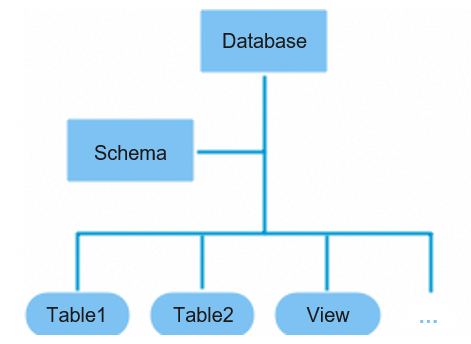
Aura implements a hierarchical permission management on databases, schemas, and data objects.
- Databases cannot communicate or share resources with each other. Their connections and permissions can be isolated. Users and roles are shared within the service, but data is not shared among databases. That is, a user can connect to any database, but can access only the database declared in the connection request.
- Schemas share more resources than databases do. User permissions on schemas and subordinate objects can be flexibly configured using the GRANT and REVOKE syntax. Each database has one or more schemas. Each schema contains various types of objects, such as tables and functions. To access the objects in a specified schema, a user must have required permissions.
- By default, only the object owner or system administrator can query, modify, and delete objects. To access a specific database object, such as Table1, other users must be granted the SELECT permission on Table1.
What is your overall rating for this page?
Thank you very much for your feedback. We will continue working to improve the documentation.See the reply and handling status in My Cloud VOC.
For any further questions, feel free to contact us through the chatbot.
Chatbot


