

Obtaining Key Parameters
- AK: access key ID, which is a unique identifier used in conjunction with a secret access key to sign requests cryptographically.
- SK: secret access key used in conjunction with an AK to sign requests cryptographically. It identifies a request sender and prevents the request from being modified.
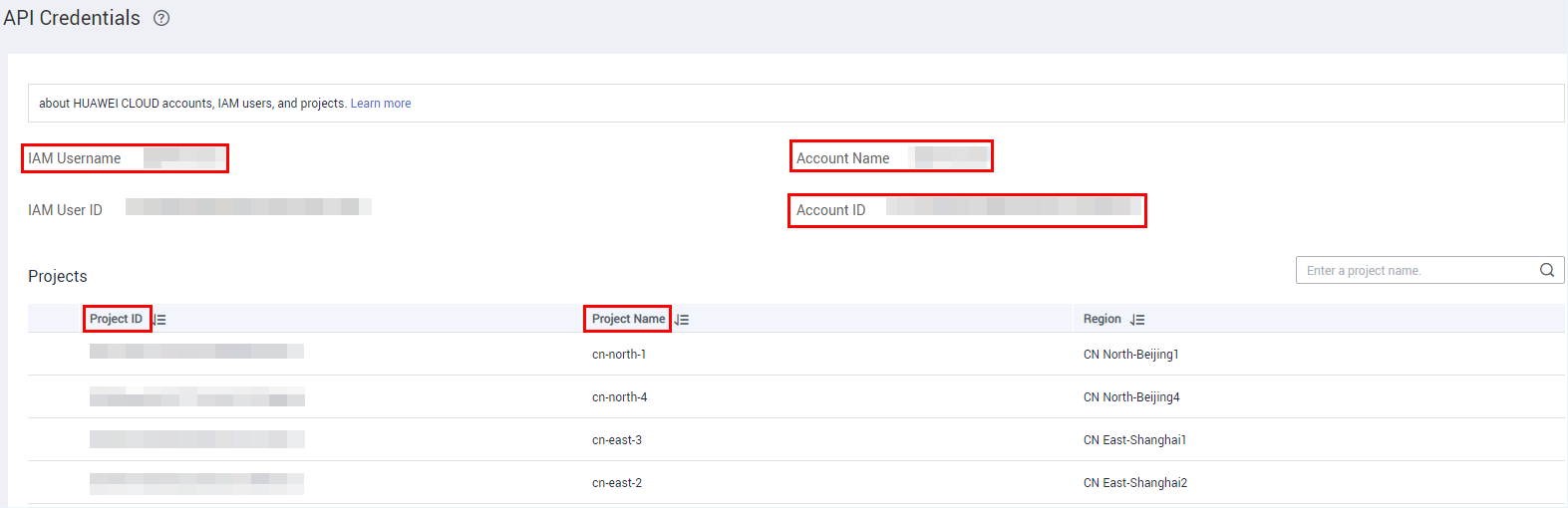
- Project_ID: Some request URLs must contain this field.
- Account name: This field must be contained in some request URLs.
- Endpoint: regions and endpoints for available services
Prerequisites
You have registered a Huawei Cloud account and completed real-name authentication.

If you are a Huawei Cloud (International) user, you need to complete real-name authentication when you:
- Purchase and use cloud services on Huawei Cloud nodes in the Chinese mainland. In this case, real-name authentication is required by the laws and regulations of the Chinese mainland.
- Select the Chinese mainland region for MPC.
Obtaining the AK/SK Pair
Note: Temporary access keys have full access permissions for your account. If the temporary access keys are disclosed, data leakage may occur. To ensure account security, you are advised to periodically change the temporary access keys and keep them secure.


Obtaining a Project ID and Account Name
- Log in to the console.
- Point to the username and choose My Credentials from the drop-down list.
- On the API Credentials page, obtain the project ID and account name. Figure 3 Obtaining a project ID
Obtaining an Endpoint
An endpoint is required during SDK initialization. You can obtain the endpoints of MPC from Regions and Endpoints.
What is your overall rating for this page?
Thank you very much for your feedback. We will continue working to improve the documentation.See the reply and handling status in My Cloud VOC.
For any further questions, feel free to contact us through the chatbot.
Chatbot


