

Configuring Spark Dynamic Masking
Scenarios
Dynamic masking is a security feature that hides sensitive data from unauthorized users and works by partially or fully masking sensitive data based on user permissions or roles.
Enabling Spark dynamic masking allows data within masked columns to be used for computations while keeping the actual values concealed in the output. The cluster's masking policy is dynamically propagated based on data lineage, ensuring that sensitive information remains protected throughout the query lifecycle. This approach optimizes data utility without compromising privacy.
Notes and Constraints
- This section applies only to MRS 3.3.1-LTS and later.
- The dynamic data masking feature cannot be enabled if jobs are submitted on the console.
- Dynamic data masking is not applicable to Hudi tables.
- Dynamic data masking is not supported for non-SQL access methods.
- Dynamic data masking is not supported for direct HDFS read/write operations.
- Dynamic data masking does not support complex data types such as array, map, and struct.
- Dynamic data masking is supported only for Spark jobs submitted via spark-beeline using a JDBC connection.
- During masking policy transfer, if the incoming policy conflicts with an existing policy on the target table, the existing policy will be overridden and marked as Custom: ***.
- Versions earlier than MRS 3.6.0: Dynamic data masking is supported only for the following data types: int, char, varchar, date, decimal, float, bigint, timestamp, tinyint, smallint, double, string, and binary. When masking policies are applied to data types such as int, date, decimal, float, bigint, timestamp, tinyint, smallint, and double, query results from Spark Beeline may not behave as expected. In some cases, the output may not accurately reflect the original values, leading to inconsistencies. To ensure that query results align with masking policy expectations, it is recommended that you use the Nullify masking policy.
- In MRS 3.6.0-LTS or later, dynamic data masking is supported for the following data types: int, char, varchar, date, decimal, float, bigint, timestamp, tinyint, smallint, double, string, and binary. When masking policies are applied to data types such as int, date, decimal, float, bigint, timestamp, tinyint, smallint, double, and binary, query results returned via Spark Beeline may appear as null. To ensure that query results behave consistently with masking policy expectations, it is recommended that you use the Nullify masking policy.
- For data types not supported by dynamic data masking policies, or when masking logic is transferred to an output column, the system defaults to the Nullify masking policy.
- In MRS 3.6.0-LTS or later, when operators or user-defined functions (UDFs) return data types that are unsupported by dynamic data masking, the system automatically applies the Nullify masking policy, if masking is applicable. However, this can lead to null pointer exceptions. For example, when using the distinct operator with more than two input parameters, the result may be returned as a struct type. If any of the input fields are subject to masking, Spark Beeline may encounter null pointer errors.
- The dynamic data masking feature cannot be enabled if jobs are submitted on the console.
Procedure
- Modify JDBCServer instance parameters. Log in to FusionInsight Manager and choose Cluster > Services > Spark. On the displayed page, click Configurations and then All Configurations, choose JDBCServer(Role), modify the following parameters, save the settings, and restart the Spark service.
- If Ranger is used for authentication, add the following custom parameters in the custom area.
Parameter
Example Value
Description
spark.dynamic.masked.enabled
true
Whether to enable dynamic data masking. Enabling this function can enhance data security.
- true: Dynamic data masking is enabled.
- false: Dynamic data masking is disabled.
spark.ranger.plugin.authorization.enable
true
Whether to enable Ranger authentication. Enabling this function can enhance data access security. If you require fine-grained access control, it is strongly recommended to enable and configure this feature.
- true: Ranger authentication is enabled.
- false: Ranger authentication is disabled.
Modify the following parameters.
Parameter
Example Value
Description
spark.ranger.plugin.masking.enable
true
Whether to enable the column masking function of the Ranger plugin. Enabling this function can enhance data security. However, you need to ensure that the Ranger service has been correctly configured and a proper masking policy has been defined.
- true: The column masking function of the Ranger plugin is enabled.
- false: The column masking function of the Ranger plugin is disabled.
spark.sql.authorization.enabled
true
Whether authorization is enabled for Spark SQL operations. After this function is enabled, Spark executes SQL queries based on user roles and permissions to enforce fine-grained access control.
- true: Authentication for Spark SQL operations is enabled.
- false: Authentication for Spark SQL operations is disabled.
- If you use Hive metadata authentication instead of Ranger authentication, add the following custom parameters in the custom area.
Parameter
Example Value
Description
spark.ranger.plugin.use.hive.acl.enable
true
Whether to enable Spark to use Hive ACLs for authorization checks.
- true: enables Spark to use Hive ACLs for authorization checks.
- false: disables Spark from using Hive ACLs for authorization checks.
spark.dynamic.masked.enabled
true
Whether to enable dynamic data masking. Enabling this function can enhance data security.
- true: Dynamic data masking is enabled.
- false: Dynamic data masking is disabled.
spark.ranger.plugin.authorization.enable
true
Whether to enable Ranger authentication. Enabling this function can enhance data access security. If you require fine-grained access control, it is strongly recommended to enable and configure this feature.
- true: Ranger authentication is enabled.
- false: Ranger authentication is disabled.
Modify the following parameters.
Parameter
Example Value
Description
spark.ranger.plugin.masking.enable
true
Whether to enable the column masking function of the Ranger plugin.
- true: The column masking function of the Ranger plugin is enabled.
- false: The column masking function of the Ranger plugin is disabled.
If you use Hive metadata authentication instead of Ranger authentication and Hive policy initialization has not been completed in Ranger, perform the following operations:- Enable the Ranger authentication function for Hive and restart Hive and Spark.
- Enable the Ranger authentication function for Spark and restart Spark.
- Disable the Ranger authentication function on Hive and restart Hive.
- Disable the Ranger authentication function on Spark and restart Spark.
- Log in to the Ranger web UI. If the Hive component exists under Hadoop SQL, the Hive policy has been initialized. Otherwise, the Hive policy has not been initialized.
- If your cluster also includes HetuEngine, and you want the corresponding dynamic masking policies in Ranger and HetuEngine to automatically update when Spark transfers a dynamic masking policy, set spark.dynamic.masked.hetu.policy.sync.update.enable to true and change the Ranger user type of built-in user Spark to admin.
- If Ranger is used for authentication, add the following custom parameters in the custom area.
- Log in to the Spark client node and run the following commands. Navigate to the directory where the client is installed.
cd Client installation directoryLoad the environment variables.
source bigdata_env
Load the component environment variables.
source Spark/component_env
In security mode, additionally perform the security authentication. Authentication is not required in normal mode.
kinit testEnter the password for authentication. (Change the password upon your first login.)
- Submit a task via Spark Beeline to create a Spark table.
spark-beeline
create table sparktest(a int, b string);
insert into sparktest values (1,"test01"), (2,"test02");
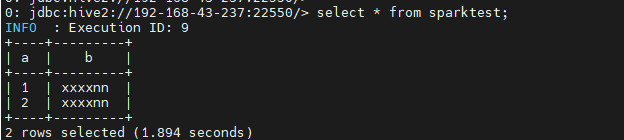
- Configure a masking policy for the sparktest table and check whether the masking takes effect. For details, see Adding a Ranger Access Permission Policy for Spark.
select * from sparktest;
- Verify the transfer of the data masking policy.
create table sparktest02 as select * from sparktest;
select * from sparktest02;
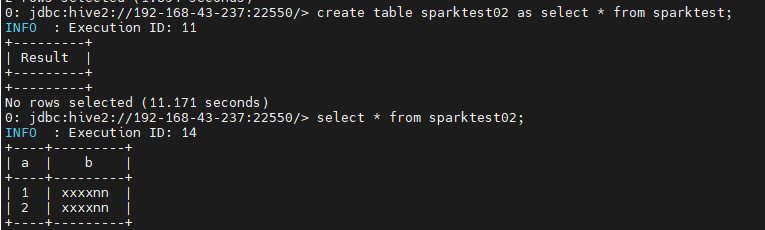
The presence of the preceding information confirms that dynamic masking is successfully configured. After logging in to the Ranger masking policy management page, you can view the automatically generated masking policy for the sparktest02 table.
Feature Description
- After Spark applies dynamic masking, the schema of the returned field must match the schema of the output column. If there is a mismatch, Spark will return null as the masked result.
- Configuration for the UDF list that does not require masking and the UDF list that requires forced hash masking is supported.
Parameter
Description
Example Value
spark.sql.udf.hash.dynamic.mask
Functions that must use hash masking when Partial mask: show last 4, Partial mask: show first 4, or Custom masking policies are applied. If multiple functions must use hash masking, separate them with commas (,).
substr,substring,left,right,concat,concat_ws,lpad,repeat,rpad,reverse
spark.sql.udf.skip.dynamic.mask
Functions that do not need masking after dynamic masking is enabled. If multiple functions do not need masking, separate them with commas (,).
count
The configured function names must match the actual function names used by the execution plan. For instance, the left function uses the substring function during execution. Consequently, you must set spark.sql.udf.hash.dynamic.mask or spark.sql.udf.skip.dynamic.mask to substring. Setting them to left will be ineffective.
You can use the EXPLAIN statement to obtain the function names used during execution. The following is an example.

spark.sql.udf.skip.dynamic.mask has a higher priority than spark.sql.udf.hash.dynamic.mask. When a function name is configured in both spark.sql.udf.skip.dynamic.mask and spark.sql.udf.hash.dynamic.mask, the former will be effective, which means skipping data masking.
- The Custom masking policy supports the configuration of the mask_partial function. The mask_partial function can:
- Handle numeric types.
mask_partial(column_name, mask_digital, mask_from[, mask_to])
Description: It replaces the numerics specified by mask_from and mask_to with mask_digital. Supported types: int, decimal, float, bigint, tinyint, smallint, and double.
Table 1 Parameters Parameter
Description
mask_to
The default value of mask_to can be used, which indicates that the digits from the mask_from position to the end of the number are replaced.
mask_digital
The value must be a number between 1 and 9.
Return type: same as column_name
For the decimal, float, and double types, the decimal point is used for counting but not for making. For example, if the column content is 3.1415926 and is masked with mask_partial('2',1,3), the return value is 2.2415926.
When Spark Beeline is used, using mask_partial produces unexpected masked decimal data, but the actual values remain hidden.
- Handle character types.
mask_partial(column_name , mask_char, mask_from[, mask_to])
Description: It replaces the characters (char, varchar, string) specified by mask_from and mask_to with the characters specified by mask_char based on the given input and output formats.
Table 2 Parameters Parameter
Description
mask_char
The single character to use for masking Supported characters are as follows:
- Uppercase letters: A, B, C, D, E, ..., Z
- Lowercase letters: a, b, c, d, e, ..., z
- Arabic numerals: 0, 1, 2, 3, 4, 5, 6, 7, 8, 9
- Punctuations: period (.), comma (,), question mark (?), exclamation mark (!), colon (:), semicolon (;), quotation mark ("), hyphen (-), and brackets (( and ), [ and ], { and })
- Special characters: At sign (@), hash sign (#), dollar sign ($), percent sign (%), ampersand (&), asterisk (*), plus sign (+), equals sign (=), tilde (~), underscore (_), and vertical bar (|).
mask_from
First character in the string that will be masked. The value must be greater than 0.
mask_to
Last character in the string that will be masked. The default value can be used, which indicates that the character from the mask_from position to the last character of the string will be masked.
Return type: same as column_name
- Handle time types.
mask_partial(column_name, mask_digital, mask_from[, mask_to])
Description: It replaces digits from the mask_from to mask_to position in a Date or TimeStamp value with the digit specified by mask_digital.
Table 3 Parameters Parameter
Description
mask_to
The default value of mask_to can be used, which indicates that the digits from the mask_from position to the end of the number are replaced.
mask_digital
The value must be a number between 1 and 9.
Return type: same as column_name- For a Date value, only year, month, and day information can be masked.
- For a TimeStamp value, year, month, day, hour, minute, second, millisecond/microsecond/nanosecond information can be masked.
- The hyphens (-), slashes (/), spaces, and colons (:) are counted and not masked.
- If the masked month and day digits of a Date or TimeStamp value exceed the normal range, the remainder of them divided by 12 will be used as the final result. For example:
Assuming that the month digit is 02 (February), which is masked by 33, then the final value is 33%12 = 9.
Assuming that the original day digit is 10, which is masked by 44, then the final result is "44%Total days in the masked month of the masked year". For example, if the masked year is 2024 and the masked month is 9 (September), which has 30 days, the final value is 14.
- For TimeStamp data, if the masked hour, minute, second, millisecond, microsecond, and nanosecond value exceed the normal range, the final values will be the modulus operation results of them.
- Assuming that the original hour digit is 20, which is masked by 66, the final value is 66%24=18.
- Assuming that the original minute digit is 30, which is masked by 66, the final value is 66%60=6.
- Assuming that the original second digit is 50, which is masked by 66, the final value is 66%60=6.
- Masked millisecond, microsecond, and nanosecond values never exceed the normal range.
Date type masking: Given the date 1920-01-03, the mask_partial('2', 5, 8) function returns 1920-10-03.
Time Stamp type masking: Given the stamp '2023-12-05 12:34:56.789', the mask_partial('2', 5, 8) function returns '2023-10-05 12:34:56.789'.
Constraints on mask_partial- The input parameter of MRS mask_partial does not support nested UDFs.
- When mask_partial encounters an unsupported type other than numeric, character, and time, it returns null.
- The value of mask_from starts from 1, meaning it should be an integer greater than 0; if less than 1, the default value 1 will be used.
- Mask_to can be left blank. It defaults to the end position of the data to be masked. Mask_to can be a negative number, with -1 indicating the end position.
- If mask_from comes after mask_to in the sequence, the function returns null.
- When mask_partial handles a numeric type and mask_digital is not within the range of [1,9], the UDF returns null.
- When the mask_partial handles a character type and mask_char is not a supported character, the UDF function returns null.
- If mask_partial is used improperly, such as using invalid input parameters, the engine throws an exception.
- Masking of Chinese characters is supported.
How to use mask_partial
To use the function, configure a masking policy on Ranger, select Custom for Mask Conditions, and enter mask_partial(mask_digital, mask_from[, mask_to]) in the custom input field. The value of the mask_digital parameter must be enclosed in single quotation marks, for example, '9' and '*'.
Example: mask_partial('*', 1, 5)


If you set Mask Conditions to Custom, you can skip the first input parameter of the mask_partial function and start configuration from the second input parameter.
- Handle numeric types.
What is your overall rating for this page?
Thank you very much for your feedback. We will continue working to improve the documentation.See the reply and handling status in My Cloud VOC.
For any further questions, feel free to contact us through the chatbot.
Chatbot


