

OBS
Function Description
This plugin is built into SecMaster and calls Object Storage Service (OBS) APIs to perform operations.
Each built-in plugin has a corresponding built-in operation connection.
Viewing Details and Operation Connections of the OBS Plugin
- Log in to the SecMaster console.
- Click
 in the upper left corner of the management console and select a region or project.
 - In the navigation pane on the left, choose Workspaces > Management. In the workspace list, click the name of the target workspace. Figure 1 Workspace management page

- In the navigation pane on the left, choose . Figure 2 Plugins page
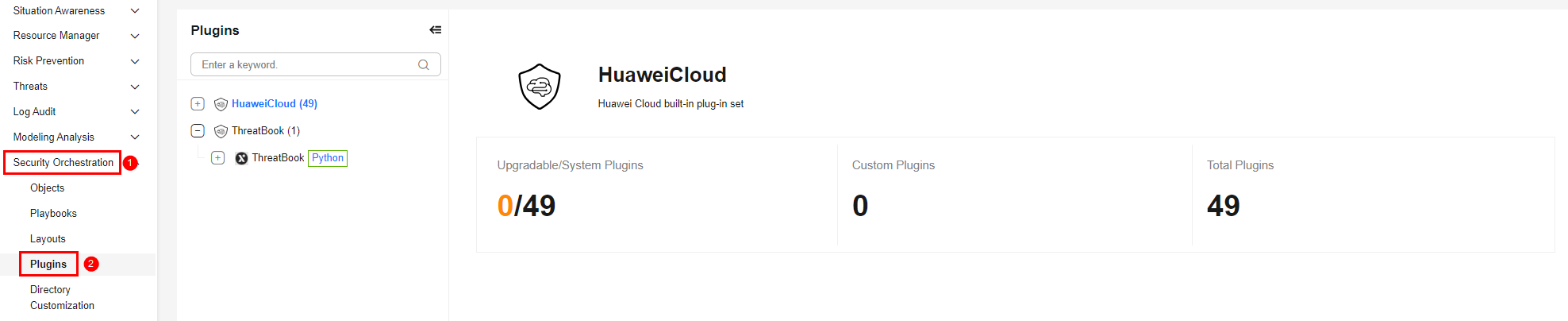
- On the Plugins page, select the OBS plugin under the Huawei Cloud catalog. The Details tab is displayed by default. The Details tab displays the login credential information of the operation connection associated with the plugin.
- Click the Operation Connections tab for the OBS plugin. On the displayed page, you can view information about the operation connections associated with the OBS plugin.
- For details about how to edit or delete an operation connection, see Editing an Operation Connection and Deleting an Operation Connection. For details about how to add an operation connection for a plugin, see Creating an Operation Connection. A plugin can have multiple operation connections.
Plugin Execution Function appendObject
- Parameters of the appendObject Function: describes the input and output parameters of the function.
- Output Example of the appendObject Function: provides an example of the function output.
Parameters of the appendObject Function
Function: Adds content to an object in an OBS bucket. If the object does not exist, a new object is created. If the object exists and the size exceeds 50 MB, the operation is rejected. If the size exceeds 20 MB, an alarm is recorded.
| Parameter | Parameter Type | Parameter Description | Mandatory |
|---|---|---|---|
| bucketName | String | OBS bucket name. | Yes |
| obsKey | String | Object key name (file path). If the object does not exist, a new object is created. | Yes |
| content | String | Content to be added. If the object size exceeds 50 MB, the operation is rejected. If the object size exceeds 20 MB, an alarm is recorded. | Yes |
| Parameter | Parameter Type | Parameter Description |
|---|---|---|
| headers | Object | API response headers, including basic information about the request and response, such as the request time, response service, and request ID. |
| code | Int | Status code, which indicates whether the request is successful. Response code description:
|
| body | Object | Content returned by the API. |
Output Example of the appendObject Function
{
  "headers": {
    "Transfer-Encoding": "chunked",
    "Server": "obs-server",
    "x-obs-request-id": "0000016A0000016A0000016A0000016A",
    "x-obs-id-2": "32AAAQAAEAABAAAQAAEAABAAAQAAEAABAAAQAAEAABAAAQAAEAABA",
    "Connection": "keep-alive",
    "Date": "Mon, 25 May 2026 09:10:00 GMT",
    "Content-Type": "application/json"
  },
  "code": 200,
  "body": {
    "status": "success",
    "resMsg": "Append successful",
    "nextPosition": 1024
  }
}
Plugin Execution Function getBucketAcl
- Parameters of the getBucketAcl Function: describes the input and output parameters of the function.
- Output Example of the getBucketAcl Function: provides an example of the function output.
Parameters of the getBucketAcl Function
Function: Obtains the access control list (ACL) configuration of a specified OBS bucket.
| Parameter | Parameter Type | Parameter Description | Mandatory |
|---|---|---|---|
| bucket_name | String | OBS bucket name. | Yes |
| Parameter | Parameter Type | Parameter Description |
|---|---|---|
| headers | Object | API response headers, including basic information about the request and response, such as the request time, response service, and request ID. |
| code | Int | Status code, which indicates whether the request is successful. Response code description:
|
| body | Object | Content returned by the API. |
Output Example of the getBucketAcl Function
{
  "headers": {
    "Transfer-Encoding": "chunked",
    "Server": "obs-server",
    "x-obs-request-id": "0000016A0000016A0000016A0000016A",
    "x-obs-id-2": "32AAAQAAEAABAAAQAAEAABAAAQAAEAABAAAQAAEAABAAAQAAEAABA",
    "Connection": "keep-alive",
    "Date": "Mon, 25 May 2026 09:10:00 GMT",
    "Content-Type": "application/json"
  },
  "code": 200,
  "body": {
    "status": "success",
    "resp": {
      "owner": {
        "id": "owner-id"
      },
      "accessControlList": [
        {
          "grantee": {
            "type": "CanonicalUser",
            "id": "user-id"
          },
          "permission": "FULL_CONTROL"
        }
      ]
    }
  }
}
Plugin Execution Function getBucketCustomdomain
- Parameters of the getBucketCustomdomain Function: describes the input and output parameters of the function.
- Output Example of the getBucketCustomdomain Function: provides an example of the function output.
Parameters of the getBucketCustomdomain Function
Function: Obtains the custom domain name bound to a specified OBS bucket.
| Parameter | Parameter Type | Parameter Description | Mandatory |
|---|---|---|---|
| bucket_name | String | OBS bucket name. | Yes |
| customdomain | String | Query parameter ID. | Yes |
| Parameter | Parameter Type | Parameter Description |
|---|---|---|
| headers | Object | API response headers, including basic information about the request and response, such as the request time, response service, and request ID. |
| code | Int | Status code, which indicates whether the request is successful. Response code description:
|
| body | Object | Content returned by the API. |
Output Example of the getBucketCustomdomain Function
{
  "headers": {
    "Transfer-Encoding": "chunked",
    "Server": "obs-server",
    "x-obs-request-id": "0000016A0000016A0000016A0000016A",
    "x-obs-id-2": "32AAAQAAEAABAAAQAAEAABAAAQAAEAABAAAQAAEAABAAAQAAEAABA",
    "Connection": "keep-alive",
    "Date": "Mon, 25 May 2026 09:10:00 GMT",
    "Content-Type": "application/json"
  },
  "code": 200,
  "body": {
    "domains": [
      {
        "domainName": "www.example.com",
        "createTime": "2026-05-25T09:10:00Z"
      }
    ]
  }
}
Plugin Execution Function getBucketEncryption
- Parameters of the getBucketEncryption Function: describes the input and output parameters of the function.
- Output Example of the getBucketEncryption Function: provides an example of the function output.
Parameters of the getBucketEncryption Function
Function: Obtains the server-side encryption configuration of a specified OBS bucket.
| Parameter | Parameter Type | Parameter Description | Mandatory |
|---|---|---|---|
| bucket_name | string | OBS bucket name. | Yes |
| encryption | string | Encryption configuration ID. | Yes |
| language | String | Response language of the query result. The value can be zh-cn or en-us. Uppercase letters and other values are not supported. The value zh-cn indicates that the query result is displayed in simplified Chinese, and the value en-us indicates that the query result is displayed in English. | No |
| Parameter | Parameter Type | Parameter Description |
|---|---|---|
| headers | Object | API response headers, including basic information about the request and response, such as the request time, response service, and request ID. |
| code | Int | Status code, which indicates whether the request is successful. Response code description:
|
| body | Object | Content returned by the API. |
Output Example of the getBucketEncryption Function
{
  "code": 200,
  "body": {
    "encryption_configuration": {
      "rule": {
        "sse_algorithm": "AES256"
      }
    }
  }
}
Plugin Execution Function getBucketLifecycle
- Parameters of the getBucketLifecycle Function: describes the input and output parameters of the function.
- Output Example of the getBucketLifecycle Function: provides an example of the function output.
Parameters of the getBucketLifecycle Function
Function: Obtains the lifecycle rule configuration of a specified OBS bucket.
| Parameter | Parameter Type | Parameter Description | Mandatory |
|---|---|---|---|
| bucket_name | String | OBS bucket name. | Yes |
| Parameter | Parameter Type | Parameter Description |
|---|---|---|
| headers | Object | API response headers, including basic information about the request and response, such as the request time, response service, and request ID. |
| code | Int | Status code, which indicates whether the request is successful. Response code description:
|
| body | Object | Content returned by the API. |
Output Example of the getBucketLifecycle Function
{
  "headers": {
    "Transfer-Encoding": "chunked",
    "Server": "obs-server",
    "x-obs-request-id": "0000016A0000016A0000016A0000016A",
    "x-obs-id-2": "32AAAQAAEAABAAAQAAEAABAAAQAAEAABAAAQAAEAABAAAQAAEAABA",
    "Connection": "keep-alive",
    "Date": "Mon, 25 May 2026 09:10:00 GMT",
    "Content-Type": "application/json"
  },
  "code": 200,
  "body": {
    "lifecycleConfiguration": {
      "rule": [
        {
          "id": "rule-1",
          "prefix": "logs/",
          "status": "Enabled",
          "expiration": {
            "days": 30
          }
        }
      ]
    }
  }
}
Plugin Execution Function getBucketLogging
- Parameters of the getBucketLogging Function: describes the input and output parameters of the function.
- Output Example of the getBucketLogging Function: provides an example of the function output.
Parameters of the getBucketLogging Function
Function: Obtains the logging configuration of a specified OBS bucket.
| Parameter | Parameter Type | Parameter Description | Mandatory |
|---|---|---|---|
| bucket_name | string | OBS bucket name. | Yes |
| Parameter | Parameter Type | Parameter Description |
|---|---|---|
| headers | Object | API response headers, including basic information about the request and response, such as the request time, response service, and request ID. |
| code | Int | Status code, which indicates whether the request is successful. Response code description:
|
| body | Object | Content returned by the API. |
Output Example of the getBucketLogging Function
{
  "result": {
    "status": "success",
    "resp": {
      "target_bucket": "log-bucket"
    }
  }
}
Plugin Execution Function getBucketObjectLockConfiguration
- Parameters of the getBucketObjectLockConfiguration Function: describes the input and output parameters of the function.
- Output Example of the getBucketObjectLockConfiguration Function: provides an example of the function output.
Parameters of the getBucketObjectLockConfiguration Function
Function: Obtains the object lock configuration of a specified OBS bucket.
| Parameter | Parameter Type | Parameter Description | Mandatory |
|---|---|---|---|
| bucket_name | string | OBS bucket name. | Yes |
| object_lock | string | Object lock identifier. | Yes |
| Parameter | Parameter Type | Parameter Description |
|---|---|---|
| headers | Object | API response headers, including basic information about the request and response, such as the request time, response service, and request ID. |
| code | Int | Status code, which indicates whether the request is successful. Response code description:
|
| body | Object | Content returned by the API. |
Output Example of the getBucketObjectLockConfiguration Function
{
  "code": 200,
  "body": {
    "object_lock_configuration": {
      "status": "Enabled"
    }
  }
}
Plugin Execution Function getBucketPolicy
- Parameters of the getBucketPolicy Function: describes the input and output parameters of the function.
- Output Example of the getBucketPolicy Function: provides an example of the function output.
Parameters of the getBucketPolicy Function
Function: Obtains the bucket policy configuration of a specified OBS bucket.
| Parameter | Parameter Type | Parameter Description | Mandatory |
|---|---|---|---|
| bucket_name | string | OBS bucket name. | Yes |
| resultVariable | Object | Output parameter filtering parameter. Format: {"New field name 1": "$ (Original parameters returned).xxx (Next level of the returned parameters) or {xxx1, xxx2}", {"New field name 2": ...}, ...}, for example, {"alert_id": "$.body.data.id"} or {"alert": "$.body.data{id,name}"}. | No |
| Parameter | Parameter Type | Parameter Description |
|---|---|---|
| headers | Object | API response headers, including basic information about the request and response, such as the request time, response service, and request ID. |
| code | Int | Status code, which indicates whether the request is successful. Response code description:
|
| body | Object | Content returned by the API. |
Output Example of the getBucketPolicy Function
{
  "headers": {
    "Transfer-Encoding": "chunked",
    "Server": "obs-server",
    "x-obs-request-id": "0000016A0000016A0000016A0000016A",
    "x-obs-id-2": "32AAAQAAEAABAAAQAAEAABAAAQAAEAABAAAQAAEAABAAAQAAEAABA",
    "Connection": "keep-alive",
    "Date": "Mon, 25 May 2026 09:10:00 GMT",
    "Content-Type": "application/json"
  },
  "code": 200,
  "body": {
    "policy": "{\"Version\":\"2012-10-17\",\"Statement\":[...]}"
  }
}
Plugin Execution Function getBucketReplication
- Parameters of the getBucketReplication Function: describes the input and output parameters of the function.
- Output Example of the getBucketReplication Function: provides an example of the function output.
Parameters of the getBucketReplication Function
Function: Obtains the cross-region replication configuration of a specified OBS bucket.
| Parameter | Parameter Type | Parameter Description | Mandatory |
|---|---|---|---|
| bucket_name | string | OBS bucket name. | Yes |
| replication | string | Replication configuration ID. | Yes |
| Parameter | Parameter Type | Parameter Description |
|---|---|---|
| headers | Object | API response headers, including basic information about the request and response, such as the request time, response service, and request ID. |
| code | Int | Status code, which indicates whether the request is successful. Response code description:
|
| body | Object | Content returned by the API. |
Output Example of the getBucketReplication Function
{
  "code": 200,
  "body": {
    "replication_configuration": {
      "rules": []
    }
  }
}
Plugin Execution Function getBucketVersioning
- Parameters of the getBucketVersioning Function: describes the input and output parameters of the function.
- Output Example of the getBucketVersioning Function: provides an example of the function output.
Parameters of the getBucketVersioning Function
Function: Obtains the versioning status of a specified OBS bucket.
| Parameter | Parameter Type | Parameter Description | Mandatory |
|---|---|---|---|
| bucket_name | string | OBS bucket name. | Yes |
| Parameter | Parameter Type | Parameter Description |
|---|---|---|
| headers | Object | API response headers, including basic information about the request and response, such as the request time, response service, and request ID. |
| code | Int | Status code, which indicates whether the request is successful. Response code description:
|
| body | Object | Content returned by the API. |
Output Example of the getBucketVersioning Function
{
  "headers": {
    "Transfer-Encoding": "chunked",
    "Server": "obs-server",
    "x-obs-request-id": "0000016A0000016A0000016A0000016A",
    "x-obs-id-2": "32AAAQAAEAABAAAQAAEAABAAAQAAEAABAAAQAAEAABAAAQAAEAABA",
    "Connection": "keep-alive",
    "Date": "Mon, 25 May 2026 09:10:00 GMT",
    "Content-Type": "application/json"
  },
  "code": 200,
  "body": {
    "status": "success",
    "versioning": "Enabled"
  }
}
Plugin Execution Function getObject
- Parameters of the getObject Function: describes the input and output parameters of the function.
- Output Example of the getObject Function: provides an example of the function output.
Parameters of the getObject Function
Function: Downloads and reads object content from an OBS bucket.
| Parameter | Parameter Type | Parameter Description | Mandatory |
|---|---|---|---|
| bucketName | String | OBS bucket name. | Yes |
| obsKey | String | Object key name, which is the name of the object to be read. | Yes |
| contentType | String | Type of the returned file content. The value can be str (string) or list (list). | Yes |
| Parameter | Parameter Type | Parameter Description |
|---|---|---|
| headers | Object | API response headers, including basic information about the request and response, such as the request time, response service, and request ID. |
| code | Int | Status code, which indicates whether the request is successful. Response code description:
|
| body | Object | Content returned by the API. |
Output Example of the getObject Function
{
  "headers": {
    "Transfer-Encoding": "chunked",
    "Server": "obs-server",
    "x-obs-request-id": "0000016A0000016A0000016A0000016A",
    "x-obs-id-2": "32AAAQAAEAABAAAQAAEAABAAAQAAEAABAAAQAAEAABAAAQAAEAABA",
    "Connection": "keep-alive",
    "Date": "Mon, 25 May 2026 09:10:00 GMT",
    "Content-Type": "application/json"
  },
  "code": 200,
  "body": {
    "fileContent": "This is the file content",
    "contentType": "str",
    "size": 1024
  }
}
Plugin Execution Function listBuckets
- Parameters of the listBuckets Function: describes the input and output parameters of the function.
- Output Example of the listBuckets Function: provides an example of the function output.
Parameters of the listBuckets Function
Function: Lists all OBS buckets under the current account.
| Parameter | Parameter Type | Parameter Description | Mandatory |
|---|---|---|---|
| isQueryLocation | Boolean | Whether to query the bucket location. true: yes. false: no. | No |
| Parameter | Parameter Type | Parameter Description |
|---|---|---|
| headers | Object | API response headers, including basic information about the request and response, such as the request time, response service, and request ID. |
| code | Int | Status code, which indicates whether the request is successful. Response code description:
|
| body | Object | Content returned by the API. |
Output Example of the listBuckets Function
{
  "headers": {
    "Transfer-Encoding": "chunked",
    "Server": "obs-server",
    "x-obs-request-id": "0000016A0000016A0000016A0000016A",
    "x-obs-id-2": "32AAAQAAEAABAAAQAAEAABAAAQAAEAABAAAQAAEAABAAAQAAEAABA",
    "Connection": "keep-alive",
    "Date": "Mon, 25 May 2026 09:10:00 GMT",
    "Content-Type": "application/json"
  },
  "code": 200,
  "body": {
    "buckets": [
      {
        "name": "test-bucket",
        "location": "cn-north-4",
        "creation_date": "2026-05-25T09:10:00Z"
      }
    ]
  }
}
Plugin Execution Function listObjects
- Parameters of the listObjects Function: describes the input and output parameters of the function.
- Output Example of the listObjects Function: provides an example of the function output.
Parameters of the listObjects Function
Function: Lists objects in a specified OBS bucket.
| Parameter | Parameter Type | Parameter Description | Mandatory |
|---|---|---|---|
| bucketName | String | OBS bucket name. | Yes |
| prefix | String | Object prefix, which is used to filter objects with a specified prefix. | No |
| mark | String | Marker. This parameter is left blank by default. The list of objects following this marker is returned in alphabetical order. | No |
| maxNum | Integer | Maximum number of objects that can be obtained at once. The default value is 1,000. The maximum value is 1,000. | No |
| Parameter | Parameter Type | Parameter Description |
|---|---|---|
| headers | Object | API response headers, including basic information about the request and response, such as the request time, response service, and request ID. |
| code | Int | Status code, which indicates whether the request is successful. Response code description:
|
| body | Object | Content returned by the API. |
Output Example of the listObjects Function
{
  "headers": {
    "Transfer-Encoding": "chunked",
    "Server": "obs-server",
    "x-obs-request-id": "0000016A0000016A0000016A0000016A",
    "x-obs-id-2": "32AAAQAAEAABAAAQAAEAABAAAQAAEAABAAAQAAEAABAAAQAAEAABA",
    "Connection": "keep-alive",
    "Date": "Mon, 25 May 2026 09:10:00 GMT",
    "Content-Type": "application/json"
  },
  "code": 200,
  "body": {
    "mark": "null",
    "object_list": [
      {
        "object_name": "test.txt",
        "size": 1024,
        "last_modified": "2026-05-25T09:10:00Z"
      }
    ]
  }
}
Plugin Execution Function uploadObject
- Parameters of the uploadObject Function: describes the input and output parameters of the function.
- Output Example of the uploadObject Function: provides an example of the function output.
Parameters of the uploadObject Function
Function: Uploads content to a specified OBS bucket.
| Parameter | Parameter Type | Parameter Description | Mandatory |
|---|---|---|---|
| bucketName | String | OBS bucket name. An OBS bucket is used for storing objects. | Yes |
| obsKey | String | Object key name, which uniquely identifies an object in a bucket. The value can be a file path. | Yes |
| content | String | Content of the file to be uploaded. The value can be a string. | Yes |
| Parameter | Parameter Type | Parameter Description |
|---|---|---|
| headers | Object | API response headers, including basic information about the request and response, such as the request time, response service, and request ID. |
| code | Int | Status code, which indicates whether the request is successful. Response code description:
|
| body | Object | Content returned by the API. |
Output Example of the uploadObject Function
{
  "headers": {
    "Transfer-Encoding": "chunked",
    "Server": "obs-server",
    "x-obs-request-id": "0000016A0000016A0000016A0000016A",
    "x-obs-id-2": "32AAAQAAEAABAAAQAAEAABAAAQAAEAABAAAQAAEAABAAAQAAEAABA",
    "Connection": "keep-alive",
    "Date": "Mon, 25 May 2026 09:10:00 GMT",
    "Content-Type": "application/json"
  },
  "code": 200,
  "body": {
    "status": "success",
    "resMsg": "Upload successful",
    "etag": "d41d8cd98f00b204e9800998ecf8427e"
  }
} What is your overall rating for this page?
Thank you very much for your feedback. We will continue working to improve the documentation.See the reply and handling status in My Cloud VOC.
For any further questions, feel free to contact us through the chatbot.
Chatbot


