

CFW
This plugin has been built into SecMaster. It can call Cloud Firewall (CFW) APIs to manage CFW resources, such as firewalls, access control list (ACL) rules, IP address groups, blacklists, and whitelists.
Each built-in plugin has a corresponding built-in operation connection.
Viewing Details and Operation Connections of the CFW Plugin
- Log in to the SecMaster console.
- Click
 in the upper left corner of the management console and select a region or project.
 - In the navigation pane on the left, choose Workspaces > Management. In the workspace list, click the name of the target workspace. Figure 1 Workspace management page

- In the navigation pane on the left, choose . Figure 2 Plugins page
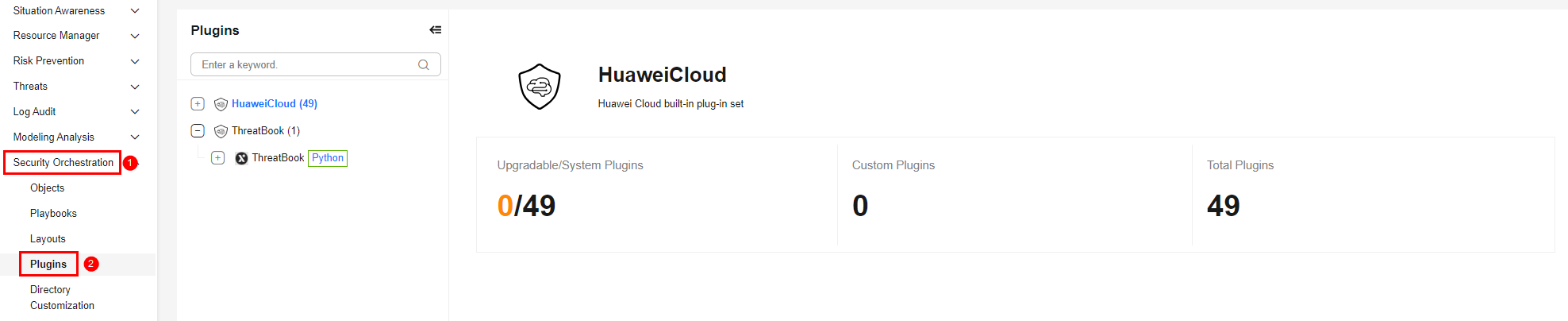
- On the Plugins page, select the CFW plugin under the Huawei Cloud catalog. The Details tab is displayed by default. The Details tab displays the login credential information of the operation connection associated with the plugin.
- Click the Operation Connections tab for the CFW plugin. On the displayed page, you can view information about the operation connections associated with the plugin.
- For details about how to edit or delete an operation connection, see Editing an Operation Connection and Deleting an Operation Connection. For details about how to add an operation connection for a plugin, see Creating an Operation Connection. A plugin can have multiple operation connections.
Plugin Execution Function addAclRule
- Parameters of the addAclRule Function: describes the input and output parameters of the function.
- Output Example of the addAclRule Function: provides an example of the function output.
Parameters of the addAclRule Function
Function: Adds an access control list (ACL) rule.
| Parameter | Parameter Type | Parameter Description | Mandatory |
|---|---|---|---|
| enterpriseProjectId | string | Enterprise project ID. | No |
| fwInstanceId | string | Firewall instance ID. | No |
| addressType | string | IP address type. 0: IPv4; 1: IPv6 | No |
| objectId | string | Protected object ID. | Yes |
| type | string | Rule type. | Yes |
| rules | array | Rule list (JSON format). | Yes |
| agency_type | string | Unified adaptation parameter for multi-account management. Use the default value. | No |
| Parameter | Parameter Type | Parameter Description |
|---|---|---|
| headers | Object | API response headers, including basic information about the request and response, such as the request time, response service, and request ID. |
| code | Int | Status code, which indicates whether the request is successful. Response code description:
|
| body | Object | Content returned by the API. |
Output Example of the addAclRule Function
{
  "headers": {
    "Transfer-Encoding": "chunked",
    "Server": "api-gateway",
    "X-Request-Id": "f7e759ff25266227a1d31f5068a5b3ed",
    "X-Content-Type-Options": "nosniff",
    "Connection": "keep-alive",
    "X-Download-Options": "noopen",
    "Pragma": "no-cache",
    "Date": "Mon, 25 May 2026 09:10:00 GMT",
    "X-Frame-Options": "SAMEORIGIN",
    "Strict-Transport-Security": "max-age=31536000; includeSubdomains;",
    "Cache-Control": "no-cache, no-store, max-age=0, must-revalidate",
    "X-XSS-Protection": "1; mode=block;",
    "Content-Type": "application/json; charset=UTF-8"
  },
  "code": 200,
  "body": {}
}
Plugin Execution Function listAclRules
- Parameters of the listAclRules Function: describes the input and output parameters of the function.
- Output Example of the listAclRules Function: provides an example of the function output.
Parameters of the listAclRules Function
Function: Lists ACL rules.
| Parameter | Parameter Type | Parameter Description | Mandatory |
|---|---|---|---|
| object_id | string | Protected object ID. | Yes |
| type | string | Rule type. | No |
| ip | string | IP address. | No |
| name | string | Rule name. | No |
| direction | string | Direction. | No |
| status | string | Status. | No |
| action_type | string | Action type. | No |
| address_type | string | Address type. | No |
| offset | string | Offset. | Yes |
| limit | string | Number of records on each page. | Yes |
| enterprise_project_id | string | Enterprise project ID. | No |
| fw_instance_id | string | Firewall ID. | No |
| tags_id | string | Rule tag ID, which is generated when a rule is created. | No |
| source | string | Source IP address. | No |
| destination | string | Destination IP address. | No |
| service | string | Service port. | No |
| application | string | List of protocols to which the rule applies. The value can be HTTP, HTTPS, TLS1, DNS, SSH, MYSQL, SMTP, RDP, RDPS, VNC, POP3, IMAP4, SMTPS, POP3S, FTPS, ANY, and BGP. | No |
| Parameter | Parameter Type | Parameter Description |
|---|---|---|
| headers | Object | API response headers, including basic information about the request and response, such as the request time, response service, and request ID. |
| code | Int | Status code, which indicates whether the request is successful. Response code description:
|
| body | Object | Content returned by the API. |
Output Example of the listAclRules Function
{
  "headers": {
    "Transfer-Encoding": "chunked",
    "Server": "api-gateway",
    "X-Request-Id": "a07e78c7c0f9b9cf556517a622cf385c",
    "X-Content-Type-Options": "nosniff",
    "Connection": "keep-alive",
    "X-Download-Options": "noopen",
    "Date": "Mon, 01 Jun 2026 07:44:15 GMT",
    "X-Frame-Options": "SAMEORIGIN",
    "Strict-Transport-Security": "max-age=31536000; includeSubdomains;",
    "Cache-Control": "no-cache, no-store, max-age=0, must-revalidate",
    "X-B3-TraceId": "a07e78c7c0xxxxxxxx556517a622cf385c",
    "X-XSS-Protection": "1; mode=block;",
    "Content-Type": "application/json"
  },
  "code": 200,
  "body": {
    "data": {
      "total": 2,
      "offset": 0,
      "records": [
        {
          "address_type": 0,
          "action_type": 1,
          "applicationsJsonString": "",
          "destination": {
            "address_group": [
              "2a57a1f9-0c35-41c4-8c35-9axxxxx8d79"
            ],
            "address_type": 0,
            "address_group_names": [
              {
                "name": "SecMaster_Group_IPv4_EGRESS_BLOCK1",
                "address_set_type": 0,
                "set_id": "2a57a1f9-0c35-41c4-8c35-9axxxxx98d79"
              }
            ],
            "type": 5
          },
          "last_open_time": "2026-03-26 15:14:43 +0800",
          "description": "SecMaster Automatic Blocking",
          "source": {
            "address": "0.0.0.0/0",
            "address_type": 0,
            "type": 0
          },
          "modified_date": "2026-03-26 15:14:43 +0800",
          "type": "0",
          "rule_id": "cffe4dd0-e2fc-48a3-82b5-afcxxxxx7b98",
          "long_connect_enable": 0,
          "service": {
            "protocol": -1,
            "type": 0
          },
          "name": "SecMaster_BLOCK_4_EGRESS_Rule0",
          "created_date": "2026-03-24 11:20:49 +0800",
          "order_id": 990000,
          "direction": 1,
          "status": 1
        },
        {
          "address_type": 0,
          "action_type": 1,
          "destination": {
            "address": "0.0.0.0/0",
            "address_type": 0,
            "type": 0
          },
          "last_open_time": "2026-03-24 10:37:06 +0800",
          "description": "SecMaster Automatic Blocking",
          "source": {
            "address_group": [
              "1e7f8d01-df22-4612-8935-bxxxxx6f55b"
            ],
            "address_type": 0,
            "address_group_names": [
              {
                "name": "SecMaster_Group_IPv4_INGRESS_BLOCK0",
                "address_set_type": 0,
                "set_id": "1e7f8d01-df22-4612-8935-xxxxxf55b"
              }
            ],
            "type": 5
          },
          "modified_date": "2026-03-24 11:12:03 +0800",
          "type": "0",
          "rule_id": "7409cb78-0b2e-446d-afe2-ed3xxxxxfce",
          "long_connect_enable": 0,
          "service": {
            "protocol": -1,
            "type": 0
          },
          "name": "SecMaster_BLOCK_4_INGRESS_Rule0",
          "created_date": "2026-03-24 10:37:06 +0800",
          "order_id": 995000,
          "direction": 0,
          "status": 1
        }
      ],
      "limit": 10,
      "up_rules_count": 0,
      "object_id": "53d54aa7-ae92-48d9-9837-8xxxx6a074"
    }
  }
}
Plugin Execution Function addAddressItemsUsingPost
- Parameters of the addAddressItemsUsingPost Function: describes the input and output parameters of the function.
- Output Example of the addAddressItemsUsingPost Function: provides an example of the function output.
Parameters of the addAddressItemsUsingPost Function
Function: Adds address items, such as IP addresses.
| Parameter | Parameter Type | Parameter Description | Mandatory |
|---|---|---|---|
| enterpriseProjectId | string | Enterprise project ID. | No |
| fwInstanceId | string | Firewall instance ID. | No |
| setId | string | Address set ID. | No |
| name | string | Address item name. | Yes |
| addressType | string | Address type. 0: IPv4; 1: IPv6 | No |
| address | string | Address. | No |
| description | string | Description. | No |
| agency_type | string | Unified adaptation parameter for multi-account management. Use the default value. | No |
| Parameter | Parameter Type | Parameter Description |
|---|---|---|
| headers | Object | API response headers, including basic information about the request and response, such as the request time, response service, and request ID. |
| code | Int | Status code, which indicates whether the request is successful. Response code description:
|
| body | Object | Content returned by the API. |
Output Example of the addAddressItemsUsingPost Function
{
  "headers": {
    "Transfer-Encoding": "chunked",
    "Server": "api-gateway",
    "X-Request-Id": "a6c1486e9c0ddcf1fb3b0997deefec94",
    "X-Content-Type-Options": "nosniff",
    "Connection": "keep-alive",
    "X-Download-Options": "noopen",
    "Date": "Mon, 01 Jun 2026 07:47:49 GMT",
    "X-Frame-Options": "SAMEORIGIN",
    "Strict-Transport-Security": "max-age=31536000; includeSubdomains;",
    "Cache-Control": "no-cache, no-store, max-age=0, must-revalidate",
    "X-B3-TraceId": "a6c1486e9c0ddcf1fb3b0997deefec94",
    "X-XSS-Protection": "1; mode=block;",
    "Content-Type": "application/json"
  },
  "code": 200,
  "body": {
    "data": {
      "covered_ip": [],
      "items": [
        {
          "id": "859b0d32-1f35-4030-904c-8b5284ff2700"
        }
      ]
    }
  }
}
Plugin Execution Function deleteAddressItemUsingDelete
- Parameters of the deleteAddressItemUsingDelete Function: describes the input and output parameters of the function.
- Output Example of the deleteAddressItemUsingDelete Function: provides an example of the function output.
Parameters of the deleteAddressItemUsingDelete Function
Function: Deletes an IP address item.
| Parameter | Parameter Type | Parameter Description | Mandatory |
|---|---|---|---|
| item_id | string | Address item ID. | Yes |
| enterpriseProjectId | string | Enterprise project ID. | No |
| fwInstanceId | string | Firewall ID. | No |
| agency_type | string | Unified adaptation parameter for multi-account management. Use the default value. | No |
| Parameter | Parameter Type | Parameter Description |
|---|---|---|
| headers | Object | API response headers, including basic information about the request and response, such as the request time, response service, and request ID. |
| code | Int | Status code, which indicates whether the request is successful. Response code description:
|
| body | Object | Content returned by the API. |
Output Example of the deleteAddressItemUsingDelete Function
{
  "headers": {
    "Transfer-Encoding": "chunked",
    "Server": "api-gateway",
    "X-Request-Id": "03a489dce9c814e5eed4eaa0d38517dc",
    "X-Content-Type-Options": "nosniff",
    "Connection": "keep-alive",
    "X-Download-Options": "noopen",
    "Date": "Mon, 01 Jun 2026 07:50:27 GMT",
    "X-Frame-Options": "SAMEORIGIN",
    "Strict-Transport-Security": "max-age=31536000; includeSubdomains;",
    "Cache-Control": "no-cache, no-store, max-age=0, must-revalidate",
    "X-B3-TraceId": "03a489dce9c814e5eed4eaa0d38517dc",
    "X-XSS-Protection": "1; mode=block;",
    "Content-Type": "application/json"
  },
  "code": 200,
  "body": {
    "data": {
      "name": "20.26.6.1",
      "id": "859b0d32-1f35-4030-904c-8b5284ff2700"
    }
  }
}
Plugin Execution Function listAddressItemsUsingGet
- Parameters of the listAddressItemsUsingGet Function: describes the input and output parameters of the function.
- Output Example of the listAddressItemsUsingGet Function: provides an example of the function output.
Parameters of the listAddressItemsUsingGet Function
Function: Lists address items.
| Parameter | Parameter Type | Parameter Description | Mandatory |
|---|---|---|---|
| offset | string | Offset. | Yes |
| limit | string | Number of records on each page. | Yes |
| set_id | string | Address set ID. | Yes |
| address | string | IP address. | No |
| keyWord | string | Keyword, including the name or part of the description of an address group member. | No |
| enterpriseProjectId | string | Enterprise project ID. | No |
| fwInstanceId | string | Firewall ID. | No |
| Parameter | Parameter Type | Parameter Description |
|---|---|---|
| headers | Object | API response headers, including basic information about the request and response, such as the request time, response service, and request ID. |
| code | Int | Status code, which indicates whether the request is successful. Response code description:
|
| body | Object | Content returned by the API. |
Output Example of the listAddressItemsUsingGet Function
{
  "headers": {
    "Transfer-Encoding": "chunked",
    "Server": "api-gateway",
    "X-Request-Id": "9fbf862f92c9373ca15fbcff56c9b9e9",
    "X-Content-Type-Options": "nosniff",
    "Connection": "keep-alive",
    "X-Download-Options": "noopen",
    "Date": "Mon, 01 Jun 2026 07:58:29 GMT",
    "X-Frame-Options": "SAMEORIGIN",
    "Strict-Transport-Security": "max-age=31536000; includeSubdomains;",
    "Cache-Control": "no-cache, no-store, max-age=0, must-revalidate",
    "X-B3-TraceId": "9fbf862f92c9373ca15fbcff56c9b9e9",
    "X-XSS-Protection": "1; mode=block;",
    "Content-Type": "application/json"
  },
  "code": 200,
  "body": {
    "data": {
      "total": 1,
      "offset": 0,
      "records": [
        {
          "address": "20.26.6.1",
          "address_type": 0,
          "item_id": "1aa59359-a214-40f4-aea5-57d9c4c260e6",
          "description": ""
        }
      ],
      "limit": 10,
      "set_id": "2a57a1f9-0c35-41c4-8c35-9ab7a3998d79"
    }
  }
}
Plugin Execution Function addAddressSetInfoUsingPost
- Parameters of the addAddressSetInfoUsingPost Function: describes the input and output parameters of the function.
- Output Example of the addAddressSetInfoUsingPost Function: provides an example of the function output.
Parameters of the addAddressSetInfoUsingPost Function
Function: Adds address set information.
| Parameter | Parameter Type | Parameter Description | Mandatory |
|---|---|---|---|
| enterpriseProjectId | string | Enterprise project ID. | No |
| fwInstanceId | string | Firewall instance ID. | No |
| name | string | Address group name. | Yes |
| address_type | string | Address type. | No |
| objectId | string | Protected object ID. | Yes |
| description | string | Address group description. | No |
| agency_type | string | Unified adaptation parameter for multi-account management. Use the default value. | No |
| Parameter | Parameter Type | Parameter Description |
|---|---|---|
| headers | Object | API response headers, including basic information about the request and response, such as the request time, response service, and request ID. |
| code | Int | Status code, which indicates whether the request is successful. Response code description:
|
| body | Object | Content returned by the API. |
Output Example of the addAddressSetInfoUsingPost Function
{
  "headers": {
    "Transfer-Encoding": "chunked",
    "Server": "api-gateway",
    "X-Request-Id": "fe015e02c42747b34a0c8247d6aec920",
    "X-Content-Type-Options": "nosniff",
    "Connection": "keep-alive",
    "X-Download-Options": "noopen",
    "Date": "Mon, 01 Jun 2026 08:49:15 GMT",
    "X-Frame-Options": "SAMEORIGIN",
    "Strict-Transport-Security": "max-age=31536000; includeSubdomains;",
    "Cache-Control": "no-cache, no-store, max-age=0, must-revalidate",
    "X-B3-TraceId": "fe015e02c42747b34a0c8247d6aec920",
    "X-XSS-Protection": "1; mode=block;",
    "Content-Type": "application/json"
  },
  "code": 200,
  "body": {
    "data": {
      "name": "test",
      "has_item": false,
      "id": "89da5700-cecb-4027-b6a4-e2fe94b8b9f7"
    }
  }
}
Plugin Execution Function deleteAddressSetInfoUsingDelete
- Parameters of the deleteAddressSetInfoUsingDelete Function: describes the input and output parameters of the function.
- Output Example of the deleteAddressSetInfoUsingDelete Function: provides an example of the function output.
Parameters of the deleteAddressSetInfoUsingDelete Function
Function: Deletes address set information.
| Parameter | Parameter Type | Parameter Description | Mandatory |
|---|---|---|---|
| set_id | string | Address group ID. | Yes |
| enterpriseProjectId | string | Enterprise project ID. | No |
| fwInstanceId | string | Firewall ID. | No |
| agency_type | string | Unified adaptation parameter for multi-account management. Use the default value. | No |
| Parameter | Parameter Type | Parameter Description |
|---|---|---|
| headers | Object | API response headers, including basic information about the request and response, such as the request time, response service, and request ID. |
| code | Int | Status code, which indicates whether the request is successful. Response code description:
|
| body | Object | Content returned by the API. |
Output Example of the deleteAddressSetInfoUsingDelete Function
{
  "headers": {
    "Transfer-Encoding": "chunked",
    "Server": "api-gateway",
    "X-Request-Id": "c858039f43996f536545b43be18985ea",
    "X-Content-Type-Options": "nosniff",
    "Connection": "keep-alive",
    "X-Download-Options": "noopen",
    "Date": "Mon, 01 Jun 2026 08:51:43 GMT",
    "X-Frame-Options": "SAMEORIGIN",
    "Strict-Transport-Security": "max-age=31536000; includeSubdomains;",
    "Cache-Control": "no-cache, no-store, max-age=0, must-revalidate",
    "X-B3-TraceId": "c858039f43996f536545b43be18985ea",
    "X-XSS-Protection": "1; mode=block;",
    "Content-Type": "application/json"
  },
  "code": 200,
  "body": {
    "data": {
      "name": "test",
      "id": "89da5700-cecb-4027-b6a4-e2fe94b8b9f7"
    }
  }
}
Plugin Execution Function listAddressSetListUsingGet
- Parameters of the listAddressSetListUsingGet Function: describes the input and output parameters of the function.
- Output Example of the listAddressSetListUsingGet Function: provides an example of the function output.
Parameters of the listAddressSetListUsingGet Function
Function: Lists address sets.
| Parameter | Parameter Type | Parameter Description | Mandatory |
|---|---|---|---|
| offset | string | Offset. | Yes |
| limit | string | Number of records on each page. | Yes |
| objectId | string | Protected object ID. | Yes |
| enterpriseProjectId | string | Enterprise project ID. | No |
| fwInstanceId | string | Firewall instance ID. | No |
| address | string | Address. | No |
| keyWord | string | Keywords. | No |
| addressType | string | Address type. | No |
| Parameter | Parameter Type | Parameter Description |
|---|---|---|
| headers | Object | API response headers, including basic information about the request and response, such as the request time, response service, and request ID. |
| code | Int | Status code, which indicates whether the request is successful. Response code description:
|
| body | Object | Content returned by the API. |
Output Example of the listAddressSetListUsingGet Function
{
  "headers": {
    "Transfer-Encoding": "chunked",
    "Server": "api-gateway",
    "X-Request-Id": "eaa66a4ee0ee4dea548d970c26b232bc",
    "X-Content-Type-Options": "nosniff",
    "Connection": "keep-alive",
    "X-Download-Options": "noopen",
    "Date": "Wed, 03 Jun 2026 02:27:04 GMT",
    "X-Frame-Options": "SAMEORIGIN",
    "Strict-Transport-Security": "max-age=31536000; includeSubdomains;",
    "Cache-Control": "no-cache, no-store, max-age=0, must-revalidate",
    "X-B3-TraceId": "eaa66a4ee0ee4dea548d970c26b232bc",
    "X-XSS-Protection": "1; mode=block;",
    "Content-Type": "application/json"
  },
  "code": 200,
  "body": {
    "data": {
      "total": 3,
      "offset": 0,
      "records": [
        {
          "address_type": 0,
          "name": "SecMaster_Group_IPv4_EGRESS_BLOCK0",
          "address_set_type": 0,
          "description": "SecMaster Automatic Blocking",
          "set_id": "33c18eaa-799a-482b-9a34-cd588e086791",
          "ref_count": 1,
          "object_id": "973ffe00-7b96-401d-87c0-fd8207423a98"
        }
      ],
      "limit": 1
    }
  }
}
Plugin Execution Function listAddressSetDetailUsingGet
- Parameters of the listAddressSetDetailUsingGet Function: describes the input and output parameters of the function.
- Output Example of the listAddressSetDetailUsingGet Function: provides an example of the function output.
Parameters of the listAddressSetDetailUsingGet Function
Function: Lists address set details.
| Parameter | Parameter Type | Parameter Description | Mandatory |
|---|---|---|---|
| setId | string | Address set ID. | Yes |
| enterpriseProjectId | string | Enterprise project ID. | No |
| fwInstanceId | string | Firewall instance ID. | No |
| Parameter | Parameter Type | Parameter Description |
|---|---|---|
| headers | Object | API response headers, including basic information about the request and response, such as the request time, response service, and request ID. |
| code | Int | Status code, which indicates whether the request is successful. Response code description:
|
| body | Object | Content returned by the API. |
Output Example of the listAddressSetDetailUsingGet Function
{
  "headers": {
    "Transfer-Encoding": "chunked",
    "Server": "api-gateway",
    "X-Request-Id": "e50f60f6d0f3c9e8b6dcf37b4d49578c",
    "X-Content-Type-Options": "nosniff",
    "Connection": "keep-alive",
    "X-Download-Options": "noopen",
    "Date": "Wed, 03 Jun 2026 02:28:24 GMT",
    "X-Frame-Options": "SAMEORIGIN",
    "Strict-Transport-Security": "max-age=31536000; includeSubdomains;",
    "Cache-Control": "no-cache, no-store, max-age=0, must-revalidate",
    "X-B3-TraceId": "e50f60f6d0f3c9e8b6dcf37b4d49578c",
    "X-XSS-Protection": "1; mode=block;",
    "Content-Type": "application/json"
  },
  "code": 200,
  "body": {
    "data": {
      "address_type": 0,
      "name": "SecMaster_Group_IPv4_EGRESS_BLOCK0",
      "address_set_type": 0,
      "description": "SecMaster Automatic Blocking",
      "id": "33c18eaa-799a-482b-9a34-cd588e086791"
    }
  }
}
Plugin Execution Function addBlackWhiteListUsingPost
- Parameters of the addBlackWhiteListUsingPost Function: describes the input and output parameters of the function.
- Output Example of the addBlackWhiteListUsingPost Function: provides an example of the function output.
Parameters of the addBlackWhiteListUsingPost Function
Function: Adds a blacklist or whitelist rule.
| Parameter | Parameter Type | Parameter Description | Mandatory |
|---|---|---|---|
| fwInstanceId | string | Firewall instance ID. | No |
| address | string | IP address. | Yes |
| direction | string | Direction. | Yes |
| protocol | string | Protocol. | No |
| port | string | Port. | No |
| addressType | string | Address type. | Yes |
| objectId | string | Protected object ID. | Yes |
| enterpriseProjectId | string | Enterprise project ID. | No |
| listType | string | IP address group type (blacklist or whitelist) 4: blacklist; 5: whitelist | Yes |
| description | string | Description. | No |
| language | string | Response language of the query result. The value can be zh-cn or en-us. Uppercase letters and other values are not supported. The value zh-cn indicates that the query result is displayed in simplified Chinese, and the value en-us indicates that the query result is displayed in English. | No |
| agency_type | string | Unified adaptation parameter for multi-account management. Use the default value. | No |
| Parameter | Parameter Type | Parameter Description |
|---|---|---|
| headers | Object | API response headers, including basic information about the request and response, such as the request time, response service, and request ID. |
| code | Int | Status code, which indicates whether the request is successful. Response code description:
|
| body | Object | Content returned by the API. |
Output Example of the addBlackWhiteListUsingPost Function
{
  "headers": {
    "Transfer-Encoding": "chunked",
    "Server": "api-gateway",
    "X-Request-Id": "fa8c2e2af80e461d79bfb361c3287cbe",
    "X-Content-Type-Options": "nosniff",
    "Connection": "keep-alive",
    "X-Download-Options": "noopen",
    "Date": "Wed, 03 Jun 2026 02:34:49 GMT",
    "X-Frame-Options": "SAMEORIGIN",
    "Strict-Transport-Security": "max-age=31536000; includeSubdomains;",
    "Cache-Control": "no-cache, no-store, max-age=0, must-revalidate",
    "X-B3-TraceId": "fa8c2e2af80e461d79bfb361c3287cbe",
    "X-XSS-Protection": "1; mode=block;",
    "Content-Type": "application/json"
  },
  "code": 200,
  "body": {
    "data": {
      "name": "20.26.6.3",
      "id": "8f178c60-304a-4d3c-bc6b-12c74ceece68"
    }
  }
}
Plugin Execution Function deleteBlackWhiteListUsingDelete
- Parameters of the deleteBlackWhiteListUsingDelete Function: describes the input and output parameters of the function.
- Output Example of the deleteBlackWhiteListUsingDelete Function: provides an example of the function output.
Parameters of the deleteBlackWhiteListUsingDelete Function
Function: Deletes a blacklist or whitelist rule.
| Parameter | Parameter Type | Parameter Description | Mandatory |
|---|---|---|---|
| listId | string | Blacklist or whitelist ID. | Yes |
| fwInstanceId | string | Firewall ID. | No |
| enterpriseProjectId | string | Enterprise project ID. | No |
| language | string | Response language of the query result. The value can be zh-cn or en-us. Uppercase letters and other values are not supported. The value zh-cn indicates that the query result is displayed in simplified Chinese, and the value en-us indicates that the query result is displayed in English. | No |
| agency_type | string | Unified adaptation parameter for multi-account management. Use the default value. | No |
| Parameter | Parameter Type | Parameter Description |
|---|---|---|
| headers | Object | API response headers, including basic information about the request and response, such as the request time, response service, and request ID. |
| code | Int | Status code, which indicates whether the request is successful. Response code description:
|
| body | Object | Content returned by the API. |
Output Example of the deleteBlackWhiteListUsingDelete Function
{
  "headers": {
    "Transfer-Encoding": "chunked",
    "Server": "api-gateway",
    "X-Request-Id": "2e83a23f720a490377149ad8d4266c2a",
    "X-Content-Type-Options": "nosniff",
    "Connection": "keep-alive",
    "X-Download-Options": "noopen",
    "Date": "Wed, 03 Jun 2026 02:36:26 GMT",
    "X-Frame-Options": "SAMEORIGIN",
    "Strict-Transport-Security": "max-age=31536000; includeSubdomains;",
    "Cache-Control": "no-cache, no-store, max-age=0, must-revalidate",
    "X-B3-TraceId": "2e83a23f720a490377149ad8d4266c2a",
    "X-XSS-Protection": "1; mode=block;",
    "Content-Type": "application/json"
  },
  "code": 200,
  "body": {
    "data": {
      "name": "20.26.6.3",
      "id": "8f178c60-304a-4d3c-bc6b-12c74ceece68"
    }
  }
}
Plugin Execution Function listBlackWhiteListsUsingGet
- Parameters of the listBlackWhiteListsUsingGet Function: describes the input and output parameters of the function.
- Output Example of the listBlackWhiteListsUsingGet Function: provides an example of the function output.
Parameters of the listBlackWhiteListsUsingGet Function
Function: Lists the blacklist and whitelist.
| Parameter | Parameter Type | Parameter Description | Mandatory |
|---|---|---|---|
| offset | string | Offset. | Yes |
| limit | string | Number of records displayed on each page. Value range: 1 to 1,024. | Yes |
| objectId | string | Protected object ID. | Yes |
| enterpriseProjectId | string | Enterprise project ID. | No |
| listType | string | IP address group type (blacklist or whitelist) 4: blacklist; 5: whitelist | Yes |
| fwInstanceId | string | Firewall ID. | No |
| address | string | IP address. | No |
| port | string | Port. | No |
| addressType | string | IP address type. 0: IPv4. 1:IPv6 | No |
| language | string | Response language of the query result. The value can be zh-cn or en-us. Uppercase letters and other values are not supported. The value zh-cn indicates that the query result is displayed in simplified Chinese, and the value en-us indicates that the query result is displayed in English. | No |
| Parameter | Parameter Type | Parameter Description |
|---|---|---|
| headers | Object | API response headers, including basic information about the request and response, such as the request time, response service, and request ID. |
| code | Int | Status code, which indicates whether the request is successful. Response code description:
|
| body | Object | Content returned by the API. |
Output Example of the listBlackWhiteListsUsingGet Function
{
  "headers": {
    "Transfer-Encoding": "chunked",
    "Server": "api-gateway",
    "X-Request-Id": "4e87c2dfe2341f6ef30db50a11411685",
    "X-Content-Type-Options": "nosniff",
    "Connection": "keep-alive",
    "X-Download-Options": "noopen",
    "Date": "Wed, 03 Jun 2026 03:11:52 GMT",
    "X-Frame-Options": "SAMEORIGIN",
    "Strict-Transport-Security": "max-age=31536000; includeSubdomains;",
    "Cache-Control": "no-cache, no-store, max-age=0, must-revalidate",
    "X-B3-TraceId": "4e87c2dfe2341f6ef30db50a11411685",
    "X-XSS-Protection": "1; mode=block;",
    "Content-Type": "application/json"
  },
  "code": 200,
  "body": {
    "data": {
      "total": 1,
      "offset": 0,
      "records": [
        {
          "protocol": -1,
          "address": "22.33.44.55",
          "address_type": 0,
          "list_id": "8f064c4a-cb4e-4007-bae9-5142300df777",
          "created_date": 1780456306000,
          "modified_date": 1780456306000,
          "direction": 0
        }
      ],
      "limit": 1
    }
  }
}
Description of the listFirewall Function
- Parameters of the listFirewall Function: describes the input and output parameters of the function.
- Output Example of the listFirewall Function: provides an example of the function output.
Parameters of the listFirewall Function
Function: Lists firewall instances.
| Parameter | Parameter Type | Parameter Description | Mandatory |
|---|---|---|---|
| offset | string | Offset. | Yes |
| limit | string | Number of records on each page. | Yes |
| keyWord | string | Keywords. | No |
| enterpriseProjectId | string | Enterprise project ID. | No |
| tags | array | Tag list. | No |
| resultVariable | string | Query result filter. | No |
| Parameter | Parameter Type | Parameter Description |
|---|---|---|
| headers | Object | API response headers, including basic information about the request and response, such as the request time, response service, and request ID. |
| code | Int | Status code, which indicates whether the request is successful. Response code description:
|
| body | Object | Content returned by the API. |
Output Example of the listFirewall Function
{
  "headers": {
    "Transfer-Encoding": "chunked",
    "Server": "api-gateway",
    "X-Request-Id": "6f81a2de70b51c81df744f097e7f49ae",
    "X-Content-Type-Options": "nosniff",
    "Connection": "keep-alive",
    "X-Download-Options": "noopen",
    "Date": "Wed, 03 Jun 2026 03:16:02 GMT",
    "X-Frame-Options": "SAMEORIGIN",
    "Strict-Transport-Security": "max-age=31536000; includeSubdomains;",
    "Cache-Control": "no-cache, no-store, max-age=0, must-revalidate",
    "X-B3-TraceId": "6f81a2de70b51c81df744f097e7f49ae",
    "X-XSS-Protection": "1; mode=block;",
    "Content-Type": "application/json"
  },
  "code": 200,
  "body": {
    "is_support_postpaid": true,
    "is_support_unibuy": true,
    "data": {
      "total": 5,
      "offset": 0,
      "project_id": "f69081793d9e4ea8a2f479dcef961989",
      "records": [
        {
          "az_code": "center",
          "fw_instance_name": "CFW-60055215",
          "az_name": "center",
          "charge_mode": 1,
          "tags": "{}",
          "flavor": {
            "vpc_count": 5,
            "eip_count": 1000,
            "default_bandwidth": 50,
            "bandwidth": 200,
            "default_eip_count": 50,
            "default_vpc_count": 2,
            "log_storage": 0,
            "version": 1,
            "default_log_storage": 0
          },
          "enterprise_project_id": "0",
          "service_type": 0,
          "engine_type": 1,
          "name": "1754635159172",
          "resource_id": "a442690e-536f-4c25-991d-a5243f1baa99",
          "fw_instance_id": "a442690e-536f-4c25-991d-a5243f1baa99",
          "ha_type": 1,
          "status": 7
        }
      ],
      "limit": 1
    },
    "is_support_buy_professional": true,
    "user_support_eps": true,
    "is_support_edge": true,
    "is_support_platinum": false,
    "os_type": 0,
    "has_ndr": false,
    "is_support_tms": true,
    "is_support_ndr": true,
    "is_support_upgrade_platinum": false,
    "is_support_basic_version": true
  }
}
Plugin Execution Function listFirewallDetail
- Parameters of the listFirewallDetail Function: describes the input and output parameters of the function.
- Output Example of the listFirewallDetail Function: provides an example of the function output.
Parameters of the listFirewallDetail Function
Function: Lists firewall details.
| Parameter | Parameter Type | Parameter Description | Mandatory |
|---|---|---|---|
| offset | string | Offset. | Yes |
| limit | string | Number of records displayed on each page. Value range: 1 to 1,024. | Yes |
| service_type | string | Service type. | Yes |
| enterprise_project_id | string | Enterprise project ID. | No |
| fw_instance_id | string | Firewall ID. | No |
| name | string | Firewall name. | No |
| resultVariable | string | Query result filter. | No |
| Parameter | Parameter Type | Parameter Description |
|---|---|---|
| headers | Object | API response headers, including basic information about the request and response, such as the request time, response service, and request ID. |
| code | Int | Status code, which indicates whether the request is successful. Response code description:
|
| body | Object | Content returned by the API. |
Output Example of the listFirewallDetail Function
{
  "headers": {
    "Transfer-Encoding": "chunked",
    "Server": "api-gateway",
    "X-Request-Id": "7ecb4f71a5279898f5f655d76c07b6cc",
    "X-Content-Type-Options": "nosniff",
    "Connection": "keep-alive",
    "X-Download-Options": "noopen",
    "Date": "Wed, 03 Jun 2026 06:39:07 GMT",
    "X-Frame-Options": "SAMEORIGIN",
    "Strict-Transport-Security": "max-age=31536000; includeSubdomains;",
    "Cache-Control": "no-cache, no-store, max-age=0, must-revalidate",
    "X-B3-TraceId": "7ecb4f71a5279898f5f655d76c07b6cc",
    "X-XSS-Protection": "1; mode=block;",
    "Content-Type": "application/json"
  },
  "code": 200,
  "body": {
    "is_support_other_project_vpc": false,
    "data": {
      "total": 5,
      "offset": 0,
      "records": [
        {
          "fw_instance_name": "CFW-60055215",
          "resources": [],
          "is_available_obs": true,
          "charge_mode": 1,
          "time_zone": "GMT+08:00",
          "feature_toggle": {
            "is_support_anti_virus": true,
            "is_support_sctp": false,
            "is_support_local_az": true,
            "is_support_other_project_vpc": false,
            "is_support_application": true,
            "is_support_mix_multi_object": true,
            "is_support_lts": true,
            "is_support_ew_create_er_tenant_inspection_mode": false,
            "is_support_dnat": true,
            "is_support_vpc_application_domain": true,
            "ips_rule_list": true,
            "is_support_capture_result_link_enhance": true,
            "is_support_close_import_acl": false,
            "is_support_ew_create_vpc_peering_inspection_mode": true,
            "is_support_multi_project": false,
            "is_support_threat_tags": true,
            "is_not_support_resource_reduction": false,
            "is_support_ew_create_er_bearer_inspection_mode": true,
            "is_support_traffic_filter_ip_blacklist": true,
            "is_support_smn": true,
            "is_support_predefined": true,
            "is_support_user_defined_dns_config": true,
            "is_support_url_profile": false,
            "is_support_flink": true,
            "is_support_domain_identify": true,
            "is_support_vpc_dns_domain": true,
            "is_support_acl_group": true,
            "is_support_acl_hit_status": true,
            "isSupportSession": false,
            "is_support_acl_region_config": true,
            "is_support_ips": false,
            "long_connect": true,
            "is_support_firewall_bypass": true,
            "is_support_api_compliance_v1": true,
            "is_new_self_engine": true,
            "alarm_config": true,
            "is_support_flow_associated_host": true,
            "acl_multi_object": true,
            "is_support_advanced_ips_rule": true,
            "is_support_capture": false,
            "is_support_ips_whitelist": true,
            "is_support_link_enhancements": false,
            "is_support_tcp_proxy": false,
            "is_support_attack_source_type": true,
            "is_support_l3gw": false,
            "is_support_upgrade": true,
            "is_support_domain_intelligence": true,
            "is_support_schedule": false,
            "is_self_support_all_application": true,
            "is_support_slb_private_network_segments": true,
            "is_support_real_ip": false,
            "is_support_qos": false,
            "is_support_multi_account": false,
            "is_support_swift_adaptor": false
          },
          "tags": "{}",
          "failed_policy_count": 8,
          "is_support_ew_ipv6": false,
          "flavor": {
            "vpc_count": 5,
            "eip_count": 1000,
            "total_rule_count": 20000,
            "bandwidth": 200,
            "version": 1,
            "default_log_storage": 0,
            "default_bandwidth": 50,
            "default_eip_count": 50,
            "default_vpc_count": 2,
            "session_create": 200,
            "log_storage": 0,
            "used_rule_count": 2,
            "vpc_bandwidth": 800,
            "session_concurrent": 200
          },
          "enterprise_project_id": "0",
          "service_type": 0,
          "engine_type": 1,
          "name": "1754635159172",
          "support_url_filtering": true,
          "resource_id": "a442690e-536f-4c25-991d-a5243f1baa99",
          "support_ipv6": false,
          "trust_service_status": false,
          "protect_objects": [
            {
              "object_name": "1754635159172",
              "type": 0,
              "object_id": "9d203d3d-66c8-4791-b2fd-7e94995e3dbd"
            },
            {
              "object_name": "ew-1756291745880",
              "type": 1,
              "object_id": "e4832163-5c96-495d-a505-88de848bb913",
              "status": 1
            }
          ],
          "acl_service_max_count": 5,
          "fw_instance_id": "a442690e-536f-4c25-991d-a5243f1baa99",
          "ha_type": 1,
          "status": 7,
          "is_old_firewall_instance": false
        }
      ],
      "limit": 1
    },
    "is_support_buy_professional": true
  }
}
Plugin Execution Function listEipResources
- Parameters of the listEipResources Function: describes the input and output parameters of the function.
- Output Example of the listEipResources Function: provides an example of the function output.
Parameters of the listEipResources Function
Function: Lists EIP resources.
| Parameter | Parameter Type | Parameter Description | Mandatory |
|---|---|---|---|
| offset | string | Offset. | Yes |
| limit | string | Number of records displayed on each page. Value range: 1 to 1,024. | Yes |
| object_id | string | Protected object ID. | Yes |
| key_word | string | Keyword for querying the protected EIP list. You can set an EIP ID or an EIP. | No |
| status | string | Protection status. null: all. 0: enabled. 1: disabled | No |
| sync | string | Whether to synchronize tenant EIP data. 0: no. 1: yes | No |
| enterprise_project_id | string | Enterprise project ID. | No |
| device_key | string | Device keyword, which is the name or ID of the asset bound to an EIP. | No |
| address_type | string | Address type. 0: IPv4. 1:IPv6 | No |
| fw_instance_id | string | Firewall ID. | No |
| fw_key_word | string | Firewall keyword. You can use the firewall ID or name for query. | No |
| eps_id | string | ID of the enterprise project that the EIP belongs to. | No |
| tags | string | Tag list. | No |
| resultVariable | string | Query result filter. | No |
| Parameter | Parameter Type | Parameter Description |
|---|---|---|
| headers | Object | API response headers, including basic information about the request and response, such as the request time, response service, and request ID. |
| code | Int | Status code, which indicates whether the request is successful. Response code description:
|
| body | Object | Content returned by the API. |
Output Example of the listEipResources Function
{
  "headers": {
    "Transfer-Encoding": "chunked",
    "Server": "api-gateway",
    "X-Request-Id": "0d1ae2716f839c7a39ec4c52b7193a8b",
    "X-Content-Type-Options": "nosniff",
    "Connection": "keep-alive",
    "X-Download-Options": "noopen",
    "Date": "Wed, 03 Jun 2026 06:49:44 GMT",
    "X-Frame-Options": "SAMEORIGIN",
    "Strict-Transport-Security": "max-age=31536000; includeSubdomains;",
    "Cache-Control": "no-cache, no-store, max-age=0, must-revalidate",
    "X-B3-TraceId": "0d1ae2716f839c7a39ec4c52b7193a8b",
    "X-XSS-Protection": "1; mode=block;",
    "Content-Type": "application/json"
  },
  "code": 200,
  "body": {
    "data": {
      "total": 5,
      "offset": 1,
      "records": [
        {
          "public_ip": "100.93.10.149",
          "device_id": "c38ac04d-5aa7-4457-b501-dcb7962189fa",
          "associate_instance_type": "ELB",
          "fw_instance_name": "CFW-260312 creation,"
          "fw_enterprise_project_id": "0",
          "bypass_status": 0,
          "object_id": "58aec820-4c68-4014-b56f-4fb4396f9a82",
          "device_owner": "",
          "tags": "",
          "domain_id": "f9d7bacbfd2c49e892532ba3f62ab75d",
          "enterprise_project_id": "0",
          "device_name": "elb-8688",
          "fw_domain_id": "f9d7bacbfd2c49e892532ba3f62ab75d",
          "id": "f3d5d454-0716-4b5b-9ff4-0094eda22232",
          "status": 0,
          "fw_instance_id": "5261f821-08db-4566-9bbf-963b819f1e7d"
        }
      ],
      "limit": 1
    }
  }
}
Plugin Execution Function listLogConfig
- Parameters of the listLogConfig Function: describes the input and output parameters of the function.
- Output Example of the listLogConfig Function: provides an example of the function output.
Parameters of the listLogConfig Function
Function: Lists log configurations.
| Parameter | Parameter Type | Parameter Description | Mandatory |
|---|---|---|---|
| fwInstanceId | string | Firewall ID. | Yes |
| enterpriseProjectId | string | Enterprise project ID. | No |
| Parameter | Parameter Type | Parameter Description |
|---|---|---|
| headers | Object | API response headers, including basic information about the request and response, such as the request time, response service, and request ID. |
| code | Int | Status code, which indicates whether the request is successful. Response code description:
|
| body | Object | Content returned by the API. |
Output Example of the listLogConfig Function
{
  "headers": {
    "Transfer-Encoding": "chunked",
    "Server": "api-gateway",
    "X-Request-Id": "c97efce461c1fbdeac58725939f6e5a9",
    "X-Content-Type-Options": "nosniff",
    "Connection": "keep-alive",
    "X-Download-Options": "noopen",
    "Date": "Wed, 03 Jun 2026 06:52:23 GMT",
    "X-Frame-Options": "SAMEORIGIN",
    "Strict-Transport-Security": "max-age=31536000; includeSubdomains;",
    "Cache-Control": "no-cache, no-store, max-age=0, must-revalidate",
    "X-B3-TraceId": "c97efce461c1fbdeac58725939f6e5a9",
    "X-XSS-Protection": "1; mode=block;",
    "Content-Type": "application/json"
  },
  "code": 200,
  "body": {
    "data": {
      "lts_enable": 0,
      "fw_instance_id": "eb20ba96-508b-4428-8900-56c1bc07034e"
    }
  }
}
Plugin Execution Function showAlarmConfig
- Parameters of the showAlarmConfig Function: describes the input and output parameters of the function.
- Output Example of the showAlarmConfig Function: provides an example of the function output.
Parameters of the showAlarmConfig Function
Function: Displays alert configurations.
| Parameter | Parameter Type | Parameter Description | Mandatory |
|---|---|---|---|
| fw_instance_id | string | Firewall ID. | Yes |
| enterprise_project_id | string | Enterprise project ID. | No |
| Parameter | Parameter Type | Parameter Description |
|---|---|---|
| headers | Object | API response headers, including basic information about the request and response, such as the request time, response service, and request ID. |
| code | Int | Status code, which indicates whether the request is successful. Response code description:
|
| body | Object | Content returned by the API. |
Output Example of the showAlarmConfig Function
{
  "headers": {
    "Transfer-Encoding": "chunked",
    "Server": "api-gateway",
    "X-Request-Id": "10a22e51032f8fbb4c31e2d3104d5d3e",
    "X-Content-Type-Options": "nosniff",
    "Connection": "keep-alive",
    "X-Download-Options": "noopen",
    "Date": "Wed, 03 Jun 2026 06:55:32 GMT",
    "X-Frame-Options": "SAMEORIGIN",
    "Strict-Transport-Security": "max-age=31536000; includeSubdomains;",
    "Cache-Control": "no-cache, no-store, max-age=0, must-revalidate",
    "X-B3-TraceId": "10a22e51032f8fbb4c31e2d3104d5d3e",
    "X-XSS-Protection": "1; mode=block;",
    "Content-Type": "application/json"
  },
  "code": 200,
  "body": {
    "alarm_configs": [
      {
        "enable_status": 0,
        "frequency_count": 10,
        "severity": "CRITICAL,HIGH,MEDIUM,LOW",
        "alarm_time_period": 0,
        "alarm_type": 0,
        "frequency_time": 5
      },
      {
        "enable_status": 0,
        "severity": "1",
        "alarm_time_period": 0,
        "alarm_type": 1
      },
      {
        "enable_status": 0,
        "severity": "3",
        "alarm_time_period": 0,
        "alarm_type": 2
      },
      {
        "enable_status": 0,
        "frequency_count": 10,
        "severity": "CRITICAL,HIGH,MEDIUM,LOW",
        "alarm_time_period": 0,
        "alarm_type": 3,
        "frequency_time": 5
      }
    ]
  }
}
Plugin Execution Function operationAddressGroup
- Parameters of the operationAddressGroup Function: describes the input and output parameters of the function.
- Output Example of the operationAddressGroup Function: provides an example of the function output.
Parameters of the operationAddressGroup Function
Function: Operates address groups in batches. You can add or delete IP addresses to or from a CFW address group.
| Parameter | Parameter Type | Parameter Description | Mandatory |
|---|---|---|---|
| ip_list | array | IP address list. | Yes |
| object_id | string | Protected object ID. | Yes |
| operation_type | string | Operation type: SENDING or DELETING. | Yes |
| fw_instance_id | string | Firewall ID. | Yes |
| enterprise_project_id | string | Enterprise project ID. | No |
| address_type | string | IP address type. | Yes |
| policy | string | Emergency policy type. BLOCK: block. UNBLOCK: cancel blocking. | Yes |
| language | string | Response language of the query result. The value can be zh-cn or en-us. Uppercase letters and other values are not supported. The value zh-cn indicates that the query result is displayed in simplified Chinese, and the value en-us indicates that the query result is displayed in English. | No |
| direction | string | Inbound or outbound. | Yes |
| agency_type | string | Unified adaptation parameter for multi-account management. Use the default value. | No |
| Parameter | Parameter Type | Parameter Description |
|---|---|---|
| failed_targets | Array | List of IP addresses that fail to be processed in the address group. |
| success_targets | Array | List of IP addresses that are successfully processed in the address group. |
Output Example of the operationAddressGroup Function
{
  "failed_targets": [],
  "success_targets": [
    {
      "address_group_name": "",
      "address_group_id": "",
      "target": "144.159.72.108"
    },
    {
      "address_group_name": "",
      "address_group_id": "",
      "target": "163.113.49.244"
    }
  ]
}
Plugin Execution Function bindAddressGroup
- Parameters of the bindAddressGroup Function: describes the input and output parameters of the function.
- Output Example of the bindAddressGroup Function: provides an example of the function output.
Parameters of the bindAddressGroup Function
Function: Binds an address group to a protected object.
| Parameter | Parameter Type | Parameter Description | Mandatory |
|---|---|---|---|
| ip_list | array | IP address list. | Yes |
| object_id | string | Protected object ID. | Yes |
| operation_type | string | Operation type: SENDING or DELETING. | Yes |
| fw_instance_id | string | Firewall ID. | Yes |
| enterprise_project_id | string | Enterprise project ID. | No |
| address_type | string | IP address type. | No |
| policy | string | Emergency policy type. BLOCK: block. UNBLOCK: cancel blocking. | Yes |
| language | string | Response language of the query result. The value can be zh-cn or en-us. Uppercase letters and other values are not supported. The value zh-cn indicates that the query result is displayed in simplified Chinese, and the value en-us indicates that the query result is displayed in English. | No |
| direction | string | Inbound or outbound. | No |
| agency_type | string | Unified adaptation parameter for multi-account management. Use the default value. | No |
| Parameter | Parameter Type | Parameter Description |
|---|---|---|
| failed_targets | Array | List of IP addresses that fail to be bound to the address group. |
| success_targets | Array | List of IP addresses that are successfully bound to the address group. |
Output Example of the bindAddressGroup Function
{
  "failed_targets": [],
  "success_targets": [
    {
      "address_group_name": "",
      "address_group_id": "",
      "target": "144.159.72.108"
    },
    {
      "address_group_name": "",
      "address_group_id": "",
      "target": "163.113.49.244"
    }
  ]
}
Plugin Execution Function operationDomainGroup
- Parameters of the operationDomainGroup Function: describes the input and output parameters of the function.
- Output Example of the operationDomainGroup Function: provides an example of the function output.
Parameters of the operationDomainGroup Function
Function: Operates a domain name group. You can add or delete domain names.
| Parameter | Parameter Type | Parameter Description | Mandatory |
|---|---|---|---|
| domain_list | array | Domain name list. | Yes |
| fw_instance_id | string | Domain group ID. | Yes |
| enterprise_project_id | string | Enterprise project ID. | No |
| policy | string | Emergency policy type. BLOCK: block. UNBLOCK: cancel blocking. | Yes |
| operation_type | string | Operation type: SENDING or DELETING. | Yes |
| object_id | string | Protected object ID. | Yes |
| language | string | Response language of the query result. The value can be zh-cn or en-us. Uppercase letters and other values are not supported. The value zh-cn indicates that the query result is displayed in simplified Chinese, and the value en-us indicates that the query result is displayed in English. | No |
| direction | string | Inbound or outbound. | No |
| Parameter | Parameter Type | Parameter Description |
|---|---|---|
| failed_targets | Array | List of domain names that fail to be processed in the domain name address group. |
| success_targets | Array | List of domain names that are successfully processed in the domain name address group. |
Output Example of the operationDomainGroup Function
{
  "failed_targets": [],
  "success_targets": [
    {
      "address_group_name": "SecMaster_Domain_Group_BLOCK0",
      "address_group_id": "279423f2-36de-49e4-94a1-0eb1dd494787",
      "target": "test-domain.com"
    }
  ]
}
Plugin Execution Function bindDomainGroup
- Parameters of the bindDomainGroup Function: describes the input and output parameters of the function.
- Output Example of the bindDomainGroup Function: provides an example of the function output.
Parameters of the bindDomainGroup Function
Function: Binds a domain group to a protected object.
| Parameter | Parameter Type | Parameter Description | Mandatory |
|---|---|---|---|
| domain_list | string | Domain group ID. | Yes |
| fw_instance_id | string | Protected object ID. | Yes |
| enterprise_project_id | string | Enterprise project ID. | No |
| operation_type | string | Operation type. Options: SENDING (blocking) and DELETING (canceling blocking) | No |
| policy | string | Emergency policy type. BLOCK: block. UNBLOCK: cancel blocking. | Yes |
| object_id | string | Protected object ID. | Yes |
| language | string | Response language of the query result. The value can be zh-cn or en-us. Uppercase letters and other values are not supported. The value zh-cn indicates that the query result is displayed in simplified Chinese, and the value en-us indicates that the query result is displayed in English. | No |
| direction | string | Inbound or outbound. | No |
| existing_domain_list | string | Existing domain name list. | No |
| Parameter | Parameter Type | Parameter Description |
|---|---|---|
| failed_targets | Array | List of domain names that fail to be bound to the domain name address group. |
| success_targets | Array | List of domain names that are successfully bound to the domain name address group. |
What is your overall rating for this page?
Thank you very much for your feedback. We will continue working to improve the documentation.See the reply and handling status in My Cloud VOC.
For any further questions, feel free to contact us through the chatbot.
Chatbot


