

VPC
Function Description
This plugin has been built into SecMaster. It calls Virtual Private Cloud (VPC) APIs to manage VPC resources, such as VPCs, security groups, security group rules, Elastic IP addresses (EIPs), flow logs, VPC peering connections, network access control lists (ACLs), IP address groups, and ports.
Each built-in plugin has a corresponding built-in operation connection.
Viewing Details and Operation Connections of the VPC Plugin
- Log in to the SecMaster console.
- Click
 in the upper left corner of the management console and select a region or project.
 - In the navigation pane on the left, choose Workspaces > Management. In the workspace list, click the name of the target workspace. Figure 1 Workspace management page

- In the navigation pane on the left, choose . Figure 2 Plugins page
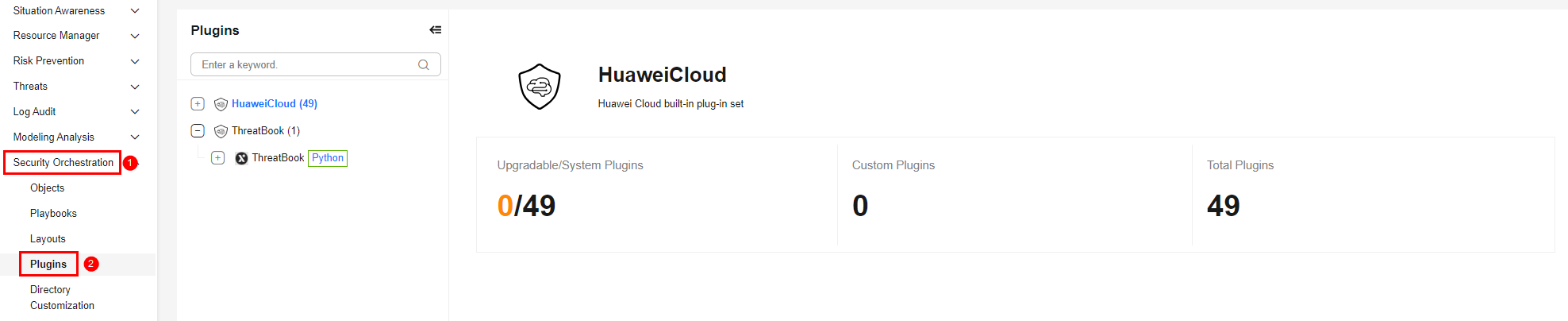
- On the Plugins page, select the VPC plugin under the Huawei Cloud catalog. The Details tab is displayed by default. The Details tab displays the login credential information of the operation connection associated with the plugin.
- Click the Operation Connections tab for the VPC plugin. On the displayed page, you can view information about the operation connections associated with the plugin.
- For details about how to edit or delete an operation connection, see Editing an Operation Connection and Deleting an Operation Connection. For details about how to add an operation connection for a plugin, see Creating an Operation Connection. A plugin can have multiple operation connections.
Plugin Execution Function listFlowLogs
- Parameters of the listFlowLogs Function: describes the input and output parameters of the function.
- Output Example of the listFlowLogs Function: provides an example of the function output.
Parameters of the listFlowLogs Function
Function: Calls the corresponding VPC API to query all flow logs of the tenant who submits the request and filter the flow logs based on the filter criteria.
| Parameter | Parameter Type | Parameter Description | Mandatory |
|---|---|---|---|
| id | String | Flow log ID. | No |
| name | String | Flow log name. | No |
| tenantId | String | Project ID. | No |
| description | String | Flow log description. | No |
| resourceType | String | Type of resources for which flow logs are collected. The options are as follows:
| No |
| resourceId | String | ID of the target resource. | No |
| trafficType | String | Flow log collection type. The options are as follows:
| No |
| logGroupId | String | Log group ID. | No |
| logTopicId | String | Log topic ID. | No |
| logStoreType | String | Flow log storage type.
| No |
| status | String | Flow log status.
| No |
| limit | String | Number of records that will be returned on each page. Value range: 0 to 2,000. Default value: 2,000. | No |
| marker | String | A resource ID for pagination query, indicating that the query starts from the next record of the specified resource ID. Parameters marker and limit must be used together. If marker is left blank, the query starts from the first record. | No |
| Parameter | Parameter Type | Parameter Description |
|---|---|---|
| headers | Object | Headers of the response returned by the API. |
| code | Int | Status code, which indicates whether the request is successful. Response code description:
|
| body | Object | Content returned by the API, including the flow log list. |
Output Example of the listFlowLogs Function
{
  "headers": {
    "Transfer-Encoding": "chunked",
    "Server": "api-gateway",
    "X-Request-Id": "b715be7fc3fe1c9960dc14e0e54ca021",
    "X-Content-Type-Options": "nosniff",
    "Connection": "keep-alive",
    "X-Download-Options": "noopen",
    "Date": "Wed, 03 Jun 2026 01:41:32 GMT",
    "Accept-Ranges": "bytes",
    "X-Frame-Options": "SAMEORIGIN",
    "Strict-Transport-Security": "max-age=31536000; includeSubdomains;",
    "Vary": "Accept-Charset, Accept-Encoding, Accept-Language, Accept",
    "X-XSS-Protection": "1; mode=block;",
    "Content-Type": "application/json"
  },
  "code": 200,
  "body": {
    "flow_logs": [
      {
        "id": "35868d55-443e-xxxx-90a4-ac618dc45c1a",
        "name": "flowlog",
        "description": "just a test",
        "tenant_id": "b2782e6708xxxxxx993e6064bc456bf8",
        "resource_type": "port",
        "resource_id": "05c4052d-8d14-xxxx-aa00-19fea5a25fde",
        "traffic_type": "reject",
        "log_group_id": "05c4052d-8d14-xxxx-aa00-19fea5a25fff",
        "log_topic_id": "a9d7dee7-37d2-xxxx-a208-a016252aaa63",
        "log_store_type": "lts",
        "created_at": "2019-01-14T11:03:02",
        "updated_at": "2019-01-14T11:03:02",
        "status": "ACTIVE",
        "admin_state": true
      }
    ]
  }
}
Plugin Execution Function listSecurityGroupRules
- Parameters of the listSecurityGroupRules Function: describes the input and output parameters of the function.
- Output Example of the listSecurityGroupRules Function: provides an example of the function output.
Parameters of the listSecurityGroupRules Function
Function: Calls the corresponding VPC API to query information about all security group rules, including the security group rule ID and protocol type.
| Parameter | Parameter Type | Parameter Description | Mandatory |
|---|---|---|---|
| id | Array | List of resource IDs of security group rules. Multiple IDs can be specified for filtering. | No |
| description | String | Description of the security group rule. | No |
| limit | Int | Number of records that will be returned on each page. Value range: 0 to 2,000. Default value: 2,000. | No |
| marker | String | A resource ID for pagination query, indicating that the query starts from the next record of the specified resource ID. Parameters marker and limit must be used together. If marker is left blank, the query starts from the first record. | No |
| protocol | Array | List of communication protocols supported by the security group rule. Multiple protocols can be specified for filtering. | No |
| remoteGroupId | Array | List of remote security group IDs supported by the security group rule. Multiple IDs can be specified for filtering. | No |
| direction | String | Security group rule direction.
| No |
| action | String | Policy for a security group rule to take effect.
| No |
| securityGroupId | Array | List of security groups to which the security group rule belongs. Multiple IDs can be specified for filtering. | No |
| remoteIpPrefix | String | Remote IP address of the security group rule, in CIDR format. | No |
| resultVariable | Object | Output parameter filtering parameter. Format: {"New field name 1": "$ (Original parameters returned).xxx (Next level of the returned parameters) or {xxx1, xxx2}", {"New field name 2": ...}, ...}, for example, {"alert_id": "$.body.data.id"} or {"alert": "$.body.data{id,name}"}. | No |
| Parameter | Parameter Type | Parameter Description |
|---|---|---|
| headers | Object | Headers of the response returned by the API. |
| code | Int | Status code, which indicates whether the request is successful. Response code description:
|
| body | Object | Content returned by the API, including the security group rule list specified by security_group_rules and pagination information specified by page_info. |
Output Example of the listSecurityGroupRules Function
{
  "headers": {
    "Server": "api-gateway",
    "X-Request-Id": "a5d39ad8ac096a7a920d1242a019eac6",
    "X-Content-Type-Options": "nosniff",
    "Connection": "keep-alive",
    "X-Download-Options": "noopen",
    "Date": "Wed, 03 Jun 2026 01:51:42 GMT",
    "X-Handler-Trace": "C->Q",
    "X-Frame-Options": "SAMEORIGIN",
    "Strict-Transport-Security": "max-age=31536000; includeSubdomains;",
    "X-Openstack-Request-Id": "Req-a5d39ad8ac096a7a920d1242a019eac6",
    "Content-Length": "163796",
    "X-XSS-Protection": "1; mode=block;",
    "Content-Type": "application/json; charset=utf-8"
  },
  "code": 200,
  "body": {
    "page_info": {
      "current_count": 325,
      "previous_marker": "00dd26f1-1603-4ed8-8b50-217ce428915c"
    },
    "request_id": "a5d39ad8ac096a7a920d1242a019eac6",
    "security_group_rules": [
      {
        "id": "f626eb24-d8bd-4d26-xxxx-c16bb65730cb",
        "project_id": "06057678298xxxx2f9ec014dd2f1148",
        "security_group_id": "0552091e-xxxx-49dd-88a7-4a5c86fd9ec3",
        "direction": "ingress",
        "protocol": "tcp",
        "description": "security group rule description",
        "created_at": "2020-08-13T07:12:36.000+00:00",
        "updated_at": "2020-08-13T07:12:36.000+00:00",
        "ethertype": "IPv4",
        "remote_ip_prefix": "10.x.x.0/16",
        "multiport": 333,
        "action": "allow",
        "priority": 1,
        "remote_group_id": null,
        "remote_address_group_id": null,
        "enabled": true
      }
    ]
  }
}
Plugin Execution Function listPublicips
- Parameters of the listPublicips Function: describes the input and output parameters of the function.
- Output Example of the listPublicips Function: provides an example of the function output.
Parameters of the listPublicips Function
Function: Calls the corresponding API of the EIP service to query the EIP list.
| Parameter | Parameter Type | Parameter Description | Mandatory |
|---|---|---|---|
| id | Array | List of EIP IDs. Multiple IDs can be specified for filtering. | No |
| description | String | Description about the EIP. | No |
| offset | Int | Start resource number of pagination query. | No |
| limit | Int | Number of records that will be returned on each page. Value range: 0 to 2,000. Default value: 2,000. | No |
| marker | String | A resource ID for pagination query, indicating that the query starts from the next record of the specified resource ID. Parameters marker and limit must be used together. If marker is left blank, the query starts from the first record. | No |
| sort_key | String | Sorting fields:
| No |
| sort_dir | String | Sorting direction:
| No |
| ip_version | Int | Filter by ip_version.
| No |
| public_ip_address | Array | Filter by public_ip_address. Multiple values are supported. | No |
| public_ip_address_like | String | Filter by public_ip_address. Fuzzy query is supported. | No |
| public_ipv6_address | Array | Filter by public_ipv6_address. Multiple values are supported. | No |
| public_ipv6_address_like | String | Filter by public_ipv6_address. Fuzzy query is supported. | No |
| type | Array | Filter by type.
| No |
| network_type | Array | Filter by network_type.
| No |
| publicip_pool_name | Array | Filter by publicip_pool_name. The value can be 5_telcom, 5_union, 5_bgp, 5_sbgp, 5_ipv6, 5_graybgp, or a dedicated pool name. | No |
| status | Array | Filter by status.
| No |
| alias_like | String | Fuzzy search by alias. | No |
| alias | Array | Filter by alias. | No |
| description | Array | Filter by description. | No |
| vnic.private_ip_address | Array | Filter by private_ip_address. | No |
| vnic.private_ip_address_like | String | Fuzzy search by private_ip_address. | No |
| vnic.device_id | Array | Filter by device_id. | No |
| vnic.device_owner | Array | Filter by device_owner. | No |
| vnic.vpc_id | Array | Filter by vpc_id. | No |
| vnic.port_id | Array | Filter by port_id. | No |
| vnic.device_owner_prefixlike | String | Fuzzy search by device_owner_prefixlike. | No |
| vnic.instance_type | Array | Filter by instance_type. | No |
| vnic.instance_id | Array | Filter by instance_id. | No |
| bandwidth.id | Array | Filter by ID. | No |
| bandwidth.name | Array | Filter by name. | No |
| bandwidth.name_like | String | Filter by name for fuzzy match. | No |
| bandwidth.size | Array | Filter by size. | No |
| bandwidth.share_type | Array | Filter by share_type:
| No |
| bandwidth.charge_mode | Array | Filter by charge_mode:
| No |
| billing_info | Array | Filter by billing_info: | No |
| billing_mode | String | Filter by billing mode:
| No |
| associate_instance_type | Array | Filter by associate_instance_type:
| No |
| associate_instance_id | Array | Filter by associate_instance_id. | No |
| enterprise_project_id | Array | Filter by enterprise_project_id. | No |
| public_border_group | Array | Filter by public_border_group. | No |
| allow_share_bandwidth_type_any | Array | Shared bandwidth type. EIPs can be filtered based on shared bandwidth types. You can specify multiple bandwidth types and separate them with commas (,). | No |
| Parameter | Parameter Type | Parameter Description |
|---|---|---|
| headers | Object | Headers of the response returned by the API. |
| code | Int | Status code, which indicates whether the request is successful. Response code description:
|
| body | Object | Content returned by the API, including the EIP list specified by publicips, pagination information specified by page_info, and total count specified by total_count. |
Output Example of the listPublicips Function
{
  "headers": {
    "Server": "api-gateway",
    "X-Request-Id": "e341d8f30baa16119701ddf2aa4e5f12",
    "X-Content-Type-Options": "nosniff",
    "Connection": "keep-alive",
    "X-Download-Options": "noopen",
    "Date": "Wed, 03 Jun 2026 02:05:08 GMT",
    "X-Handler-Trace": "C->Q",
    "X-Frame-Options": "SAMEORIGIN",
    "Strict-Transport-Security": "max-age=31536000; includeSubdomains;",
    "X-Openstack-Request-Id": "Req-e341d8f30baa16119701ddf2aa4e5f12",
    "Content-Length": "6029",
    "X-XSS-Protection": "1; mode=block;",
    "Content-Type": "application/json; charset=utf-8"
  },
  "code": 200,
  "body": {
    "total_count": 1,
    "page_info": {
      "current_count": 1,
      "previous_marker": "0a88e7b4-53fd-4dbb-8875-4d8bbe6fa7ac"
    },
    "request_id": "e341d8f30baa16119701ddf2aa4e5f12",
    "publicips": [
      {
        "public_ip_address": "215.252.12.244",
        "associate_instance_type": "PORT",
        "vnic": {
          "port_vif_details": "{\"primary_interface\":true}",
          "instance_id": "",
          "device_id": "25c4a8d9-9b08-442e-883c-399eaec39847",
          "vpc_id": "316a461f-8219-498e-84cc-726d0ffe8976",
          "port_id": "37a55739-a847-4577-8ff6-38bbb5158d9e",
          "private_ip_address": "192.168.0.97",
          "instance_type": "",
          "device_owner": "compute:cn-north-7c",
          "mac": "fa:16:3e:1e:76:d7"
        },
        "bandwidth": {
          "billing_info": "",
          "size": 10,
          "share_type": "PER",
          "name": "ecs-secmaster-z60114071-bandwidth-f517",
          "charge_mode": "traffic",
          "id": "efa99393-192c-4128-9d21-905de88729e5"
        },
        "created_at": "2026-05-15T02:45:12Z",
        "publicip_pool_id": "8a425166-82ac-4163-94d5-e6913579e7e7",
        "associate_instance_id": "37a55739-a847-4577-8ff6-38bbb5158d9e",
        "type": "EIP",
        "tags": [],
        "enterprise_project_id": "0",
        "publicip_pool_name": "5_g-vm",
        "updated_at": "2026-05-15T02:45:12Z",
        "ip_version": 4,
        "project_id": "f69081793d9e4ea8a2f479dcef961989",
        "allow_share_bandwidth_types": [
          "share",
          "share_bgp_ext",
          "testshare"
        ],
        "id": "0a88e7b4-53fd-4dbb-8875-4d8bbe6fa7ac",
        "public_border_group": "center",
        "status": "ACTIVE"
      }
    ]
  }
}
Plugin Execution Function deleteSecurityGroupRule
- Parameters of the deleteSecurityGroupRule Function: describes the input and output parameters of the function.
- Output Example of the deleteSecurityGroupRule Function: provides an example of the function output.
Parameters of the deleteSecurityGroupRule Function
Function: Calls the corresponding VPC API to delete a security group rule that is no longer used.
| Parameter | Parameter Type | Parameter Description | Mandatory |
|---|---|---|---|
| securityGroupRuleId | String | ID of the security group rule to be deleted. | Yes |
| agency_type | String | Unified adaptation parameter for multi-account management. Use the default value. | No |
| Parameter | Parameter Type | Parameter Description |
|---|---|---|
| headers | Object | Headers of the response returned by the API. |
| code | Int | Status code, which indicates whether the request is successful. Response code description:
|
| body | Object | Content returned by the API. No response body is returned for the deletion operation. |
Output Example of the deleteSecurityGroupRule Function
{
  "headers": {
    "Accept-Ranges": "bytes",
    "X-Frame-Options": "SAMEORIGIN",
    "Strict-Transport-Security": "max-age=31536000; includeSubdomains;",
    "Server": "api-gateway",
    "X-Request-Id": "3dca9828e35bf051b99babff33462981",
    "X-Content-Type-Options": "nosniff",
    "Connection": "keep-alive",
    "X-Download-Options": "noopen",
    "Vary": "Accept-Charset, Accept-Encoding, Accept-Language, Accept",
    "X-XSS-Protection": "1; mode=block;",
    "Date": "Fri, 05 Jun 2026 06:50:09 GMT",
    "Content-Type": "application/json"
  },
  "code": 204,
  "body": "success"
}
Plugin Execution Function createSecurityGroup
- Parameters of the createSecurityGroup Function: describes the input and output parameters of the function.
- Output Example of the createSecurityGroup Function: provides an example of the function output.
Parameters of the createSecurityGroup Function
Function: Calls the corresponding VPC API to create a security group.
| Parameter | Parameter Type | Parameter Description | Mandatory |
|---|---|---|---|
| dryRun | Boolean | Whether the request is a pre-check request. true: The request is a pre-check request, and no security group will be created. false: The request is a normal request, and a security group will be created. The default value is false. | No |
| name | String | Security group name. The value can contain 1 to 64 characters. Only letters, digits, underscores (_), hyphens (-), and periods (.) are allowed. | Yes |
| description | String | Security group description. The value can contain 0 to 255 characters and cannot contain angle brackets ("<" or ">"). | No |
| enterpriseProjectId | String | Enterprise project ID. The value can be 0 or a string that contains a maximum of 36 characters in UUID format with hyphens (-). | No |
| agency_type | String | Unified adaptation parameter for multi-account management. Use the default value. | No |
| Parameter | Parameter Type | Parameter Description |
|---|---|---|
| headers | Object | Headers of the response returned by the API. |
| code | Int | Status code, which indicates whether the request is successful. Response code description:
|
| body | Object | Content returned by the API, including the security group object specified by security_group. |
Output Example of the createSecurityGroup Function
{
  "headers": {
    "Server": "api-gateway",
    "X-Request-Id": "4a04a7195f3f097db0eb9995cb465721",
    "X-Content-Type-Options": "nosniff",
    "Connection": "keep-alive",
    "X-Download-Options": "noopen",
    "Date": "Fri, 05 Jun 2026 06:52:36 GMT",
    "X-Handler-Trace": "C->Q",
    "X-Frame-Options": "SAMEORIGIN",
    "Strict-Transport-Security": "max-age=31536000; includeSubdomains;",
    "X-Openstack-Request-Id": "Req-4a04a7195f3f097db0eb9995cb465721",
    "Content-Length": "2156",
    "X-XSS-Protection": "1; mode=block;",
    "Content-Type": "application/json; charset=utf-8"
  },
  "code": 201,
  "body": {
    "security_group": {
      "enterprise_project_id": "0",
      "updated_at": "2026-06-05T06:52:36Z",
      "project_id": "f8ae07d4148f4e418c5fe15833f6b105",
      "name": "test",
      "description": "",
      "created_at": "2026-06-05T06:52:36Z",
      "id": "381f726c-6225-47c1-ac06-54381e711c35",
      "security_group_rules": [
        {
          "updated_at": "2026-06-05T06:52:36Z",
          "project_id": "f8ae07d4148f4e418c5fe15833f6b105",
          "ethertype": "IPv6",
          "security_group_id": "381f726c-6225-47c1-ac06-54381e711c35",
          "description": "",
          "created_at": "2026-06-05T06:52:36Z",
          "action": "allow",
          "id": "3b23a1af-520e-4d86-97a7-2d446d00587f",
          "priority": 100,
          "enabled": true,
          "direction": "egress"
        },
        {
          "updated_at": "2026-06-05T06:52:36Z",
          "project_id": "f8ae07d4148f4e418c5fe15833f6b105",
          "ethertype": "IPv4",
          "security_group_id": "381f726c-6225-47c1-ac06-54381e711c35",
          "description": "",
          "created_at": "2026-06-05T06:52:36Z",
          "action": "allow",
          "id": "de0036a8-8d2c-4a62-9735-2433179f4a72",
          "priority": 100,
          "enabled": true,
          "direction": "egress"
        },
        {
          "remote_group_id": "381f726c-6225-47c1-ac06-54381e711c35",
          "updated_at": "2026-06-05T06:52:36Z",
          "project_id": "f8ae07d4148f4e418c5fe15833f6b105",
          "ethertype": "IPv6",
          "security_group_id": "381f726c-6225-47c1-ac06-54381e711c35",
          "description": "",
          "created_at": "2026-06-05T06:52:36Z",
          "action": "allow",
          "id": "314498ae-8f54-419f-8f2a-93c9674fb936",
          "priority": 100,
          "enabled": true,
          "direction": "ingress"
        },
        {
          "remote_group_id": "381f726c-6225-47c1-ac06-54381e711c35",
          "updated_at": "2026-06-05T06:52:36Z",
          "project_id": "f8ae07d4148f4e418c5fe15833f6b105",
          "ethertype": "IPv4",
          "security_group_id": "381f726c-6225-47c1-ac06-54381e711c35",
          "description": "",
          "created_at": "2026-06-05T06:52:36Z",
          "action": "allow",
          "id": "4bb21d10-8083-47a7-a9ac-854692462fac",
          "priority": 100,
          "enabled": true,
          "direction": "ingress"
        }
      ],
      "tags": []
    },
    "request_id": "4a04a7195f3f097db0eb9995cb465721"
  }
}
Plugin Execution Function createSecurityGroupRule
- Parameters of the createSecurityGroupRule Function: describes the input and output parameters of the function.
- Output Example of the createSecurityGroupRule Function: provides an example of the function output.
Parameters of the createSecurityGroupRule Function
Function: Calls the corresponding VPC API to create a security group rule.
| Parameter | Parameter Type | Parameter Description | Mandatory |
|---|---|---|---|
| dryRun | Boolean | Whether the request is a pre-check request. true: The request is a pre-check request, and no rule will be created. false: The request is a normal request, and a rule will be created. The default value is false. | No |
| securityGroupId | String | ID of the security group that contains the security rules. | Yes |
| description | String | Security group rule description. The value can contain 0 to 255 characters and cannot contain angle brackets ("<" or ">"). | No |
| direction | String | Security group rule direction. The value can be ingress (inbound) or egress (outbound). | Yes |
| ethertype | String | IP address protocol type. The value can be IPv4 or IPv6. | No |
| protocol | String | Communication protocol type. The value can be icmp, tcp, udp, icmpv6, or an IP protocol number. | No |
| multiport | String | Port range. The value can be a single port (80), a port range (1-30), or inconsecutive ports separated by commas (22,3389,80). | No |
| remoteIpPrefix | String | Remote IP address in CIDR format, for example, 192.168.0.0/16. | No |
| remoteGroupId | String | Remote security group ID. | No |
| remoteAddressGroupId | String | Remote address group ID. | No |
| action | String | Policy type. Value: allow or deny. | No |
| priority | Integer | Priority. The value ranges from 1 to 100. The value 1 indicates the highest priority. | No |
| agency_type | String | Unified adaptation parameter for multi-account management. Use the default value. | No |
| Parameter | Parameter Type | Parameter Description |
|---|---|---|
| headers | Object | Headers of the response returned by the API. |
| code | Int | Status code, which indicates whether the request is successful. Response code description:
|
| body | Object | Content returned by the API, including the security group rules specified by security_group_rule. |
Output Example of the createSecurityGroupRule Function
{
  "headers": {
    "Content-Type": "application/json",
    "X-Request-Id": "b2c3d4e5f6a7b8c9d0e1f2a3b4c5d6e7",
    "Connection": "keep-alive",
    "Date": "Wed, 03 Jun 2026 03:10:00 GMT",
    "Server": "api-gateway"
  },
  "code": 201,
  "body": {
    "security_group_rule": {
      "id": "f626eb24-d8bd-4d26-ae0b-c16bb65730cb",
      "description": "security group rule description",
      "security_group_id": "0552091e-b83a-49dd-88a7-4a5c86fd9ec3",
      "direction": "ingress",
      "protocol": "tcp",
      "ethertype": "IPv4",
      "multiport": "33",
      "remote_ip_prefix": "10.10.0.0/16",
      "action": "allow",
      "priority": 1,
      "remote_group_id": null,
      "remote_address_group_id": null,
      "created_at": "2026-06-03T03:10:00.000+00:00",
      "updated_at": "2026-06-03T03:10:00.000+00:00",
      "project_id": "060576782980d5762f9ec014dd2f1148",
      "enabled": true
    }
  }
}
Plugin Execution Function listAddressGroup
- Parameters of the listAddressGroup Function: describes the input and output parameters of the function.
- Output Example of the listAddressGroup Function: provides an example of the function output.
Parameters of the listAddressGroup Function
Function: Calls the corresponding VPC API to query information about all IP address groups, including the name and IP addresses of each IP address group.
| Parameter | Parameter Type | Parameter Description | Mandatory |
|---|---|---|---|
| limit | Integer | Number of resources on each page. Value range: 0 to 2000. | No |
| marker | String | Start resource ID of pagination query. If the parameter is left blank, only resources on the first page are queried. | No |
| address_id | Array of strings | IP address group ID. Multiple IDs can be specified for filtering. | No |
| name | Array of strings | IP address group name. Multiple names can be specified for filtering. | No |
| ip_version | Integer | IP address group version. Value: 4 (IPv4) or 6 (IPv6). | No |
| description | Array of strings | IP address group description. Multiple descriptions can be specified for filtering. | No |
| enterprise_project_id | String | Enterprise project ID. The value can be 0 or a string that contains a maximum of 36 characters in UUID format with hyphens (-). | No |
| Parameter | Parameter Type | Parameter Description |
|---|---|---|
| headers | Object | Headers of the response returned by the API. |
| code | Int | Status code, which indicates whether the request is successful. Response code description:
|
| body | Object | Content returned by the API, including the address group list and pagination information. |
Output Example of the listAddressGroup Function
{
  "headers": {
    "Content-Type": "application/json",
    "X-Request-Id": "c3d4e5f6a7b8c9d0e1f2a3b4c5d6e7f8",
    "Connection": "keep-alive",
    "Date": "Wed, 03 Jun 2026 03:20:00 GMT",
    "Server": "api-gateway"
  },
  "code": 200,
  "body": {
    "address_groups": [
      {
        "id": "dd6a0c79-5e48-4e5d-9c1b-84b0a5c6e7d8",
        "name": "SecMaster_Group_IPv4_INGRESS_BLOCK0",
        "description": "SecMaster Automatic Blocking",
        "ip_version": 4,
        "ip_set": [
          "192.168.1.1",
          "192.168.1.2"
        ],
        "enterprise_project_id": "0"
      }
    ],
    "request_id": "c3d4e5f6a7b8c9d0e1f2a3b4c5d6e7f8",
    "page_info": {
      "previous_marker": "dd6a0c79-5e48-4e5d-9c1b-84b0a5c6e7d8",
      "current_count": 1
    }
  }
}
Plugin Execution Function listFirewall
- Parameters of the listFirewall Function: describes the input and output parameters of the function.
- Output Example of the listFirewall Function: provides an example of the function output.
Parameters of the listFirewall Function
Function: Calls the corresponding VPC API to query the network ACL list.
| Parameter | Parameter Type | Parameter Description | Mandatory |
|---|---|---|---|
| limit | Integer | Number of resources on each page. Value range: 0 to 2000. | No |
| marker | String | Start resource ID of pagination query. If the parameter is left blank, only resources on the first page are queried. | No |
| id | Array of strings | Network ACL ID. Multiple IDs can be specified for filtering. | No |
| name | Array of strings | Network ACL name. Multiple names can be specified for filtering. | No |
| enterprise_project_id | String | Enterprise project ID. | No |
| status | String | Network ACL status. | No |
| admin_state_up | Boolean | Management status. true: enabled. false: disabled. | No |
| resultVariable | String | Query result filter. | No |
| Parameter | Parameter Type | Parameter Description |
|---|---|---|
| headers | Object | Headers of the response returned by the API. |
| code | Int | Status code, which indicates whether the request is successful. Response code description:
|
| body | Object | Content returned by the API, including the ACL list specified by firewalls and pagination information specified by page_info. |
Output Example of the listFirewall Function
{
  "headers": {
    "Content-Type": "application/json",
    "X-Request-Id": "d4e5f6a7b8c9d0e1f2a3b4c5d6e7f8a9",
    "Connection": "keep-alive",
    "Date": "Wed, 03 Jun 2026 03:30:00 GMT",
    "Server": "api-gateway"
  },
  "code": 200,
  "body": {
    "firewalls": [
      {
        "id": "f78a0c79-5e48-4e5d-9c1b-84b0a5c6e7d8",
        "name": "firewall-test",
        "description": "Test network ACL",
        "status": "ACTIVE",
        "admin_state_up": true,
        "enterprise_project_id": "0"
      }
    ],
    "request_id": "d4e5f6a7b8c9d0e1f2a3b4c5d6e7f8a9",
    "page_info": {
      "previous_marker": "f78a0c79-5e48-4e5d-9c1b-84b0a5c6e7d8",
      "current_count": 1
    }
  }
}
Plugin Execution Function listSecurityGroups
- Parameters of the listSecurityGroups Function: describes the input and output parameters of the function.
- Output Example of the listSecurityGroups Function: provides an example of the function output.
Parameters of the listSecurityGroups Function
Function: Calls the corresponding VPC API to query information about all security groups, including the name, ID, and description of each security group. A maximum of 2,000 records can be returned for each query. If the number of records exceeds 2,000, the pagination marker will be returned.
| Parameter | Parameter Type | Parameter Description | Mandatory |
|---|---|---|---|
| limit | Integer | Number of resources on each page. Value range: 0 to 2000. | No |
| marker | String | Start resource ID of pagination query. If the parameter is left blank, only resources on the first page are queried. | No |
| enterpriseProjectId | String | Enterprise project ID. The value can be 0 or a string that contains a maximum of 36 characters in UUID format with hyphens (-). To obtain all security groups that you have permissions to view, specify all_granted_eps. | No |
| vpcId | Array of strings | ID of the VPC to which the security group belongs. | No |
| Parameter | Parameter Type | Parameter Description |
|---|---|---|
| headers | Object | Headers of the response returned by the API. |
| code | Int | Status code, which indicates whether the request is successful. Response code description:
|
| body | Object | Content returned by the API, including the security group list specified by security_groups and pagination information specified by page_info. |
Output Example of the listSecurityGroups Function
{
  "headers": {
    "Server": "api-gateway",
    "X-Request-Id": "55f74ba6e6691be7b3f64b54539b5325",
    "X-Content-Type-Options": "nosniff",
    "Connection": "keep-alive",
    "X-Download-Options": "noopen",
    "Date": "Fri, 05 Jun 2026 07:14:15 GMT",
    "X-Handler-Trace": "C->Q",
    "X-Frame-Options": "SAMEORIGIN",
    "Strict-Transport-Security": "max-age=31536000; includeSubdomains;",
    "X-Openstack-Request-Id": "Req-55f74ba6e6691be7b3f64b54539b5325",
    "Content-Length": "11630",
    "X-XSS-Protection": "1; mode=block;",
    "Content-Type": "application/json; charset=utf-8"
  },
  "code": 200,
  "body": {
    "security_groups": [
      {
        "enterprise_project_id": "0",
        "updated_at": "2025-08-18T11:35:52Z",
        "project_id": "099706f4090026a62f0bc014b68c0527",
        "name": "test495011-cce-node-mdssd",
        "description": "The security group is created by CCE cluster 7db9da55-7c27-11f0-8e7a-0255ac10024a for the node",
        "created_at": "2025-08-18T11:35:52Z",
        "id": "3be73caa-519f-4168-b97f-4f98d937e8f6",
        "tags": []
      },
      {
        "enterprise_project_id": "0",
        "updated_at": "2023-07-19T02:34:45Z",
        "project_id": "099706f4090026a62f0bc014b68c0527",
        "name": "SecMaster",
        "description": "You can select common protocol ports to quickly add inbound rules to allow traffic from the selected protocols and ports. If you do not select any protocol ports, no ports will be allowed. After creating a security group, you can add or modify security group rules based on your access requirements.",
        "created_at": "2023-07-19T02:34:45Z",
        "id": "4950081a-f0a4-4c19-8aac-1d8168197828",
        "tags": []
      },
      {
        "enterprise_project_id": "b5566e6a-7b7e-4629-8b2f-75108ee8214b",
        "updated_at": "2023-09-13T06:11:23Z",
        "project_id": "099706f4090026a62f0bc014b68c0527",
        "name": "Sys-WebServer",
        "description": "",
        "created_at": "2023-09-13T06:11:23Z",
        "id": "65fad4c2-1a81-47e1-a01f-5e2286177bbc",
        "tags": []
      },
      {
        "enterprise_project_id": "0",
        "updated_at": "2020-08-11T02:55:52Z",
        "project_id": "099706f4090026a62f0bc014b68c0527",
        "name": "mrd-10086",
        "description": "The security group that you create using this template includes default rules that deny inbound traffic on any port. You can add or modify security group rules as required.",
        "created_at": "2020-08-11T02:55:52Z",
        "id": "71385f85-ff57-46c4-b94d-5218ef515081",
        "tags": []
      },
      {
        "enterprise_project_id": "0",
        "updated_at": "2023-09-06T07:33:56Z",
        "project_id": "099706f4090026a62f0bc014b68c0527",
         "name": "SecMaster_One-click host isolation",
        "description": "Security group automatically created by SecMaster",
        "created_at": "2023-09-06T07:33:56Z",
        "id": "73f39739-b23d-429d-9e60-23d68aad3008",
        "tags": []
      },
      {
        "enterprise_project_id": "0",
        "updated_at": "2022-09-23T10:10:34Z",
        "project_id": "099706f4090026a62f0bc014b68c0527",
        "name": "CSB",
        "description": "The security group that you create using this template includes default rules that deny inbound traffic on any port. You can add or modify security group rules as required.",
        "created_at": "2022-09-23T10:10:34Z",
        "id": "a7c4649c-4a64-4611-828c-a44aa5158d87",
        "tags": []
      },
      {
        "enterprise_project_id": "0",
        "updated_at": "2023-10-10T03:49:56Z",
        "project_id": "099706f4090026a62f0bc014b68c0527",
        "name": "all",
        "description": "Allowing inbound traffic on all ports poses security risks.",
        "created_at": "2023-10-10T03:49:56Z",
        "id": "ab58944d-5475-450b-afd5-bff11b7fd8a9",
        "tags": []
      },
      {
        "enterprise_project_id": "f5cd2ecb-7e77-4c6e-8836-105b47e05771",
        "updated_at": "2024-11-21T09:10:19Z",
        "project_id": "099706f4090026a62f0bc014b68c0527",
        "name": "sg-1fb0",
        "description": "",
        "created_at": "2024-11-21T09:10:19Z",
        "id": "b2ee13ce-1bc4-49a5-819c-323bc099776d",
        "tags": []
      }
    ],
    "page_info": {
      "current_count": 8,
      "previous_marker": "06b553e2-02c1-4eb9-b621-993251c681b9"
    },
    "request_id": "55f74ba6e6691be7b3f64b54539b5325"
  }
}
Plugin Execution Function listVpcPeerings
- Parameters of the listVpcPeerings Function: describes the input and output parameters of the function.
- Output Example of the listVpcPeerings Function: provides an example of the function output.
Parameters of the listVpcPeerings Function
Function: Calls the corresponding VPC API to query all VPC peering connections of the tenant who submits the request. The connections are filtered based on the filtering condition.
| Parameter | Parameter Type | Parameter Description | Mandatory |
|---|---|---|---|
| limit | Integer | Number of records that will be returned on each page. Value range: 0 to 2,000. Default value: 2,000. | No |
| marker | String | A resource ID for pagination query, indicating that the query starts from the next record of the specified resource ID. | No |
| id | String | Filter by peering_id for the query. | No |
| name | String | Filter by peering_name for the query. The value contains a maximum of 64 characters. | No |
| status | String | Filter by status for the query. The value can be PENDING_ACCEPTANCE, REJECTED, EXPIRED, DELETED, or ACTIVE. | No |
| tenant_id | String | Filter by tenant_id for the query. | No |
| vpc_id | String | Filter by vpc_id for the query. | No |
| resultVariable | String | Query result filter. | No |
| Parameter | Parameter Type | Parameter Description |
|---|---|---|
| headers | Object | Headers of the response returned by the API. |
| code | Int | Status code, which indicates whether the request is successful. Response code description:
|
| body | Object | Content returned by the API, including the VPC peering connection list. |
Output Example of the listVpcPeerings Function
{
  "headers": {
    "Content-Type": "application/json",
    "X-Request-Id": "f6a7b8c9d0e1f2a3b4c5d6e7f8a9b0c1",
    "Connection": "keep-alive",
    "Date": "Wed, 03 Jun 2026 03:50:00 GMT",
    "Server": "api-gateway"
  },
  "code": 200,
  "body": {
    "peerings": [
      {
        "request_vpc_info": {
          "vpc_id": "9daeac7c-a98f-430f-8e38-67f9c044e299",
          "tenant_id": "f65e9ebc-ed5d-418b-a931-9a723718ba4e"
        },
        "accept_vpc_info": {
          "vpc_id": "f583c072-0bb8-4e19-afb2-afb7c1693be5",
          "tenant_id": "f65e9ebc-ed5d-418b-a931-9a723718ba4e"
        },
        "name": "test",
        "description": "test",
        "id": "b147a74b-39bb-4c7a-aed5-19cac4c2df13",
        "status": "ACTIVE"
      }
    ]
  }
}
Description of the listVpcs Function
- Parameters of the listVpcs Function: describes the input and output parameters of the function.
- Output Example of the listVpcs Function: provides an example of the function output.
Parameters of the listVpcs Function
Function: Calls the corresponding VPC API to query the VPC list.
| Parameter | Parameter Type | Parameter Description | Mandatory |
|---|---|---|---|
| limit | Integer | Number of resources on each page. Value range: 0 to 2000. | No |
| marker | String | Start resource ID of pagination query. If the parameter is left blank, only resources on the first page are queried. | No |
| id | Array of strings | VPC resource ID. Multiple IDs can be specified for filtering. | No |
| Parameter | Parameter Type | Parameter Description |
|---|---|---|
| headers | Object | Headers of the response returned by the API. |
| code | Int | Status code, which indicates whether the request is successful. Response code description:
|
| body | Object | Content returned by the API, including the VPC list specified by vpcs and pagination information specified by page_info. |
Output Example of the listVpcs Function
{
  "headers": {
    "Content-Type": "application/json",
    "X-Request-Id": "a7b8c9d0e1f2a3b4c5d6e7f8a9b0c1d2",
    "Connection": "keep-alive",
    "Date": "Wed, 03 Jun 2026 04:00:00 GMT",
    "Server": "api-gateway"
  },
  "code": 200,
  "body": {
    "vpcs": [
      {
        "id": "0552091e-b83a-49dd-88a7-4a5c86fd9ec3",
        "name": "vpc-test",
        "description": "Test VPC,"
        "cidr": "192.168.0.0/16",
        "status": "ACTIVE",
        "project_id": "060576782980d5762f9ec014dd2f1148",
        "enterprise_project_id": "0",
        "created_at": "2026-01-01T00:00:00.000+00:00",
        "updated_at": "2026-01-01T00:00:00.000+00:00",
        "tags": []
      }
    ],
    "request_id": "a7b8c9d0e1f2a3b4c5d6e7f8a9b0c1d2",
    "page_info": {
      "previous_marker": "0552091e-b83a-49dd-88a7-4a5c86fd9ec3",
      "current_count": 1
    }
  }
}
Description of the showFirewall Function
- Parameters of the showFirewall Function: describes the input and output parameters of the function.
- Output Example of the showFirewall Function: provides an example of the function output.
Parameters of the showFirewall Function
Function: Calls the corresponding VPC API to query details about a network ACL, including the network ACL name and status.
| Parameter | Parameter Type | Parameter Description | Mandatory |
|---|---|---|---|
| firewall_id | String | Resource ID of the network ACL. You can obtain the ID of the target network ACL by calling the API for querying network ACLs. | Yes |
| Parameter | Parameter Type | Parameter Description |
|---|---|---|
| headers | Object | Headers of the response returned by the API. |
| code | Int | Status code, which indicates whether the request is successful. Response code description:
|
| body | Object | Content returned by the API, including the network ACL object specified in firewall. |
Output Example of the showFirewall Function
{
  "headers": {
    "Content-Type": "application/json",
    "X-Request-Id": "b8c9d0e1f2a3b4c5d6e7f8a9b0c1d2e3",
    "Connection": "keep-alive",
    "Date": "Wed, 03 Jun 2026 04:10:00 GMT",
    "Server": "api-gateway"
  },
  "code": 200,
  "body": {
    "firewall": {
      "id": "f78a0c79-5e48-4e5d-9c1b-84b0a5c6e7d8",
      "name": "firewall-test",
        "description": "Test network ACL",
      "status": "ACTIVE",
      "admin_state_up": true,
      "enterprise_project_id": "0",
      "ingress_rules": [],
      "egress_rules": []
    },
    "request_id": "b8c9d0e1f2a3b4c5d6e7f8a9b0c1d2e3"
  }
}
Description of the showSecurityGroup Function
- Parameters of the showSecurityGroup Function: describes the input and output parameters of the function.
- Output Example of the showSecurityGroup Function: provides an example of the function output.
Parameters of the showSecurityGroup Function
Function: Calls the corresponding VPC API to query details about a single security group, including the name, ID, and description of the security group.
| Parameter | Parameter Type | Parameter Description | Mandatory |
|---|---|---|---|
| securityGroupId | String | Security group ID. | Yes |
| Parameter | Parameter Type | Parameter Description |
|---|---|---|
| headers | Object | Headers of the response returned by the API. |
| code | Int | Status code, which indicates whether the request is successful. Response code description:
|
| body | Object | Content returned by the API, including the security group object specified in security_group and security group rule list specified in security_group_rules. |
Output Example of the showSecurityGroup Function
{
  "headers": {
    "Content-Type": "application/json",
    "X-Request-Id": "c9d0e1f2a3b4c5d6e7f8a9b0c1d2e3f4",
    "Connection": "keep-alive",
    "Date": "Wed, 03 Jun 2026 04:20:00 GMT",
    "Server": "api-gateway"
  },
  "code": 200,
  "body": {
    "security_group": {
      "id": "69c999ad-d9ef-4d79-94fd-35e6ceb75325",
      "name": "security_group_1",
      "project_id": "060576782980d5762f9ec014dd2f1148",
      "description": "security group description",
      "enterprise_project_id": "0",
      "created_at": "2026-06-03T04:20:00.000+00:00",
      "updated_at": "2026-06-03T04:20:00.000+00:00",
      "tags": [],
      "security_group_rules": [
        {
          "id": "f626eb24-d8bd-4d26-ae0b-c16bb65730cb",
          "direction": "ingress",
          "protocol": "tcp",
          "ethertype": "IPv4",
          "multiport": "33",
          "action": "allow",
          "priority": 1
        }
      ]
    },
    "request_id": "c9d0e1f2a3b4c5d6e7f8a9b0c1d2e3f4"
  }
}
Description of the mapError Function
- Parameters of the mapError Function: describes the input and output parameters of the function.
- Output Example of the mapError Function: provides an example of the function output.
Parameters of the mapError Function
Function: Maps VPC error codes to readable descriptions.
| Parameter | Parameter Type | Parameter Description | Mandatory |
|---|---|---|---|
| language | String | Language. The value can be zh (Chinese) or en (English). The default value is en. | No |
| code | String | VPC error code, for example, VPC.0002, VPC.0003, VPC.0004, VPC.0005, VPC.0007, VPC.0008, VPC.0009, VPC.0010, VPC.0011, VPC.0014, VPC.2201, VPC.2701, VPC.0602, VPC.9902, or VPC.9929. | Yes |
| Parameter | Parameter Type | Parameter Description |
|---|---|---|
| result | String | Readable string corresponding to the error code. |
| engine_has_error | Int | 0: The mapping is successful. |
Output Example of the mapError Function
{
  "result": "The security group rule already exists. Modify the request body to create a security group rule.",
  "engine_has_error": 0
}
Plugin Execution Function operationAddressGroup
- Parameters of the operationAddressGroup Function: describes the input and output parameters of the function.
- Output Example of the operationAddressGroup Function: provides an example of the function output.
Parameters of the operationAddressGroup Function
Function: Manages IP addresses in an address group. You can add or delete IP addresses to or from a VPC address group. When an IP address is added, a new address group is automatically created or the IP address is added to an existing address group. When an IP address is deleted, the specified IP address is removed from the address group. Each address group can contain a maximum of 20 IP addresses, and a maximum of 50 address groups can be created.
| Parameter | Parameter Type | Parameter Description | Mandatory |
|---|---|---|---|
| ip_list | JSON Array | IP address list, in JSON array format. | Yes |
| policy | String | Policy. Options: BLOCK and ALLOW. | Yes |
| operation_type | String | Operation type. SENDING: adding an IP address. DELETING: deleting an IP address. | Yes |
| enterprise_project_id | String | Enterprise project ID. | Yes |
| language | String | Language. | No |
| agency_type | String | Unified adaptation parameter for multi-account management. Use the default value. | No |
| Parameter | Parameter Type | Parameter Description |
|---|---|---|
| failed_targets | Array | List of IP addresses that fail to be processed. |
| success_targets | Array | List of IP addresses that are successfully processed. |
Output Example of the operationAddressGroup Function
{
  "failed_targets": [],
  "success_targets": [
    {
      "target": "192.168.1.1",
      "address_group_id": "dd6a0c79-5e48-4e5d-9c1b-84b0a5c6e7d8",
      "address_group_name": "SecMaster_Group_IPv4_INGRESS_BLOCK0"
    }
  ]
}
Description of the bindAddressGroup Function
- Parameters of the bindAddressGroup Function: describes the input and output parameters of the function.
- Output Example of the bindAddressGroup Function: provides an example of the function output.
Parameters of the bindAddressGroup Function
Function: Binds an IP address group to a security group rule to enabled address group-based access control. The BLOCK (deny) and WHITE (allow) policies are supported.
| Parameter | Parameter Type | Parameter Description | Mandatory |
|---|---|---|---|
| ip_list | JSON Array | IP address list, in JSON array format. | Yes |
| ip_version | String | IP version. Value: IPv4 or IPv6. Default value: IPv4. | Yes |
| enterprise_project_id | String | Enterprise project ID. | Yes |
| description | String | Description. | Yes |
| action | String | Operation policy. WHITE: mapped to allow. BLOCK: mapped to deny. | Yes |
| direction | String | Direction. INGRESS: inbound. EGRESS: outbound. | Yes |
| operation_type | String | Operation type. SENDING: binding. DELETING: unbinding. | Yes |
| language | String | Language. | No |
| agency_type | String | Unified adaptation parameter for multi-account management. Use the default value. | No |
| Parameter | Parameter Type | Parameter Description |
|---|---|---|
| failed_targets | Array | List of IP addresses that fail to be bound. |
| success_targets | Array | List of IP addresses that are successfully bound. |
What is your overall rating for this page?
Thank you very much for your feedback. We will continue working to improve the documentation.See the reply and handling status in My Cloud VOC.
For any further questions, feel free to contact us through the chatbot.
Chatbot


