

Overview of Backups
What Are Database Backups?
RDS for SQL Server automatically creates backups for DB instances during the backup time window. The backups are stored based on a preset retention period (1 to 732 days).
A backup file is generated each time a backup is complete. If the instance fails or data is damaged, you can use the backup file to restore the instance, ensuring data reliability.
Backup Types
RDS for SQL Server supports multiple backup types. For details, see Backup Types.
Where Data Is Backed Up
- Single-node instance
A single-node architecture, which is more cost-effective than mainstream primary/standby DB instances. After a backup task is triggered, data is backed up from the primary instance and stored on OBS. The backup does not take up storage space of the instance.
- Primary/standby instance
An HA architecture. In a primary/standby pair, each instance has the same instance class. After a backup task is triggered, data is backed up from the standby instance (or from the primary instance only when there is a long primary/standby replication delay) and stored on OBS. The backup does not take up storage space of the instance.
If a database or table in the primary instance is maliciously or mistakenly deleted, the database or table in the standby instance will also be deleted. In this case, you can only use backups to restore the deleted data.
How Data Is Backed Up
RDS for SQL Server automated backup is enabled by default and cannot be disabled. RDS for SQL Server performs automated full backups based on the time window and interval specified in the backup policy. It also backs up data modifications made after the most recent automated full or incremental backup every five minutes. When you restore an instance to a point in time, the most recent full backup will be downloaded from OBS for restoration. After the restoration is complete, incremental backups will be replayed to the specified point in time.
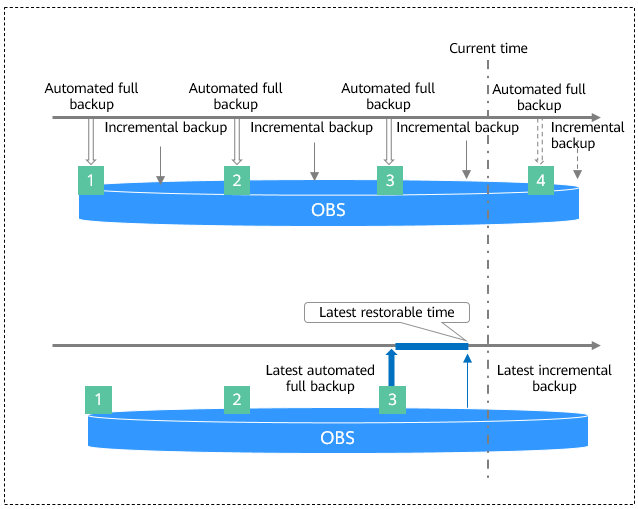
Backup Solutions
Table 1 describes how to back up data and download backups.
| Task | Backup Type | Description |
|---|---|---|
| Backing up data in the same region | RDS automatically creates full backups for your instance during a backup window you specified and saves the backups based on the configured retention period. If necessary, you can restore data to any point in time within the backup retention period. Once the automated backup policy is enabled, a full physical backup is triggered immediately. After that, full backups will be created according to the specified time window and backup cycle. | |
| Manual backups are user-initiated full backups of instances. The backup method is physical backup. Manual backups will not be deleted until you delete them manually. | ||
| Transaction logging is enabled for RDS for SQL Server instances by default. RDS automatically backs up data modifications made after the most recent automated or incremental backup every five minutes. | ||
| Downloading backups | You can use OBS Browser+, the browser, or the download URL to download a full backup. |
Backup Storage and Billing
Backups of the enterprise and standard editions are saved as packages in OBS buckets. The web edition does not support backup compression.
Backups occupy backup space in OBS. If the free space RDS provides is used up, the additional space required will be billed. For details, see How Is RDS Backup Data Billed?
Deleting Backups
- Manual backups can only be manually deleted.
- Automated backups cannot be manually deleted. To delete them, you can adjust the retention period specified in your automated backup policy. Retained backups will be automatically deleted at the end of the retention period.
What is your overall rating for this page?
Thank you very much for your feedback. We will continue working to improve the documentation.See the reply and handling status in My Cloud VOC.
For any further questions, feel free to contact us through the chatbot.
Chatbot


