

EG-based Event Notifications
Scenarios
You can configure EventGrid (EG) event notifications to promptly detect operations on a bucket and its objects and trigger follow-up actions.
For example, you can define an EG event notification that automatically adds watermarks to images uploaded to a specific bucket and stores the watermarked images in a target bucket.
How OBS Works with EG
OBS stores objects such as files, images, and videos. Uploading, modifying, or deleting these objects generates OBS events. After capturing the OBS events, EG automatically triggers follow-up actions or workflows based on the predefined rules. In this process, OBS sends notifications, and EG delivers tasks, removing the need for manual intervention.
An EG event notification rule consists of an event source, channel, and event target:
- Event source: a source that generates events. For a cloud service, there will be events when users send requests to it.
- Channel: a transfer station that receives events from cloud services
- Event target: a destination that processes events. Cloud service events from the channel can trigger other cloud services to perform actions. (For example, FunctionGraph can be triggered to add watermarks to images and store the images in OBS buckets.)
Figure 1 shows how OBS works with EG.
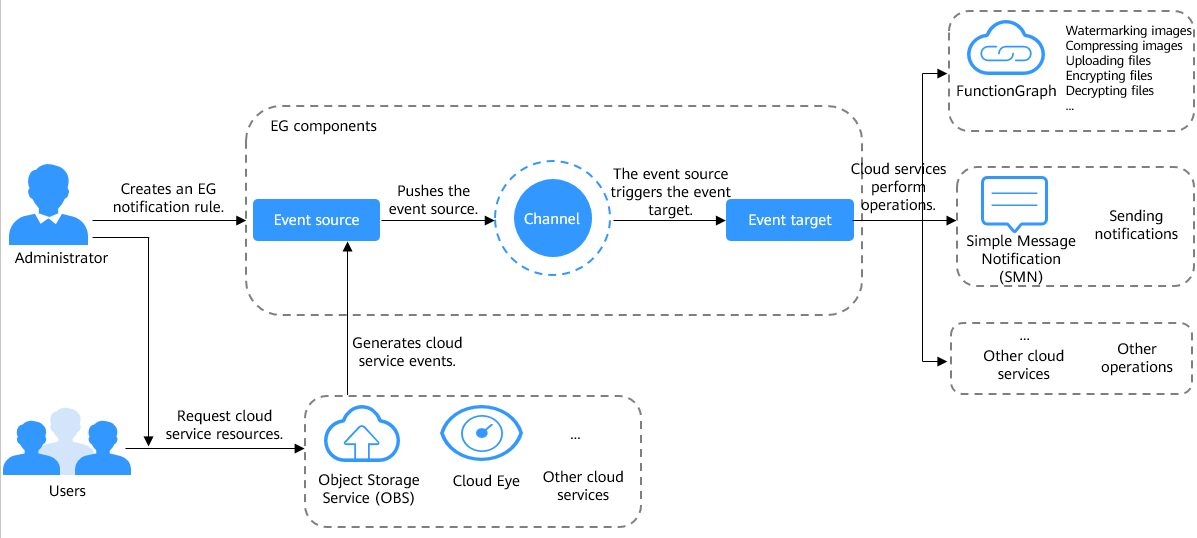
The following describes how OBS works with EG in detail:
- An administrator creates an EG notification rule that includes the event source, channel, and event target.
- When the administrator or other users perform operations on objects in OBS buckets, OBS events are generated.
- EG pushes the events to the event target through the channel. The event target then triggers other cloud services to perform follow-up operations.
Supported OBS Event Types
EG notifications support two types of OBS event sources: OBS Application Service and Object Storage Service (OBS).
- OBS Application Service: this source pushes events for specific operations performed on objects in OBS buckets
- Object Storage Service (OBS): this source pushes audit log events for operations performed on OBS buckets and objects and operations triggered by the system itself
| OBS Event Source Type | EG Event Type | Description |
|---|---|---|
| OBS Application Service | OBS:DWR:ObjectCreated:PUT | Uploading an object using PUT |
| OBS:DWR:ObjectCreated:POST | Uploading an object using POST | |
| OBS:DWR:ObjectCreated:COPY | Copying an object | |
| OBS:DWR:ObjectCreated:CompleteMultipartUpload | Assembling parts in a multipart upload | |
| Object Storage Service (OBS) | OBS:CloudTrace:ApiCall | Audit log events for operations triggered by API Gateway calls |
| OBS:CloudTrace:ObsSDK | Audit log events for OBS bucket operations triggered by OBS SDK calls | |
| OBS:CloudTrace:ConsoleAction | Audit log events for operations performed on the console | |
| OBS:CloudTrace:SystemAction | Audit log events for operations triggered by the system itself | |
| OBS:CloudTrace:Others | Audit log events for operations except those on OBS buckets triggered by OBS SDK calls |
Structure of the Event Notification Messages Sent by OBS
Once there is an OBS event, OBS sends an event notification message in a fixed JSON structure to EG. After receiving the notification, EG triggers other cloud services to perform actions.
The following gives an example of the JSON notification message OBS sends to EG:
{
    channel_id: "a1b2c3d4e5f678901234567890abcdef",
    events: [
        {
            specversion: "1.0",
            id: "17793124-84s5-5e1c-9s20-8fes5s8b54wf",
            source: "HC.OBS.DWR",
            type: "OBS:DWR:ObjectCreated:PUT",
            datacontenttype: "application/json",
            dataschema: "",
            subject: "exampleobject",
            time: "Fri, 04 Jul 2025 06:08:01 GMT",
            ttl: "4000",
            data: {
                eventVersion: "3.0",
                eventSource: "OBS",
                eventRegion: "cn-east-3",
                eventTime: "2025-7-04T06:08:01.957Z",
                eventName: "ObjectCreated:PUT",
                userIdentity: {
                    ID: "08b4efe0fc00d3ce0f17c01b948f6e80"
                },
                requestParameters: {
                    sourceIPAddress: "x.x.x.x"
                },
                responseElements: {
                    x-obs-request-id: "000001980D3CC5B5024FE333FEB97E7F",
                    x-obs-id-2: "",
                },
                obs: {
                    Version: "1.0",
                    configurationId: "test-trigger",
                    bucket: {
                        name: "examplebucket",
                        ownerIdentity: {
                            ID: "08b4efe0fc00d3ce0f17c01b948f6e80",
                        },
                        bucket: "examplebucket"
                    },
                    object: {
                        key: "exampleobject",
                        eTag: "65a8e27d8879283831b664bd8b7f0ad4",
                        size: "1024",
                        versionId: 9876543210987654321,
                        sequencer: "1",
                        oldpsxpth: ""
                    }
                }
            }
        },
    ]
}
The following table describes the fields that the message includes.
| Field | Description |
|---|---|
| channel_id | The unique identifier of the EG event channel |
| events[].specversion | The version of the EG event specification |
| events[].id | The unique identifier of the EG event |
| events[].source | The service name of the EG event source. The value is always HC.OBS.DWR. |
| events[].type | The EG event type, which is a character string separated by commas (,) |
| events[].datacontenttype | The content type of the EG event data. The value is always application/json. |
| events[].dataschema | The schema of the EG event data |
| events[].subject | The object name |
| events[].time | The UTC time when the EG event occurs |
| events[].ttl | How long the EG event remains valid. The default value is 4 seconds. |
| events[].data.eventVersion | The version of the OBS message |
| events[].data.eventSource | The message source. The value is always OBS. |
| events[].data.eventRegion | The region where the event occurs |
| events[].data.eventTime | The event time in ISO-8601 format |
| events[].data.eventName | The name of the event that triggered the notification |
| events[].data.userIdentity.ID | The billing ID of the user who triggered the event |
| events[].data.requestParameters.sourceIPAddress | The request's source IP address |
| events[].data.responseElements.x-obs-request-id | The request ID |
| events[].data.responseElements.x-obs-id-2 | The special symbols that help locate problems |
| events[].data.obs.Version | The OBS version |
| events[].data.obs.configurationId | The name of the OBS event trigger that matches the event |
| events[].data.obs.bucket.name | The bucket name |
| events[].data.obs.bucket.ownerIdentity.ID | The account ID of the bucket owner |
| events[].data.obs.bucket.bucket | The bucket name NOTE: To be compatible with multiple message formats, there are two bucket name parameters. |
| events[].data.obs.object.key | The object name |
| events[].data.obs.object.eTag | The object ETag |
| events[].data.obs.object.size | The object size |
| events[].data.obs.object.versionId | The object version ID |
| events[].data.obs.object.sequencer | The identifier that determines the sequence of a specific object event |
| events[].data.obs.object.oldpsxpth | The path of the file before being renamed in the parallel file system |
- Object upload
{ channel_id: "a1b2c3d4e5f678901234567890abcdef", events: [ { specversion: "1.0", id: "17793124-84s5-5e1c-9s20-8fes5s8b54wf", source: "HC.OBS.DWR", type: "OBS:DWR:ObjectCreated:PUT", datacontenttype: "application/json", dataschema: "", subject: "exampleobject", time: "Fri, 04 Jul 2025 06:08:01 GMT", ttl: "4000", data: { eventVersion: "3.0", eventSource: "OBS", eventRegion: "cn-east-3", eventTime: "2025-7-04T06:08:01.957Z", eventName: "ObjectCreated:PUT", userIdentity: { ID: "08b4efe0fc00d3ce0f17c01b948f6e80" }, requestParameters: { sourceIPAddress: "x.x.x.x" }, responseElements: { x-obs-request-id: "000001980D3CC5B5024FE333FEB97E7F", x-obs-id-2: "", }, obs: { Version: "1.0", configurationId: "test-trigger", bucket: { name: "examplebucket", ownerIdentity: { ID: "08b4efe0fc00d3ce0f17c01b948f6e80", }, bucket: "examplebucket" }, object: { key: "exampleobject", eTag: "65a8e27d8879283831b664bd8b7f0ad4", size: "1024", versionId: 9876543210987654321, sequencer: "1", oldpsxpth: "" } } } }, ] } - Manual object deletion
{ channel_id: "a1b2c3d4e5f678901234567890abcdef", events: [ { specversion: "1.0", id: "17793124-84s5-5e1c-9s20-8fes5s8b54wf", source: "HC.OBS.DWR", type: "OBS:DWR:ObjectRemoved:Delete", datacontenttype: "application/json", dataschema: "", subject: "exampleobject", time: "Fri, 04 Jul 2025 06:08:01 GMT", ttl: "4000", data: { eventVersion: "3.0", eventSource: "OBS", eventRegion: "cn-east-3", eventTime: "2025-7-04T06:08:01.957Z", eventName: "ObjectRemoved:Delete", userIdentity: { ID: "08b4efe0fc00d3ce0f17c01b948f6e80" }, requestParameters: { sourceIPAddress: "x.x.x.x" }, responseElements: { x-obs-request-id: "000001980D3CC5B5024FE333FEB97E7F", x-obs-id-2: "", }, obs: { Version: "1.0", configurationId: "test-trigger", bucket: { name: "examplebucket", ownerIdentity: { ID: "08b4efe0fc00d3ce0f17c01b948f6e80", }, bucket: "examplebucket" }, object: { key: "exampleobject", eTag: "65a8e27d8879283831b664bd8b7f0ad4", size: "1024", versionId: 9876543210987654321, sequencer: "1", oldpsxpth: "" } } } }, ] } - Object deletion using a lifecycle rule
{
    channel_id: "a1b2c3d4e5f678901234567890abcdef",
    events: [
        {
            specversion: "1.0",
            id: "17793124-84s5-5e1c-9s20-8fes5s8b54wf",
            source: "HC.OBS.DWR",
            type: "OBS:DWR:ObjectRemoved:Delete",
            datacontenttype: "application/json",
            dataschema: "",
            subject: "exampleobject",
            time: "Fri, 04 Jul 2025 06:08:01 GMT",
            ttl: "4000",
            data: {
                eventVersion: "3.0",
                eventSource: "OBS",
                eventRegion: "cn-east-3",
                eventTime: "2025-7-04T06:08:01.957Z",
                eventName: "ObjectRemoved:Delete",
                userIdentity: {
                    ID: "08b4efe0fc00d3ce0f17c01b948f6e80"
                },
                requestParameters: {
                    sourceIPAddress: "x.x.x.x"
                },
                responseElements: {
                    x-obs-request-id: "000001980D3CC5B5024FE333FEB97E7F",
                    x-obs-id-2: "",
                },
                obs: {
                    Version: "1.0",
                    configurationId: "test-trigger",
                    bucket: {
                        name: "examplebucket",
                        ownerIdentity: {
                            ID: "08b4efe0fc00d3ce0f17c01b948f6e80",
                        },
                        bucket: "examplebucket"
                    },
                    object: {
                        key: "exampleobject",
                        eTag: "65a8e27d8879283831b664bd8b7f0ad4",
                        size: "1024",
                        versionId: 9876543210987654321,
                        sequencer: "1",
                        oldpsxpth: ""
                    }
                }
            }
        },
    ]
}
Constraints
| Category | Description |
|---|---|
| OBS buckets |
|
| Permissions | If you select OBS Application Service as the event source, your account must have the Tenant Administrator permission. For details, see Assigning Dependency Roles. |
| Accounts | Currently, federated accounts cannot use EG notifications. |
| Creation of EG notification rules |
|
| Edit of EG notification rules |
|
| Others | For services that require responses within seconds, EG notifications cannot guarantee the required latency. |
Billing for EG Notifications
You need to pay for using EG. For details, see EG Billing.
Prerequisites
- You have enabled EG and your account or IAM user has the EG FullAccess permission.
- Your Huawei Cloud account or IAM user has the Tenant Administrator permission. For details, see Using IAM to Grant Access to OBS.
Creating an EG Notification Rule
You can use OBS Console to create EG notification rules. You cannot use APIs, SDKs, OBS Browser+, or obsutil to do so.
Using OBS Console
- In the navigation pane of OBS Console, choose Buckets.
- In the bucket list, click the desired bucket. The Objects page is displayed.
- In the navigation pane, choose Data Management > Event Notification. The EG tab page is displayed.
- Click Create to go to the EG console and create an event subscription.
For details about how to use EG, see Sending a Huawei Cloud Service Event.
- Modify the subscription name and description.
- Click
 next to the subscription name. In the Configuration name and description dialog box, modify the subscription name and description.
 The subscription name must start with a letter or digit and can be up to 128 characters long. It can only include letters, digits, periods (.), underscores (_), and hyphens (-).
- Click OK.
- Click
- If you are an enterprise user, select an enterprise project next to the subscription name. You can click View Enterprise Projects to check the enterprise project list.
If you do not have any specific needs for enterprise project division and management, choose the default enterprise project.
An enterprise project cannot be changed after being configured. Consider your needs when selecting the enterprise project.
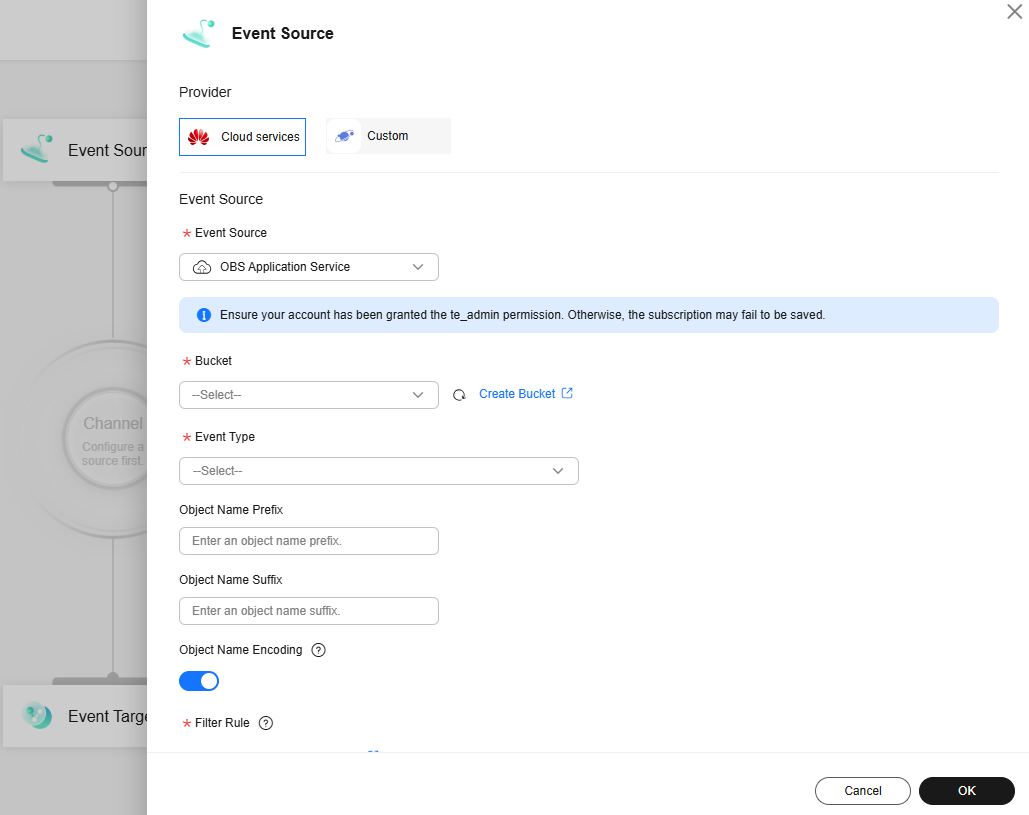
- Configure an event source.
- Click Event Source. The Event Source dialog box is displayed on the right, as shown in Figure 2.
- Select an event source provider.
- Set event source parameters.
Table 4 OBS event source parameters Parameter
Description
Event Source
Select a cloud service event source.
To use OBS as the event source, you can select either of the following options:
- OBS Application Service: this source pushes events for specific operations performed on objects in OBS buckets
To select OBS Application Service, your account must have the Tenant Administrator permission. For details, see Assigning Dependency Roles.
- Object Storage Service (OBS): this source pushes audit log events for operations performed on OBS buckets and objects and operations triggered by the system itself
Bucket
This parameter is mandatory when you select OBS Application Service for Event Source.
Select the bucket that generates OBS events. When operations are performed on the selected bucket or its objects, OBS events are generated and serve as the event source of EG notifications.
Event Type
Select OBS event types that trigger EG notifications. For example, if you want the object upload operations to trigger EG notifications, you can select OBS:DWR:ObjectCreated:PUT and OBS:DWR:ObjectCreated:POST.
You can include multiple event types in an EG event notification rule.
- EG notification rules for the same bucket cannot overlap. An event can only match one rule. If the rule you are creating conflicts with an existing one, the rule creation will fail.
- If you delete an object from a bucket with versioning enabled but do not specify the version ID, no object version is deleted by default, and no object deletion event notification will be triggered. Instead, the current object version becomes a historical one, and a delete marker is inserted as the new current version.
For details about the OBS event types supported by EG, see Supported OBS Event Types.
Object Name Prefix
Optional
This parameter is required if you select OBS Application Service for Event Source and need to specify a set of objects for which events are generated.
When operations are performed on objects with the specified prefix, OBS events are generated and serve as the event source of EG notifications.
- To match all objects in the bucket, leave both Object Name Prefix and Object Name Suffix blank.
- To match all objects in the testfolder directory in the root directory of the bucket, set Object Name Prefix to testfolder/ and leave Object Name Suffix blank.
- To match all JPG objects in the bucket, leave Object Name Prefix blank and set Object Name Suffix to .jpg.
- To match all MP3 objects in the testfolder directory in the root directory of the bucket, set Object Name Prefix to testfolder/ and Object Name Suffix to .mp3.
Object Name Suffix
Optional
This parameter is required if you select OBS Application Service for Event Source and need to specify a set of objects for which events are generated.
When operations are performed on objects with the specified suffix, OBS events are generated and serve as the event source of EG notifications.
- To match all objects in the bucket, leave both Object Name Prefix and Object Name Suffix blank.
- To match all objects in the testfolder directory in the root directory of the bucket, set Object Name Prefix to testfolder/ and leave Object Name Suffix blank.
- To match all JPG objects in the bucket, leave Object Name Prefix blank and set Object Name Suffix to .jpg.
- To match all MP3 objects in the testfolder directory in the root directory of the bucket, set Object Name Prefix to testfolder/ and Object Name Suffix to .mp3.
Object Name Encoding
Optional
This parameter is required if you select OBS Application Service for Event Source and need to encode the names of objects for which events are generated.
If the function you used in the event target decodes object names, enable Object Name Encoding so that the function can correctly read the object names.
Filter Rule
The event filter rule. Only events that match the filter rule can be delivered to the event target for follow-up operations.
For example, if you want operations of uploading .jpg images to buckets except test-bucket to trigger EG event notifications, configure the settings as follows:
- Event Source: Select OBS Application Service.
- Bucket: Select test-bucket.
- Event Type: Select OBS:DWR:ObjectCreated:PUT and OBS:DWR:ObjectCreated:POST.
- Object Name Suffix: Enter .jpg.
- Filter Rule: Define it as follows:
{
  "source": [
    {
      "op": "StringIn",
      "values": [
        "HC.OBS.DWR"
      ]
    }
  ],
  "type": [
    {
      "op": "StringIn",
      "values": [
        "OBS:DWR:ObjectCreated:PUT",
        "OBS:DWR:ObjectCreated:POST"
      ]
    }
  ],
  "subject": {
    "and": [
      {
        "op": "StringEndsWith",
        "values": [
          ".jpg"
        ]
      }
    ]
  },
  "data": {
    "obs": {
      "bucket": {
        "name": [
          {
            "op": "StringNotIn",
            "values": [
              "test-bucket"
            ]
          }
        ]
      }
    }
  }
}
For more information about filter rules, see Filter Rule Parameters and Example Filter Rules.
- OBS Application Service: this source pushes events for specific operations performed on objects in OBS buckets
- Click OK.
- Configure an event target.
- Click Event Target. Figure 3 Configuring an event target
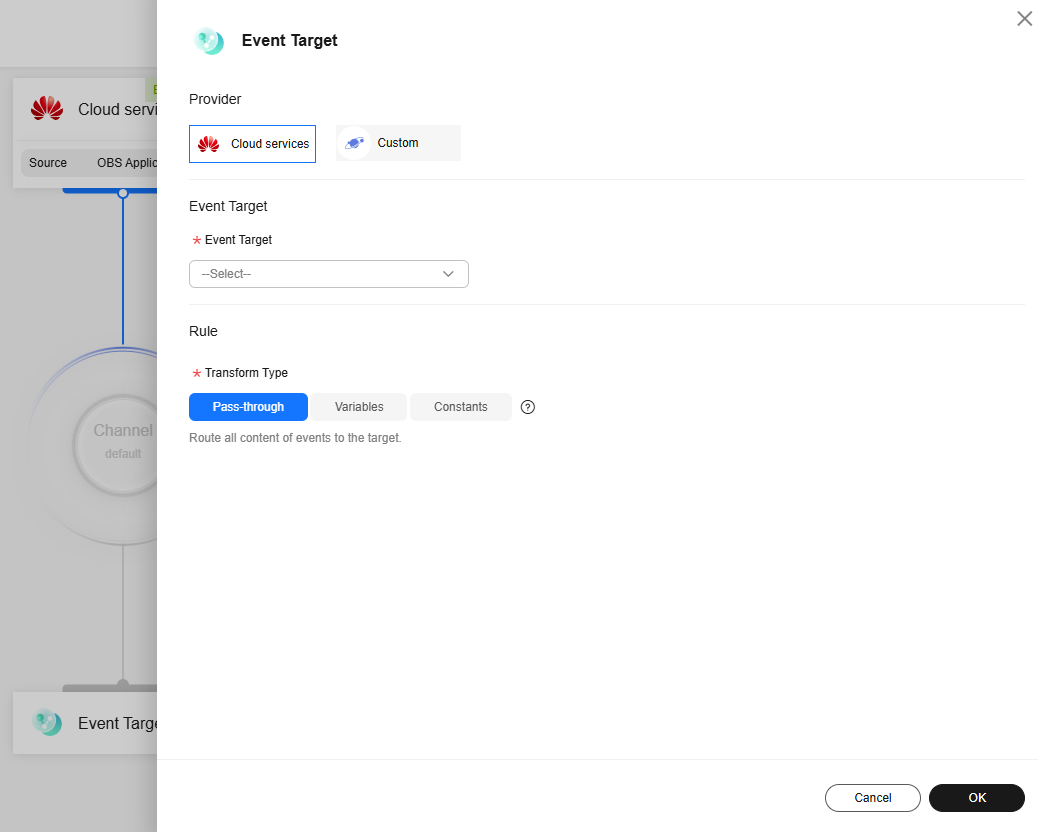
- Set event target parameters.
- Selecting Cloud services for Provider: A cloud service works as the event target provider. After receiving a notification from the event source, the event target triggers a cloud service to perform operations. The following table describes relevant parameters.
Table 5 Selecting Cloud services as the event target provider Parameter
Option
Description
Event Target
Simple Message Notification (SMN)
The event target delivers tasks to SMN, triggering SMN to send message notifications.
Set the following parameters:- Topic: Select a message topic. You need to create a topic in advance. For details, see Creating a Topic.
- Agency: It grants EG the smn:topic:publish permission required to publish SMN messages.
- The drop-down list displays only the agencies that are delegated to EG. Ensure that the agency you selected has the smn:topic:publish permission.
- If no agency is available, click Create Agency to create one named EG_SMN_PUBLISHER_AGENCY.
- Type: the type of the message subject. This parameter is required if you want to specify the message subject in a fixed format. Two types are available:
- Constants: By selecting this option, you need to specify a subject. The subject does not change once specified. All messages will use the same subject.
- Variables: The subject in the template is a variable value from CloudEvents-compliant events. If the subject is too long, only the first 512 characters will be retained.
FunctionGraph (function computing)
The event target delivers tasks to FunctionGraph, triggering FunctionGraph to execute related function operations.
Set the following parameters:- Function: Select the function to trigger. If no function is available, create a function first.
- Version/Alias: Choose either Version or Alias.
- Version: Select a version of the function. The default value is latest.
- Alias: Select an alias of the function.
- Execute: the way to request a function call
- Asynchronously: Asynchronous execution refers to sending a function call request without waiting for the result.
- Synchronously: Synchronous execution means that a function call request must explicitly wait for the response. In other words, such a request must invoke the user's function and return only after the call is completed.
- Agency: It grants EG the functiongraph:function:invoke* permission to execute functions synchronously or asynchronously.
- The drop-down list displays only the agencies that are delegated to EG. Ensure that the agency you selected has the functiongraph:function:invoke* permission.
- If no agency is available, click Create Agency to create one named EG_TARGET_AGENCY.
Rule
Transform Type
EG transforms CloudEvents-compliant events into the event types that the targets can accept. Three transformation types are available:- Pass-through: EG does not transform CloudEvents-compliant events and directly routes them to the target.
- Variables: EG routes variables obtained from CloudEvents-compliant events to the target.
- Parameters: the parameters that need to be transformed
- Template: Customize a template that includes the required variables. EG transforms events according to the format defined by the template.
- Constants: EG routes only the specified constants in events to the target.
For more information about transformation types, see Event Content Transformation.
- Selecting Custom for Provider: Customize an event target provider. Set the following parameters:
Table 6 Selecting Custom as the event target provider Parameter
Option
Description
URL
URL
The custom event target URL, which is used to consume events
The URL must start with http:// or https:// and use the POST method.
The default timeout for delivering events to the custom event target is 9 seconds. Exceeding this limit will cause delivery failure.
The HTTP protocol has high security risks, which may cause data to be eavesdropped or tampered with. To ensure data security, you are advised to use HTTPS. If you have to use HTTP, make sure that custom events do not include sensitive information. You are solely responsible for all related risks.
Connection
You can connect to a private webhook through the VPC and subnet connection. For details, see Connections.
Request Parameters
Headers
You can set request headers when requesting a URL.
The settings of a header include the header name, value, and whether it is encrypted.
Figure 4 Adding a header
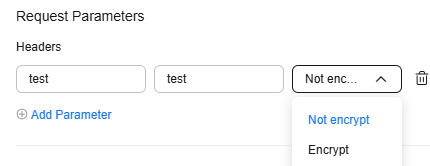
- Request header (a key): It can include uppercase or lowercase letters and hyphens (-) and must start or end with a letter. It can be up to 256 characters long.
- Value: It can include uppercase or lowercase letters, hyphens (-), underscores (_), spaces, and the following special characters: ~!@#$%^&*()=+|[{}];:'",<.>/? It can be up to 1,024 characters long.
NOTE:If the request header or value is invalid, the encryption option is unavailable.
Rule
Transform Type
EG transforms CloudEvents-compliant events into the event types that the targets can accept. Three transformation types are available:- Pass-through: EG does not transform CloudEvents-compliant events and directly routes them to the target.
- Variables: EG routes variables obtained from CloudEvents-compliant events to the target.
- Parameters: the parameters that need to be transformed
- Template: Customize a template that includes the required variables. EG transforms events according to the format defined by the template.
- Constants: EG routes only the specified constants in events to the target.
For more information about transformation types, see Event Content Transformation.
- Selecting Cloud services for Provider: A cloud service works as the event target provider. After receiving a notification from the event source, the event target triggers a cloud service to perform operations. The following table describes relevant parameters.
- Click OK.
- Click Event Target.
- Click Save in the upper right corner of the page to finish the settings of the subscription.
After the event subscription is created, you can see it in the event subscription list and the subscription status defaults to Enabled.
Disabling, Enabling, Modifying, or Deleting EG Notification Rules
You can use OBS Console to disable, enable, modify, or delete EG notification rules. You cannot use APIs, SDKs, OBS Browser+, or obsutil to do so.
Using OBS Console
- In the navigation pane of OBS Console, choose Buckets.
- In the bucket list, click the desired bucket. The Objects page is displayed.
- In the navigation pane, choose Data Management > Event Notification. The EG tab page is displayed.
- Click Go to EG Console in the operation column of the EG notification rule to be edited. The event subscription editing page is displayed.
- Disabling or enabling the event subscription
- Click Disable or Enable in the upper right corner of the page.
- Click Save.
In the event subscription list, the subscription status is disabled or enabled.
- Modifying the event subscription: Modify the name, description, event source, or event target of the event subscription by referring to 5.
Currently, the enterprise project to which an event subscription belongs cannot be modified.
- Deleting the event subscription
- Click Delete in the upper right corner of the page.
- In the Delete Event Subscription dialog box, click Auto Enter. The system automatically enters DELETE.
- Click OK.
If the deleted subscription no longer appears in the event subscription list, the deletion is successful.

Deleted event subscriptions cannot be recovered.
- Disabling or enabling the event subscription
Exporting EG Notification Rules
You can use OBS Console to export EG notification rules. You cannot use APIs, SDKs, OBS Browser+, or obsutil to do so.
What is your overall rating for this page?
Thank you very much for your feedback. We will continue working to improve the documentation.See the reply and handling status in My Cloud VOC.
For any further questions, feel free to contact us through the chatbot.
Chatbot


