

Help Center/ Distributed Database Middleware/ User Guide/ Instance Management/ Modifying Parameters of a DDM Instance
Updated on 2026-08-04 GMT+08:00
Modifying Parameters of a DDM Instance
Configure parameters of a DDM instance based on your needs to keep the instance running well.
Procedure
- Log in to the DDM console.
- In the instance list, locate the DDM instance whose parameters you want to configure and click its name.
- In the navigation pane on the left, choose Parameters. On the displayed page, modify parameters as needed.Figure 1 Parameter management

By default, DDM allows you to modify the instance parameters in Instance Parameters.
In special scenarios (such as data migration), if you need to modify more instance parameters, submit a request by choosing Service Tickets > Create Service Ticket in the upper right corner of the management console.
The following are parameter configuration examples.Figure 2 Results displayed when bind_table is not used
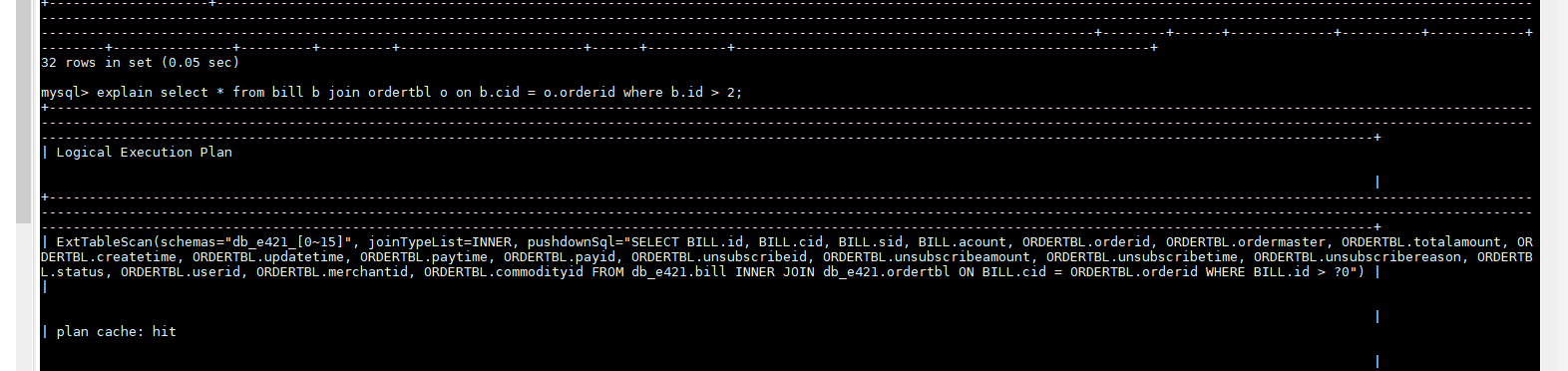
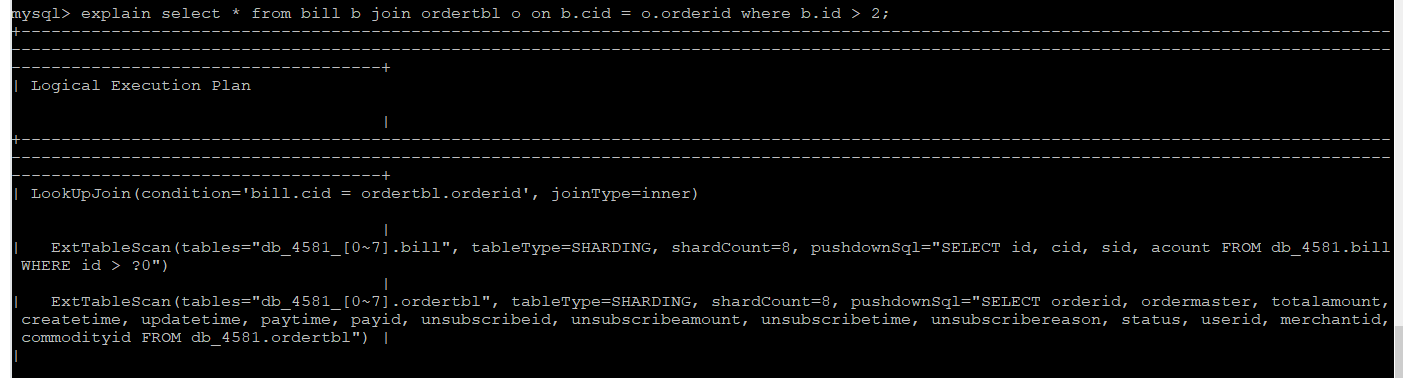 Figure 3 Results displayed when bind_table is used
- Click Save in the upper left corner and then Yes in the displayed dialog box.

- Modifying parameters may affect access to the DDM instance. Exercise caution when performing this operation.
- It takes 20s to 60s to have the modifications to take effect.
Parent topic: Instance Management
What is your overall rating for this page?
0
1
2
3
4
5
6
7
8
9
10
Very dissatisfiedVery satisfied
Thank you very much for your feedback. We will continue working to improve the documentation.See the reply and handling status in My Cloud VOC.
The system is busy. Please try again later.
For any further questions, feel free to contact us through the chatbot.
Chatbot


