

Help Center/ Customer Engagement Center/ User Guide/ Tenant Administrator Guide/ Managing Cases/ Case 2.0 Operation Guide/ Case Handling/ Merging Cases
Updated on 2025-11-07 GMT+08:00
Merging Cases
An agent can merge multiple cases of the same type to improve the work efficiency.
Procedure
- Sign in to the AICC, choose , select cases of the same type from the To Do list, and click Merge. Figure 1 Merge page
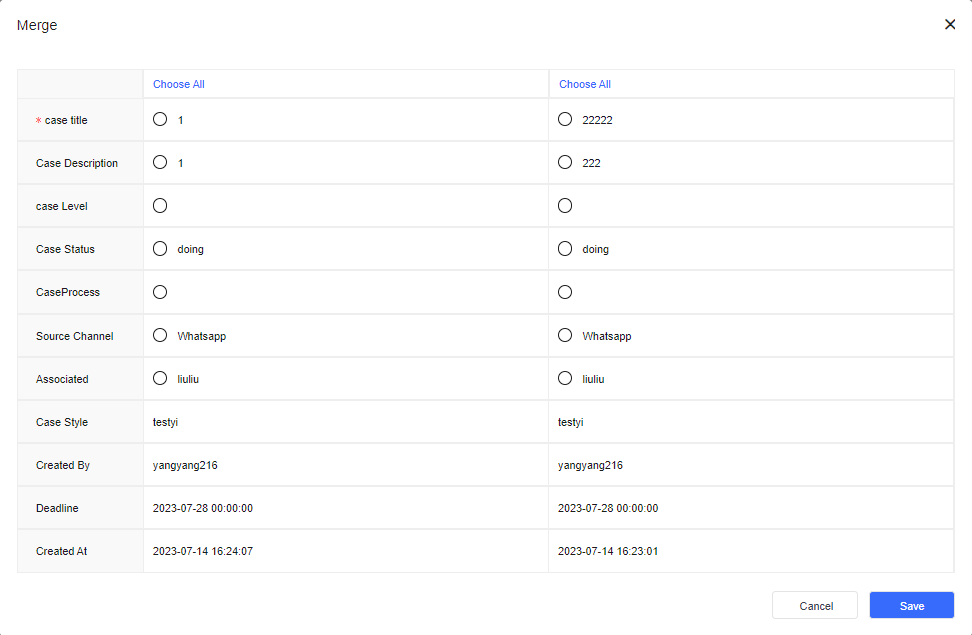

Case types, creators, expected completion time, and creation time cannot be merged.
- Complete configuration and click Save. After the merging is successful, a case is retained and a case track is generated.
- Click the case, and view the merged case on the Associated Case tab page. Figure 2 Associated Case tab page

- Cases to be merged must be of the same type.
- A maximum of five cases can be merged at a time.
- If case A is retained after merging, you can view case B on the Associated Case tab page of case A.
Parent topic: Case Handling
What is your overall rating for this page?
0
1
2
3
4
5
6
7
8
9
10
Very dissatisfiedVery satisfied
Thank you very much for your feedback. We will continue working to improve the documentation.See the reply and handling status in My Cloud VOC.
The system is busy. Please try again later.
For any further questions, feel free to contact us through the chatbot.
Chatbot


