

Overview
There are multiple storage volume types that can be used by the pods for the workloads scheduled to CCI. In this section, you can learn about:
- Storage volume types used by the pods for the workloads scheduled to CCI 2.0.
- Typical scenarios of hostPath volumes and how to use them.
Basic Concepts
The following storage volume types are available.
General Purpose File System (SFS 3.0) Volumes
You can mount a volume created from a General Purpose File System (SFS 3.0) to a container path for persistent data storage. SFS 3.0 volumes support the ReadWriteMany access mode and are ideal for large-scale, cost-sensitive workloads such as media processing, content management, big data analytics, and workload analysis. For details, see General Purpose File System (SFS 3.0) Volumes.
SFS Turbo Volumes
You can mount SFS Turbo volumes to specific container paths. SFS Turbo file systems are fast, on-demand, and scalable. They are suitable for DevOps pipelines, containerized microservices, and enterprise office applications. For details, see SFS Turbo Volumes.
Notes and Constraints
For cluster workloads that can be scheduled to CCI, the following storage types are supported: ConfigMaps, secrets, emptyDir volumes, downwardAPI volumes, projected volumes, and PVCs. downwardAPI and projected volumes can only be used when the CCE Cloud Bursting Engine for CCI version is 1.3.25 or later.
- emptyDir volumes: Subpaths are not supported.
- PersistentVolumeClaims: Only SFS Turbo and General Purpose File System are supported, with StorageClass set to CSI. Volcano Scheduler v1.17.10 or earlier does not support scheduling of all cloud storage types, and General Purpose File System is only supported by the CCE Cloud Bursting Engine for CCI add-on v1.5.58 or later.
- Projected volumes: If a source of the serviceAccountToken type is configured, the token in the corresponding service-account-token secret is injected into the pod after it is scheduled to CCI. The token is valid for a long time and has no expected audience. This means the settings of expirationSeconds and audience do not take effect.
Storage Types
There are various storage types on the CCE cluster console.
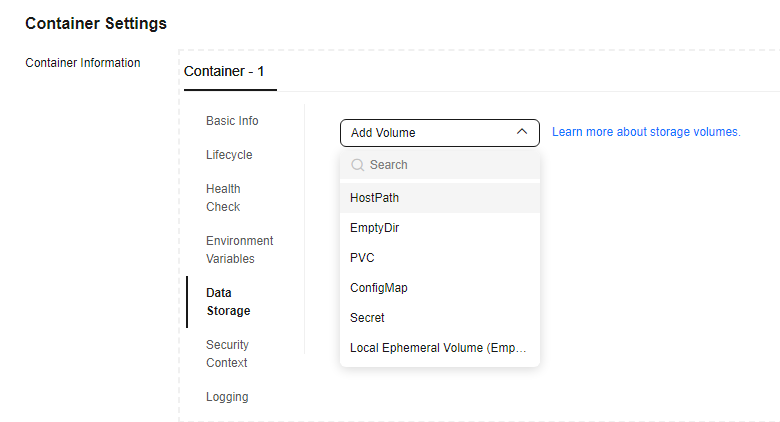
The following table lists the storage volume types.
| Volume Type | Supported by CCI | Remarks |
|---|---|---|
| hostPath | No |
|
| ConfigMap | Yes | - |
| Secret | Yes | Only secrets of the Opaque, kubernetes.io/tls, kubernetes.io/dockercfg, and kubernetes.io/dockerconfigjson types can be mounted. |
| emptyDir | Yes | The sizeLimit parameter of emptyDir is only valid when emptyDir.medium is set to Memory. |
| DownwardAPI | Yes | - |
| Projected | Yes | If a source of the serviceAccountToken type is configured, the token in the corresponding service-account-token secret is injected into the pod scheduled to CCI. The token is valid for a long time and has no audience. This means the settings of expirationSeconds and audience do not take effect. |
| PVC | Yes | Only SFS Turbo and general-purpose file systems are supported. The StorageClass must be set to CSI. |
How to Use hostPath
Scenarios
A hostPath volume can be used for storage when CCE or other Kubernetes clusters are used. However, CCI underlying clusters are used by all users so using hostPath volumes presents many security risks. As a result, hostPath volumes are unavailable. When a pod with a hostPath volume mounted is scheduled to CCI, the pod will be rejected. If hostPath configured in spec.volumes for a pod cannot be changed, you can configure annotations to allow the pod to be scheduled to CCI. During the bursting verification, hostPath needs to be removed or replaced with emptyDir.
Notes and Constraints
localDir and flexVolume are not supported currently.
Procedure
- Replace hostPath with emptyDir.
bursting.cci.io/hostpath-replacement: '[{"name":"source-hostpath-volume-3","policyType":"replaceByEmptyDir","emptyDir":{"sizeLimit":"10Gi"}}]'
- Ignore a single hostPath volume:
bursting.cci.io/hostpath-replacement: '[{"name":"source-hostpath-volume-1","policyType":"remove"}]'
- Ignore all hostPath volumes.
bursting.cci.io/hostpath-replacement: '[{"name":"*","policyType":"remove"}]'
- Replace each hostPath volume with a different storage type.
bursting.cci.io/hostpath-replacement: '[{"name":"source-hostpath-volume-1","policyType":"remove"},{"name":"source-hostpath-volume-3","policyType":"replaceByEmptyDir","emptyDir":{"sizeLimit":"10Gi"}}]'

For hostPath volumes whose path is /etc/localtime, if the name of a hostPath volume is the same as that of a replacement policy, the hostPath volume will be replaced. If the replacement policy name is *, hostPath volumes whose path is /etc/localtime will not be replaced.
Example Deployment YAML:
apiVersion: apps/v1
kind: Deployment
metadata:
  annotations:
    description: ''
  labels:
    bursting.cci.io/burst-to-cci: enforce
    appgroup: ''
    version: v1
  name: test
  namespace: default
spec:
  replicas: 2
  selector:
    matchLabels:
      app: test
      version: v1
  template:
    metadata:
      labels:
        app: test
        version: v1
      annotations:
        bursting.cci.io/hostpath-replacement: '[{"name": "test-log2", "policyType": "remove"}, {"name": "test-log", "policyType": "replaceByEmptyDir", "emptyDir":{"sizeLimit":"10Gi"}}, {"name": "test-log1", "policyType": "remove" }]'
    spec:
      containers:
        - name: container-1
          image: nginx
          imagePullPolicy: IfNotPresent
          resources:
            requests:
              cpu: 250m
              memory: 512Mi
            limits:
              cpu: 250m
              memory: 512Mi
          volumeMounts:
            - name: test-log
              mountPath: /tmp/log
            - name: test-log1
              mountPath: /tmp/log1
            - name: test-log2
              mountPath: /tmp/log2
      volumes:
      - hostPath:
          path: /var/paas/sys/log/virtual-kubelet
          type: ""
        name: test-log
      - hostPath:
          path: /var/paas/sys/log
          type: ""
        name: test-log1
      - hostPath:
          path: /var/paas/sys/log2
          type: ""
        name: test-log2
What is your overall rating for this page?
Thank you very much for your feedback. We will continue working to improve the documentation.See the reply and handling status in My Cloud VOC.
For any further questions, feel free to contact us through the chatbot.
Chatbot


