

Configuring Monitoring by Seconds
GeminiDB Redis API supports monitoring by seconds at an interval of 5 seconds to improve instantaneous accuracy of metrics.
Constraints
This function is only available to proxy cluster and primary/standby GeminiDB Redis instances with classic storage.
Monitoring by seconds cannot be enabled for instances with fewer than four vCPUs.
Even if monitoring by seconds is enabled, it will be automatically disabled when there are more than four vCPUs.
Procedure
- Log in to the GeminiDB console.
- Click
 in the upper left corner and select a region and project.
 - On the Instances page, click the instance name.
- In the navigation pane, choose Metrics.
- In the displayed dialog box, click Yes.
- This function is unavailable to instances with fewer than four vCPUs.
- Once this function is enabled, the system will report monitoring data again and show it in about 5 minutes.
- Once this function is disabled, the system will report monitoring data again and show it in about 5 minutes.
Figure 3 Enabling monitoring by seconds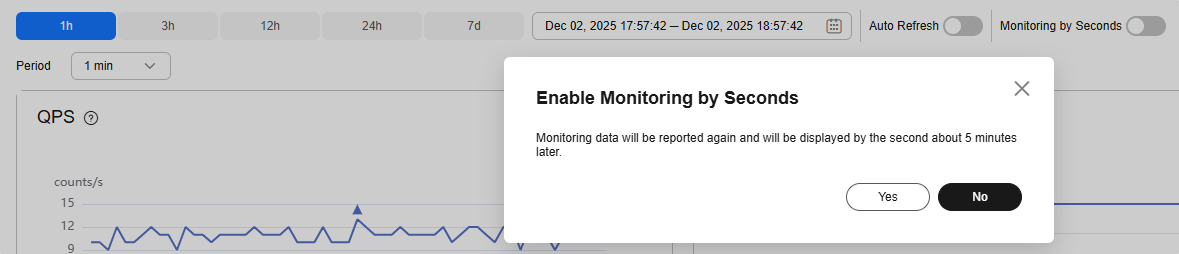
- After enabling monitoring by seconds, select 5 second.
Figure 4 Period


- Log in to the GeminiDB console.
- Click
 in the upper left corner and select a region and project.
 - On the Instances page, click the instance name.
- In the navigation pane, choose Metrics.
- In the displayed dialog box, click Yes.
Once this function is disabled, the system will report monitoring data again and show it in about 5 minutes.
Figure 7 Disabling monitoring by seconds


Feedback
Was this page helpful?
Provide feedbackThank you very much for your feedback. We will continue working to improve the documentation.See the reply and handling status in My Cloud VOC.
For any further questions, feel free to contact us through the chatbot.
Chatbot


