

Help Center/ Cloud Application Engine/ FAQs/ Component Configuration FAQs/ Why Is an Instance Abnormal After Configuring the Access Mode?
Updated on 2025-11-21 GMT+08:00
Why Is an Instance Abnormal After Configuring the Access Mode?
Symptom
After I configured the access mode, the instance becomes abnormal.
Possible Cause
By default, the backend service TCP health check is enabled on the Access Component from Another Environment > Load Balancing page of CAE, that is, the TCP three-way handshake is performed. After the TCP three-way handshake, data is transmitted. However, RST is sent to interrupt the established TCP connection during health check. This may cause your component to exit due to abnormal TCP connection and print error information, such as "Connection reset by peer".
Solution
- On the CAE console, choose Component Configurations, click Edit on the Access Mode card, and disable Health Check for the load balancer. Figure 1 Disabling health check
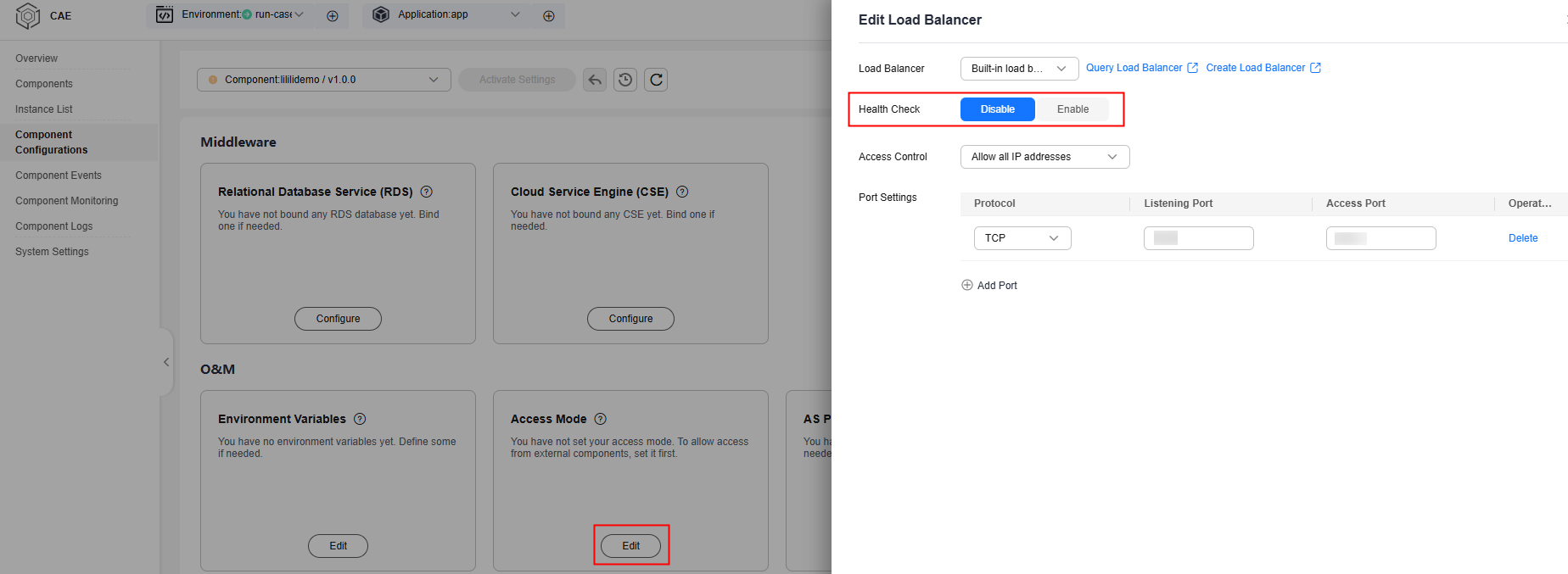
- On the Component Configurations page, click Edit on the Health Check card, enable Probe, and set Check Method to HTTP.
- Ignore the health check connection error in the service code.
Parent topic: Component Configuration FAQs
What is your overall rating for this page?
0
1
2
3
4
5
6
7
8
9
10
Very dissatisfiedVery satisfied
Thank you very much for your feedback. We will continue working to improve the documentation.See the reply and handling status in My Cloud VOC.
The system is busy. Please try again later.
For any further questions, feel free to contact us through the chatbot.
Chatbot


