

Video Packaging Enables the Playback of Online Education Videos on Multiple Terminal Types
Scenarios
MPC can convert mainstream video formats to MP4 or HLS for multi-terminal compatibility, so that online education videos can be played regardless of terminal types and network conditions. For example, users can watch videos of online education platforms on mobile apps.
How It Works
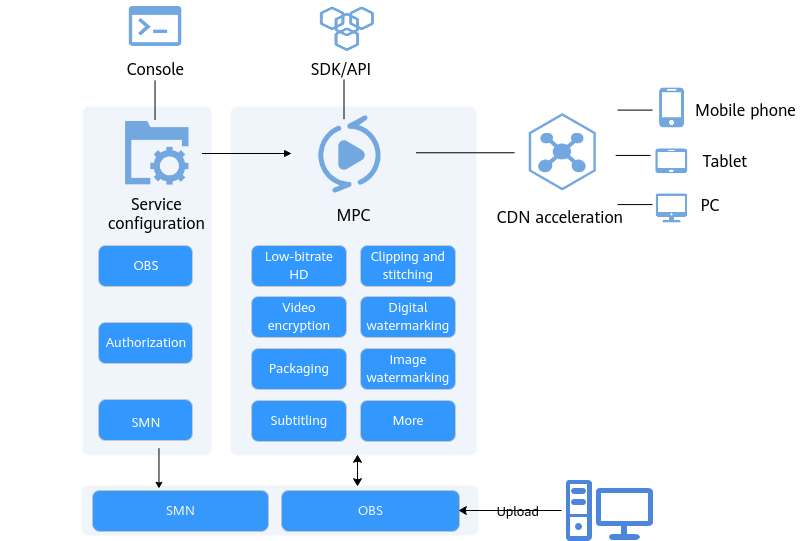
Restrictions
- Supported input formats: MP3, MP4, FLV, and TS
- Supported output formats: HLS and MP4
Procedure
- Log in to the MPC console.
- In the navigation pane, choose Media Processing > Packaging.
- Click Create Task. Figure 2 Creating a packaging task

- Configure task parameters by referring to Table 1.
Table 1 Parameters Parameter
Description
Where the source bucket is located
Region where the OBS bucket for storing the source video file is
Bucket name
OBS bucket for storing the source video file
Source File
Path for storing the source video file
Output Region
Where the output bucket is located
Output bucket name
OBS bucket for storing the packaged video file
Output Path (Optional)
Path for storing the output file
File Name (Optional)
Name of the packaged file
Output Format
Format of the output file. Currently, only HLS and MP4 are supported.
Segment Duration (s)
HLS segment length. This parameter is used only when Output Format is HLS.
The value ranges from 2 to 10.
Default value: 5
- Click OK.
- View the task status in the task list.
When the task status changes to Completed, you can obtain the packaged file from the output path.
SDK Integration Example
For details about the packaging feature and its sample code, see Creating a Packaging Task.
SDK core code for education website developers to access MPC:
    ObsObjInfo input = new ObsObjInfo().withBucket("mpc-east-2").withLocation("region01").withObject("ok.flv");
    ObsObjInfo output = new ObsObjInfo().withBucket("mpc-east-2").withLocation("region01").withObject("output");
    // Create a packaging request.
    CreateRemuxTaskRequest req = new CreateRemuxTaskRequest()
            .withBody(new CreateRemuxTaskReq().withInput(input).withOutput(output)
                    // Configure packaging parameters.
                    .withOutputParam(new RemuxOutputParam()
                            // Set the packaging format.
                            .withFormat("HLS")
                            // Set the HLS segment interval.
                            .withSegmentDuration(5)));
    // Send the packaging request.
    CreateRemuxTaskResponse rsp = initMpcClient().createRemuxTask(req);
System.out.println(rsp.toString()) What is your overall rating for this page?
Thank you very much for your feedback. We will continue working to improve the documentation.See the reply and handling status in My Cloud VOC.
For any further questions, feel free to contact us through the chatbot.
Chatbot


