

Help Center/ Identity and Access Management_Identity and Access Management (New Edition)/ User Guide/ Access Analyzer/ Setting Access Analyzers/ Managing Findings/ Unarchiving Findings
Updated on 2026-07-24 GMT+08:00
Unarchiving Findings
Unarchiving is typically performed to correct archiving errors, respond to state changes, or complete periodic reviews. This action reactivates archived findings, returning them to the active findings list for further evaluation.
Procedure
- Log in to the new IAM console.
- In the navigation pane, choose Access Analysis > External Access, Best Practice Compliance, or Unused Access.
- In the upper left corner of the displayed page, select a target analyzer from the drop-down list.
- Click the Archived tab. Select target findings and click Unarchive above the finding list. Figure 1 Unarchiving findings
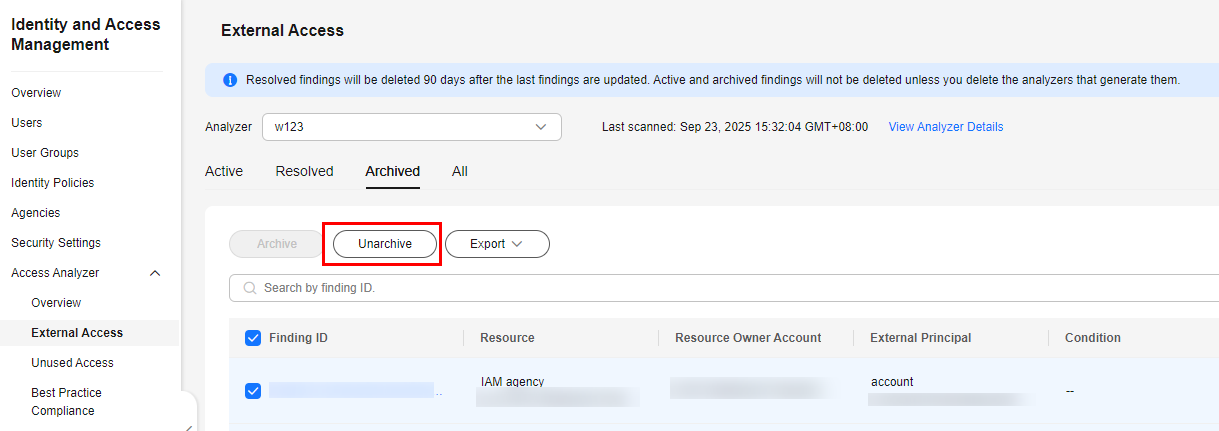
- After findings are unarchived, their status changes from Archived to Active.
Parent topic: Managing Findings
What is your overall rating for this page?
0
1
2
3
4
5
6
7
8
9
10
Very dissatisfiedVery satisfied
Thank you very much for your feedback. We will continue working to improve the documentation.See the reply and handling status in My Cloud VOC.
The system is busy. Please try again later.
For any further questions, feel free to contact us through the chatbot.
Chatbot


