

Using IAM Identity Policies to Grant Access to HSS
You can perform identity policy-based authorization using Identity and Access Management (IAM).
- Create IAM users or user groups for personnel based on your enterprise's organizational structure. Each IAM user has their own identity credentials for accessing HSS resources.
- Grant only the permissions required for users to perform a specific task.
- Entrust an account or cloud service to perform professional and efficient O&M on your HSS resources.
If your Huawei Cloud account does not require individual IAM users, skip this chapter.
This section describes how to perform identity policy-based authorization. Figure 1 shows the process.
Prerequisites
Before granting permissions, learn about the HSS permissions and select them as required. For details about the system identity policies supported by HSS, see Identity Policy-based Authorization. To grant permissions for other services, learn about all system-defined permissions supported by IAM.
Authorization Process
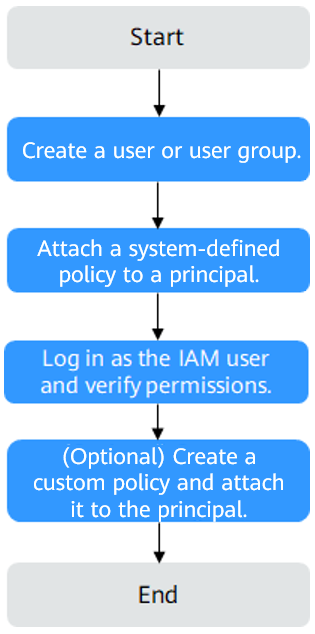
- On the IAM console, create an IAM user or create a user group.
Create a user or user group on the IAM console.
- Attach a system identity policy to a user or user group.
Authorize the HSSReadOnlyAccessPolicy system-defined identity policy to a user or user group.
- Log in as the IAM user and verify permissions.
In the authorized region, perform the following operations:
- Choose HSS from the service list. On the HSS console, click Buy HSS. If the purchase fails (assuming that only the HSSReadOnlyAccessPolicy permission is granted), the HSSReadOnlyAccessPolicy permission has already taken effect.
- Choose any other service in the service list. If a message appears indicating that you have insufficient permissions to access the service (assuming that only the HSSReadOnlyAccessPolicy permission is granted), the HSSReadOnlyAccessPolicy has already taken effect.
Example Custom Identity Policies
If the system-defined policies of HSS cannot meet your needs, you can create custom identity policies. For details about actions supported by custom identity policies, see Actions Supported by Identity Policy-based Authorization.
To create a custom policy, choose either visual editor or JSON.
- Visual editor: Select cloud services, actions, resources, and request conditions without the need to know policy syntax.
- JSON: Edit JSON policies from scratch or based on an existing policy.
For details, see Creating a Custom Identity Policy and Attaching It to a Principal.
When creating a custom identity policy, use the Resource element to specify the resources the policy applies to and use the Condition element (condition keys) to control when the policy is in effect. For details about the supported resource types and condition keys, see Actions Supported by Identity Policy-based Authorization.
The following provides examples of custom HSS identity policies.
- Example 1: Granting the permission to query protected directories
{ "Version": "5.0", "Statement": [ { "Effect": "Allow", "Action": [ "hss:wtp:listWtpHostProtectDirInfo" ] } ] } - Example 2: Creating a custom policy containing multiple actions
A custom identity policy can contain the actions of multiple services. The following is a policy with multiple statements:
{
        "Version": "1.1",
        "Statement": [
                {
                        "Effect": "Allow",
                        "Action": [
                                "hss:host:listHostStatus"
                        ]
                },
               {
                        "Effect": "Allow",
                        "Action": [
                                "hss:host:switchHostsProtectStatus",
                                "hss:host:manualCheckVul",
                                "hss:vulnerability:getVulCheckStatus"
                        ]
                }
        ]
}
Feedback
Was this page helpful?
Provide feedbackThank you very much for your feedback. We will continue working to improve the documentation.See the reply and handling status in My Cloud VOC.
For any further questions, feel free to contact us through the chatbot.
Chatbot


