

Ansible
This action aims to execute your uploaded playbook on the host.
Constraints
This action is available only to users who have used it before August 30, 2025.
Configuring Deployment Actions
- Create an application by referring to Creating an Application.
- On the Deployment Actions page, add this deployment action based on the service scenario.
- Configure the action using the parameters described in the table below.
Table 1 Parameters Parameter
Description
Action Name
Custom action name. Enter 1 to 128 characters. Do not start or end with a space. Use letters, digits, spaces, and these special characters: -_,;:./()
Environment
Deployment object. Select an environment whose resource type is host cluster.
Playbook Source
Artifact and Repo are available.
Playbook File
You can select an existing playbook file from Artifact or a playbook file uploaded from a local host.
Local software packages or files uploaded to Artifact can be reused.
Entry File Path
The entry file path of playbook.
Action Control
Whether to enable the settings.
- Keep running on failure: Continue the task even if this action fails.
The following describes how to use playbook based on the playbook source:
CodeArts Artifact
- On the tab displaying application action details, select Artifact for Playbook Source, and click
 on the right of Playbook File.
 - In the displayed Select File dialog box, select the corresponding playbook file compression package.

- Enter the entry file path of playbook.
- The entry file path is the directory generated after the playbook package is decompressed.
- If the directory after decompression is similar to that shown in the following figure, the entry file path is AnsibleDemo/install.yml.

- If the directory after decompression is similar to that shown in the following figure, the entry file path is install.yml.
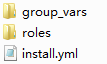
- If the directory after decompression is similar to that shown in the following figure, the entry file path is AnsibleDemo/install.yml.
CodeArts Repo
- On the tab displaying application action details, select Repo for Playbook Source.
- Select the code repository address (that is, the SSH URL of the code repository for storing playbook) from the Repo drop-down list.
- Select a code repository before selecting a branch.
- Select the entry file path.
The entry file path is generated after the playbook package is decompressed.
- Configure parameters.
- Switch to the Parameter tab and click Create Now to add parameters for the Ansible application action or replace parameters in the all file.
- If an added parameter exists in the playbook all file, the parameter with the same name in the all file will be replaced. Otherwise, the parameter will be used as a new parameter.
- The parameter name cannot contain the following characters: decimal points (.), hyphens (-), and colons (:).
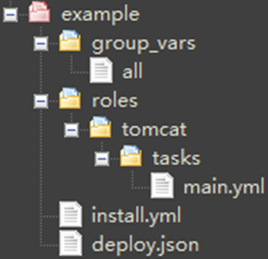
- After an application task is executed, the corresponding build task is downloaded to a specified path. The following is an example of the architecture and content of the all file:
tomcat_url: http://mirror.olnevhost.net/pub/apache/tomcat/tomcat-7/v7.0.78/bin/apache-tomcat-7.0.78.tar.gz
war_url: http://test.com/xxx.war
Figure 1 File architecture
- Switch to the Parameter tab and click Create Now to add parameters for the Ansible application action or replace parameters in the all file.
Helpful Links
If you encounter any problems during deployment, see Ansible.
What is your overall rating for this page?
Thank you very much for your feedback. We will continue working to improve the documentation.See the reply and handling status in My Cloud VOC.
For any further questions, feel free to contact us through the chatbot.
Chatbot


