

How Does MgC Generate Target Server Recommendations?
This section describes how the system recommends target servers based on the assessment policy and preferences you configure.
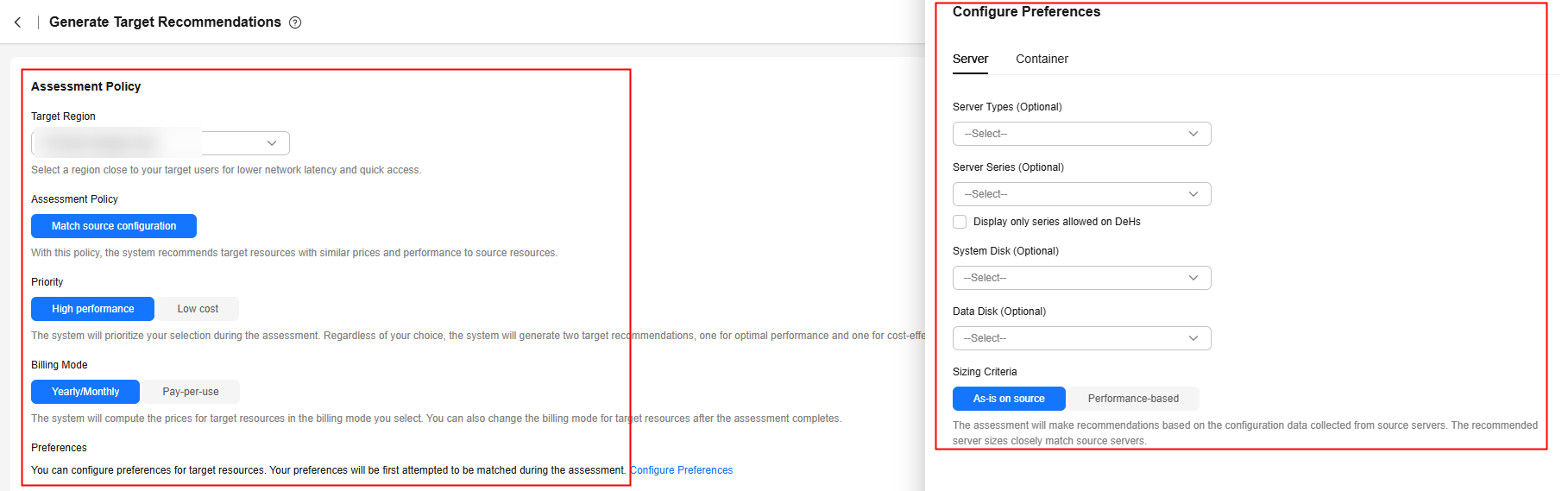
| Parameter | Option | Description |
|---|---|---|
| Target Region | - | Select the region where you want to purchase resources on Huawei Cloud. You are advised to select a region close to your target users for lower network latency and quick access. |
| Assessment Policy | Match source configuration | MgC will recommend Huawei Cloud resources in the same or slightly larger size as source resources. For a server manually added to MgC or automatically discovered by MgC over an intranet, the recommendation is limited to three instance types: FlexusX, General Computing ECS, and General Computing-plus ECS. MgC first sorts all flavors in these three types in descending order of price or performance as you prefer. Then it recommends the first eligible flavor that you can purchase. A flavor is considered eligible if it provides an amount of CPU and memory resources not less than the source server and within the thresholds. If no flavor is eligible, an error will be reported. If you have specific requirements for target servers (such as large memory), configure Preferences or select Match business scenario for Assessment Policy to obtain more accurate recommendations. NOTICE:
Examples:
|
| Match business scenario | MgC recommends the right Huawei Cloud resources based on the business scenario of source resources and Huawei Cloud best practices. For a source server, MgC first automatically selects the instance type that matches the business scenario of the source server, and sorts all flavors of the matched instance type by price or performance as you prefer. Then it recommends the first eligible flavor that you can purchase. A flavor is considered eligible if it provides an amount of CPU and memory resources not less than the source server and within the thresholds. If no flavor is eligible, an error message is displayed. Examples: Assume that a 4U8G source server is used to run a personal application, and you select High performance for Priority. The recommendation will be limited to two instance types: FlexusX and General Computing ECS.
| |
| Priority | High performance | MgC recommends target resources designed for optimal performance. |
| Low cost | MgC recommends the most cost-effective target resources that meet your demands. | |
| Billing Mode | Yearly/Monthly | Yearly/Monthly is a prepaid billing mode. If you expect to use resources for a longer period, you can save money by selecting the yearly/monthly billing mode. |
| Pay-per-use | Pay-per-use is postpaid and useful if you do not want to pay upfront or make long-term commitments. | |
| Preferences | Server Types (Optional) | Select the ECS types you prefer. |
| Server Series (Optional) | Select the server series you prefer. The system will generate recommendations based on your preferred server types and series. NOTICE: If you select Display only series allowed on DeHs, Server Types will be dimmed, and the server series allowed on DeHs in the target region will be listed. | |
| System Disk (Optional) | Select the system disk type you prefer. | |
| Data Disk (Optional) | Select the data disk type you prefer. | |
| Sizing Criteria | Select the criteria that the system will follow for generating server recommendations.
|
Any missing key fields may cause the server assessment process to fail. The following table describes the fields required for server assessment.
| Required Field | Field Description |
|---|---|
| CPU | Number of CPUs on a server |
| Memory size | Memory size of a server |
| OS image type | OS image version currently used by a server |
| OS type | Server OS, such as Linux and Windows |
| Firmware type | Server boot firmware type, such as BIOS and UEFI |
| Server disk information | Total capacity and used capacity of the system disk and all data disks on a server |
What is your overall rating for this page?
Thank you very much for your feedback. We will continue working to improve the documentation.See the reply and handling status in My Cloud VOC.
For any further questions, feel free to contact us through the chatbot.
Chatbot


