

Help Center/
Relational Database Service_RDS for MariaDB/
User Guide/
Problem Diagnosis and SQL Analysis/
Problem Diagnosis/
Viewing Table Diagnosis Results
Updated on 2025-11-26 GMT+08:00
Viewing Table Diagnosis Results
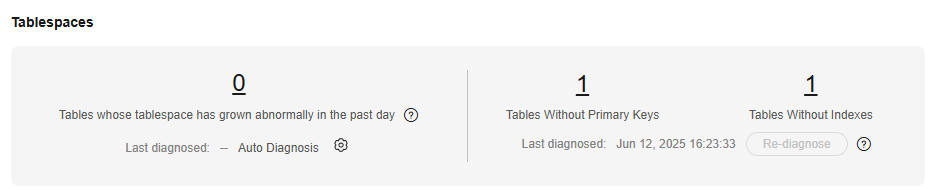
Intelligent table diagnosis can diagnose tables with abnormal tablespace growth, tables without primary keys, and tables without indexes, helping you quickly locate abnormal tables.
To use this function, you need to subscribe to Intelligent O&M first. For details, see Subscribing to Intelligent O&M.
Procedure
- Log in to the management console.
- Click
 in the upper left corner and select a region and project.
 - Click
 in the upper left corner of the page and choose Databases > Relational Database Service.
 - On the Instances page, click the target DB instance name to go to the Summary page.
- In the navigation pane, choose DBA Assistant > Storage Analysis.
- On the Storage Analysis page, view the table diagnosis results of your instance.
Figure 1 Table diagnosis results
Parent topic: Problem Diagnosis
Feedback
Was this page helpful?
Provide feedbackThank you very much for your feedback. We will continue working to improve the documentation.See the reply and handling status in My Cloud VOC.
The system is busy. Please try again later.
For any further questions, feel free to contact us through the chatbot.
Chatbot


