

Fault Detection Mechanism
ModelArts provides two fault detection mechanisms: fault tolerance detection and suspension detection to ensure the HA of model training jobs. This section describes the principles and detection rules of the two fault detection mechanisms.
Fault Tolerance Detection
This section describes the execution principles of ModelArts fault tolerance check by referring to Fault Tolerance Check Principles.
For details about how to configure HA, see Enabling and Viewing HA Configurations.
Fault Tolerance Check Principles
During model training, a training failure may occur due to a hardware fault. For hardware faults, ModelArts provides fault tolerance check to isolate faulty nodes to improve user experience in training.
The fault tolerance check involves environment pre-check and periodic hardware check. If any fault is detected during either of the checks, ModelArts automatically isolates the faulty hardware and issues the training job again. In distributed training, the fault tolerance check will be performed on all compute nodes used by the training job.
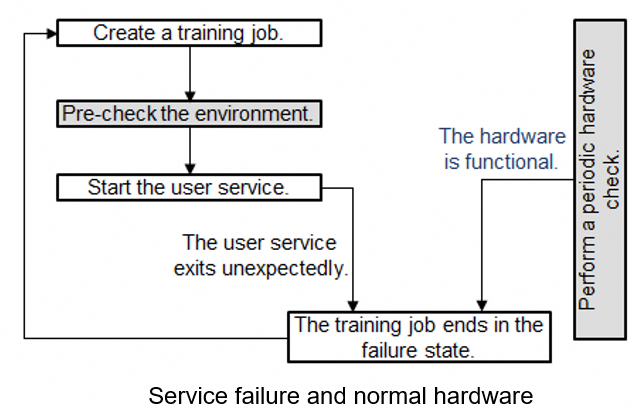
The following shows four failure scenarios, among which the failure in scenario 4 is not caused by a hardware fault. You can enable fault tolerance in the other three scenarios to automatically resume the training job.
- Scenario 1: The environment pre-check fails, and the hardware is faulty. Then, ModelArts automatically isolates all faulty nodes and issues the training job again. Figure 1 Pre-check failure and hardware fault

- Scenario 2: The environment pre-check fails but the hardware is functional. Then, ModelArts randomly allocates nodes and issues the training job again. Figure 2 Pre-check failure but functional hardware
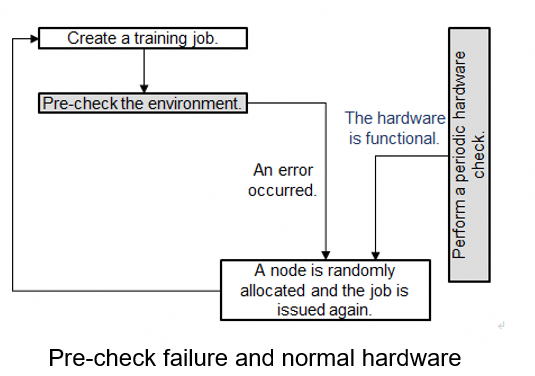
- Scenario 3: The environment pre-check is successful and the user service starts. A hardware fault occurs and the user service exits unexpectedly. Then, ModelArts automatically isolates all faulty nodes and issues the training job again. Figure 3 Service failure and hardware fault

- Scenario 4: The environment pre-check is successful and the user service starts. The hardware is functional. A fault occurs in the user service, the training job ends in the failure state. Figure 4 Service failure and functional hardware
After the faulty node is isolated, ModelArts creates a training job on new compute nodes. If the resources provided by the resource pool are limited, the re-issued training job will be queued with the highest priority. If the waiting time exceeds 30 minutes, the training job will automatically exit. This indicates that the resources are so limited that the training job cannot start. In this case, buy a dedicated resource pool to obtain dedicated resources.
If you use a dedicated resource pool to create a training job, the faulty nodes identified during the fault tolerance check will be removed. The system automatically adds healthy compute nodes to the dedicated resource pool. (This function is coming soon.)
Suspension Detection
This section describes Overview and Detection Rules for suspension detection.
For details about how to configure HA, see Enabling and Viewing HA Configurations.
Overview
A training job may be suspended due to unknown reasons. If the suspension cannot be detected promptly, resources cannot be released, leading to a waste. To minimize resource cost and improve user experience, ModelArts provides suspension detection for training jobs. With this function, suspension can be automatically detected and displayed on the log details page. You can also enable notification so that you can be promptly notified of job suspension.
Detection Rules
Suspension detection determines whether a job is suspended based on the monitored job process status and resource usage. A coroutine is started to periodically monitor the changes of the two metrics. There are two types of suspension detection rules: single-instance detection and all-instance detection. Both apply simultaneously.
- Single-instance detection
- Process status: If the process I/O of a single instance of a training job changes, the next detection period starts. If the process I/O remains unchanged in multiple detection periods, the resource usage detection starts.
- Resource usage: If the process I/O of a single instance of a training job remains unchanged, the system collects the GPU or NPU usage within a certain period of time and determines whether the resource usage changes based on the variance and median of the GPU or NPU usage within the period. If the GPU usage is not changed, the job is suspended.
- All-instance detection
Resource usage: The system suspends a job if all its running instances' GPU or NPU usage remains unchanged for a while and each instance's CPU usage stays below one core.
The system has the environment variable MA_HANG_DETECT_TIME set to 30. This means the job suspends if the system detects a metric issue for 30 minutes. To adjust this, update the value of the MA_HANG_DETECT_TIME variable. For details, see Managing Environment Variables of a Training Container.

- Due to the limitation of detection rules, there is a certain error probability in suspension detection. If the suspension is caused by the logic of job code (for example, long-time sleep), ignore it.
What is your overall rating for this page?
Thank you very much for your feedback. We will continue working to improve the documentation.See the reply and handling status in My Cloud VOC.
For any further questions, feel free to contact us through the chatbot.
Chatbot


