

How Do I View Aggregated Spark Application Logs?
Question
How do I view the aggregated container logs on the page when the log aggregation function is enabled on YARN?
Answer
When yarn.log-aggregation-enable of YARN is set to true, the container log aggregation function is enabled. Log aggregation indicates that after applications are run on YARN, NodeManager aggregates all container logs of the node to HDFS and deletes local logs. For details, see Configuring Container Log Aggregation.
However, all logs will be aggregated to an HDFS directory and can only be viewed by accessing an HDFS file. Open-source Spark and YARN do not support the function of viewing aggregated logs on the web UI.
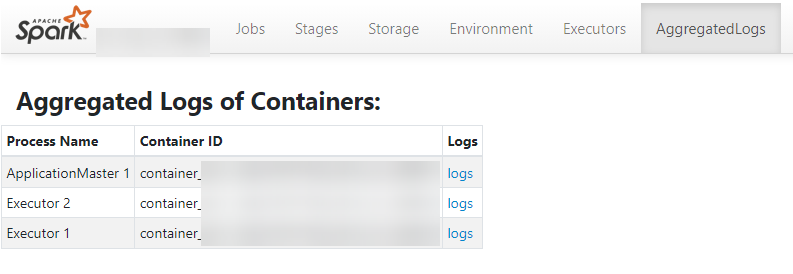
Spark supports this function. As shown in Figure 1, the AggregatedLogs tab is added to the HistoryServer page. You can click logs to view aggregated logs.
What is your overall rating for this page?
Thank you very much for your feedback. We will continue working to improve the documentation.See the reply and handling status in My Cloud VOC.
For any further questions, feel free to contact us through the chatbot.
Chatbot


