

Using IAM Identity Policies to Allow Access to SWR
System-defined permissions in identity policy-based authorization provided by Identity and Access Management (IAM) let you control access to your SWR resources. With IAM, you can:
- Create IAM users or user groups for personnel based on your enterprise's organizational structure. Each IAM user has their own identity credentials for accessing SWR resources.
- Grant users only the permissions required to perform a given task based on their job responsibilities.
- Entrust a Huawei Cloud account or a cloud service to perform efficient O&M on your SWR resources.
If your Huawei Cloud account meets your permissions requirements, you can skip this section.
Figure 1 shows the process flow of identity policy-based authorization.
Prerequisites
Before granting permissions, learn about system-defined permissions in Identity Policy-based Authorization.
Process Flow
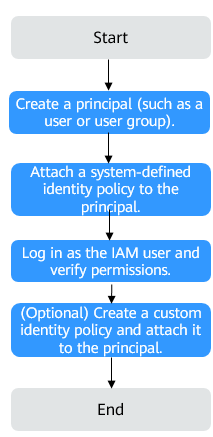
- On the IAM console, create an IAM user or create a user group.
- Attach a system-defined identity policy to the user or user group.
Assign the permissions defined in the system-defined identity policy SWRReadOnlyPolicy to the user or group, or attach the system-defined identity policy to it.
- Log in as the IAM user and verify permissions.
Log in to the SWR console as an authorized user and verify the permissions.
- Choose Service List > SoftWare Repository for Container. On the SWR console, click Create Organization. If you are not allowed for this operation and have only the SWRReadOnlyPolicy assigned, the SWRReadOnlyPolicy has been applied.
- Choose any other service from Service List. If a message appears, indicating insufficient permissions to access the service, the SWRReadOnlyPolicy has been applied.
Example Custom Identity Policies
Custom identity policies can be created to supplement system-defined identity policies. You can add actions in custom identity policies as needed. For details about supported actions, see Table 1.
To create a custom identity policy, choose either visual editor or JSON.
- Visual editor: Select cloud services, actions, resources, and request conditions. This does not require knowledge of policy syntax.
- JSON: Create a JSON policy or edit an existing one.
For details, see Creating a Custom Identity Policy and Attaching It to a Principal.
- Example: Grant permission to create, view, and delete organizations.
"Version": "5.0",
"Statement": [
{
"Effect": "Allow",
"Action": [
"swr:namespace:createNamespace",
"swr:namespace:deleteNamespace",
"swr:namespace:listNamespaces",
"swr:namespace:deleteNamespaceAccess",
"swr:namespace:getNamespaceAccess"
]
}
]
}
Actions Supported by System-defined Identity Policies
|
Operation |
Action |
SWR Admin |
|---|---|---|
|
Creating an organization |
swr:namespace:createNamespace |
√ |
|
Deleting an organization |
swr:namespace:deleteNamespace |
√ |
|
Listing organizations |
swr:namespace:listNamespaces |
√ |
|
Querying details about an organization |
swr:namespace:getNamespace |
√ |
|
Creating a repository in an organization |
swr:repo:createRepo |
√ |
|
Deleting repositories from an organization |
swr:repo:deleteRepo |
√ |
|
Listing repositories |
swr:repo:listRepos |
√ |
|
Listing shared images |
swr:repo:listSharedRepos |
√ |
|
Querying brief information about a repository |
swr:repo:getRepo |
√ |
|
Updating brief information about a repository |
swr:repo:updateRepo |
√ |
|
Deleting images with a specified tag from a repository |
swr:repo:deleteRepoTag |
√ |
|
Listing image tags |
swr:repo:listRepoTags |
√ |
|
Creating an account used for image sharing |
swr:repo:createRepoDomain |
√ |
|
Deleting an account used for image sharing |
swr:repo:deleteRepoDomain |
√ |
|
Listing accounts used for image sharing |
swr:repo:listRepoDomains |
√ |
|
Checking whether an account used for image sharing exists |
swr:repo:getRepoDomain |
√ |
|
Updating an account used for image sharing |
swr:repo:updateRepoDomain |
√ |
|
Creating a trigger |
swr:repo:createTrigger |
√ |
|
Deleting a trigger |
swr:repo:deleteTrigger |
√ |
|
Listing triggers in a repository |
swr:repo:listTriggers |
√ |
|
Querying details about a trigger |
swr:repo:getTrigger |
√ |
|
Updating a trigger |
swr:repo:updateTrigger |
√ |
|
Creating an image retention policy |
swr:repo:createRetention |
√ |
|
Deleting an image retention policy |
swr:repo:deleteRetention |
√ |
|
Listing image retention records |
swr:repo:listRetentionHistories |
√ |
|
Listing image retention policies |
swr:repo:listRetentions |
√ |
|
Querying details about an image retention policy |
swr:repo:getRetention |
√ |
|
Updating an image retention policy |
swr:repo:updateRetention |
√ |
|
Generating a temporary login command |
swr::createLoginSecret |
√ |
|
Listing quotas |
swr::listQuotas |
√ |
|
Querying the tenant resource overview |
swr::getDomainOverview |
√ |
|
Querying tenant resource statistics |
swr::getDomainResourceReports |
√ |
|
Uploading an image using multipart upload (on the SWR console) |
swr:namespace:multipartUpload |
√ |
|
Pushing an image (docker) |
swr:repo:upload |
√ |
|
Pulling an image (docker) |
swr:repo:download |
√ |
Feedback
Was this page helpful?
Provide feedbackThank you very much for your feedback. We will continue working to improve the documentation.See the reply and handling status in My Cloud VOC.
For any further questions, feel free to contact us through the chatbot.
Chatbot


