

ThreatBook
Function Description
This plugin has been built into SecMaster. It can call ThreatBook (ThreatBook online X intelligence community) to query threat indicators.
Each built-in plugin has a corresponding built-in operation connection.
Viewing Details and Operation Connections of the ThreatBook Plugin
- Log in to the SecMaster console.
- Click
 in the upper left corner of the management console and select a region or project.
 - In the navigation pane on the left, choose Workspaces > Management. In the workspace list, click the name of the target workspace. Figure 1 Workspace management page

- In the navigation pane on the left, choose . Figure 2 Plugins page
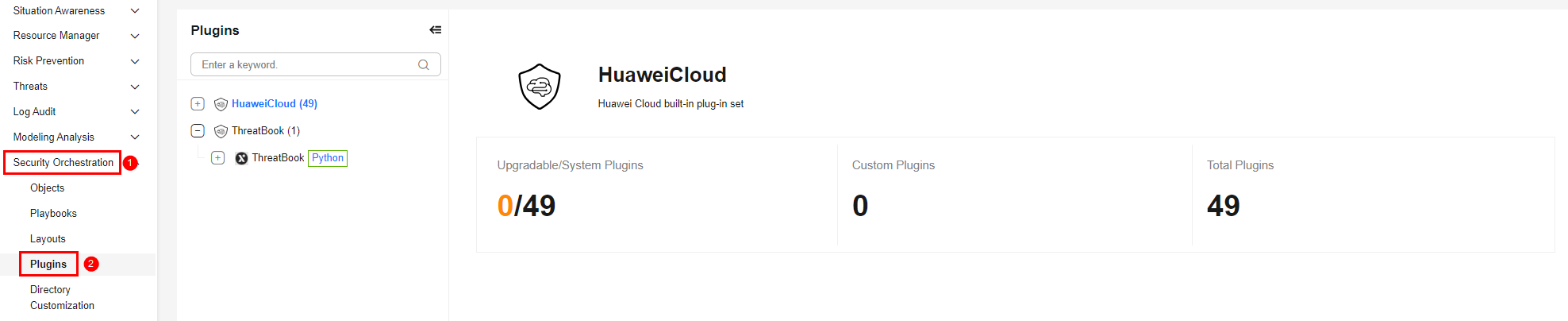
- On the Plugins page, select the ThreatBook plugin under the ThreatBook catalog. The Details tab is displayed by default. The Details tab displays the login credential information of the operation connection associated with the plugin.
- Click the Operation Connections tab for the ThreatBook plugin. On the displayed page, you can view information about the operation connections associated with the ThreatBook plugin.
- For details about how to edit or delete an operation connection, see Editing an Operation Connection and Deleting an Operation Connection. For details about how to add an operation connection for a plugin, see Creating an Operation Connection. A plugin can have multiple operation connections.
Plugin Execution Function getThreatBookInfo
- Parameters of the getThreatBookInfo Function: describes the input and output parameters of the function.
- Output Example of the getThreatBookInfo Function: provides an output example of the function.
Parameters of the getThreatBookInfo Function
Function: calls ThreatBook (ThreatBook online X intelligence community) to query threat indicators.
| Parameter | Parameter Type | Parameter Description | Mandatory |
|---|---|---|---|
| inputData | String | Value of the query object, which corresponds to type.
| Yes |
| sourceType | String | Data type of the threat indicator object. Value range: Only filehash, ip, and domain are supported. Uppercase letters and other values are not supported. | Yes |
| language | String | Response language of the query result. The value can be zh or en. Uppercase letters and other values are not supported. zh indicates that the query result is displayed in simplified Chinese. en indicates that the query result is displayed in English. | Yes |
| Parameter | Parameter Type | Parameter Description |
|---|---|---|
| header | Object | Response header. It includes basic information about the request and response, such as the request time, response service, and request ID. |
| code | Int | Status code, which indicates whether the request is successful. Response code description:
|
| body | Object | Content details returned by the API, including details about related indicators. |
Output Example of the getThreatBookInfo Function
{
  "data": {
    "severity": "info",
    "is_malicious": false,
    "tags_classes": [
      {
        "tags_type": "public_info",
        "tags": [
          "GoogleCloud"
        ]
      }
    ],
    "update_time": "2026-04-14 06:08:38",
    "judgments": [
      "Gateway",
      "Whitelist",
      "CDN"
    ],
    "confidence_level": "high",
    "orikey": "8.8.8.8",
    "permalink": "https://x.threatbook.com/v5/ip/8.8.8.8",
    "basic": {
      "carrier": "Google LLC",
      "location": {
        "country": "United States",
        "country_code": "US",
        "province": "",
        "lng": "-101.407912",
        "city": "",
        "lat": "39.765054"
      }
    },
    "asn": {
      "number": 15169,
      "rank": 4,
      "info": "GOOGLE"
    },
    "scene": "Cloud Provider"
  },
  "logMsg": [],
  "status": "success"
} What is your overall rating for this page?
Thank you very much for your feedback. We will continue working to improve the documentation.See the reply and handling status in My Cloud VOC.
For any further questions, feel free to contact us through the chatbot.
Chatbot


