

SecMasterUtilities
Function Description
This plugin is built into SecMaster and provides a variety of common utility methods, including string, list, dictionary, and time processing, as well as arithmetic operations.
Each built-in plugin has a corresponding built-in operation connection.
Viewing Details and Operation Connections of the SecMasterUtilities Plugin
- Log in to the SecMaster console.
- Click
 in the upper left corner of the management console and select a region or project.
 - In the navigation pane on the left, choose Workspaces > Management. In the workspace list, click the name of the target workspace. Figure 1 Workspace management page

- In the navigation pane on the left, choose . Figure 2 Plugins page
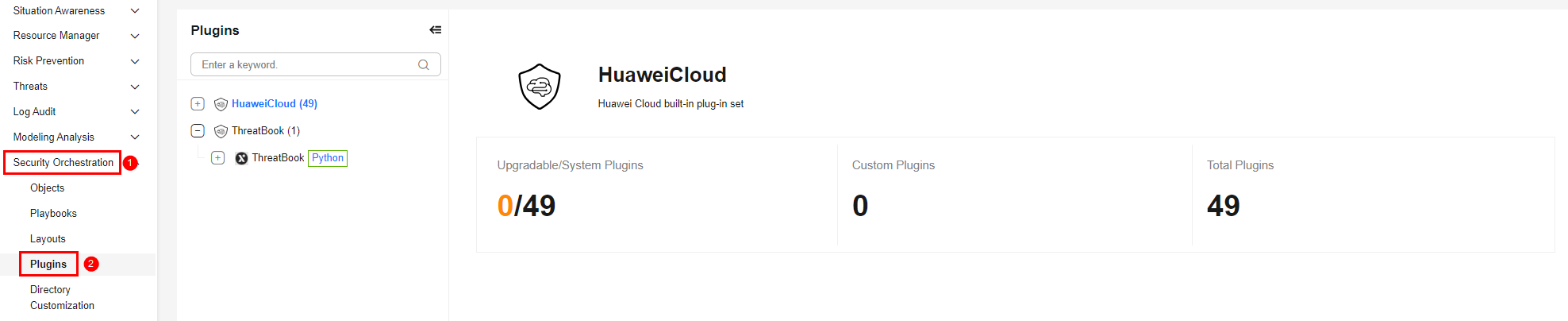
- On the Plugins page, select the SecMasterUtilities plugin under the Huawei Cloud catalog. The Details tab is displayed by default. The Details tab displays the login credential information of the operation connection associated with the plugin.
- Click the Operation Connections tab for the SecMasterUtilities plugin. On the displayed page, you can view information about the operation connections associated with the SecMasterUtilities plugin.
- For details about how to edit or delete an operation connection, see Editing an Operation Connection and Deleting an Operation Connection. For details about how to add an operation connection for a plugin, see Creating an Operation Connection. A plugin can have multiple operation connections.
Plugin Execution Function stringToJson
- Parameters of the stringToJson Function: describes the input and output parameters of the function.
- Output Example of the stringToJson Function: provides an output example of the function.
Parameters of the stringToJson Function
Function: Converts the data type from string to JSON.
| Parameter | Parameter Type | Parameter Description | Mandatory |
|---|---|---|---|
| sourceString | String | JSON string to be converted. | Yes |
| Parameter | Parameter Type | Parameter Description |
|---|---|---|
| targetJson | Object | JSON object obtained after conversion. |
Plugin Execution Function isMatch
- Parameters of the isMatch Function: describes the input and output parameters of the function.
- Output Example of the isMatch Function: provides an output example of the function.
Parameters of the isMatch Function
Function: Checks whether the input string matches the regular expression.
| Parameter | Parameter Type | Parameter Description | Mandatory |
|---|---|---|---|
| input | String | String to be checked whether it matches the regular expression. | Yes |
| pattern | String | Regular expression for judgment. | Yes |
| Parameter | Parameter Type | Parameter Description |
|---|---|---|
| result | Bool |
|
Plugin Execution Function stringReplace
- Parameters of the stringReplace Function: describes the input and output parameters of the function.
Parameters of the stringReplace Function
Function: Replaces a string.
| Parameter | Parameter Type | Parameter Description | Mandatory |
|---|---|---|---|
| originString | String | Original string. | Yes |
| target | String | Part to be replaced in the string. You can enter a regular expression. | Yes |
| replacement | String | String used for the replacement. | Yes |
| Parameter | Parameter Type | Parameter Description |
|---|---|---|
| newString | String | String after the replacement. |
Plugin Execution Function updateJsonObject
- Parameters of the updateJsonObject Function: describes the input and output parameters of the function.
Parameters of the updateJsonObject Function
Function: Updates object attributes.
| Parameter | Parameter Type | Parameter Description | Mandatory |
|---|---|---|---|
| originoriginJsonObject | Object | Original JSON object to be updated. Example input parameter: {"name":"Jack","age":18} | Yes |
| appendJsonObject | Object | JSON object consisting of the fields to be updated. The value can be directly written as a key-value pair. If you need to specify the type of the value to be updated, use the type and value format. {"age":24,"city":{"type":"string","value":{"name":"Chengdu","id":"86"}}} | No |
| Parameter | Parameter Type | Parameter Description |
|---|---|---|
| newJsonObject | Object | Updated JSON object. Example: {"city":"{'name': 'Chengdu', 'id': '86'}","name":"Jack","age":24} |
Plugin Execution Function formulaOperation
- Parameters of the formulaOperation Function: describes the input and output parameters of the function.
Parameters of the formulaOperation Function
Function: Performs simple arithmetic operations.
| Parameter | Parameter Type | Parameter Description | Mandatory |
|---|---|---|---|
| formulas | String | Arithmetic expression, which supports mixed operations with parentheses. No extra space is allowed in the expression. | Yes |
| decimalGigits | Int | Number of decimal places to be retained in the calculation result. The default value is 0. | No |
| Parameter | Parameter Type | Parameter Description |
|---|---|---|
| result | String | Result of the arithmetic operations. The decimal place is obtained based on decimalGigits. |
Plugin Execution Function createUUID
- Parameters of the createUUID Function: describes the input and output parameters of the function.
Parameters of the createUUID Function
Function: Randomly generates a UUID.
| Parameter | Parameter Type | Parameter Description | Mandatory |
|---|---|---|---|
| input | String | This parameter is used as a placeholder and can be left blank. | No |
| Parameter | Parameter Type | Parameter Description |
|---|---|---|
| uuid | String | Randomly generated UUID. |
Plugin Execution Function listAddList
- Parameters of the listAddList Function: describes the input and output parameters of the function.
Parameters of the listAddList Function
Function: Merges lists.
| Parameter | Parameter Type | Parameter Description | Mandatory |
|---|---|---|---|
| list1 | Array | List 1 to be merged. | No |
| list2 | Array | List 2 to be merged. | No |
| deduplicate | String | Whether to deduplicate the merged list. Value range:
| No |
| Parameter | Parameter Type | Parameter Description |
|---|---|---|
| newList | String | New list after merging. |
Plugin Execution Function getTimeString
- Parameters of the getTimeString Function: describes the input and output parameters of the function.
Parameters of the getTimeString Function
Function: Obtains the time in a specified time format and offset.
| Parameter | Parameter Type | Parameter Description | Mandatory |
|---|---|---|---|
| timeFormat | String | Time format. If this parameter is left blank, the millisecond timestamp is obtained. Example: %Y-%m-%d %H:%M:%S | No |
| timeOffset | String | Time offset based on the current time. Add a hyphen (-) before each time unit to indicate the past time. If this sign is not added, the future time is obtained. M indicates the month, and m indicates the minute. -1y2M3d-4h5m6s | No |
| Parameter | Parameter Type | Parameter Description |
|---|---|---|
| timeString | String | A time string with a specified format and offset. |
Description of the stringSplit Function
- Parameters of the stringSplit Function: describes the input and output parameters of the function.
Parameters of the stringSplit Function
Function: Splits a string based on a specified symbol.
| Parameter | Parameter Type | Parameter Description | Mandatory |
|---|---|---|---|
| originString | String | Original string to be split. | No |
| value | String | Character used to split a string. | No |
| Parameter | Parameter Type | Parameter Description |
|---|---|---|
| targetList | Array | List of substrings generated after a string is split. |
Description of the isContains Function
- Parameters of the isContains Function: describes the input and output parameters of the function.
Parameters of the isContains Function
Function: Checks whether an object contains a certain attribute, whether a list contains a certain element, or whether a string contains a certain substring.
| Parameter | Parameter Type | Parameter Description | Mandatory |
|---|---|---|---|
| parentCollection | String | Object, list, or string that needs to be checked whether it contains subattributes. | No |
| subsets | String | Subattribute or substring that needs to be checked whether it is contained. | No |
| Parameter | Parameter Type | Parameter Description |
|---|---|---|
| result | Bool |
|
Plugin Execution Function stringAppend
- Parameters of the stringAppend Function: describes the input and output parameters of the function.
Parameters of the stringAppend Function
Function: Concatenates strings.
| Parameter | Parameter Type | Parameter Description | Mandatory |
|---|---|---|---|
| originString | String | Original string. | No |
| value | String | String concatenated to the end of the original string. | No |
| Parameter | Parameter Type | Parameter Description |
|---|---|---|
| targetString | String | String after concatenation. |
Plugin Execution Function stringCompare
- Parameters of the stringCompare Function: describes the input and output parameters of the function.
Parameters of the stringCompare Function
Function: Compares strings in lexicographical order.
| Parameter | Parameter Type | Parameter Description | Mandatory |
|---|---|---|---|
| string1 | String | String 1. | No |
| string2 | String | String 2. | No |
| Parameter | Parameter Type | Parameter Description |
|---|---|---|
| result | String | String comparison result.
|
Plugin Execution Function getValueOrIndexInList
- Parameters of the getValueOrIndexInList Function: describes the input and output parameters of the function.
Parameters of the getValueOrIndexInList Function
Function: Obtains the value based on the key or obtains the key based on the value.
| Parameter | Parameter Type | Parameter Description | Mandatory |
|---|---|---|---|
| originList | Object/Array | Original object or array for the query. | Yes |
| index | String | Set this parameter when you need to query the value of the primary key. After setting this parameter, you do not need to specify value. | No |
| value | String | Set this parameter when you need to query the primary key corresponding to the value. After setting this parameter, you do not need to specify index. | No |
| Parameter | Parameter Type | Parameter Description |
|---|---|---|
| result | String/Object/Int |
|
Plugin Execution Function listCompare
- Parameters of the listCompare Function: describes the input and output parameters of the function.
Parameters of the listCompare Function
Function: Obtains the page number list or offset list during pagination query.
| Parameter | Parameter Type | Parameter Description | Mandatory |
|---|---|---|---|
| list1 | Array | Original element list 1. | No |
| list2 | Array | List 2 of elements to be removed. | No |
| Parameter | Parameter Type | Parameter Description |
|---|---|---|
| result | Array | List of remaining elements after the elements in list 2 are removed from list 1. |
Plugin Execution Function createCountList
- Parameters of the createCountList Function: describes the input and output parameters of the function.
- Output Example of the createCountList Function: describes the function output example.
Parameters of the createCountList Function
Function: Obtains the list of elements that exist in list1 but do not exist in list2.
| Parameter | Parameter Type | Parameter Description | Mandatory |
|---|---|---|---|
| length | Int | Total query data length | No |
| strideDistance | Int | Interval length. | No |
| flag | String | Page number list or offset list for output records. 0: Obtains the page number list. 1: Obtains the offset list. | No |
| Parameter | Parameter Type | Parameter Description |
|---|---|---|
| newList | Array | Page number list or offset list for pagination query. |
Output Example of the createCountList Function
Page number list
 newList:[1,2,3,4,5,6,7,8,9,10]
Offset list
 newList:[0,10, 20,30,40,50,60,70,80,90]
Plugin Execution Function JsonToString
- Parameters of the jsonToString Function: describes the input and output parameters of the function.
Parameters of the jsonToString Function
Function: Converts a dictionary object to a string.
| Parameter | Parameter Type | Parameter Description | Mandatory |
|---|---|---|---|
| sourceJson | Object | Dictionary object to be converted into a string. | Yes |
| Parameter | Parameter Type | Parameter Description |
|---|---|---|
| targetString | String | String converted from a dictionary object. |
Plugin Execution Function agglomeration
- Parameters of the agglomeration Function: describes the input and output parameters of the function.
- Output Example of the agglomeration Function: describes the function output example.
Parameters of the agglomeration Function
Description: Obtains the most frequent element in a list along with its occurrence count.
| Parameter | Parameter Type | Parameter Description | Mandatory |
|---|---|---|---|
| list | Array | Element list. | Yes |
| Parameter | Parameter Type | Parameter Description |
|---|---|---|
| first_key | String | Value of the most frequent element. |
| first_value | Int | Number of occurrences of the most frequent element. |
Plugin Execution Function extractingSubsets
- Parameters of the extractingSubsets Function: describes the input and output parameters of the function.
- Output Example of the extractingSubsets Function: provides an example of the function output.
Parameters of the extractingSubsets Function
Function: Extracts subsets that meet specific conditions from an original list specified by originList.
| Parameter | Parameter Type | Parameter Description | Mandatory |
|---|---|---|---|
| originList | Array | Element list. | Yes |
| subsetCondition | String | Subset condition | Yes |
| Parameter | Parameter Type | Parameter Description |
|---|---|---|
| result | Object | Value of the most frequent element. |
Plugin Execution Function listDeduplicate
- Parameters of the listDeduplicate Function: describes the input and output parameters of the function.
Parameters of the listDeduplicate Function
Function: Deduplicates elements in a list.
| Parameter | Parameter Type | Parameter Description | Mandatory |
|---|---|---|---|
| originList | Array | Original element list. | Yes |
| Parameter | Parameter Type | Parameter Description |
|---|---|---|
| newList | Array | List of elements after deduplication. |
Plugin Execution Function listSize
- Parameters of the listSize Function: describes the input and output parameters of the function.
Parameters of the listSize Function
Function: Calculates the length of a list.
| Parameter | Parameter Type | Parameter Description | Mandatory |
|---|---|---|---|
| originList | Array | Original element list. | Yes |
| Parameter | Parameter Type | Parameter Description |
|---|---|---|
| size | Int | Length of the original list (number of elements). |
Plugin Execution Function listAppend
- Parameters of the listAppend Function: describes the input and output parameters of the function.
Parameters of the listAppend Function
Function: Adds elements to a list.
| Parameter | Parameter Type | Parameter Description | Mandatory |
|---|---|---|---|
| originList | Array | Original element list. | Yes |
| Parameter | Parameter Type | Parameter Description |
|---|---|---|
| newList | Array | List after elements are added. |
Plugin Execution Function slice
- Parameters of the slice Function: describes the input and output parameters of the function.
Parameters of the slice Function
Function: Splits a list into sublists of equal length.
| Parameter | Parameter Type | Parameter Description | Mandatory |
|---|---|---|---|
| arr | Array | Original element list. | Yes |
| size | Int | Length of the sublist. | Yes |
| Parameter | Parameter Type | Parameter Description |
|---|---|---|
| result | Array | List of sublists generated after the splitting. |
What is your overall rating for this page?
Thank you very much for your feedback. We will continue working to improve the documentation.See the reply and handling status in My Cloud VOC.
For any further questions, feel free to contact us through the chatbot.
Chatbot


