

VPC Border Firewall Overview
CFW can protect VPC traffic. After protection is enabled, your service traffic will pass through CFW. All traffic will be allowed by default.
This section describes the concepts and protection configuration of the VPC border firewall in CFW.
What Is VPC Border Traffic?
VPC border traffic refers to communication traffic between a VPC and an on-premises data center, or between different VPCs (also known as east-west traffic). By deploying a VPC border firewall via CFW and leveraging Enterprise Router (ER), you can achieve complete visualization and security protection for internal service interactions.
VPC border traffic protection targets threats such as intranet scanning, worm propagation, and unauthorized privilege escalation. It is ideal for multi-VPC networking, hybrid cloud interconnection, and multi-tier service architectures, preventing lateral movement and threat propagation within the internal network.
Once protection is active, your service traffic is routed through CFW. By default, all traffic is allowed. For granular traffic control, you can configure access control policies or modify the Intrusion Prevention System (IPS) mode based on your security requirements. CFW will inspect, block, or allow traffic according to these rules, safeguarding traffic between VPCs and on-premises IDCs.

A VPC border firewall supports cross-account protection. For example, if account A has VPC_A and account B has VPC_B, you only need to configure an enterprise router and a firewall under account A, share the enterprise router with account B, and add an attachment to VPC_B. In this way, the VPCs of accounts A and B can both be protected.
Introduction to VPC Border Traffic Protection
Supported Protected Objects
Virtual Private Cloud (VPC), Virtual Gateway (VGW), Virtual Private Network (VPN), and Global Access Gateway (DGW)
Protection Specifications
The protection specifications of a VPC border firewall include the number of protected VPCs and the VPC border protection bandwidth.
| Specifications | Description | Standard | Professional Edition |
|---|---|---|---|
| Protected VPCs | Total number of VPCs that can be protected by the current firewall instance. | × | |
| VPC Border Protection Bandwidth | Maximum VPC border traffic that can be protected by the current firewall instance. | × |
|
Constraints
- Only the professional edition supports VPC border firewalls.
- Traffic diversion depends on the enterprise router.
In the VPC route table, when you configure the route with the enterprise router as the next hop, do not specify the default CIDR block 0.0.0.0/0. If an ECS in the VPC has an EIP bound, the VPC route table will have a policy-based route with the default CIDR block as the destination. This route has a higher priority than the route with the enterprise router as the next hop. In this case, traffic is forwarded to the EIP and cannot reach the enterprise router. Therefore, do not set the destination of a route (with an enterprise router as the next hop) to 0.0.0.0/0 in the VPC route table if the following conditions are met. Otherwise, some service traffic cannot be forwarded to the enterprise router.
- An ECS in the VPC has an EIP bound.
- The VPC has ELB, NAT Gateway, VPCEP, or DCS deployed.
For details about how to configure routes in the preceding scenario, see Why Traffic Can't Be Forwarded from a VPC with a Route Destination of 0.0.0.0/0 to Its Enterprise Router?
- To use public network CIDR blocks other than 10.0.0.0/8, 172.16.0.0/12, 192.168.0.0/16, or the 100.64.0.0/10 segment reserved for carrier-level NAT as private network CIDR blocks, modify private network CIDR blocks or add private CIDR blocks. If private network CIDR blocks are insufficient, the CFW may fail to forward traffic between your VPCs.
Impacts on Services
Before enabling VPC protection, check whether there is any protection rule or blacklist that blocks all traffic.
- If protection is enabled for a VPC, such a protection rule or blacklist will take effect and block all the traffic of the VPC. This may interrupt services. Before enabling protection, check for persistent connections and services that do not support session reestablishment. If any, handle them first.
For details about how to edit a protection rule, see Managing Protection Rules. For details about how to edit a blacklist, see Managing the Blacklist and the Whitelist.
- If there is no protection rule or blacklist that blocks all traffic, enabling or disabling VPC protection will not interrupt services.
Configuration and Usage Process
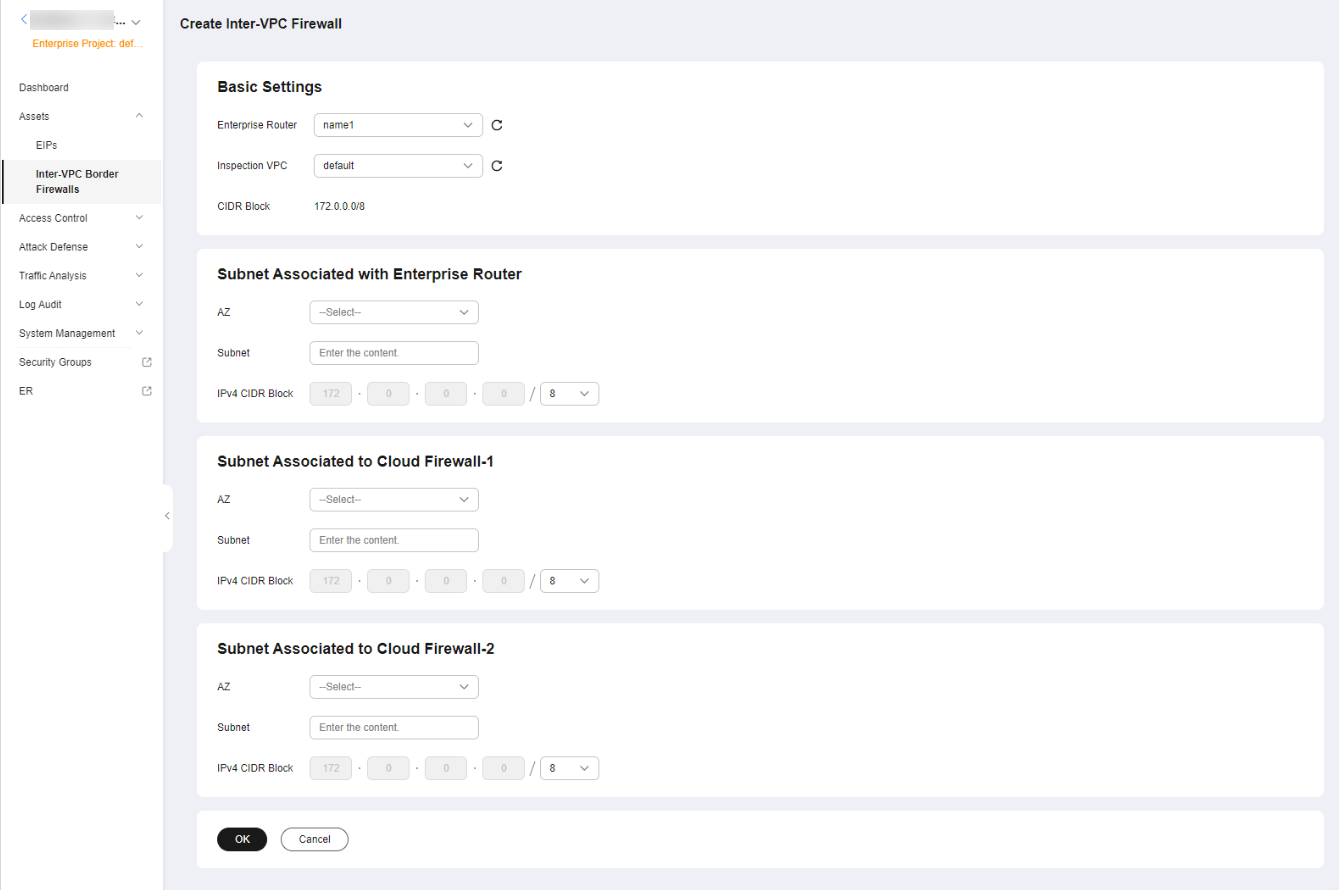
Because of dependency issues, the new and old versions of the VPC border firewall in enterprise router mode are used in different projects. You can check which version you are using on the firewall configuration page.
Figure 2 shows the configuration page. Table 2 shows the configuration process. For details about the configuration document, see Enterprise Router Mode (New).

| Procedure | Description |
|---|---|
| Plan CIDR blocks for traffic diversion on the VPC border firewall. NOTE: The traffic diversion VPC does not occupy the VPC protection quotas under your account. | |
| Use an enterprise router to transmit traffic among VPCs and CFW.
| |
| Enabling the VPC Border Firewall and Ensuring the Traffic Passes Through CFW | Enable VPC border traffic protection and check whether the traffic passes through CFW. |
| Configuring Protection Rules to Block or Allow VPC Border Traffic | Allow or block traffic based on protection rules. (Allowed traffic will be checked by IPS and antivirus functions.) |
| Adding Blacklist or Whitelist Items to Block or Allow VPC Border Traffic | Allow or block traffic based on the blacklist and whitelist. (Traffic allowed or blocked in this way will not be checked by other functions.) |
| Check whether protection policies take effect. | |
| (Optional) Perform the operations in this section if you need to add a VPC to be protected. |
Figure 3 shows the configuration page. Table 3 shows the configuration process. For details about the configuration document, see Enterprise Router Mode (Old).
| Procedure | Description |
|---|---|
| Plan CIDR blocks for traffic diversion on the VPC border firewall. NOTE: The traffic diversion VPC does not occupy the VPC protection quotas under your account. | |
| Use an enterprise router to transmit traffic among VPCs and CFW.
| |
| Enable VPC border traffic protection and check whether the traffic passes through CFW. | |
| Configuring Protection Rules to Block or Allow VPC Border Traffic | Allow or block traffic based on protection rules. (Allowed traffic will be checked by IPS and antivirus functions.) |
| Adding Blacklist or Whitelist Items to Block or Allow VPC Border Traffic | Allow or block traffic based on the blacklist and whitelist. (Traffic allowed or blocked in this way will not be checked by other functions.) |
| Check whether protection policies take effect. | |
| (Optional) Perform the operations in this section if you need to add a VPC to be protected. |
What is your overall rating for this page?
Thank you very much for your feedback. We will continue working to improve the documentation.See the reply and handling status in My Cloud VOC.
For any further questions, feel free to contact us through the chatbot.
Chatbot


