

Create Solution
Partner Architects register solutions.
The architect clicks the workspace name on the home page to go to the solution management page.

- If you completed the joint project initiation in the partner center, you can go to the solution draft editing page of the InnoStage Workbench from the partner center. For details, see Certification Test Operation Guide. Alternatively, you can log in to the InnoStage Workbench , click the workspace name to enter the workspace, click the solution name. Figure 2 Editing Solution

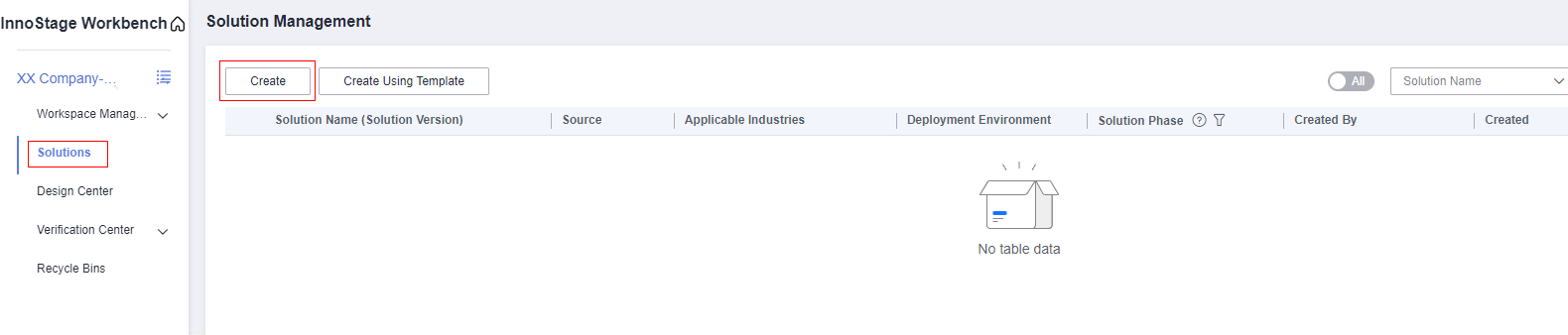
- If you create a workspace manually, you need to create a schema manually,log in to the InnoStage Workbench , click the workspace name to enter the workspace, choose [Solution] -> [Create]. Figure 3 Creating Solution
Reuse Verified Solution-NoS(Create)
- Basic Information: Figure 4 Solution Registration
 Fill in the solution basic info.
Information item
Description
Solution Name
If the solution name has been automatically filled in, do not modify it. If the solution name is not automatically filled in, associate it with CSBI,the solution name will be automatically filled in based on CSBI. If the project initiation has not been completed,please enter the solution name,the solution name must be consistent with the solution name in the project initiation OBP material.
Access Type
The value can be Hardware,API,Lisence,Saas.
Associate CSBI(Optional)
Associate the solution of the CSBI master data platform. The baseline solution must be initiated and associated here. If the project initiation has not been completed, you can also complete the association through the solution change function after the project initiation is completed.
Applicable Industry
Select the industry to which the product is applied. You can select multiple industries.
Deployment Environment
Set this parameter based on the actual deployment environment. The value can be HUAWEI CLOUD, HUAWEI CLOUD Stack (HCS), HUAWEI CLOUD Stack Online (HCSO), or Intelligent EdgeSite (IES)
Solution Description
Fill in the product solution description by referring to the sample text dimension.(The solution description is mandatory. Do not use the sample text directly.)
Select Node Handler.Information item
Description
Sub-item
Solution design
The person responsible for designing the technical architecture and configuration list needs to be an architect role in the workspace to be selected.
Select a partner's architect
Solution review
Person responsible for reviewing the solution, technical architecture, and configuration list
Select the PSA and a TE that interconnects with the project.
Test requirement submission
Person responsible for editing and submitting test requirements
Select a partner's test engineer
Test case design
Person responsible for designing test cases based on service requirements.
Select a partner's test engineer
Test case execution
Person responsible for executing test cases
Select a partner's test engineer
Test requirement review
Person responsible for reviewing requirements
Select the TE that interconnects with the project.
Test case review
Person responsible for reviewing whether test cases are qualified
Select the TE that interconnects with the project.
Test report review
Person responsible for reviewing whether the test report is qualified
Select Caofeng and wujunchaun.

By default, the handler of each node is the specified user in the flowchart.
When finished, click [complete solution registe,to version manager].
- Version Manager:
Click [Add]->Enter the version number in the dialog box that is displayed.
Figure 5 Add Version

When finished, click [Complete version management and proceed to Function List & Self-lnspection Checklist].
- Function List & Self-Inspection Checklist:During subsequent solution verification, function test requirements and test cases are generated based on the function list, performance test requirements and test cases are generated based on the performance indicator selfCheck, and reliability test requirements and test cases are generated based on the reliability index self-check.
- Download the function list template. Figure 6 Download template

- Fill in the function list template.
- Open the template and enter the solution name in the format of [XXX system product function list, version number: vx.x]. Figure 7 Modifying the solution name and version number
 Figure 8 Example

- The information in column A does not need to be adjusted. The product or solution component column in column B has three types: software, hardware, and manual service. Fill in the content involved in the solution based on the site requirements. In normal cases, the software part is mandatory. For components that are not involved, delete the corresponding information. Figure 9 Software, hardware, and manual service types
 Figure 10 Example

- Fill in the component feature division in columns D, E, and F. In the same column, cells with the same name are combined to facilitate identification on the Innostage workbench. For core functions in column G, partner lead venture is mandatory, corresponding to some sub-functions under level-2 functions, such as "Add" and "Delete". If there is no core function, copy the secondary function name to the core function. Figure 11 Filling in columns C, D, E, and F
 Figure 12 Example

- The self-check table allows you to edit the self-check of performance and reliability indicators in the template. Figure 13 Self-check list

After the above information is complete, save the file and modify the file name in the format of [XX Company-XX Solution Function List]
- Open the template and enter the solution name in the format of [XXX system product function list, version number: vx.x].
- Import FunctionList&Sel-lnspection Checkist.click [Import FunctionList&Sel-lnspection Checkist]->Import template. Figure 14 Import FunctionList&Sel-lnspection Checkist
 Figure 15 FunctionList Example

 Manual addition, deletion, and modification are also supported.Figure 16 FunctionList
 Figure 17 FunctionList

- Sel-lnspection Checklist,If the self-check commitment switch is turned on, the system automatically generates performance test cases and reliability test cases after the requirement is submitted in the verification phase. One test case is generated for each indicator. Figure 18 Sel-lnspection Example

When finished, click [Complete the function list and de-architecture design].
If your business does not need to test performance or reliability, close the Promised button.
- Download the function list template.
- Architecture Design;
- Integration Architecture Design.
Click [Create Architecture] and enter the integration architecture name and deployment environment.
Figure 19 Create Architecture

Design the integration architecture in the designer.For details, seeDesigning an Technical Architecture.
Figure 20 Architecture Design

- After the integration architecture design is complete, return to the Catalog page, select the configuration list, click [Create], and fill in the configuration list name and associated integration architecture in the dialog box that is displayed.
- Integration Architecture Design.
Review Solution
- After completing the architecture and configuration list design, the designer clicks [Complete the design and go to Solution Review]. Figure 21 Design Center

- Select the architecture and configuration list to be reviewed, select the reviewer, and click [Submit for Review]. Figure 22 Review Solution

- The reviewer will generate a to-do task. Click the button of the to-do task to go to the review page. Figure 23 To-Dos

- On the review page, click the [Review] button of the architecture or configuration list to review the architecture or configuration list. Select Through or Reject and click [OK.] Figure 24 Review Solution
 Figure 25 Review Solution

The rejected architecture or configuration list returns to the to-be-submitted phase. The designer modifies the rejected architecture or configuration list and submits it for review.
Reuse Verified Solution-Yes
If you meet the requirements for report reuse, you can reuse historical test reports without repeated tests(only test reports of the AP-Singapore site can be reused). If the reuse conditions are not met, the reuse process is still performed. Test cases that need to be retested need be designed in the case design phase.
- If you have completed certification tests such as Joint Operation Verification or advanced cloud software on the Innostage Workbench, select Reuse and select the workspace,solution,test requirement to which the report to be reused belongs. Figure 26 Reuse Verified Solution

- Fill in the solution basic info.
Information item
Description
Solution Name
If the solution name has been automatically filled in, do not modify it. If the solution name is not automatically filled in, associate it with CSBI,the solution name will be automatically filled in based on CSBI. If the project initiation has not been completed,please enter the solution name,the solution name must be consistent with the solution name in the project initiation OBP material.
Access Type
The value can be Hardware,API,Lisence,Saas.
Associate CSBI(Optional)
Associate the solution of the CSBI master data platform. The baseline solution must be initiated and associated here. If the project initiation has not been completed, you can also complete the association through the solution change function after the project initiation is completed.
Applicable Industry
Select the industry to which the product is applied. You can select multiple industries.
Deployment Environment
Set this parameter based on the actual deployment environment. The value can be HUAWEI CLOUD, HUAWEI CLOUD Stack (HCS), HUAWEI CLOUD Stack Online (HCSO), or Intelligent EdgeSite (IES)
Solution Description
Fill in the product solution description by referring to the sample text dimension.(The solution description is mandatory. Do not use the sample text directly.)
Select Node Handler.Information item
Description
Sub-item
Solution design
The person responsible for designing the technical architecture and configuration list needs to be an architect role in the workspace to be selected.
Select a partner's architect
Solution review
Person responsible for reviewing the solution, technical architecture, and configuration list
Select the PSA and a TE that interconnects with the project.
Test requirement submission
Person responsible for editing and submitting test requirements
Select a partner's test engineer
Test case design
Person responsible for designing test cases based on service requirements.
Select a partner's test engineer
Test case execution
Person responsible for executing test cases
Select a partner's test engineer
Test requirement review
Person responsible for reviewing requirements
Select the TE that interconnects with the project.
Test case review
Person responsible for reviewing whether test cases are qualified
Select the TE that interconnects with the project.
Test report review
Person responsible for reviewing whether the test report is qualified
Select Caofeng and wujunchaun.
click[complete solution register,to version manager].
- The solution version automatically inherits the version of the reused solution. You can manually add versions. Figure 27 Version Management

When finished, click[Complete versio management and proceed to Function List & Self-Inspection Checklist].
pection Checkist
In the "Capability Assessment" table, the column Qualified is displayed. The test case marked with Yes indicates that the test case has been executed and passed for the reused test requirement. In this case, you do not need to perform the test again. The test cases marked No are the test cases that need to be retested.
Figure 28 Reuse Verified Solution

The criterion for determining whether the solution can be reused is as follows: Compare the solution architecture and function list to be reused. If the architecture is consistent and the change rate of the function list is lower than 10%, the solution can be reused.
- The new solution automatically inherits the function list of the reused solution. If the new solution requires new function modules, add new function items to the original function list. For details, seeFunction List. Figure 29 Function List & Self-Inspection Checklist

When finished, click[Complete versio management and proceed to Function List & Self-Inspection Checklist].
- The new solution automatically inherits the integration architecture and configuration list of the reused solution. If the new solution needs to modify the architecture or configuration list, modify the architecture or configuration list based on the existing architecture and configuration list. For details, seeSolution design. Figure 30 Architecture Design

When finished, click[Review Solution].
- Submit for review.
After the solution design is complete, click [Complete the design and go to Solution Review].
Figure 31 Review Solution

- Select the architecture to be submitted, use the default handler as the reviewer.(Huawei test engineers are required),click [Submit for Review] . Figure 32 review the solution

- After the architecture is submitted, Huawei PSA and test engineers generate a to-do task. After the to-do task is approved by them, the solution phase is design completion. Figure 33 to-do
 Figure 34 Solution Management

What is your overall rating for this page?
Thank you very much for your feedback. We will continue working to improve the documentation.See the reply and handling status in My Cloud VOC.
For any further questions, feel free to contact us through the chatbot.
Chatbot


