

Updated on 2026-09-23 GMT+08:00
Querying Timbre IDs
You can query timbre IDs on the MetaStudio console or using the API:
- Method 1: Querying Timbre IDs on the Console: only for custom timbre IDs
- Method 2: Querying Timbre IDs on the Console: all timbre IDs
- Method 3: Querying Timbre IDs Using the API: all timbre IDs
Method 1: Querying Timbre IDs on the Console
This query method applies only to custom timbre IDs, not preset ones.
- Log in to the MetaStudio console and go to the Overview page.
- Click Go to MetaStudio Console to go to the MetaStudio console.
- In the navigation pane, choose Assets > My Models.
- Choose Voices > Activated. Click
 in the lower right corner of the voice card to be used and select View Details from the drop-down list. The Voice Details page is displayed. The asset ID is the timbre ID required by the WebSocket API for speech synthesis.Figure 1 Voice details

Method 2: Querying Timbre IDs on the Console
You can press F12 on the MetaStudio console to query timbre IDs. Perform the following steps:
- Log in to the MetaStudio console and go to the Overview page.
- Click Go to MetaStudio Console to go to the MetaStudio console.
- Click Create under Video production.
- On the page displayed, press F12 to open the code window and select the Network tab.
- Return to the video production page and click Education female at the bottom of the page. The voice dialog box is displayed.
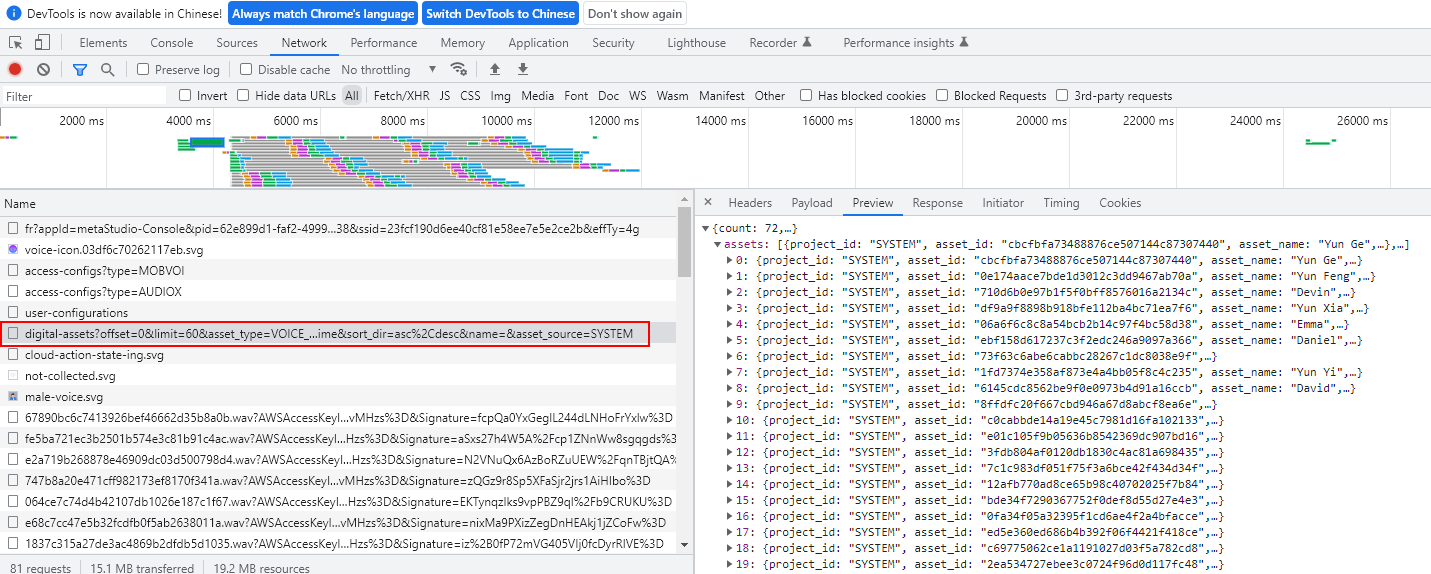
- In the Name column of the code window, find and click the line starting with digital-assets, as shown in Figure 2.
digital-assets is also a value in the URI of the API for querying assets.
Under the Preview tab on the right, you can see the asset_ids of all timbres, which are the desired timbre IDs.
Method 3: Querying Timbre IDs Using the API
You can call the API for querying assets to query timbre IDs. Configure these parameters:
- offset=0: The query starts from the first timbre. You can customize the value.
- limit=60: Voice data records that can be queried each time. You can customize the value.
- asset_type=VOICE_MODEL: The asset type is timbre model.
- asset_state=ACTIVED: The asset has been activated.
- asset_source=SYSTEM: The asset is a preset one.
- voice_provider=HUAWEI_METASTUDIO: The timbre model MetaStudio-developed. You can change the value.
What is your overall rating for this page?
0
1
2
3
4
5
6
7
8
9
10
Very dissatisfiedVery satisfied
Thank you very much for your feedback. We will continue working to improve the documentation.See the reply and handling status in My Cloud VOC.
The system is busy. Please try again later.
For any further questions, feel free to contact us through the chatbot.
Chatbot


