

Cloud computing is a service model that provides resources such as compute, storage, networking, databases, and software on demand over networks. Powered by resource pooling, virtualization, and automatic scheduling, cloud computing enables fast resource delivery, elastic scaling, and pay-per-use billing. It also provides AI with compute power, model training, and inference deployment capabilities. These capabilities lower the barrier to building and using intelligent applications, driving business innovation, digital transformation, and intelligent upgrade.
In traditional IT models, many enterprises face common challenges during IT construction and routine O&M:
- Low average resource utilization and energy efficiency: In traditional models, different business systems are like independent silos, each occupying server resources exclusively and unable to share resources with one another. As hardware performance improves, a single software application often cannot fully utilize the compute power of an entire server. This results in resource waste and unnecessary energy consumption.
- Long test periods and low efficiency for new service rollout: Whenever a new idea or service needs to be launched, the IT team typically has to go through a series of steps, from purchasing underlying hardware and setting up the environment to optimizing the network, followed by repeated tests. The entire process usually takes two to three months, often missing market opportunities and failing to support rapid innovation.
- Insufficient resource capacity and elasticity: During holidays or traffic peaks, fixed hardware resources often cannot be quickly expanded, causing slow system responses or even system breakdowns. To handle occasional peaks, enterprises have to purchase and maintain redundant equipment, which wastes costs.
- Conflict between information security and mobile access: Enterprises need to strictly protect core data while also enabling employees to collaborate efficiently anytime, anywhere using various mobile devices. Traditional security architectures often struggle to balance strict control with convenient access. Overly strict policies may hinder collaboration efficiency, while overly loose policies may increase data risks.
- High IT construction costs for small- and medium-sized enterprises (SMEs): For many growing enterprises, building a professional IT team, setting up equipment rooms, and managing full lifecycle operations require high upfront and ongoing costs. Enterprises prefer to obtain out-of-the-box, pay-per-use IT services and focus their limited resources on core business.
To address these needs, cloud computing offers a more lightweight and flexible approach. Through resource pooling, service-based delivery, and automatic scheduling, cloud computing enables enterprises to centrally manage their underlying infrastructure and development and operating environments on a cloud platform. This not only effectively reduces the total cost of ownership (TCO) and shortens the service delivery period, but also transforms IT resource allocation from static planning to on-demand provisioning. As a result, enterprises can reduce their O&M burden and focus more on their core business.
- On-demand provisioning: Multiple resource provisioning and billing modes are available, such as pay-per-use, hourly, and bandwidth-based billing. Billing details, cost analysis, and budget alerts are provided to ensure cost transparency and control. Enterprises do not need to build their own data centers or reserve a large amount of hardware, reducing auxiliary expenditures on facility construction, power supply, and cooling.
- Elastic scaling: Compute, storage, and networking resources can be automatically or manually adjusted in real time based on traffic fluctuations. Rapid scale-out during peak hours ensures stable services, and timely scale-in during off-peak hours prevents resource idleness. This approach helps enterprises better handle sudden traffic surges and supports long-term stable business growth.
- Agile development: Out-of-the-box capabilities such as big data, AI/machine learning, IoT, containers, and microservices are provided. Enterprises can quickly integrate and deploy applications without building complex underlying platforms from scratch. This shortens the R&D and rollout periods, reduces trial-and-error costs, and improves business innovation efficiency.
- Comprehensive security and compliance: Systematic security capabilities are provided, including Anti-DDoS, Web Application Firewall (WAF), and Data Encryption Workshop (DEW). These capabilities, combined with audit and access control, help meet compliance requirements.
- High availability (HA) and reliability: The multi-region and multi-AZ redundancy design enables fault isolation and automatic failover, reducing the risk of service interruptions caused by single points of failure. Multi-copy backup and comprehensive data protection are used to reduce the risk of data loss caused by hardware faults or misoperations.
Common use cases of cloud computing include:
- Quick rollout of Internet applications: When building websites, e-commerce platforms, or mobile application backends, enterprises need to prepare servers, databases, storage, and network environments while handling access traffic fluctuations. Cloud computing can quickly create and run resources, deploy applications, and distribute access requests through load balancing. Resources scale out as traffic increases and scale in during off-peak periods, shortening rollout cycles and mitigating the impact of traffic spikes on system stability.
- Collaboration between IoT and edge computing: In scenarios such as manufacturing and energy, a large number of IoT devices continuously generate data and require quick responses. Cloud computing works with edge computing technologies to preliminarily process and filter data on edge nodes close to data sources, and then upload key data to the cloud for in-depth analysis and modeling. This reduces the amount of data transmitted over networks and ensures timely processing of key data.
- Cloud-based deployment of enterprise business systems: Core enterprise systems, such as office systems and financial systems, usually require long-term stable running and unified governance. Cloud computing centralizes the management of applications, databases, and network environments on a unified platform. Through permission control, monitoring and alarms, and automatic O&M, it simplifies management and improves operational efficiency.
- Big data processing and analytics: Tasks such as log analysis, user behavior analysis, and operation reports usually involve massive data volumes and changing compute requirements. Cloud computing allows for the dynamic addition of compute and storage resources based on task requirements to facilitate data collection, cleansing, analysis, and archiving. Once the tasks are complete, the resources are released, thereby enhancing processing efficiency and enabling more flexible resource utilization.
- Disaster recovery and business continuity: Industries such as finance, government, and manufacturing need to minimize system downtime and data loss risks. The cloud platform allows for data backups and service replicas to be stored in different regions or availability zones (AZs). If a device or region fails, services can be quickly recovered, improving the continuous operation of key systems.
Cloud computing has advanced through four stages: first improving resource efficiency, then accelerating resource delivery, next adapting application architectures, and ultimately enabling platform-based and intelligent operations.
- Cloud computing 1.0: virtualization
In the early stage, each application typically required a dedicated physical server, which was often underutilized. Virtualization allowed a single physical server to be divided into multiple virtual servers, enabling multiple applications to share the same hardware and reducing idle capacity. However, in this stage, O&M personnel still had to manually prepare and configure resources, and the application rollout speed remained relatively slow.
- Cloud computing 2.0: resource as a service
Building on virtualization, enterprises centralized server, storage, and networking resources into a unified resource pool. Users could request resources through a cloud platform, with the system automating part of the configuration instead of relying entirely on manual operations. When access traffic increased, resources could be added. When access traffic decreased, resources could be released. This stage mainly solved the problems of resource requests and delivery efficiency. However, many applications were still constructed in the traditional way.
- Cloud computing 3.0: cloud native
In the past, many functions of a large system were tightly coupled. Modifying one part of the system might affect the entire system. Cloud native breaks down a large system into multiple relatively independent microservices. Each microservice can be developed, upgraded, and scaled independently. Common capabilities such as databases and messaging services are provided by the platform in a unified way. This makes the system more flexible and easier to adapt to business changes.
- Cloud computing 4.0: platform-based and intelligent operations
In this stage, the cloud platform not only provided servers and storage devices, but also became a unified technical platform for enterprises. Developers could quickly obtain development environments and common tools through the platform, reducing repeated configurations. O&M personnel could use AI to analyze logs, monitoring data, and fault alarms, helping them identify and handle issues. In addition, enterprises could complete data processing, model training, and AI application deployment on the cloud platform, and integrated AI capabilities into their business systems for intelligent analysis, decision-making assistance, and automated processing.
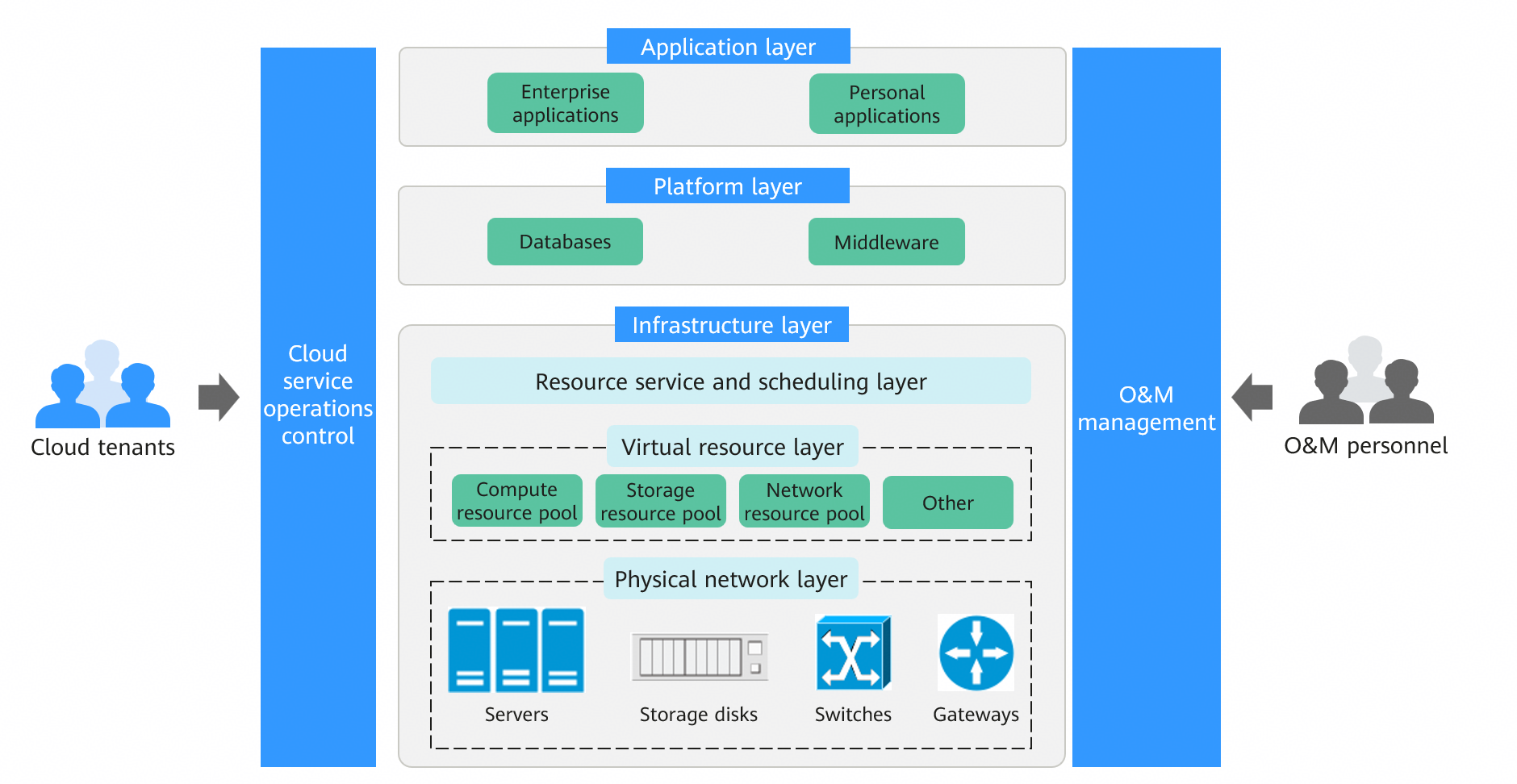
A cloud computing system typically consists of five modules: physical infrastructure layer, platform layer, application layer, cloud service operations control layer, and O&M management layer. Each layer has clear responsibilities and functions, and together they support the stable operation and external service capabilities of the cloud platform.
- Infrastructure layer: The foundation of the cloud computing system, including servers, storage devices, network devices, and power and cooling facilities related to data centers. This layer provides foundational compute, storage, and networking communication capabilities that source all cloud services. Its primary objective is to ensure stable performance, adequate capacity, and high reliability, laying a foundation for upper-layer resource abstraction and workload execution.
- Platform layer: Located above the physical infrastructure, this layer is responsible for virtualizing and centrally managing underlying hardware resources. By leveraging virtualization, containerization, and resource scheduling technologies, it consolidates distributed physical resources into a unified resource pool, enabling elastic allocation of compute, storage, and networking resources. In addition, this layer provides basic platform capabilities such as databases, middleware, and runtime environments, offering development and operational support for upper-layer application systems. It serves as the core layer that connects basic resources with business systems.
- Application layer: This layer hosts specific business systems and software services, such as office systems, enterprise management systems, e-commerce systems, and big data analytics platforms. It directly provides functions and services for end users. The application layer is deployed based on the runtime environments and resources provided by the platform layer. Users can access related services through a unified portal without paying attention to the underlying technologies.
- Cloud service operations control layer: It is responsible for unified management and service control of the cloud platform, including user management, permission management, resource requests and approval, quota management, service orchestration, and metering and billing. This layer enforces standardized and controllable resource allocation while supporting multi-tenant management and refined operations. It is a key module for commercializing the platform and scaling cloud operations.
- O&M management layer: It runs throughout the entire cloud computing system and is responsible for system monitoring, performance management, log analysis, troubleshooting, security management, and capacity planning. Monitoring and automatic O&M tools are used to monitor resources at each layer in real time and provide risk warnings, ensuring the platform runs securely, stably, and efficiently.
During the overall operation, the physical infrastructure layer provides underlying hardware resources, the platform layer consolidates and schedules resources in a unified way, and the application layer deploys and runs various business systems based on platform capabilities. The cloud service operations control layer centrally manages processes such as resource requests, allocation, permission, and billing. The O&M management layer continuously monitors and maintains the entire platform. These modules collaborate to enable on-demand resource allocation, elastic scaling, and centralized management. They improve resource utilization and service stability, reduce construction and O&M costs, and effectively support sustained growth of multi-tenant, multi-workload scenarios.
Cloud computing and traditional IT share the same objective of providing compute, storage, and networking support for enterprise business systems. However, they differ significantly in their construction models and technical approaches, making them suitable for different development stages and business requirements.
- Application scenarios: Traditional IT is more suitable for environments with relatively stable workloads, predictable capacity needs, and stringent requirements for on-premises deployment and localized control. Cloud computing is more suitable for scenarios characterized by traffic fluctuations, fast rollouts, or continuous iteration, providing superior support for innovative and growing businesses.
- Implementation principle: Traditional IT relies on physical devices directly hosting business systems, with resources typically dedicated and expansion dependent on new hardware. Cloud computing uses virtualization, containerization, and distributed architecture to abstract physical resources into unified pools and dynamically allocate resources through centralized scheduling.
- Resource provisioning: Traditional IT requires upfront device procurement and capacity planning based on peak demand. The construction period is relatively long. Cloud computing supports on-demand resource provisioning and elastic scaling, enabling rapid resource delivery.
- Cost structure: Traditional IT relies primarily on upfront capital expenditures (CapEx). Cloud computing operates mainly on usage-based billing, converting fixed costs into variable operational expenditures (OpEx) to align spending directly with actual business scale.
- Performance characteristics: Traditional IT performance depends heavily on single-server or small-cluster capabilities. Cloud computing, built on distributed architectures, supports horizontal scaling, enabling systems to boost overall processing capabilities during high-concurrency scenarios by adding instances, while improving availability through multi-replica redundancy.
- O&M model: Traditional IT infrastructure and systems are maintained by enterprises' in-house teams. In cloud computing environments, infrastructure is maintained by cloud platforms, allowing enterprises to focus on applications and business innovation.
| Dimension | Traditional IT | Cloud Computing |
|---|---|---|
| Application scenarios | Stable workloads, predictable capacity, and high localization requirements | Traffic fluctuations, requiring fast rollout and expansion |
| Implementation principle | Direct physical device hosting with dedicated resource allocation | Virtualization and distributed architectures with pooled resource management |
| Resource provisioning | Upfront procurement with fixed configurations | On-demand provisioning and elastic scaling |
| Cost structure | Primarily upfront CapEx | Primarily usage-based billing |
| Performance characteristics | Depending on single-server performance with vertical scaling (scaling up) | Powered by horizontal scaling (scaling out) with stronger overall elasticity |
| O&M model | End-to-end management by enterprises' in-house teams | Infrastructure centrally maintained by cloud service providers, allowing enterprises to focus on business |
Cloud computing can be classified from different dimensions, with common classification criteria including deployment models and service types. Deployment models reflect who builds and uses cloud resources, and service types reflect the abstraction level of capabilities provided by the cloud platform to users.
Deployment models
- Public cloud: enables cloud service providers to build and maintain the infrastructure and provide resources and services to multiple customers. This model is suitable for services that require fast rollout, high elasticity, and limited O&M capabilities.
- Private cloud: serves only a specific organization, with clearer resource and management boundaries tailored to internal standards. This model is suitable for scenarios with high requirements for data isolation, compliance auditing, or network and security policies.
- Hybrid cloud: combines on-premises environments with the public or private cloud, so that different services can run in their optimal environments. This model is suitable for enterprises that gradually move their services to the cloud and need to retain local control over specific systems.
Service types
- Infrastructure as a service (IaaS): provides foundational resources such as compute, storage, and networking. You are responsible for deploying and managing operating systems, middleware, and applications. It is suitable for teams that have certain O&M capabilities and want to control the running details.
- Platform as a service (PaaS): provides platform capabilities such as databases, container runtime environments, and messaging services on the basis of IaaS, reducing the underlying O&M workload. It is suitable for teams that want to develop and deliver services faster and focus more on services.
- Software as a service (SaaS): directly delivers ready-to-use software functions. You primarily focus on configuration and usage. It is suitable for teams that want to quickly obtain general capabilities and reduce IT construction and O&M costs.
Huawei Cloud has built a full-stack cloud service system that covers infrastructure, platform capabilities, and business applications to meet enterprises' digital and intelligent upgrade requirements.
- AI: In the era of intelligent transformation, large models and AI agents have become key technologies for enterprises to improve their core competitiveness. Huawei Cloud has built a full-stack AI service matrix that covers underlying compute power, model training and inference, agent development, and business applications. Typical services include ModelArts, Model as a Service (MaaS), and CodeArts Agent. These services aim to help enterprises overcome the limitations of compute provisioning and technical thresholds, and seamlessly integrate AI capabilities into software development, business automation, and enterprise knowledge management.
- Compute: Compute services are an important part of Huawei Cloud computing infrastructure and provide the basic compute foundation for diverse workloads on the cloud. Typical services include Elastic Cloud Server (ECS), Flexus L Instance (FlexusL), and Image Management Service (IMS). These services offer secure, reliable, high-performance compute capacity on demand for all scenarios, from lightweight applications to enterprise-grade core systems. With a core focus on scalability, high availability, and simplified O&M, they enable you to quickly create, deploy, and manage compute resources.
- Storage: Storage services are an important part of cloud computing infrastructure, providing diverse capabilities for data storage, management, and protection. Typical services include Object Storage Service (OBS), Elastic Volume Service (EVS), Scalable File Service Turbo (SFS Turbo), and Scalable File Service (SFS). These services provide reliable, secure, and scalable storage resources for different workloads, helping enterprises improve data availability and service continuity.
- Networking: Networking services build cloud network topologies that provide secure isolation, flexible connectivity, and cross-region interconnection. Typical services include Virtual Private Cloud (VPC), Elastic IP (EIP), Elastic Load Balance (ELB), and Cloud Connect. These services provide a full spectrum of networking capabilities, including foundational networking, multi-cloud interconnection, application load balancing and traffic scheduling, edge distribution and acceleration, and network security.
- Security: Huawei Cloud provides a broad range of security services and data encryption services. Typical security services include Anti-DDoS Service (AAD) and Web Application Firewall (WAF). Typical data encryption services include Data Encryption Workshop (DEW).
- Containers & Middleware: Huawei Cloud provides a wide range of container services and ecosystem services. Centered on Cloud Container Engine (CCE) alongside Cloud Container Instance (CCI) and SoftWare Repository for Container (SWR), it forms a complete cloud-native container product matrix covering cluster management, serverless containers, image management, service mesh, and artifact management. This portfolio supports all scenarios from development and testing to large-scale production.
- Databases: Huawei Cloud provides a wide range of database services and ecosystem services, covering relational, key-value, document, in-memory, time series, and wide-column databases. Centered on services such as GaussDB, Relational Database Service (RDS), GeminiDB, and Document Database Service (DDS), Huawei Cloud supports all scenarios from development and testing to business cloud migration and core production system construction.
- Big Data: Huawei Cloud big data services include core offerings such as MapReduce Service (MRS), Data Warehouse Service (DWS), DataArts Studio, and Cloud Search Service (CSS). These cloud services work together as a comprehensive big data technology stack on Huawei Cloud, covering the full data lifecycle from data collection, storage, processing, and analytics to search.
- Content Delivery Network (CDN) and edge computing: extend compute and content delivery capabilities to the edge closer to users. Typical services include Content Delivery Network (CDN) and CloudPond, which effectively reduce network latency, relieve origin server pressure, and improve cross-region access experience.Through cross-domain collaboration, Huawei Cloud has developed a full-stack cloud architecture that features elastic scaling, security and controllability, and high availability. This architecture aligns with the digital transformation and business development needs of enterprises at different stages.
Related Products
Related Products

ModelArts
Build, train, and deploy machine learning modelsquickly and easily

CodeArts Agent
AI coding platform with deep understanding of project context

MaaS
Ultimate Performance, Intuitive Tokens Service

Elastic Cloud Server (ECS)
Get your own secure, scalable virtual servers in the cloud

Huawei Cloud Flexus L Instance
Lightweight cloud servers ready for use out-of-the-box

Image Management Service (IMS)
Create and manage cloud servers and disks with ease

Object Storage Service (OBS)
Take advantage of infinitely scalable, durable, and secure object storage

Elastic Volume Service (EVS)
Give your servers persistent block storage

Scalable File Service Turbo (SFS Turbo)
Enjoy high-bandwidth, low-latency access to fully-hosted shared file systems

Scalable File Service (SFS)
Enjoy fully hosted NAS file systems

Cloud Backup and Recovery (CBR)
Centrally manage backups of your cloud and on-premises resources

Virtual Private Cloud (VPC)
Guard your system with isolated, private networks

Elastic Load Balance (ELB)
Distribute incoming traffic across multiple backend servers

Elastic IP (EIP)
Create highly available systems with static public IP addresses

Cloud Connect
Connect VPCs across regions

Domain Name Service (DNS)
Highly available, scalable authoritative resolution

Direct Connect
Establish dedicated network connections to Huawei Cloud

Cloud Container Engine (CCE)
Experience enterprise-class, managed Kubernetes service

SoftWare Repository for Container (SWR)
Manage your container images easily

Ubiquitous Cloud Native Service (UCS)
Extend cloud native to where your business goes

Web Application Firewall (WAF)
Protects web applications and websites from common online attacks.

Host Security Service (HSS)
Manage assets, prevent intrusions, and eliminate vulnerabilities

Anti-DDoS Service (AAD)
Swiftly mitigate cyberattacks that could disrupt services

TaurusDB
A MySQL-compatible enterprise-grade database

RDS for MySQL
Power your LAMP stack with this popular, open-source database

GaussDB
An enterprise-grade, distributed relational database

GeminiDB
A cloud-native multi-model database compatible with mainstream NoSQL database protocols

Data Replication Service (DRS)
Migrate your databases with minimal downtime

MapReduce Service (MRS)
Run open source analytics workloads on high-availability big data clusters

Cloud Search Service (CSS)
Query accurately by multiple conditions

DataArts Studio
Manage your data development and governance in one place

Data Warehouse Service (DWS)
Give your warehouse market-leading performance, superlative stability, and on-demand scaling

Data Lake Insight (DLI)
Analyze and process streaming and batch data

Content Delivery Network (CDN)
Get content to users on this fast, scalable, and secure network

Intelligent Edge Cloud (IEC)
Deploy cloud services near you for low latency

CloudPond
Deploy integrated racks and cloud services on customer's facilities