

Updated on 2026-02-09 GMT+08:00
Why Can't I Find the Uploaded Video on the Console?
Possible causes are as follows:
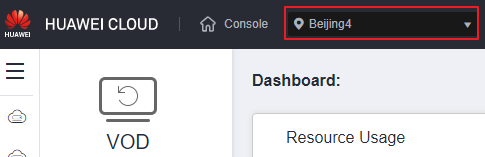
- You are viewing the video in a region different from where it was uploaded. You can check its upload region by performing the following operations:
Log in to the VOD console and check the region where the video was uploaded.
Figure 1 Region
- The video was uploaded via API, but its upload was not confirmed. In this case, call the Confirming Media Upload API to complete the upload confirmation.
If the problem persists, submit a service ticket for technical support.
Parent topic: Upload
What is your overall rating for this page?
0
1
2
3
4
5
6
7
8
9
10
Very dissatisfiedVery satisfied
Thank you very much for your feedback. We will continue working to improve the documentation.See the reply and handling status in My Cloud VOC.
The system is busy. Please try again later.
For any further questions, feel free to contact us through the chatbot.
Chatbot


