

Help Center/
Distributed Message Service for RabbitMQ/
User Guide/
Applying for Increasing RabbitMQ Quotas
Updated on 2025-11-20 GMT+08:00
Applying for Increasing RabbitMQ Quotas
What Is Quota?
A quota is a limit on the quantity or capacity of a certain type of service resources that you can use, for example, the maximum number of RabbitMQ instances that you can create.
If the current resource quota cannot meet your service requirements, you can apply for a higher quota.
How Do I View My Quotas?
- Log in to the RabbitMQ console.
- Click
 in the upper left corner of the console and select a region and a project.
 - In the upper right corner of the page, choose Resources > My Quotas.
The Quotas page is displayed.
Figure 1 My quotas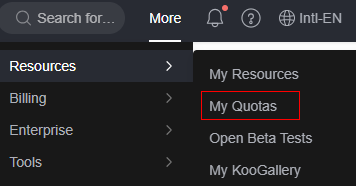
- On the Quotas page, view the used and total quotas of each type of resources.
If a quota cannot meet your service requirements, apply for more quotas.
How Do I Increase My Quota?
- Log in to the RabbitMQ console.
- In the upper right corner of the page, choose Resources > My Quotas.
The Quotas page is displayed.
- In the upper right corner of the page, click Increase Quota.
- On the Create Service Ticket page, set the parameters.
In the Problem Description area, enter the required quota and the reason for the quota adjustment.
- Read the agreements and confirm that you agree to them, and then click Submit.
Feedback
Was this page helpful?
Provide feedbackThank you very much for your feedback. We will continue working to improve the documentation.See the reply and handling status in My Cloud VOC.
The system is busy. Please try again later.
For any further questions, feel free to contact us through the chatbot.
Chatbot


