

Dynamic Port Honeypot Overview
What is Dynamic Port Honeypot?
The dynamic port honeypot function is a proactive defense measure. It uses a real port as a honeypot port to induce attackers to access the network. In the horizontal penetration scenario, the function can effectively detect attackers' scanning, identify faulty servers, and protect real resources of the user.
You can enable the dynamic port honeypot using recommended ports or user-defined ports to deceive compromised servers and reduce the risk of resources intrusion.
Principles of Dynamic Port Honeypot Protection
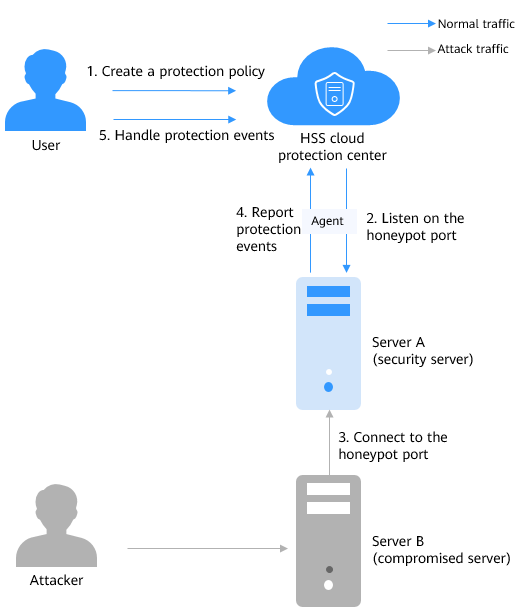
Figure 1 shows the principles of dynamic port honeypot protection. The process is as follows:
- Create a protection policy.
Select a target server and set a honeypot port. Generally, select a common service port that is not used in actual services.
- Listen to the honeypot port.
- Connect to the honeypot port.
If an attacker scans the network or attempts to connect to the honeypot port, HSS records the connection event and rejects the connection.
- Report protection events.
Once the honeypot port is connected, HSS immediately generates an alarm and displays the event information in the protection event list.
- Handle alarms.
Check whether there are compromised servers on the intranet based on the honeypot port protection events or other related events.
Application Scenarios of Dynamic Port Honeypot
Unlike traditional security technologies that focus on defense, dynamic port honeypot proactively lures attackers in the intranet. It not only detects compromised servers in a timely manner, but also deceives and delays attackers.
How Do I Use Dynamic Port Honeypot?
|
No. |
Operation |
Description |
|---|---|---|
|
1 |
Configure the honeypot port, the source IP address whitelist, and associated servers. (Only the servers not bound to any EIPs are supported.) |
|
|
2 |
The dynamic port honeypot function reports an alarm when a potentially compromised server proactively connects to a honeypot port. You can handle the alarm as needed. |
Constraints
- Dynamic port honeypots apply only to servers that are not bound to EIPs.
- Dynamic port honeypots are available only in HSS premium, web tamper protection, and container editions. For details about how to purchase and upgrade HSS, see Purchasing an HSS Quota and Upgrading a Protection Quota.
- To use the dynamic port honeypots, ensure that the agent installed on the server falls within the following ranges. For more information, see Upgrading the Agent.
- Linux: 3.2.10 or later.
- Windows: 4.0.22 or later.
Feedback
Was this page helpful?
Provide feedbackThank you very much for your feedback. We will continue working to improve the documentation.See the reply and handling status in My Cloud VOC.
For any further questions, feel free to contact us through the chatbot.
Chatbot


