

Metadata Security Best Practices
Disabling Instance Metadata (When Purchasing an ECS)
If your ECS applications do not need to access metadata, disable metadata to avoid unnecessary security risks.
- Go to the Buy ECS page.
Set the required parameters to purchase an ECS. For details, see Purchasing an ECS in Custom Config Mode.
- In Advanced Settings, set Metadata Access to Disable. Figure 1 Setting the metadata version

- Confirm the settings and click Submit.
Disabling Instance Metadata (For an Existing ECS)
If your ECS applications do not need to access metadata, disable metadata to avoid unnecessary security risks.
- Go to the Buy ECS page.
- Click the ECS name to go to the ECS details page.
- Disable metadata access. Figure 2 Disabling metadata access

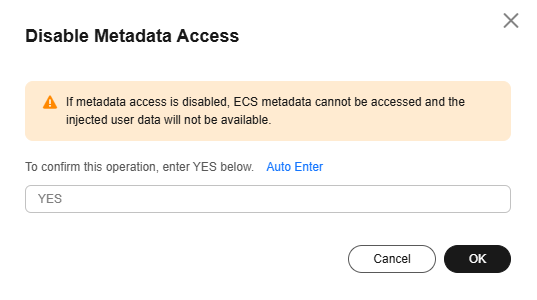
- In the Disable Metadata Access dialog box, enter YES and click OK. Figure 3 Disabling metadata access
Restricting the Scope of an Agency
Configure an agency to obtain temporary credentials from metadata. For details, see Accessing Other Cloud Services from ECS Using Temporary Access Keys of an Agency.
To prevent credential leakage, you need to strictly control the scope of the agency.
- If temporary credentials are not required, do not configure an agency.
- If temporary credentials are required, configure only necessary permissions for the agency based on the principle of least privilege (PoLP).
Accessing Metadata Using V2 (Hardening)
V2 (hardening) helps prevent most SSRF attacks on metadata.
However, this denies access using the V1 (traditional) method. To prevent this issue, use V2 (hardening) at the instance level.
- Set the access method of services or applications in the OS to V2 (hardening) for metadata access.
- Set Metadata Version of an ECS to Only V2 (Token). For details, see Configuring Instance Metadata Options.
What is your overall rating for this page?
Thank you very much for your feedback. We will continue working to improve the documentation.See the reply and handling status in My Cloud VOC.
For any further questions, feel free to contact us through the chatbot.
Chatbot


