

Example: Configuring SNAT Protection Rules
This section describes how to configure SNAT-based defense. For more parameter settings, see Configuring Protection Rules to Block or Allow NAT Gateway Border Traffic.
SNAT Protection Configuration
Assume your private IP address is 10.1.1.2 and the external domain name accessed through the NAT gateway is www.example.com. Configure NAT protection as follows and set other parameters based on your deployment:
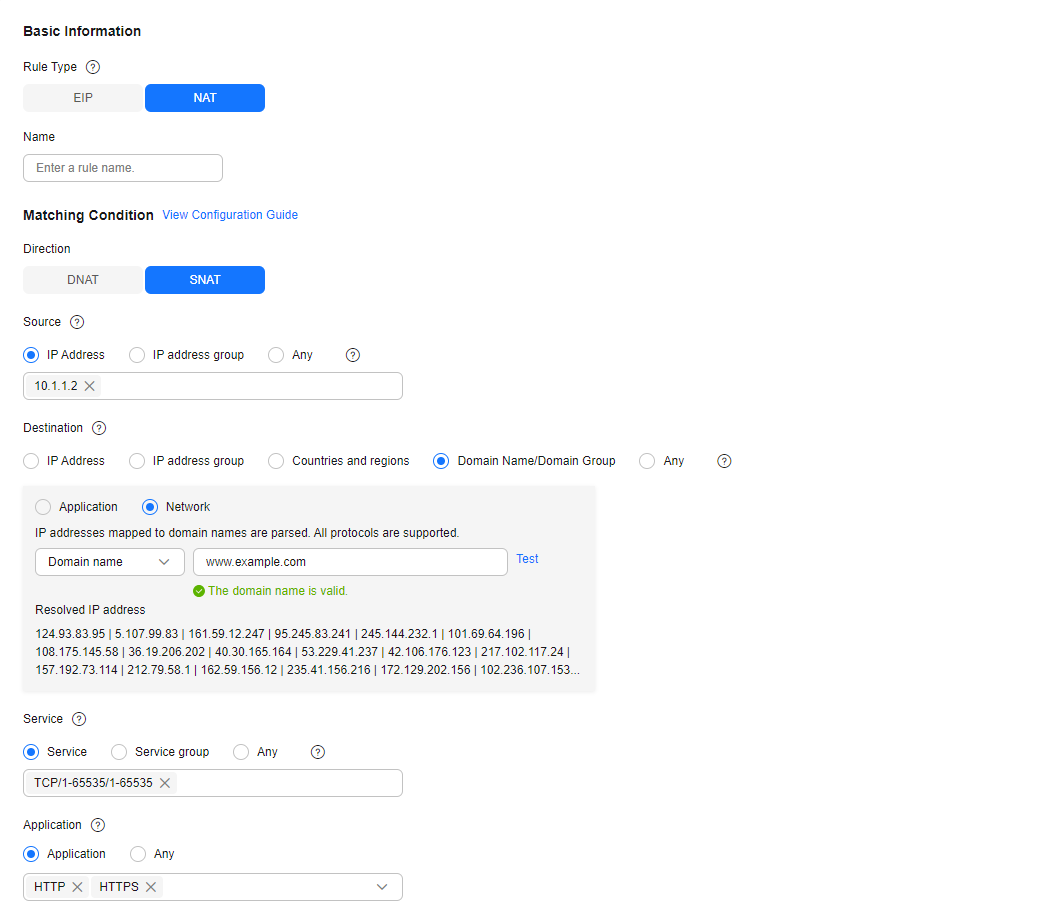
| Parameter | Example Value | Description |
|---|---|---|
| Direction | SNAT | Direction of the protected traffic. |
| Source | IP Address/IP address group/Countries and regions IP Address 10.1.1.2 | Origin of network traffic. |
| Destination | IP Address/IP address group/Countries and regions/Domain name/Domain name group: Network domain name group, www.example.com | Receiver of network traffic. |
| Service | Service TCP, 1-65535, 1-65535 | Protocol, source port, and destination port of network traffic. |
| Application | Application HTTP, HTTPS | Protection policy for application layer protocols. |
| Protection Action | Allow | Action taken when traffic passes through the firewall. |
Follow-up Operations
- Policy hits: For details about the protection overview, see Viewing Protection Information Using the Policy Assistant. For details about logs, see Viewing Attack Event Logs.
- For details about the traffic trend and statistics, see Traffic Center. For details about traffic records, see Log Query.
References
- For details about protection rule parameters, see Configuring Protection Rules to Block or Allow NAT Gateway Border Traffic.
- For details about blacklist and whitelist configuration, see Adding Blacklist or Whitelist Items to Block or Allow NAT Gateway Border Traffic.
- For details about how to batch add protection policies, see Importing and Exporting Protection Policies.
- For details about how to block network attacks, see Configuring Basic IPS Protection.
- For details about antivirus, see Configuring Virus Defense.
What is your overall rating for this page?
Thank you very much for your feedback. We will continue working to improve the documentation.See the reply and handling status in My Cloud VOC.
For any further questions, feel free to contact us through the chatbot.
Chatbot


