

A Server Created Using an Image Enters Maintenance Mode After Login
Symptom
A server is created using the image of a cloud server backup. However, upon login to the server, the server enters maintenance mode and cannot be used.
Possible Cause
After the server is created, the /etc/fstab file on the system disk of the new server retains configuration parameters from the source server. As a result, the UUIDs referenced in the file do not match the new data disks, causing the ECS instance to encounter an error when loading /etc/fstab and enter maintenance mode.
Solution
The following uses CentOS as an example.
- After creating an ECS using an image, log in to the ECS console, click Remote Login in the row of the ECS.
- On the maintenance mode page that is displayed, access the system as prompted.
Figure 1 Maintenance mode of the system

- Run the cat /etc/fstab command to check the disk attachment information.
Figure 2 Data disk UUIDs
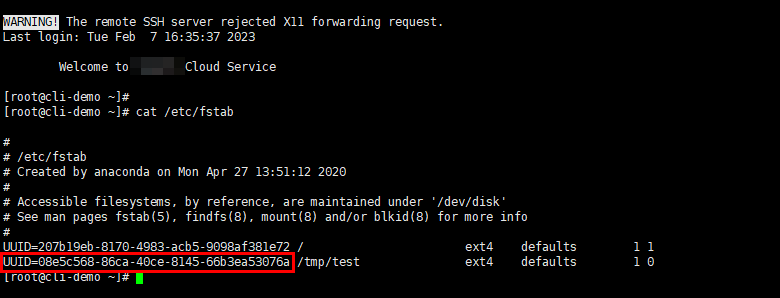
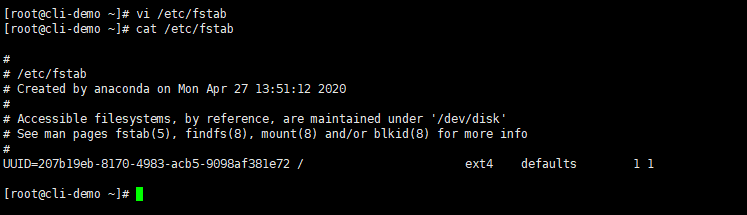
- Run the vi /etc/fstab command to open the file, press i to enter the editing mode, and delete the attachment information of all data disks. Then, press Esc to exit the editing mode and run :wq! to save the change and exit.
Figure 3 /etc/fstab after being updated
- Run the reboot command to restart the system.
Figure 4 Normal bootup page

- After entering the system, attach the data disks manually.
Figure 5 Attaching the data disks manually

- Run the blkid command to obtain the UUID information of the data disks.
Figure 6 Obtaining UUIDs of data disks

- Run the vi /etc/fstab command to open the file, press i to enter the editing mode, and add the attachment information of all data disks. Then, press Esc to exit the editing mode and run :wq! to save the change and exit.
Figure 7 Adding attachment information of data disks
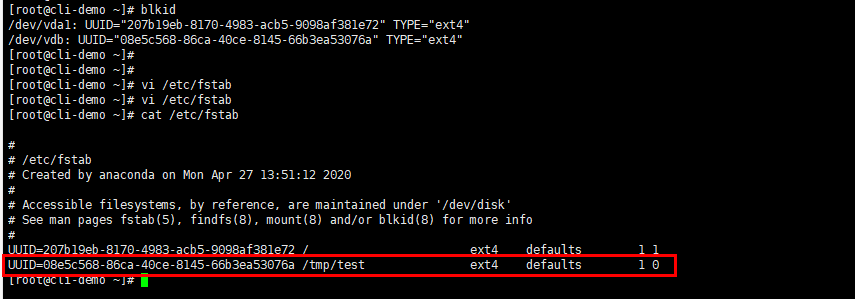
After the information is added, the system will automatically attach the data disks on restart.
Feedback
Was this page helpful?
Provide feedbackThank you very much for your feedback. We will continue working to improve the documentation.See the reply and handling status in My Cloud VOC.
For any further questions, feel free to contact us through the chatbot.
Chatbot


