

Basic Concepts
RCU
The ROMA Compute Unit (RCU) is the capability compute unit of the new edition ROMA Connect. Each RCU can be allocated to different integration capabilities, including FDI, APIC, MQS, LINK, and composable applications. The performance specifications of each integration capability depend on the number of RCUs allocated. More RCUs indicate higher specifications.
Connector
A connector is a custom data source plug-in. ROMA Connect supports common data source types, such as relational databases, big data storage, semi-structured storage, and message systems. If the data source types supported by ROMA Connect cannot meet your data integration requirements, you can develop a read/write plug-in to connect to ROMA Connect through a standard RESTful API to enable ROMA Connect to read and write these data sources.
Environment
An environment refers to the usage scope of an API. You can call an API only after you publish it in an environment. You can publish APIs in different custom environments, such as the development environment and test environment. RELEASE is the default environment for formal publishing.
Environment Variable
Environment variables are specific to environments. You can create environment variables in different environments to call different backend services by using the same API.
Load Balance Channel
A load balance channel allows ROMA Connect to access ECSs in the same VPC and use the backend services deployed on the ECSs to expose APIs. In addition, the load balance channel can balance access requests sent to backend services.
Producer
A producer is a party that publishes messages into topics. The messages will be then delivered to other systems for processing.
Consumer
A consumer is a party that subscribes to messages from topics. The ultimate purpose of subscribing to messages is to process the message content. For example, in a log integration scenario, the alarm monitoring platform functions as a consumer to subscribe to log messages from topics, identify alarm logs, and send alarm messages or emails.
Partition
A topic is a place holder of your messages in Kafka and is further divided into partitions. Messages are stored in different partitions in a distributed manner, implementing horizontal expansion and high availability of Kafka.
Replica
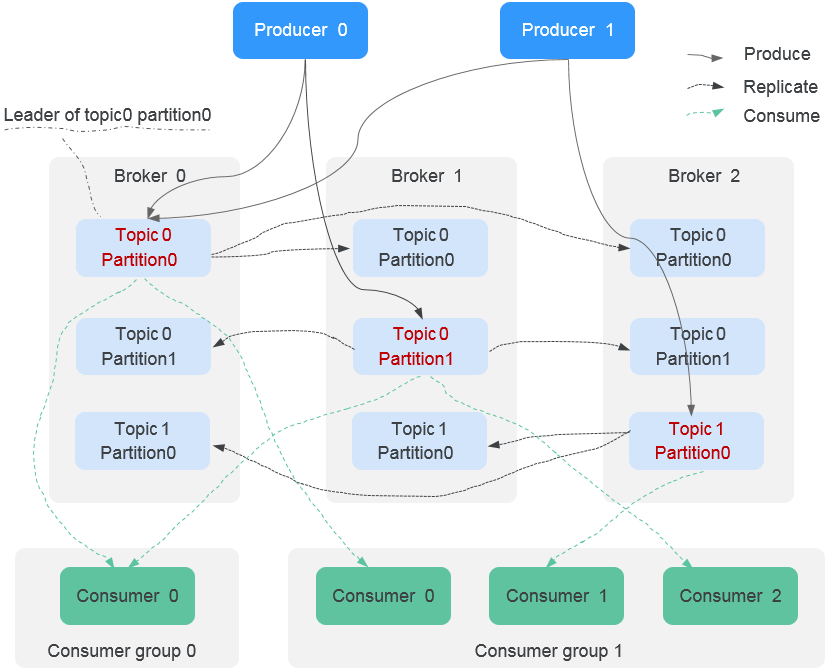
To improve message reliability, each partition of Kafka has multiple replicas to back up messages. Each replica stores all data of a partition and synchronizes messages with other replicas. A partition has one replica as the leader which handles the creation and retrieval of all messages. The rest replicas are followers which replicate the leader.
The topic is a logical concept, whereas the partition and broker are physical concepts. The following figure shows the relationship between partitions, brokers, and topics of Kafka based on the message production and consumption directions.
Topic
A topic is a model for publishing and subscribing to messages in a message queue. Messages are produced, consumed, and managed based on topics. A producer publishes a message to a topic. Multiple consumers subscribe to the topic. The producer does not have a direct relationship with the consumers.
Product
A product is a collection of devices with the same capabilities or features. Each device belongs to a product. You can define a product to determine the functions and attributes of a device.
Thing Model
A thing model defines the service capabilities of a device, that is, what the device can do and what information the device can provide for external systems. After the capabilities of a device are divided into multiple thing model services, define the attributes, commands, and command fields of each thing model service.
Rule Engine
A rule engine allows you to configure forwarding rules so that data reported by devices can be forwarded to other cloud services for storage or further analysis.
Composite Application
A composite application integrates multiple business flows into a sophisticated automation solution, enabling end-to-end service process automation across systems and services to meet diverse requirements.
For example, you can connect workflows, such as data collection, processing, storage, and notification, to create a complete data processing pipeline. Composite applications offer flexibility and scalability, allowing you to adjust or extend workflows as service needs evolve. They also support data sharing and collaboration between workflows, enhancing operational efficiency.
A composite application can contain multiple workflows. You can edit, start, stop, and debug these flows.
Workflow
A workflow is a sequence of automated tasks executed in a predefined order to complete a specific service process. It orchestrates tasks like data reading, processing, storage, and notification to implement complex service logic, supporting features such as conditional branching, loops, and error handling. By automating these processes, business flows reduce manual effort and enhance efficiency.
Key elements of a workflow include triggers, connectors, and processors.
Trigger
A trigger is a condition or event that starts a flow. It monitors specific external events or time points and automatically initiates the flow when the condition is met. Triggers can be event-driven, such as a file upload to OBS or a database update, or time-driven, like a task scheduled for early morning daily.
Serving as the flow's starting point, triggers ensure processes run automatically at the right time. Their flexible configuration allows flows to adapt to various service scenarios for efficient, automated responses.
Connector (In a Workflow)
A connector links to external services or systems, encapsulating communication details to simplify integration. It supports various services, including cloud platforms, messaging systems, databases, HTTP, and third-party tools like email and WeChat. Connectors provide predefined API calls, authentication, and data format conversion, enabling flows to easily read/write external data, call APIs, or send notifications.
For example, use a database connector to access RDS or an email connector to send notifications. Connectors reduce integration complexity and enhance flow scalability and versatility.
Processor
A processor is a core component that operates on and transforms data within a flow. It receives input from a trigger, connector, or previous processor, processes it according to predefined logic, and passes the result to the next component.
Processors are categorized into logical control, data processing, and fault detection types to handle diverse data processing needs.
Variable
A variable is a container for temporary data within a flow, used to store and transfer information during execution. It can originate from triggers, connectors, processors, or system variables defined in composite applications.
Variables may hold basic data types (string, number, Boolean) or objects (arrays, JSON). Using variables enables data sharing between processors and connectors to support complex service logic.
Function
A function is a logical expression used to calculate, convert, and manipulate data within a flow. It supports various built-in operations, including math, string handling, date processing, and encryption, to address complex data needs.
Functions enable dynamic calculations, output formatting, and type conversions in processors and connectors.
What is your overall rating for this page?
Thank you very much for your feedback. We will continue working to improve the documentation.See the reply and handling status in My Cloud VOC.
For any further questions, feel free to contact us through the chatbot.
Chatbot


