

Stopping Billing
Yearly/Monthly Resources
When you purchase a yearly/monthly NAT gateway, you make a one-time up-front payment. By default, the billing automatically stops when the purchased subscription expires.
- If you no longer need a resource, but the subscription has not yet expired, you can unsubscribe from it. Depending on what coupons were used for the purchase, Huawei Cloud may issue you a refund. For details about unsubscription rules, see Unsubscriptions.
- If you have enabled auto-renewal, disable it before the auto-renewal deduction date (seven days before the expiration date by default) to avoid unexpected fees.
Pay-per-Use Resources
If pay-per-use resources, such as NAT gateways, are no longer required, delete them in a timely manner
Searching for Resources from Bills and Stopping Billing
To ensure that all related resources are deleted, you can search the billing records by resource ID and delete the resources you identify in this way.
Example 1: Use the resource ID in the bill to search for the resource.
- On the top menu bar, choose Billing > Bills.
The Dashboard page is displayed.
- Click the icon shown in the following figure to copy the resource ID.
- Log in to the management console and choose Networking > NAT Gateway.
The NAT gateway list is displayed.
- Select the region where the NAT gateway is located, select ID from the filter criteria, paste the resource ID copied in 2, and click the
 icon to search for the resource.
Figure 1 Searching for resources
icon to search for the resource.
Figure 1 Searching for resources
- Choose More > Delete in the Operation column to delete the NAT gateway. Ensure that the NAT gateway does not exist in the list.

You are billed one hour after the resource usage is calculated, so a bill may still be generated after the pay-per-use resource is deleted. For example, if you delete a private NAT gateway (which is billed on an hourly basis) at 08:30, the expenditures for the hour from 08:00 to 09:00 are usually not billed until about 10:00.
Example 2: Use the resource name in the bill to search for the resource.
- On the top menu bar, choose Billing > Bills.
The Dashboard page is displayed.
- Click the icon shown in the following figure to copy the resource name.
- Log in to the management console and choose Networking > NAT Gateway.
The NAT gateway list is displayed.
- Select the region where the resource is located, select Name from the filter criteria, paste the resource name copied in 2, and click the
 icon to search for the resource.
Figure 2 Searching for resources
icon to search for the resource.
Figure 2 Searching for resources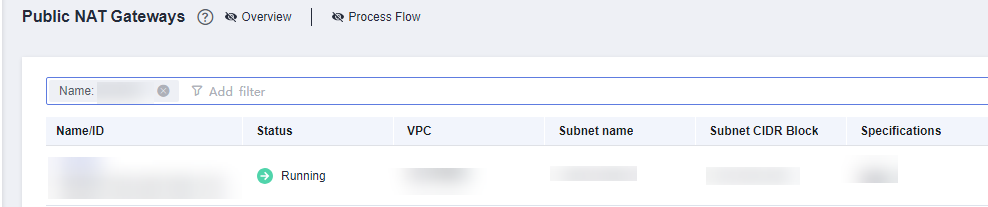
- Choose More > Delete in the Operation column to delete the NAT gateway. Ensure that the NAT gateway does not exist in the list.
You are billed one hour after the resource usage is calculated, so a bill may still be generated after the pay-per-use resource is deleted. For example, if you delete a private NAT gateway (which is billed on an hourly basis) at 08:30, the expenditures for the hour from 08:00 to 09:00 are usually not billed until about 10:00.
Feedback
Was this page helpful?
Provide feedbackThank you very much for your feedback. We will continue working to improve the documentation.See the reply and handling status in My Cloud VOC.
For any further questions, feel free to contact us through the chatbot.
Chatbot


