

Updated on 2024-08-07 GMT+08:00
Changing the Billing Option
Live CDN supports billing by traffic, daily peak bandwidth, or 95th percentile bandwidth. If you want to change the billing option to billing by 95th percentile bandwidth, submit a service ticket. The change takes effect at 00:00 the next day. You can change the billing option on the Live console.
Notes
- If you change the billing option from By traffic to By peak bandwidth or by 95th percentile bandwidth, you cannot use the Live CDN traffic package to pay for downstream traffic.
- You can change the billing option multiple times before the system performs the change. The latest change takes effect.
- If you want to change the billing option to by 95th percentile bandwidth, submit a service ticket.
Change Operations
- Log in to the Live console.
- In the navigation pane, choose .
- In the area in the upper right corner, click Change.
In the dialog box displayed, select a new billing option.Figure 1 Changing the billing option
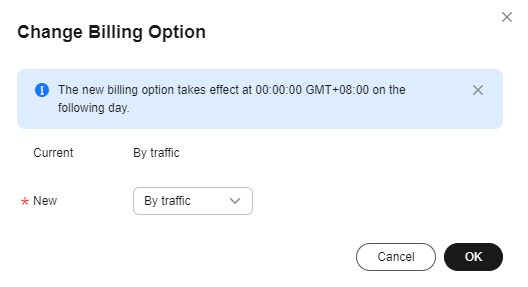
- Click OK.
The new billing option takes effect at 00:00 (Beijing time) the next day. Before that, fees are still deducted based on the previous billing option.
Feedback
Was this page helpful?
Provide feedbackThank you very much for your feedback. We will continue working to improve the documentation.See the reply and handling status in My Cloud VOC.
The system is busy. Please try again later.
For any further questions, feel free to contact us through the chatbot.
Chatbot


