

What Should I Do If the Hudi Destination Job Stays in Running State and the Number of Written Data Rows Is Always 0?
Symptom
Open the log. If the last line of the log is as follows, concurrent resources of the cluster are exhausted, or the upper limit for the cluster memory usage has been reached. New jobs must wait in a queue.
submit task attempt_local1847334969_1748_m_000003_0, current waiting task number for job job_local1847334969_1748 is : 4
Possible Cause
- The number of concurrent jobs allowed by the cluster has reached the upper limit.
Contact SRE to view the CDM background log /var/log/cdm/local/framework.log and search for cluster running task. If the number of concurrent running jobs is the same as the number of available concurrent jobs, the number of concurrent jobs has reached the upper limit.
- The cluster memory usage has reached the upper limit.
Contact the SRE to view the CDM background log /var/log/cdm/local/framework.log and search for memory usage exceeds threshold. If the cluster keeps printing this log, the heap memory usage has exceeded 75%, which may result in out of memory (OOM).
Solution
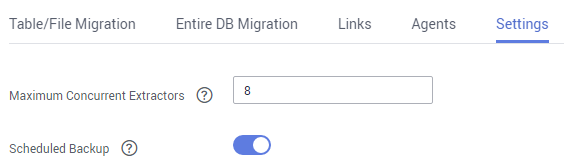
Adjust the number of concurrent jobs to ensure that it does not exceed the number of concurrent jobs allowed by the cluster. (It is recommended that the number of concurrent jobs allowed by the cluster be less than or equal to 46.) The number of concurrent jobs allowed by the cluster refers to the Maximum Concurrent Extractors parameter on the Settings page shown in the following figure.
What is your overall rating for this page?
Thank you very much for your feedback. We will continue working to improve the documentation.See the reply and handling status in My Cloud VOC.
For any further questions, feel free to contact us through the chatbot.
Chatbot


