

How Can I Use exec-maven-plugin for Hybrid Builds with Maven and npm?
Symptoms
This Maven project includes front-end code that must be built using npm. However, the provided Maven mirror does not include an npm build environment.
Solution
You can use exec-maven-plugin for hybrid compilation. First configure the plug-in, and then configure the npm environment, and finally run the build task.
- Configure the POM file.
Each npm command is an <execution> element in the <executions> tag. You are advised not to configure a proxy or a private npm registry. Instead, use Huawei's open-source mirrors. The configuration is as follows:
<build> <plugins> <plugin> <groupId>org.codehaus.mojo</groupId> <artifactId>exec-maven-plugin</artifactId> <executions> <execution> <id>exec-npm-config</id> <phase>prepare-package</phase> <goals> <goal>exec</goal> </goals> <configuration> <executable>npm</executable> <arguments> <argument>config</argument> <argument>set</argument> <argument>registry</argument> <argument>https://mirrors.xxcloud.com/repository/npm/</argument> </arguments> <!-- <workingDirectory>${basedir}</workingDirectory>--> </configuration> </execution> <execution> <id>exec-npm-config-4</id> <phase>prepare-package</phase> <goals> <goal>exec</goal> </goals> <configuration> <executable>npm</executable> <arguments> <argument>config</argument> <argument>set</argument> <argument>sass_binary_site</argument> <argument>https://repo.huaweicloud.com/node-sass</argument> </arguments> <!-- <workingDirectory>${basedir}</workingDirectory>--> </configuration> </execution> <execution> <id>exec-npm-install</id> <phase>prepare-package</phase> <goals> <goal>exec</goal> </goals> <configuration> <executable>npm</executable> <arguments> <argument>install</argument> </arguments> <workingDirectory>${basedir}</workingDirectory> </configuration> </execution> <execution> <id>exec-npm-run-build</id> <phase>prepare-package</phase> <goals> <goal>exec</goal> </goals> <configuration> <executable>npm</executable> <arguments> <argument>run</argument> <argument>build</argument> </arguments> <workingDirectory>${basedir}</workingDirectory> </configuration> </execution> </executions> </plugin> </plugins> </build> - Create a Maven build task.
- Add the following npm installation and environment configuration commands to the Maven build task:
# Create a directory.
mkdir ./node
# Run the curl command to download the Node.js software package.
curl -kv https://mirrors.xxxcloud.com/nodejs/v10.15.3/node-v10.15.3-linux-x64.tar.gz -o ./node/node-v10.15.3-linux-x64.tar.gz
# Run the tar command to decompress the package:
1tar -zxvf ./node/node-v10.15.3-linux-x64.tar.gz -C ./node
# Configure environment variables.
export NODEJS_HOME="${WORKSPACE}/node/node-v10.15.3-linux-x64"
export PATH="${NODEJS_HOME}/bin:${PATH}"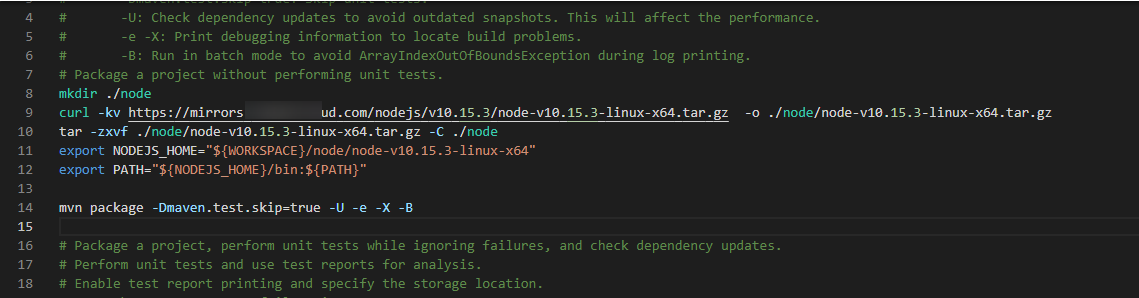
- Save the settings and verify the build.
What is your overall rating for this page?
Thank you very much for your feedback. We will continue working to improve the documentation.See the reply and handling status in My Cloud VOC.
For any further questions, feel free to contact us through the chatbot.
Chatbot


